Skip to content
TORNLIFE More

[Script+PDA] Organized Crime Analytics

Started by Allenone [2033011] on in Tools & Userscripts.

49 replies · 2.13k views · thread synced · 9 days ago · View on torn.com
About this thread

Posts archived: 50 / 50 posts (100%) · the total is Torn's reply count + the opening post at the last fetch

Counted by TornLife from the archived posts.

Archived posts
50
Discussion span
→
Authority score
54 / 100
Historical score
39 / 100
Story score
56 / 100
Engagement score
79 / 100

People posting, likes and official posts are not counted for this thread yet: on threads longer than one page they come from a periodic pass over the archive, which has not covered it.

Allenone [2033011]

Here's a little scuffed project I threw together in the last week. This is the first public version, it's going to have some minor issues, many I'm already aware of.


Version 3.0 added TornPDA support.


This script adds two new tabs in the 'Crimes' section on the faction page. "Player Statistics" and "Faction Statistics". These new tabs populate data based on cached data from your completed tab.


Download link. ( make sure you read/skim this post to understand how it works. )


When you first install this script you will need to scroll through all of your OCs in the 'Completed' tab to get accurate numbers.


Player Analytics Dashboard:
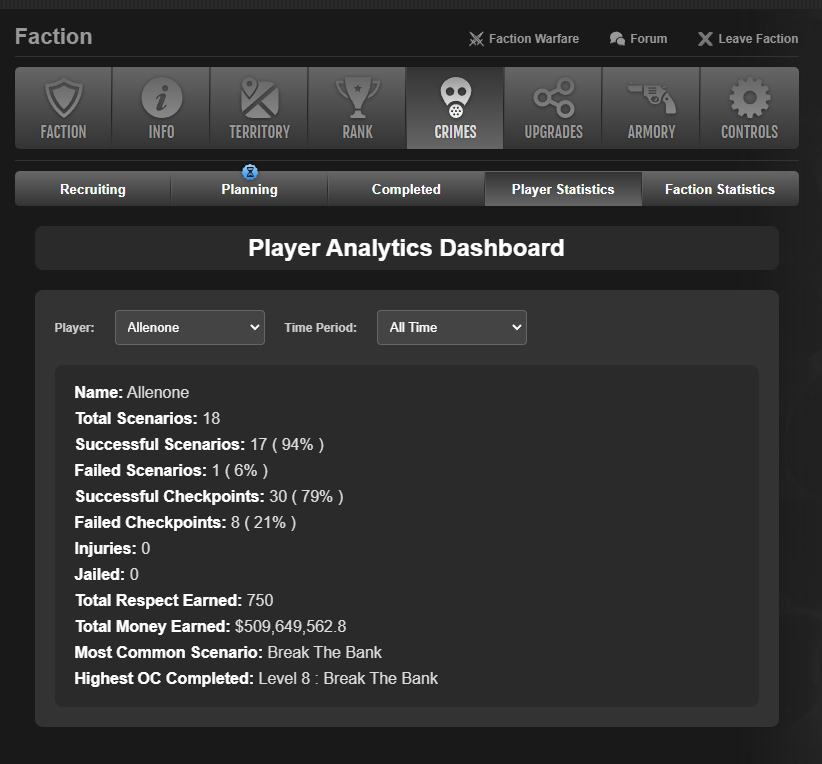
I don't think much needs explaining here. Respect is calculated by the rewarded respect divided by number of members in that scenario. similarly with money earned ( minus the faction cut that is set on the Faction Stats page )


Faction Analytics Dashboard:
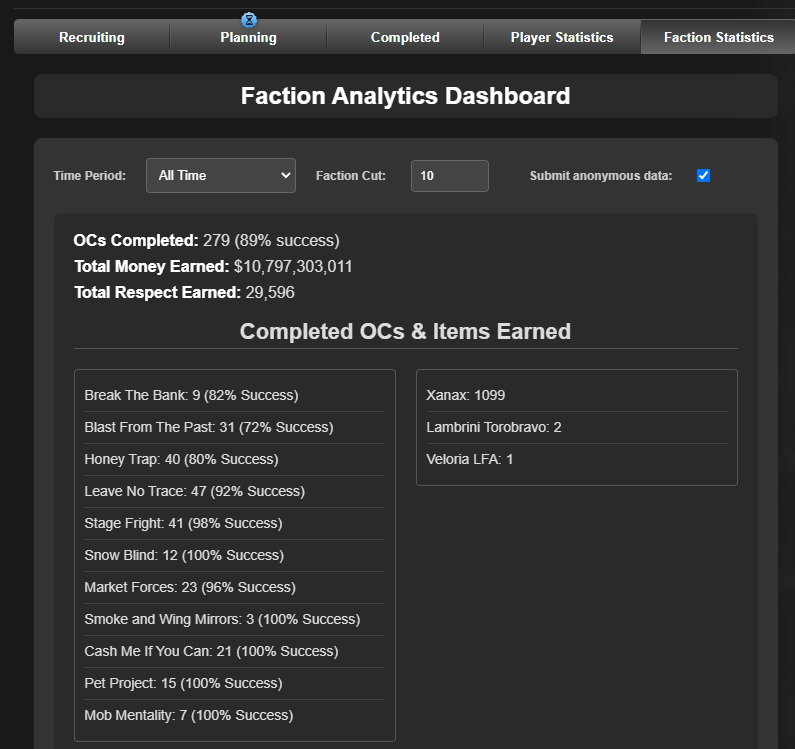
 

Not much else needs explaining here imo. just some more interesting data.


set your faction cut % ( if there is a faction cut ), the remainder of the reward is divided equally to participants.


If you would like to submit your scenario data you can select the checkbox to do so. It implements functionality for scenario path and reward tracking exactly as described in it's stand-alone script found here. ( no need to have both installed at the same time. however the stand-alone script works on tornPDA )


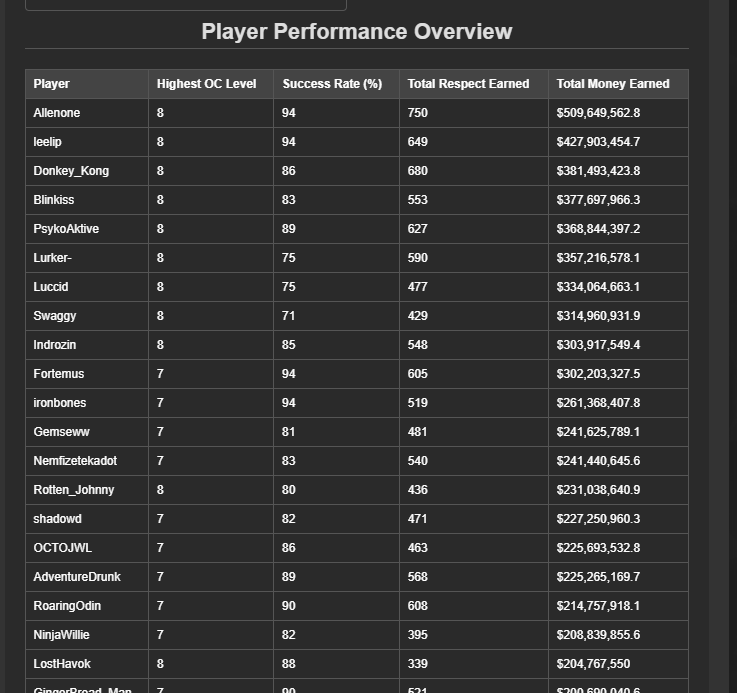
The table in the Player Performance Overview section is sortable, and you can also click the player names to quickly see their player stats.


What's is currently scuffed?

  • Not currently supported by TornPDA
  • Navigating from the Completed Tab to either new stats tabs and then scrolling down will load the next block of completed OCs
  • Time sorting isn't exactly accurate. This is due to a limitation in how i'm getting the data from intercepted XHR data. currently my only option here is to use the expiresAt time since endTime isn't populated.
  • no light mode support ( honestly don't plan on adding this. quit punishing your eyeballs! )


What makes this better than current alternatives?

  1. Other sites and tools use your API key, while they can derive better more time accurate data- they require faction API access, which a large majority of players don't have.
  2. You don't have to open new tabs or go to external websites to see mildly interesting statistics.
  3. Ched said it's better? ( don't fact check this, he doesn't know who I am )


What this isn't going to be:

  • Due to self inflicted limitations I've put on the scope of this project. This won't be a tool to replace other websites and tools that utilize your API key. I have no intention of mixing XHR data interception and API calls into this script at the same time. Unfortunately this means I'm at the whims of the accuracy of the data thrown while loading the OCs.
  • This won't be a tool to help you min-max your OC spawning and make decisions on which OCs to spawn.
  • This won't track or display CPR growth over time.


Enjoy.

Mentions: [Site + Script] Torn OC Scenario Tracker

Dyno [1043377]

This is great, the only thing I can see as being an issue is the faction cut, as the cut is different for different OCs, so the data isn't accurate. 

Allenone [2033011]

Agreed. We also do a different cut depending on OC level. This won't be hard to implement but may clutter the UI.

I tried to rush the initial release before my work week took my desire to work on it. I figured this would be a first good public release.

Allenone [2033011]

Unfortunately there's no value in this until "endTime" is populated instead of null. Currently I'm forced to use 'expiresAt' and if i give more precise control over time filtering it would be misleading.

Allenone [2033011]

I made a statement in the Loot Rangers discord but I'll re-iterate it here for those who don't follow there religiously.


I plan on revisiting this soon. maybe this weekend. I've been swamped with work and haven't had the motivation to rework this yet and deal with mobile scaling/support and fixing the current bugs- but I will get to it soon.


I think the plan is

  1. Mobile support
  2. fixing existing bugs
  3. adding blacklist feature for members who aren't in the faction anymore
  4. variable cuts per OC level


Unfortunately accurate time based sorting isn't on the table after some discussions regarding not catering internal network data to script makers. ( which is fine with me. I usually just look at 'All Time' data anyways. Anyone who wants accurate time based data should look into other alternatives that utilize the API. )

Simmeltron [2945165]

So I moved to a child faction today and all the old statistics from my old faction are still there. What is the best way to purge all the old data? I deleted and reinstalled the script but it's still there. Stored in a cookie I assume?

Allenone [2033011]

Interesting that it stayed between installs.


It's cached through tampermonkey. You'll want to be in 'advanced' configuration mode for TamperMonkey


Then in the script under the new visible 'Storage' tab, delete the content and then save. 

Simmeltron [2945165]

Thank you, that worked great! I did have to leave the base outer brackets in order for it to let me save. Just a heads up for anyone else wanting/needing to do this!


Thanks again!

Varides [2176530]

Hey Allenone, still love this tool, and I understand it was a quick project, but I was curious if you had seen the below issue previously? 

It currently shows multiple of the same OCs. As of posting this, my only thought was that it might be because of the OC patches pushed forward by Ched? If I organize by 30 days, 90 days, or all time it shows multiples, whereas if I show by 7 days, it's only singular OCs.