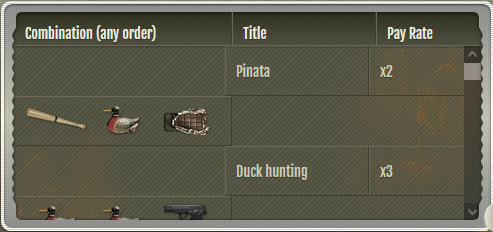
The Pay Table on the Slots has a strange wrapping(?) issue on Windows or non-hidpi displays (above). On macOS (with a hidpi 'Retina' display, below) the Pay Table renders correctly. Same Browser used on both (Firefox) with the same(ish) plugins used.
CloudJumper[1636201]Staff · #2
Can you please provide your display's resolution and the zoom ratio set in your Window's display settings?
Can you please also provide your browser version and OS version? Please also confirm if the issue exists in Incognito window with all of your scripts and extensions turned off.
I've been noticing this for a while. Probably since late last year I think, but I didn't create a bug report about it. I can't remember exactly when it changed.
[Windows 10, Firefox 131.0.3 (64-bit), 1920x1080px at 100% scale]
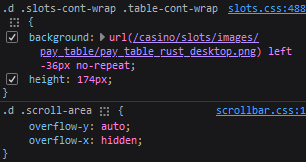
I think this has to do with this DIV
For me it looks like this.
If you get rid of the 174px height the pay table continues down outside the wrapper and the scroll bar disappears
I can see a gap between the Combination and Title columns which I assume is there to accommodate for the width of the scroll bar, but the scroll bar is too fat and pushes things aside. GIF 1 Link [image: s14.gifyu.com]
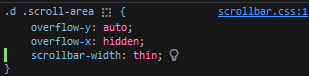
So if I add scrollbar-width:thin to the CSS
The gap between the columns accommodates the scroll bar perfectly when I reinstate the height and bring the scroll bar back GIF 2 Link [image: s14.gifyu.com]
this fix seems to have cause a slight hick up with how the slots are displayed on mobile? Specifically, I’m using an iPhone 15 and the Chrome app
It looks like the height of the pay table is larger than the active slots display, but the margins don’t account for the difference, so all the text below it seems placed too high
![[image: wolfgirl.party]](https://wolfgirl.party/GZ9Cz8e.png)
![[image: s14.gifyu.com]](https://s14.gifyu.com/images/bsjVv.gif)
![[image: s14.gifyu.com]](https://s14.gifyu.com/images/bsjVU.gif)
![[image: i.ibb.co]](https://i.ibb.co/JwK1K85B/IMG-7400.png)
![[image: i.ibb.co]](https://i.ibb.co/LXPrRFWX/IMG-7401.png)