Skip to content
TORNLIFE More

Torn Status Desktop Widget

Started by GNSC4 [268863] on in Tools & Userscripts.

28 replies · 595 views · thread synced · 9 days ago · View on torn.com
About this thread

Posts archived: 29 / 29 posts (100%) · the total is Torn's reply count + the opening post at the last fetch

Counted by TornLife from the archived posts.

Archived posts
29
Discussion span
→
Authority score
38 / 100
Historical score
29 / 100
Story score
42 / 100
Engagement score
71 / 100

People posting, likes and official posts are not counted for this thread yet: on threads longer than one page they come from a periodic pass over the archive, which has not covered it.

Mentioned in this thread

GNSC4 [268863] ×2

GNSC4 [268863]

🚀 Torn Status Widget - Your Ultimate Desktop Companion! 🚀

Tired of constantly tabbing back to Torn City just to check your energy, nerve, or if that crucial cooldown is over? Want a sleek, at-a-glance overview of your vital stats right on your desktop?


Introducing the Torn Status Widget!


This lightweight and customizable desktop application is designed to keep you informed and ahead of the game. Spend less time checking and more time playing!
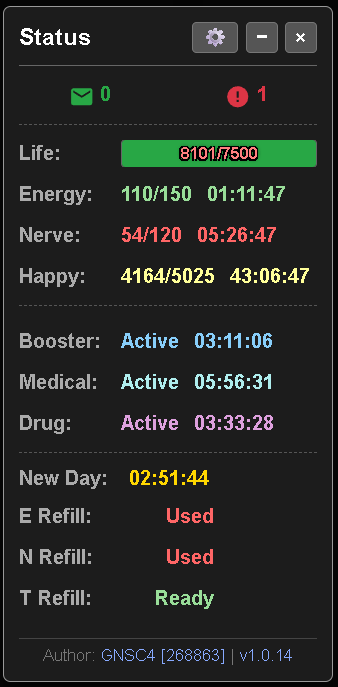


⭐ Key Features at Your Fingertips: ⭐


  • Real-Time Status Monitoring:


    • Life: Current/Maximum displayed, with a visual health bar that changes color based on life percentage (e.g., green for high, yellow for medium, red for low).
    • Energy: Current/Maximum with a clear timer showing when you'll be full.
    • Nerve: Current/Maximum with a timer to full.
    • Happiness: Current/Maximum with a timer to full.
    • New Day Timer: Displays a countdown to the next Torn day, with a visual warning when the new day is approaching.


  • Essential Cooldown Timers:


    • Booster Cooldown: Shows "Active" or "Ready" status (flashes when "Ready") and a timer indicating remaining time or time until next availability. Tooltip shows exact end time and max cooldown duration.
    • Medical Cooldown: Shows "Active" or "Ready" status and a timer. Tooltip shows exact end time and max cooldown duration.
    • Drug Cooldown: Shows "Active" or "Ready" status (flashes when "Ready") and a timer. Tooltip shows exact end time.


  • Refill Status:


    • Instantly see if your Energy, Nerve, and Token Refills are "Ready" or "Used".
    • Refill statuses will flash if "Ready" when the New Day timer is in its warning period.


  • Instant Notifications:


    • New Messages: Get alerted with an icon and count; visuals change for new messages.
    • New Events: Never miss an important event, alerted with an icon and count; visuals change for new events.
    • Widget Updates: Notification for new versions of the widget, with a direct link to the releases page.


  • Sleek & Customizable Interface:


    • Minimize Mode: Shrink the widget to a compact icon when you need more screen space.
    • Always On Top: Keep the widget visible over your other windows (common widget behavior, supported by Tauri).
    • Transparent Background: For a clean look that integrates with your desktop.
    • Customizable Item Link Destinations: Choose whether clicking on items like Drugs, Boosters, Medical, Energy Refills, and Nerve Refills directs you to your personal inventory/items or the faction armoury equivalents via toggle switches in the settings.


  • Convenient Settings:


    • Settings Panel: A dedicated panel to manage API key, autostart preferences, and link destinations.
    • Easy API Key Management: Securely save or clear your Torn API key from the main view or the settings panel.
    • Autostart Option: Set the widget to launch automatically when your computer starts, configurable during first setup and in settings.


  • Direct Torn Links:


    • Click on status bars (Life, Energy, Nerve, Happy) to go directly to relevant pages like Medical Items, Gym, Crimes, or Candy Items.
    • Click on cooldowns (Booster, Medical, Drug) to go to the corresponding item categories on Torn.com.
    • Click on notification icons (Messages, Events) to open your Torn Messages or Events page.
    • Click on refill statuses to go to the Points Building page.
    • Quick link to the Torn API preferences page to "Get Key".
    • Access the widget's forum thread and author's profile via links in the version display.


  • Informative Tooltips:


    • Hover over timers for detailed information, such as the exact end timestamp for cooldowns/timers or the maximum duration of a cooldown.
    • Tooltips on header buttons (Settings, Minimize, Close) and other interactive elements like the "Get Key" link.


  • Cross-Platform:


    • Available for Windows (.msi & .exe), macOS (.dmg), and Linux (.deb & .AppImage) (supported by the Tauri framework).

💻 Download & Installation: 💻

Ready to enhance your Torn experience?

  1. Head over to our GitHub Releases page: GitHub Release Page

  2. Download the latest installer for your operating system.

  3. Follow the simple installation instructions provided on the GitHub page (also in the README).

🛠️ Setup: 🛠️

  1. Launch the Torn Status Widget.

  2. You'll be prompted to enter your Torn API Minimal Access Key. You can get this from Torn City Preferences -> API Key.

  3. Paste your key, click "Save," and you're good to go!

  4. Optionally, enable the "Start widget on system boot" feature.

💬 Feedback & Support: 💬

This widget is for the Torn community! Your feedback is invaluable.

  • Found a bug?

  • Have a suggestion for a new feature?

  • Just want to say hi?

Please post in this thread or open an issue on the GitHub Issues Page.


Stay ahead, stay informed, and optimize your Torn gameplay with the Torn Status Widget!


Author: GNSC4 [268863]
Widget Version: v1.0.50

TOS: https://gnsc4.org/static/TornWidgetToS.html


Download Link Here
Can't believe I have to add this... But NOT A VIRUS/MALWARE

Mentions: GNSC4 [268863]
GNSC4 [268863]

Patch Notes:


1.0.2

    • Release Version


1.0.14

    • Added Life Bar Visual
    • Added New Day Timer
    • Added Flashing Text Notification
    • Made the Timers match the color of the --/--
    • Increased the API frequency the API now updates every 15 sec, 1 call every 15 sec, so 4 calls per min


1.0.18

    • Added Faction/Personal Item use Slidders to the Settings Page
    • Added Update Notifications that should tell you when there is an update released (Untested)


1.0.19

    • Fixed API not calling automatically after initial start due to typo (whoops)


1.0.22

    • Changed Font Color and Shadows
    • Increased Font Size Slightly
    • Made the background more transparent


1.0.30

    • Added Travel Timers (Only shows when actively traveling)
    • Added Race Timers (only shows when a race is actively in progress. (Does not show if waiting for a race to start)
    • Changed Font Color
    • Added new v2 API call for racing
    • Updated v1 API call to add Travel
    • Adjusted ToS to add the new API changes
    • ToS must now be accepted before the Widget will allow you to add your API key to the Widget


1.0.42

    • Added a Tray Icon to open or quit the application or refocus the UI if you don't have always on top toggled to true.
    • Added Auto Update features (Untested)
    • Application is now signed for Tauri, not for any OS you will still get notified it's not signed
    • Changed from Tauri v1 to Tauri v2 (god that was an undertaking)
    • GitHub Actions now creates all file formats for Linux, MacOS, and Windows.


1.0.50

    • Added Desktop Notifications
    • Added Text-to-Speech Notifications
    • Updated Settings appearance
    • Added Toggleable Notifications
    • Added Customizable Energy Notifications
    • Added Options for Flashing
    • Added update checking every 15 min (pings GitHub)
    • Updated Linux and MacOS files to be newer versions of their OS's (hopefully fixing the issues)
    • Updated the ReadMe File on GitHub to explain how to install the program on MacOS as its unsigned (I'm not paying $99 to have a dev account)
    • Updated the ReadMe File on GitHub to add instructions for installing on Linux, as it needs certain permissions to install
    • Updated Application to be a bit wider to accommodate the New Settings
    • Added Close to Tray instead of turning off the application, so notifications can run in the background without the UI if desired
    • Organized Settings: Please look through them for all the new features. They are in many different areas.


Known Bugs:

    • When using settings drop-downs, a transparent box is created below the UI that is not click-throughable. Close the settings dropdown to remove the erroneous box.
GNSC4 [268863]

Looking for someone who is experienced in Linux to help me make the .appimage and .deb files for this release

Caio [2488372]

Nice one!
Unsure if is possible to have, like the other for medical, booster cooldown, etc., the option of open in faction or in items each link (and e refill maybe?)

GNSC4 [268863]

If you have version 1.0.18 please update as I had a typeo in the index and so it wasn't recalling the API calls to update the info after the first load.

-Fortie- [3566613]

This is a great handy little tool to have sitting on my desktop while I work haha.

Would be good if it had a travel bar maybe to show time remaining on flight and where you're flying to?

Maybe even a racing bar also?


Even if they are able to be toggled on/off in the settings?

GNSC4 [268863]

No, unfortunately, you are not. I need to find someone willing to compile it for me, as I only have a Windows PC I just need someone who has that OS to compile it so I can add it to the github. It's written to be compatible; it just needs to be compiled.


Edit: I now have support for Linux and MacOS built by github so you can now install it, sorry about that. Link

OsakaTX [3719629]

Not bad...  Couple notes:
-Last few repo builds didnt include the installer files, only source files
-Add option to disable flashing "Ready" statuses, either in settings or an individual button besides the flashing element if you wanna be fancy

-Minimized window state isnt great on Windows... its just a tiny maximize button and its hard to drag and drop... Maybe a "T" from the Torn logo?  Perhaps also add config option to change the window border color when minimized...
-Another useful option would be "Only show travel timer in minimized state"...

All meant to be constructive criticism!  Great job on a useful utility!


n33712 [2478974]

Hey


This is awesome......exactly what i have been looking for. Thank you.


Only thing is i cant get the racing / flying to show. Am i doing something wrong?

GNSC4 [268863]

thats why the latest versions dont have .exe's is I've been trying to get GH to create the files lol and it keeps failing XD

GNSC4 [268863]

Finally got GH Actions to work, that was quite the learning curve lol

1.0.42 released with all OS versions available MacOS, Linux, Windows.

GNSC4 [268863]

It should show up automatically if you are in a race or actively traveling. Make sure you have a version that has those features, as it was added in 1.0.30, so you need that version or newer for it to work.