Skip to content
TORNLIFE More

[Userscript] OC Track CPR

Started by Heartflower [2626587] on in Tools & Userscripts.

31 replies · 1.3k views · thread synced · 3 days ago · View on torn.com
About this thread

Posts archived: 32 / 32 posts (100%) · the total is Torn's reply count + the opening post at the last fetch

Counted by TornLife from the archived posts.

Archived posts
32
Discussion span
→
Authority score
39 / 100
Historical score
35 / 100
Story score
52 / 100
Engagement score
74 / 100

People posting, likes and official posts are not counted for this thread yet: on threads longer than one page they come from a periodic pass over the archive, which has not covered it.

Mentioned in this thread

Allenone [2033011] ×2 Legaci [2100546] ×2

Heartflower [2626587]

This script adds features to show someone's CPR data based on TornStats and local data, adds status icons to your unavailable members and highlights unavailable and unfit members. It was a custom script request from Legaci [2100546], who agreed it would be useful to share this with the masses. You can thank him for the script idea as well as some of the design-aspects. 


Clicky link to greasyfork


This script is PDA friendly


Please note that this script was tested on two accounts with OC perms available, so I'm unaware of any issues for those without OC perms.


The script adds an extra "CPR Data" button to the OC dropdown.
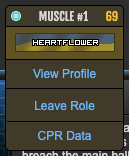
 

Upon clicking this button, a modal will appear with that person's CPR data. By default this will try fetching data from TornStats first, which is why your TornStats login key is recommended. If no TornStats data can be found, it will use local data. It is recommended to scroll through your list of planned and completed OCs if you want all data to be available. For those using TornStats, I'd recommend going through the Recruiting and Planning tabs for any data regarding OC levels to show up.
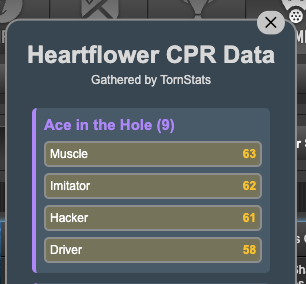
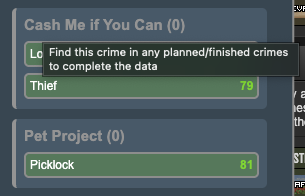


On top of that, this script also uses your API key to fetch the current online status of those not yet in an OC

Clicking on the online/idle/offline dot, will also bring up the same CPR data modal as shown above.


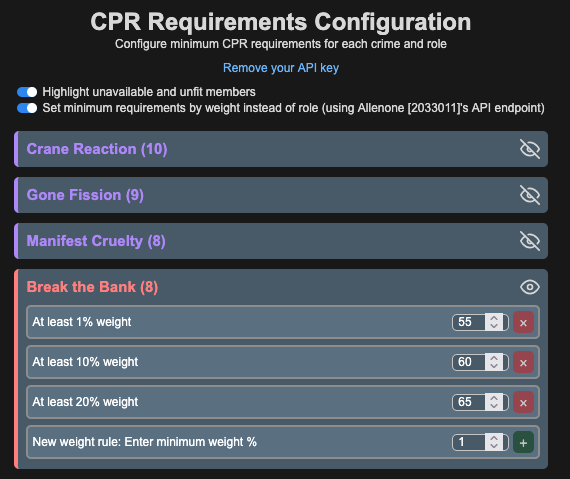
A new tab will also show up upon installing this script, where it's possible to configure minimum CPR requirements for each crime and role.
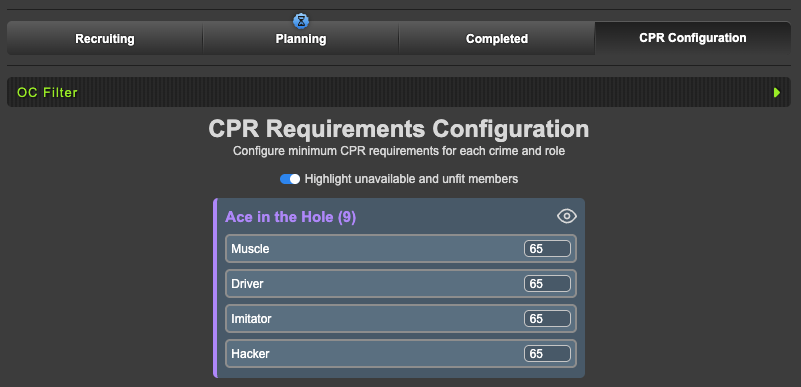
 

As of version 1.1.0, you are now also able to configure minimum CPR requirements by weight. Upon toggling this setting, the page needs to be refreshed for the changes to take effect.
 

As of version 1.2, you can now enable a setting to show a CPR button to see all CPRs for that role.


If you enable the "Highlight unavailable and unfit members" toggle (turned off by default), those who are below the minimum requirement or those who do not have the OC item or are in the hospital when the OC is due, will be highlighted. This gives you a clear indication that action might be required.
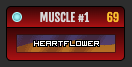
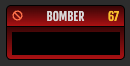
(Red = low CPR, Yellow = unavailable)

Mentions: Legaci [2100546]

Heartflower [2626587]

Patch Notes


v1.2.4.2 (20/08/2026) CURRENT VERSION

  • Now also works on https://www.torn.com/factions.php?step=your&type=1#faction-crimes URL


v1.2.4.1 (20/08/2026)

  • Fix CSS of "CPR Data" on mobile
  • Fix issues with the script loading properly if chat is open


v1.2.4 (19/08/2026)

  • Make the CPR panel less wide on PC
  • Fixed a bug with hiding OCs in the CPR panel
  • Changed colour background to solid colours
  • Added reasoning to the tooltip if user is highlighted
  • Added max CPR rules
  • Added an option to overwrite all OC settings with the current one for weighted rules


v1.2.3 (16/07/2026)

  • Fixed a bug with data parsing


v1.2.2 (29/06/2026)

  • Prioritise too low CPR (red) over item missing (yellow)


v1.2.1 (26/06/2026)

  • Fixes CPRS button showing up twice on some devices


v1.2 (24/06/2026)

  • Make modal background colour slightly darker
  • If enabled in settings, shows a "CPRS" button where the "24h" container is. Upon clicking, you can now see the CPR of every member for that specific role in that specific crime.


v1.1.3 (21/06/2026)

  • Another attempt at fixing issues fetching weight on PDA, this time by giving a parameter to the API url


v1.1.2 (11/06/2026)

  • Fixed minimum CPR being calculated by weight rules if weight settings disabled


v1.1.1 (11/06/2026)

  • Sets a timeout of 1s on fetching weight data (if enabled) in order to not interfere with the "Torn OC Weights Under Roles" script on PDA


v1.1.0 (10/06/2026)

  • Now adds the option to have CPR requirements by weight using Allenone [2033011]'s API endpoint
  • Removed "Send to TornStats" since TornStats now fetches CPR via API
  • Now differentiates "Muscle #1, #2, #3" etc from each other
  • Now sorts role names by alphabet in settings
  • Now yellow if unavailable item / hosped to differentiate from low CPR
  • Fixed online/idle/offline no longer showing in "Members not in an OC"
  • Fixed typos
  • Minor code refactoring


v1.0.9 (16/05/206)

  • Fix class issues


v1.0.8 (29/09/2025)

  • Moves "CPR Data" button to the top instead of the bottom


v1.0.7 (29/09/2025)

  • Fixed an issue where it was looking for the role name in the wrong place
  • Add option to send your personal CPR data to TornStats (off by default)
  • Added a "remove API key" button in the settings
  • Fixed an issue with role names Torn changed

Mentions: Allenone [2033011]

BorrFedick [3470183]

I'm using TornPDA.


- Clicking CPR Data for a faction member doesn't load anything

- setting a minimum for a role doesn't seem to highlight members (though the existing default settings of 65 do)

BREADHEADBOY [3137712]

Im having a similar issue with the not loading, worked perfect the first time scrolled down and everything loaded. But now each time I press the CPR Data button the box does not appear.


Also small feedback could the CPR Data button appear top of the list? Im worried my fat fingers would click remove from role instead of the Data


Im on PDA and have OC Perms for reference. 

Dyno [1043377]

For Assassin on Lv8 Clinical Precision, the members have the item and the CPR is set correctly in the settings, but they are still highlighting red.


Also, Cat Burglar isn't shown in the settings for Clinical Precision.

Heartflower [2626587]

Due to health reasons and lack of a working laptop, a bit of a delay on any issues. My apologies.


Updated to v1.0.7

  • Fixed an issue where it was looking for the role name in the wrong place
  • Add option to send your personal CPR data to TornStats (off by default)
  • Added a "remove API key" button in the settings
  • Fixed an issue with role names Torn changed


This should account for any issues mentioned above. If any other issues arise, feel free to post it here or DM me :) 

Heartflower [2626587]

Oops, forgot about the button movement


Updated to v1.0.8

  • Moves "CPR Data" button to the top instead of the bottom


Are you still experiencing the issue about the CPR data box not appearing? 

BREADHEADBOY [3137712]

Hey Heart! 


Thats awesome thank you! 


Just updated and still dosent seem to be appearing, I have quite a few scripts installed for OC's now so maybe one is conflicting if everyone else is reporting that its working, happy to do some testing if required and can turn a few off see if I can find the conflict if it even is that

Chi [2487971]

Thank you for sharing this script! For the CPR Configuration tab, it'd be great if we could specify different CPRs for roles like Thief #1 vs. #2 since certain roles have different weights. It would also be great if the tab could be hidden somehow or if it wasn't in the tab bar there, since configuration isn't really something needed on a day-to-day basis.

Toypurina [2373781]

Did anyone ever figure out the cause and a solution?

 Added it to PDA today and when I chose the CPR Data option nothing happens.

I use it on my pc and am so happy to have it.


 May have used the wrong api, reinstalling now

Toypurina [2373781]

Nope.  It didn’t request my api.  The button is there but still not working.  Tap CPR Data button and it does nothing.


Toypurina [2373781]

Since it only shows CPR for roles a person has been in, does anyone know how long a person must be in a role for the CPR data to be logged.