This is intended to guide you through connecting your account to your faction on Torn Stats and then installing a script that further connects your Organized Crime CPR(Checkpoint Pass Rate) to Torn Stats also.
This helps factions track data that allows them to better understand how well they are doing and how they can do better, resulting in more money for everybody.
Step 1 - Torn Stats
Things needed before you start
-
Limited Access Api Key(Do not share this key with other players)
-
https://www.tornstats.com/
-
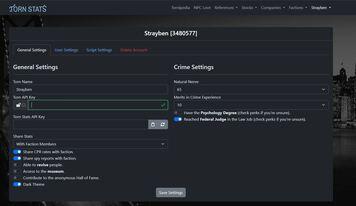
Sign in and go to settings it should look like this
-
Input your API Key into the Torn API Key slot.
-
Where it says, “Share Stats”; Click that and set it to, “With Faction Members”
-
Below that click the “Share CPR rates with Faction. And you're done with Step 1.
Step 2 - Faction CPR Tracker Script
Things needed before you start
-
The same Limited Access Api Key you used for Torn Stats in Step 1
-
Download Torn Stats Faction CPR Tracker
-
A) If you are on a web browser like chrome, continue reading, but if you’re on Torn PDA go down to step B. Go to the Faction page and click Crimes; Or click Here - Faction Crime Page. When you first load the page it will prompt you to input an API Key. Use the same Limited Access Api Key you used for Torn Stats in Step 1. Boom you’re done….
B) If you are playing on Torn PDA, you will have to manually add your API Key into the script.
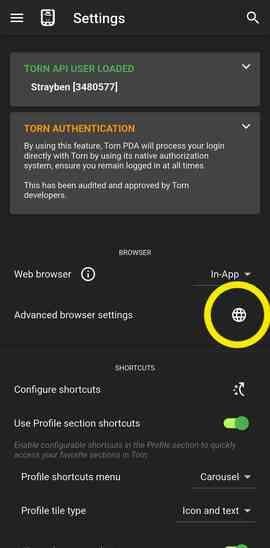
To do this go to your settings in Torn PDA and Click Advanced Browser Settings indicated by the yellow circle.
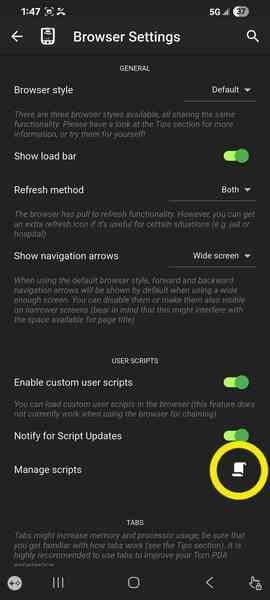
Then click Manage scripts indicated by the yellow circle.
Then find your Torn Stats Faction CPR Tracker in there and click the edit button (Pencil) on the right hand side.
Once you are in there, scroll down and find the API_KEY = “###########”; right around line 52.
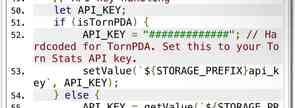
Replace the ##### with the same Limited Access Api Key you used for Torn Stats in Step 1.
Make sure once it's all done to go to the OC Page to load your data. CPR data is only obtained when you view the page.
Now you’re all done! Confirm with council when you have completed these steps!