Open to work.
My addiction will probably fluctuate for a while, so I will likely not be at maximum effectiveness.
Looking for either a good wage, or trains instead please.
Manual Labor:215,781
Intelligence:136,345
Endurance:163,848
Jack-o [133039] Level 100 Hospital Ionization -O- Staff Hack Jack
From the 416 newest archived posts.
Likes as archived at fetch time, adjusted for how long each post had been up. Scored posts only; the full score pass runs after the import.
Open to work.
My addiction will probably fluctuate for a while, so I will likely not be at maximum effectiveness.
Looking for either a good wage, or trains instead please.
Manual Labor:215,781
Intelligence:136,345
Endurance:163,848
My apologies :) I set it to be a Note, to try to keep the fanfare low. Nothing to see here really, as i'll be mostly behind the scenes.
But thought it worth putting something brief out there, before my name randomly popped up in the staff list.
Appreciate the congratulations though. And to all those who have messaged me (and sent me a bottle of beer). I'm getting a bit of a beer belly in real life though, so I don't need the temptation ;)
Hopefully my post hasn't unnecessarily distracted everyone from the real newsworthy item - Easter Egg time!
Looking for a chilled out faction.
I'm active, and will be a lot more active soon.
I'm not the most active/effective during competitive wars though. Hence looking for more chilled out factions.
Looking to join a faction with a few million respect please :)
Citizens,
Following the conclusion of Elimination 2026, you may have noticed something new waiting for you.
Choose Your Prize is a new reward system. Rather than receiving a fixed prize for taking part, you've been presented with a selection of rewards and can pick whichever one you want.
The options span most corners of Torn, including items that were previously only acquirable via City finds, the Mission shop or as subscriber rewards.
Your Options
Everyone who remained with their team through to the end of the competition has received something. The number of options you've been presented with, and the quality of those options, is based on how you and your team performed during the competition. The better you and your team did, the more choices you'll have, and the better those choices will be. We're not going to detail exactly how this is determined, we'd rather leave some of that for you to work out.
Choose Your Prize is intended as a bonus for taking part, rather than some form of compensation for the effort and energy spent. The competition itself, your team's final placement, as well as the honors and profile badges on offer are still the main event, and this sits on top of that.
Choosing Your Prize
You can only select one reward, so it's worth giving it some thought. Once you've confirmed, your choice is redeemed immediately and the remaining options are no longer available to you.
Your options can be found via the Elimination page, by selecting Choose Your Prize from the menu. They'll remain available for 31 days.
Thanks.
Citizens,
We're pleased to announce Elimination 2026, which returns to its usual September slot after last year's one-off December run. Entry opens at midday on the 5th, and the competition will run for two weeks, closing on the 18th. Last year's Elimination was the first outing on the rebuilt system, and we were careful not to change too much alongside it.
That's given us a solid base to work from this year, and a number of the things we said we were considering last time have now made it in. Twelve brand new teams have been created for 2026, each with their own banner, sigil and colours.
Timings
Entry period: 5th September 12:00 to 10th September 12:00
Captain voting: 7th September 12:00 to 8th September 12:00
Vice-captain assignment: 8th September 12:00 to 10th September 12:00
Attacking begins: 10th September 12:00
Lives begin to be lost: 11th September 12:00
Competition closes: 18th September
Please note: the voting period closes two days before entry closes. If you'd like a say in who captains your team, it's worth joining early rather than leaving it until the final days.
Team Leadership
Last year, the three team members with the most votes became joint team captains. This year each team will elect a single captain, who can then appoint up to five vice-captains alongside them. Vice-captains hold exactly the same abilities as the captain (except for the ability to appoint vice-captains). Members who would like to be captain now need to put themselves forward as a candidate before voting opens. Previously, anyone in the team was eligible to receive votes whether they wanted the role or not.
Note: Vice-captains can be freely added and removed by the captain until the point at which attacking begins. Beyond this deadline vice-captains can still be removed from their duties, but captains will not be able to replace them. So choose wisely!
The voting period is 24 hours rather than 48. Each member has one vote, you can't vote for yourself, and you're free to change or withdraw your vote at any point before the deadline. As last year, we anticipate members running their election campaigns within the team's forum. We've also decided to run the vote in the open this year. A live chart shows the leading candidates and how their support shifts through the day, so the race can be followed as it happens rather than waiting for a result at the end.
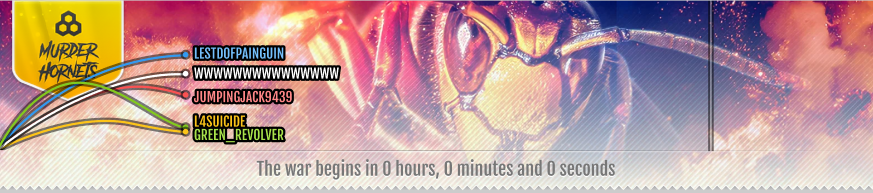
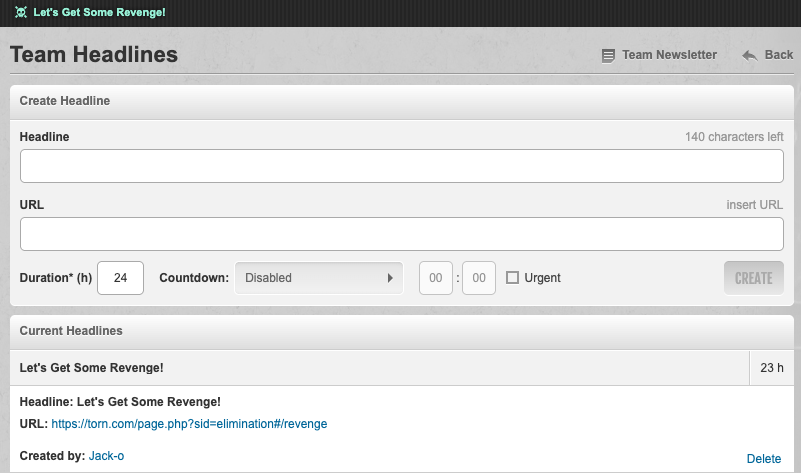
Alongside sending newsletters and posting headlines to their team, captains and vice-captains can now also moderate the team's forum. This was something we said we planned to add following feedback last year. Newsletters can now be sent either to the whole team, or only to those members who've been active in the last fifteen minutes, making it easier for captains and vice-captains to share targeted instructions to active team members. Headlines can be published to the news ticker, providing team members with easy to access instructions during Elimination.
Live Updating
We're also introducing live updating across the team pages, the revenge list and recent attacks, so member status and online indicators stay current without needing to refresh the page. Some of this will arrive during the competition rather than on day one.
Attacking
One change worth being aware of is that stealthed attacks will still count towards your attack total, but will no longer update your last attack time. In practice this means a member who only ever attacks a team stealthily won't appear on that team's revenge list.
Rules
This year, the following mechanics are in place.
- 12 teams
- 50 lives per team
- 1,000 tickets per team
- Lives are lost every 15 minutes
Rewards
The usual honor bars are available to earn.
Mission Accomplished: Finish the Elimination competition with your team in 1st, 2nd or 3rd
Purple Heart: Achieve 50 attacks against enemy team members in the Elimination competition
Domination: Finish the Elimination competition with your team in 1st place
Supremacy: Finish the Elimination competition within the top 5% of attacks
We hope this year's Elimination goes well and that all participants have fun.
Thanks.
Citizens,
Today we're moving players who are still using Chat 2.0 across to Chat 3.0.
Chat 3.0 has been available for a while now and has been the default for new players for some time, but a large number of you are still on Chat 2.0. In most cases that's simply because you weren't aware there was a newer version to try. All of our chat work since release has gone into 3.0, and 2.0 no longer receives updates, so we'd rather you were on the version we're actively looking after.
As a reminder, the original announcement for Chat 3.0, including the enhanced features that it brings, can be found here.
If you'd prefer to stay on Chat 2.0
You can switch back at any time via Chat Settings > Return to old Chat 2.0. Nothing is being taken away today, and the choice remains yours. But please be aware that this version will be removed in the near future.
More message history
Chat 3.0 lets you scroll back much further through a conversation than Chat 2.0 does.
Ongoing improvements
Any further work on Chat happens in 3.0, and it's the version future Chat updates will build on. Moving across now means you'll already be familiar with it when those arrive.
Thank you as always for the feedback and suggestions that help to shape Torn.
56,046 Respect faction for sale.
No wasted Respect:
So lots of spare respect to use on anything you like!
Looking to sell up in order to purchase a larger faction.
Open to offers, so drop me a DM.
The Developer Focus list is usually updated on a fortnightly basis, and sometimes we will mark a member of the team as having annual leave / vacation / time off where it is a reasonable chunk of that given period.
It doesn't necessarily mean that the particular team member was on leave for the whole of that period, but we like to give as best representation of their focus in the given period as possible.
Sometimes this means that optically it looks like a member of the team is on leave for the whole period (or maybe even consecutive periods), but more often than not, that's not the case.
There is also the caveat that this is just an indication of key 'focus' areas. It is not an exhaustive list, and also the team will pick up other items mid-period where priorities deem it appropriate.
...That said, I vote for annual leave as a feature for in-game jobs. I need a break from my rehabbing to keep my boss happy at the Oil Rig!
Citizens,
We wanted to let you know ahead of time that from Tuesday 11th August, Ranked War matchmaking will use a new ranking system to pair factions, and how faction ranks are calculated is changing alongside it. The aim is fairer matchups, with fewer wars that are one-sided from the start.
Matches will be based on your faction's rating, built from your stats and recent war performance, rather than roster stats alone.
Your rank will be recalculated to reflect that rating. If your rating has drifted a long way from your current rank, for example after a big change to your roster, this may be corrected before your next match rather than over several wars.
The old faction lock and rank decay system are being removed. In their place, if your faction doesn't enlist for 6 consecutive weeks, you will lose your current rank. Enlisting again will place you back at the rank your current rating supports, with no reduction to rewards.
Nothing else about how Ranked Wars work is changing.
We'll share full details at the time of release, and we're looking forward to your feedback as we continue to refine the system with the community.
Thanks.
Just to confirm, we have since added a Stealth icon to indicate an outgoing Stealthed attack in these updated Attack Logs.
Thank you all very much again for the continued thoughts and feedback.
Citizens,
Today we're releasing a rebuilt version of the Dirty Bomb alerting system, changing how warning and detonation alerts are selected and delivered to you.
Alerts matched to your situation
We've rebuilt how the Dirty Bomb alert system selects which alert you see when a Dirty Bomb is planted or detonated.
Previously this was pulled from a small, fixed pool of six, regardless of what was actually happening to you.
The system now checks your circumstances first, including your location, status, and faction, and selects the alert that applies to you specifically.
This required building out proper priority handling across dozens of possible player states, so that if you qualify for more than one alert at a time, you're shown the one that's actually correct for you. If you don't meet the requirements for any alert, none will be shown.
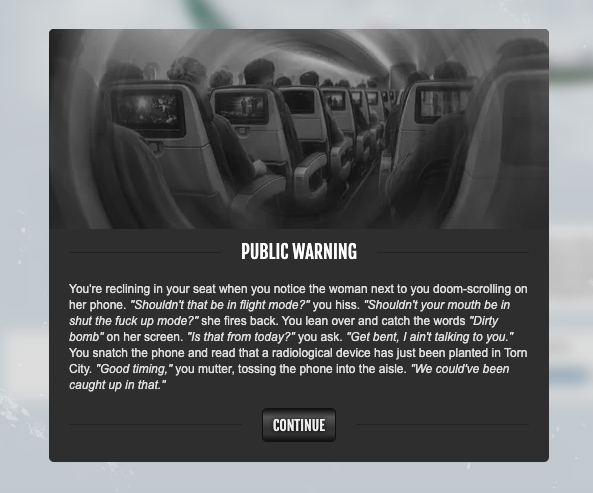
We've built out a much larger library of scenario-specific alerts to sit behind this new logic. We're not going to spoil what's in there, but there's substantially more depth and variety than before.
Clickable faction, territory links and mini-profiles
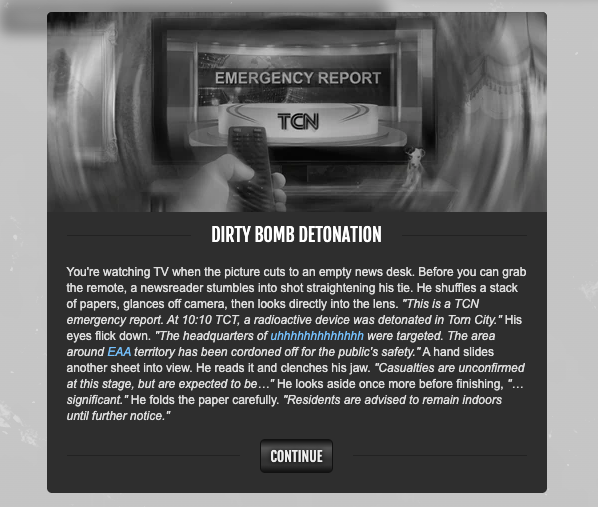
Player, faction and territory names referenced within these new contextualised Dirty Bomb alerts (such as the targeted faction, or nearby faction members) are now clickable links that open the standard mini-profile or navigate you to the relevant faction page or territory location on the city map.
Thanks.
Thank you for all of the positive (and constructive) feedback. I cannot take any credit whatsoever, however I will absolutely continue to share this with the Development team, who are the real orchestrators of this set of enhancements, as well as the other recent releases.
Thank you all again for sharing your thoughts and feedback.
Citizens,
Today we're introducing Faction Headlines, a new way to share short, timely updates with your members. As part of this change, Urgent and Important announcements are being retired, with Faction Headlines taking their place. Main Page Announcement is not affected, and continues to work exactly as it does today.
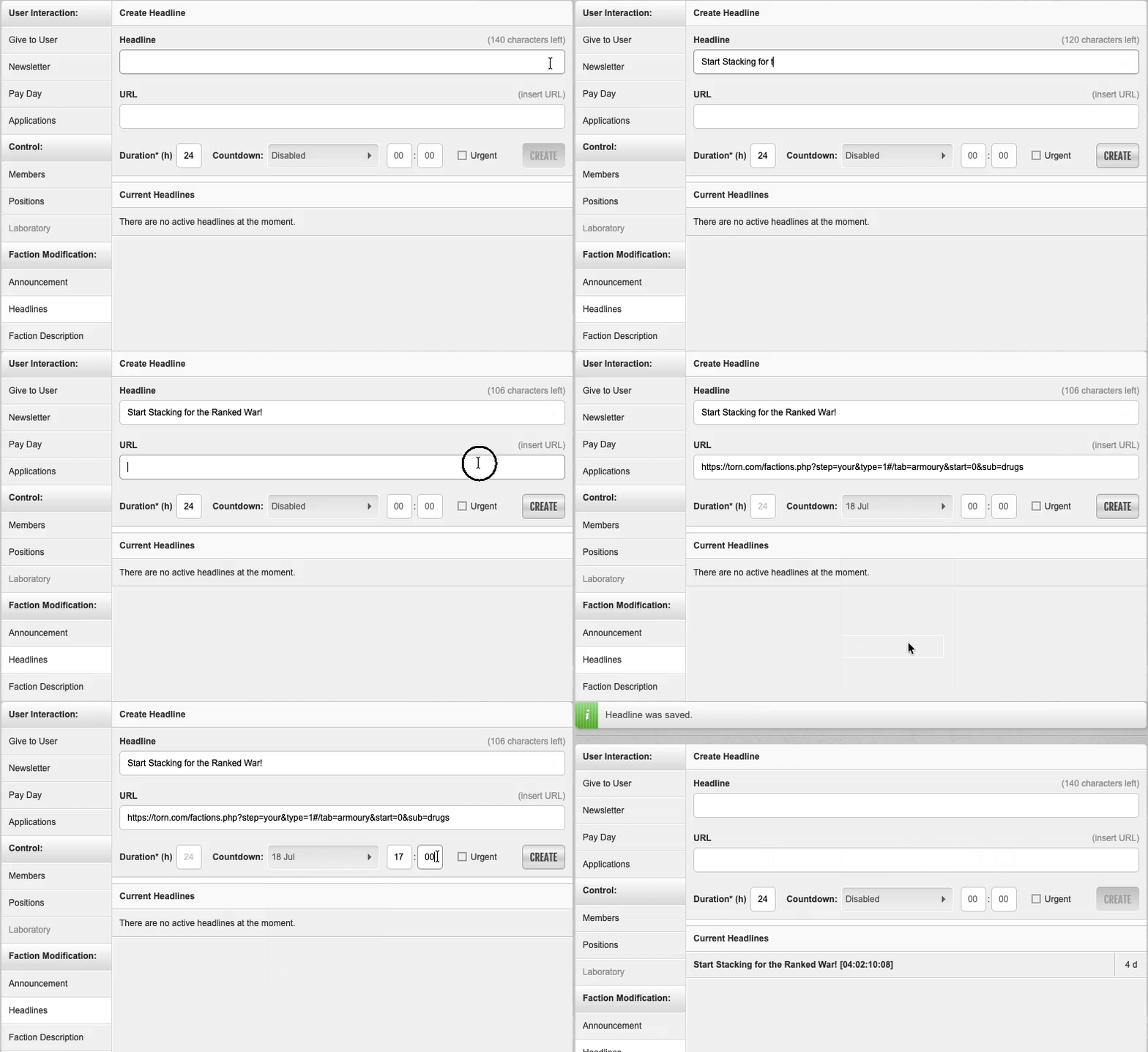
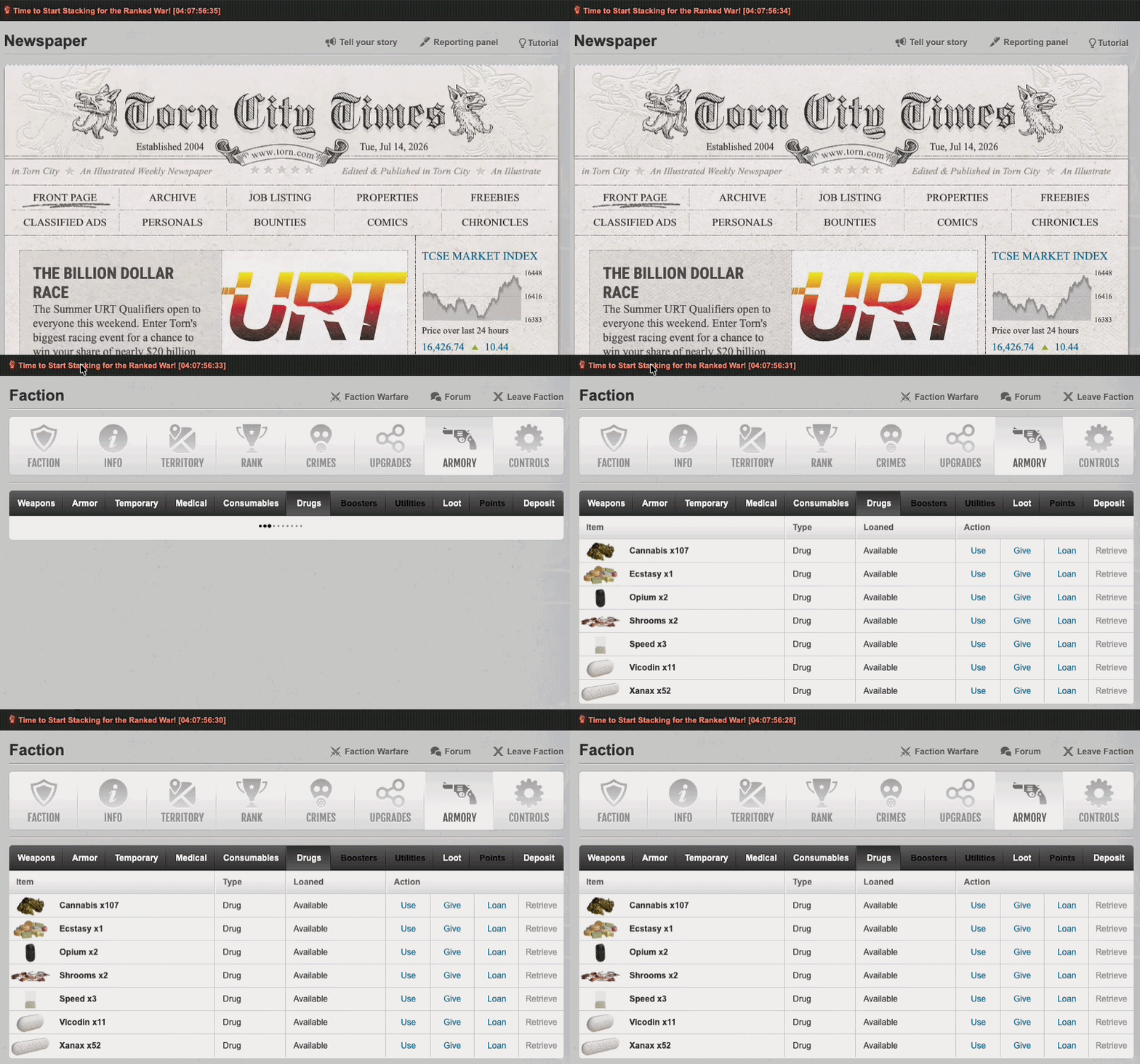
Announcements are best suited to a single, persistent message on your faction's main page. Headlines are designed for shorter-lived updates, which appear in the News Ticker. Headlines can include a hyperlink, a countdown timer, and clear themselves automatically once they expire, so you're not relying on someone remembering to take them down.
Headline URLs
Headlines can be linked directly to a page, whether within Torn or on an external site.
Simply paste in the full URL and it'll be validated automatically. Clicking an external headline will still show the usual redirect confirmation, so members always know when they're leaving Torn.
Automated durations and countdown timers
Headlines can be given an automatic expiry, rather than relying on manual removal.
Note: Setting 'Duration' to '0' will create a Headline with no expiration date/time.
Hovering over a headline will show a tooltip confirming exactly when it's due to expire, or confirm if it's set to never expire.

Headline management
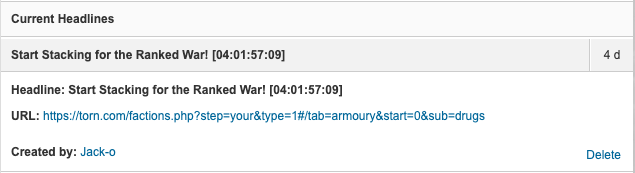
The Current Headlines list makes it easy to see everything that's currently live for your faction, as well as delete Headlines as appropriate. Headlines deleted in error can be quickly recovered via the 'Restore' button until you refresh or move away from the page, at which point they can no longer be restored.
Separate tabs for Announcements and Headlines
Faction Headlines has its own tab under Faction Modification, sitting alongside your main page Announcement tab.
Permission management remains unchanged with the introduction of Faction Headlines. The existing Announcement Changes permission continues to define which faction members can manage Headlines.
If your faction had any Urgent or Important announcements active before this release, these have automatically been migrated into Headlines for you. Urgent announcements carry over as Urgent Headlines (still shown in red), and Important announcements carry over as standard Headlines. You'll find them all under Current Headlines, no action is needed on your part.

Thanks.
I cannot take any credit for what's cooking. I just get the absolute pleasure of sharing it with you all.
The team behind the scenes are doing all of the hard work, and we very much appreciate the positive feedback!
Citizens,
Today we’re releasing an improved version of the Attack Log, with a number of changes designed to make it more accurate, easier to read, and more useful for both solo and group attacks.
Improved attack log data display
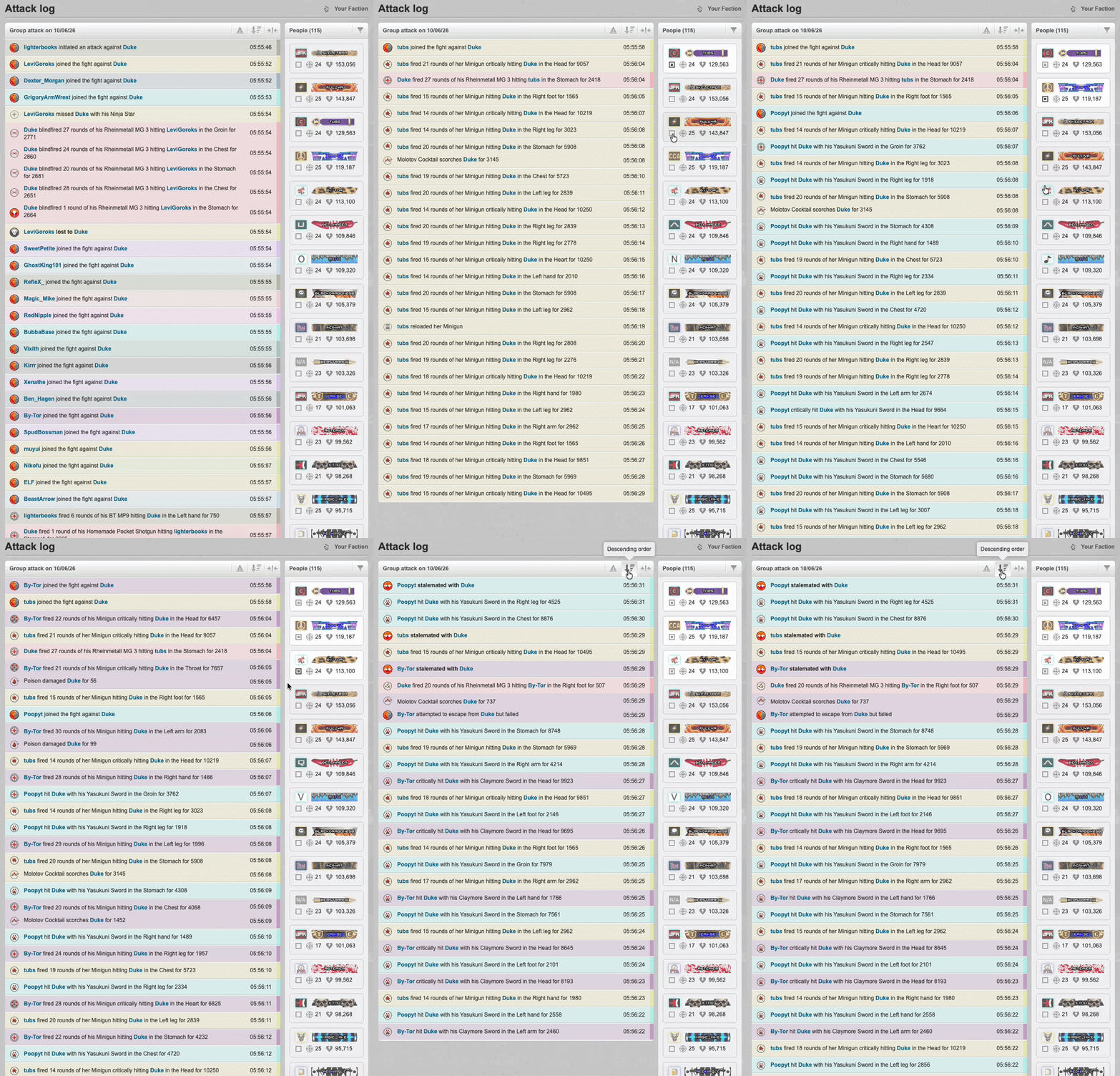
We’ve improved how the Attack Log displays hits and damage, so the numbers shown in the log are clearer and easier to trust, including in larger group attacks.
The log now uses the underlying attack data more directly, and values will use compact notation where needed so they fit cleanly within the UI.
Better group attack filtering
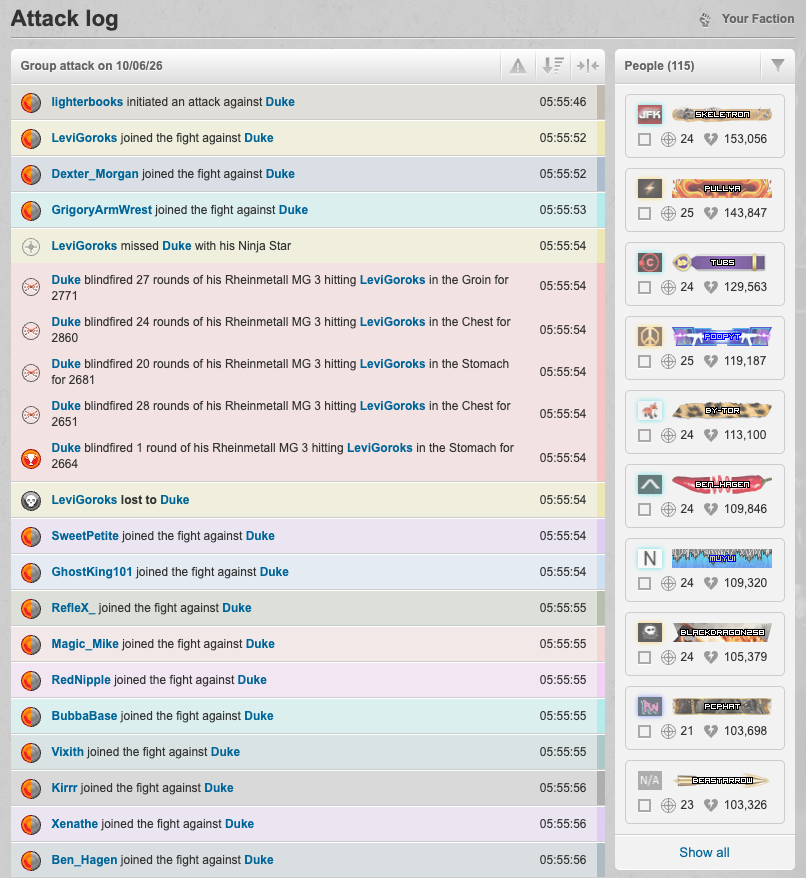
The People panel has been improved to make large group logs easier to work through. You can now select one or more people in the People panel and focus the Actions table on only their hits, incoming damage, and damage-over-time ticks. This should make it much easier to understand what happened in a specific part of a large fight without having to scroll through the full log.
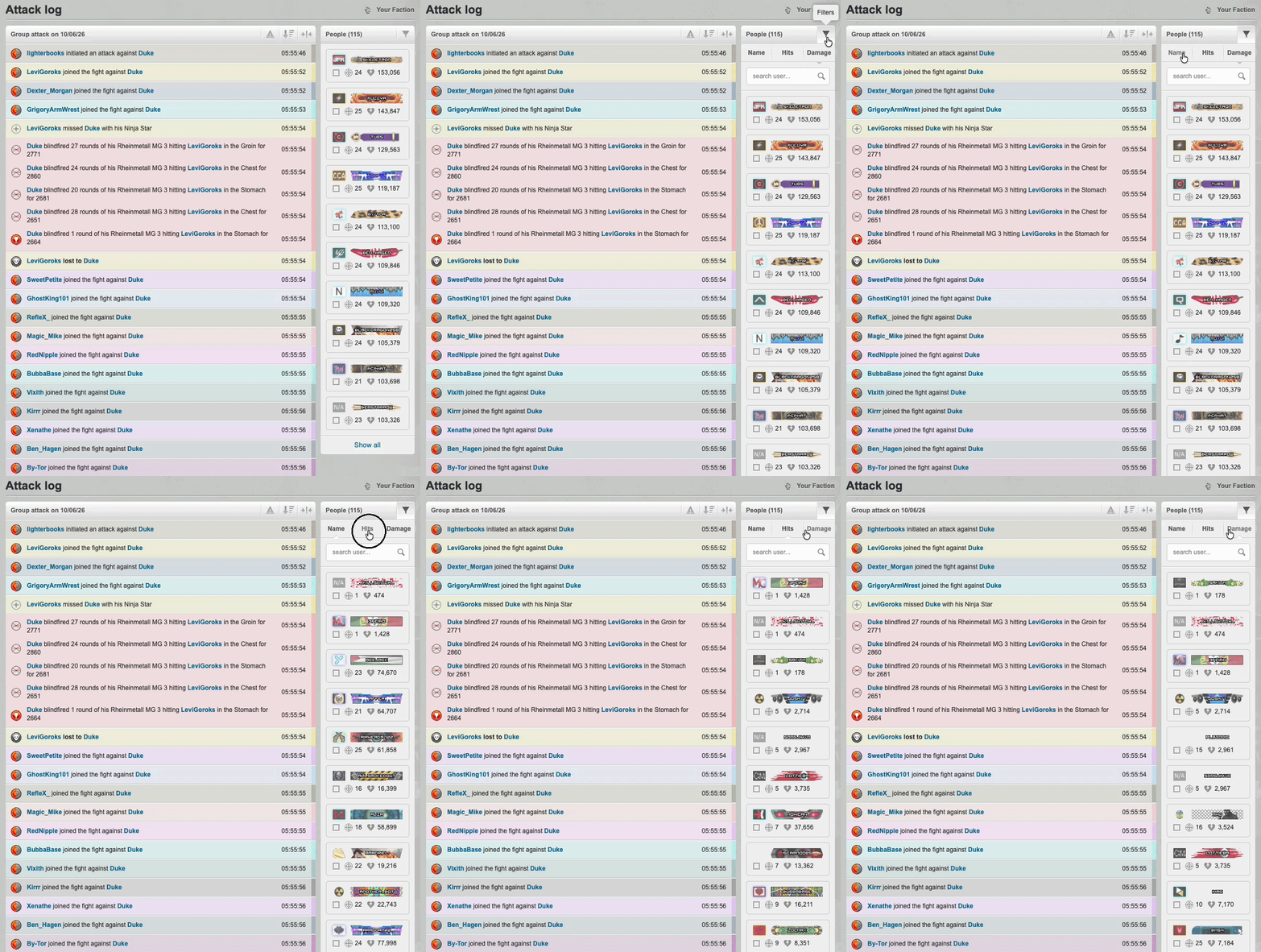
We’ve also improved the People list so it can be searched and sorted by name, hits, or damage where appropriate.
Simpler view controls
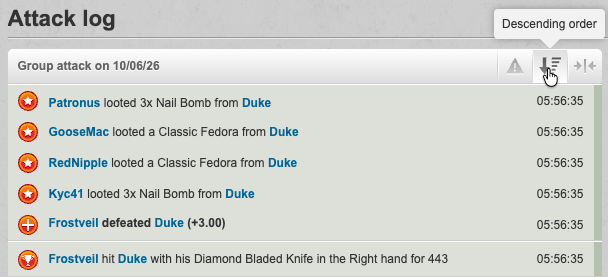
The 'Important' and 'Simplified' toggles remain as simple on/off settings, and their state is remembered per player across logs. 'Reversed' has been renamed to 'Descending order', to provide a clearer indicator as to the current sort order.
We’ve kept these controls intentionally straightforward so that players can use their preferred view without having to reconfigure the page each time.
Cleaner log layout
We’ve removed some legacy clutter from the page, including the attack log number.
Date and time information is still available through clearer headers and per-row timestamps, which should make it easier to review attacks and investigate bug reports.
We have also included players' honor bars and faction tags within the People panel, to provide a more consistent experience. Making it easier to identify relevant players at a glance.
Thanks.
Very swift service. Will definitely use again.
Thanks Revive!
I naively posted in the Companies forum looking for work just before recording the video. I really do need to reply to the offers 😅
Happy to be of some assistance.
Thank you. I hope you have a brilliant rest of the day, too.
Hi DarthRevan,
I hope you're well.
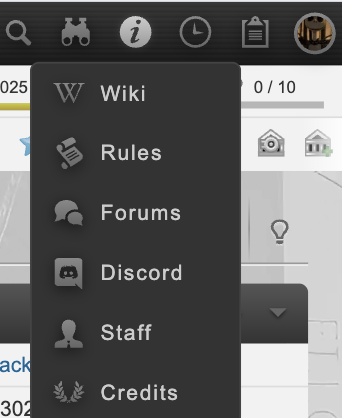
The links which were previously accessible via the hamburger menu are now accessed primarily via the  (i) icon (see below):
I hope this helps,
Jack
Citizens,
Today we’re releasing the Fly-out Sidebar for touchscreen devices. Designed to make navigation faster, clearer, and more accessible to use.
Smoother mobile navigation
The Fly-out Sidebar is now available, and players can enable it via Profile icon > Settings > General Settings > Touchscreen Navigation, where you can toggle on the 'Fly-out sidebar'.
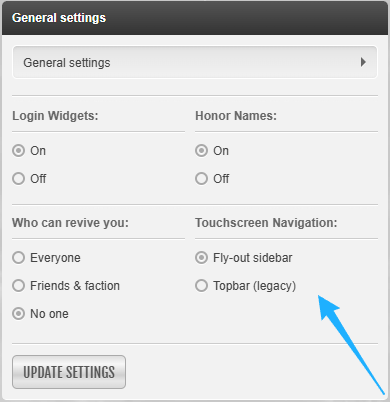
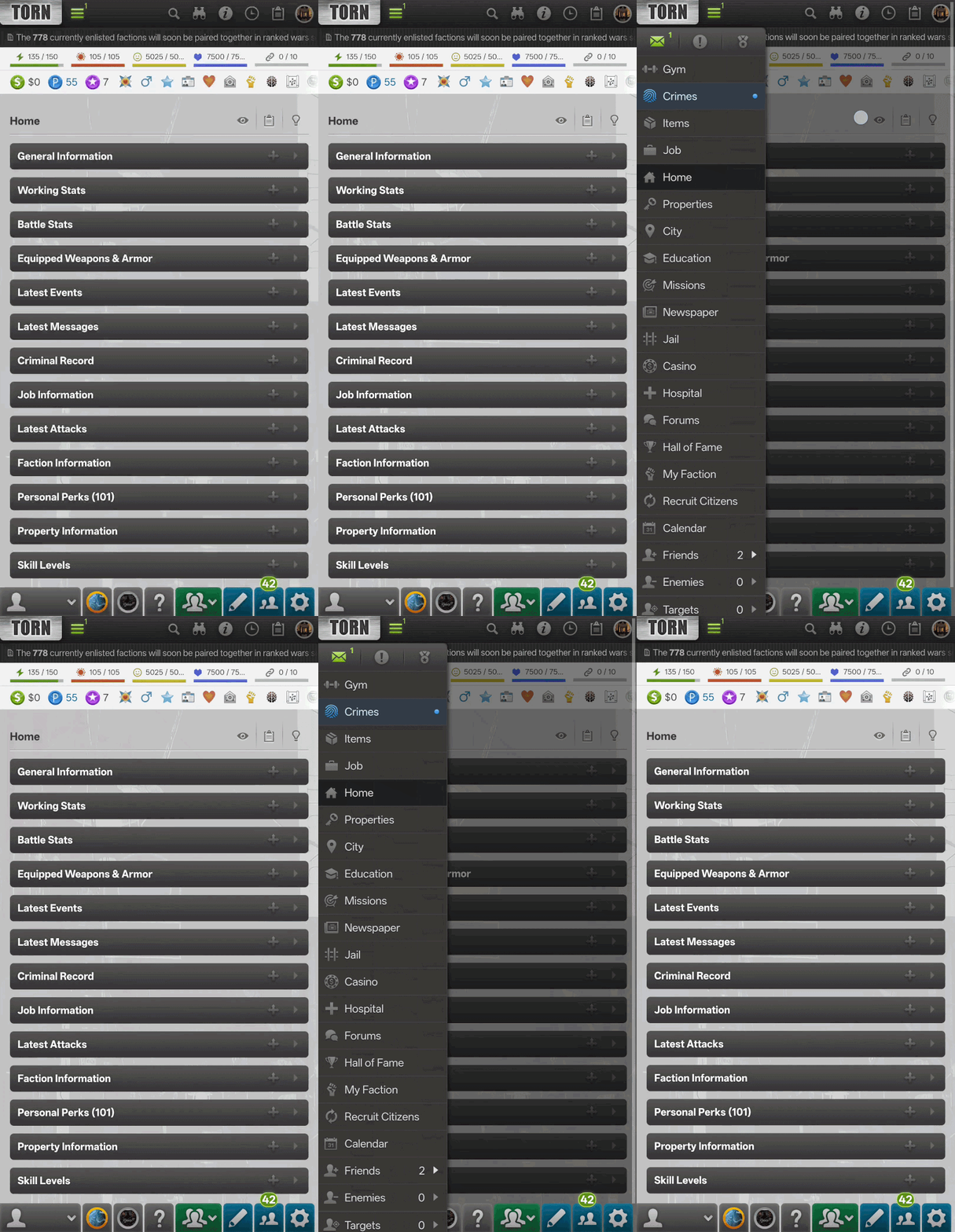
This provides a more intuitive navigation experience for touchscreen devices, while keeping access to key areas of Torn quick and familiar. If you’d prefer to use the legacy Topbar, you can do so by toggling the setting back off in the same place.
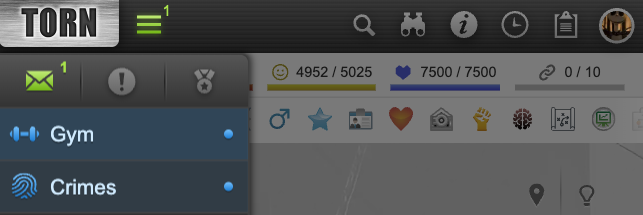
We’ve also added a quick and easy way to see how many unread notifications you have, with a number indicator now shown at the top-right of the hamburger icon.
Access to key areas
The Messages, Events, and Awards options now persist at the top of the Fly-out Sidebar, ensuring that they are still easy to access when you need them most.
In support of the Fly-out Sidebar we also recently updated the way that notifications are indicated in both the new Fly-out Sidebar and the existing desktop sidebar. Green now indicates unread items such as Messages, Events, or Awards. Blue now draws attention to things such as the Gym when your Energy is full, Crimes when your Nerve is full, and similar prompts.
To make sure these indicators remain accessible to everyone, they now also include a pip/dot, so players do not need to rely on color differences alone.
Tutorial updates
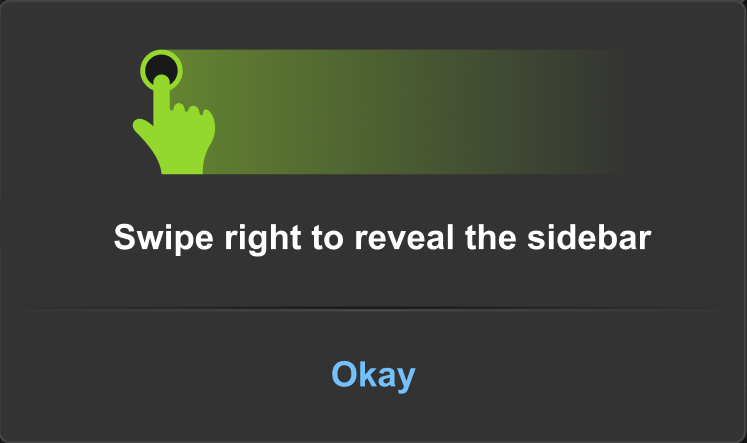
When the Fly-out Sidebar is enabled, players will initially see a short tutorial explaining how to interact with it.
Thank you as always for the feedback and suggestions that help to shape Torn.
Open to work.
My addiction will probably fluctuate for a while, so I will likely not be at maximum effectiveness.
Looking for either a good wage, or trains instead please.
Manual Labor:215,781
Intelligence:136,345
Endurance:163,848
Hi all,
I am in the market for 15 sets of Combat Armor, if anyone is looking to offload a bunch.
I'm not too worried about the stats of them, and so if you have some low quality ones that you're looking to move on a little cheaper in bulk, please do drop me a message.
Thanks!
Looking to buy a faction, open to considering Respect across various ranges.
