Skip to content
TORNLIFE More

DrChrono: forum

DrChrono [1372430] Level 100 Natural Selection II NS Lead Developer

Forum posts (Torn's count)
923 observed
Archived posts
262
Threads started (archived)
10

Boards

From the 262 newest archived posts.

Threads started

Most-liked posts

Likes as archived at fetch time, adjusted for how long each post had been up. Scored posts only; the full score pass runs after the import.

[v7.1.3] Books+Gym, SEs, Flying, $, Halloween · · 549 likes

Greetings all,

Figured it's about time to drop an API-driven spreadsheet I've worked on for a long while now.

If you want something added, or find something wrong - chat, mail, or hit me on Discord @drchrono


----

The sheet can be found here

This is a Google Sheets document, and the above link should bring you directly to the option of making your own copy.

Notes:
Mobile refreshing possible thanks to Omanpx, though you will still have to run the initial "setup" on a PC.
You should use a Full Access API key for this document.

Terms of Service can be found at the bottom of the Cover tab: 


----
Gym Sheet

This utilizes the most recent formula for gym gains, and should have most (if not all) modifiers you'll run into during training.

There are separate checkbox toggles to import: your current stats; your faction's current steadfast; your max happy, property swimming pool, educations completed, faction energy drink voracity perks, and job perks. 

You may uncheck these import checkboxes and add in your own data if wished. Color coding changes depending on if data is being imported or not, as well.
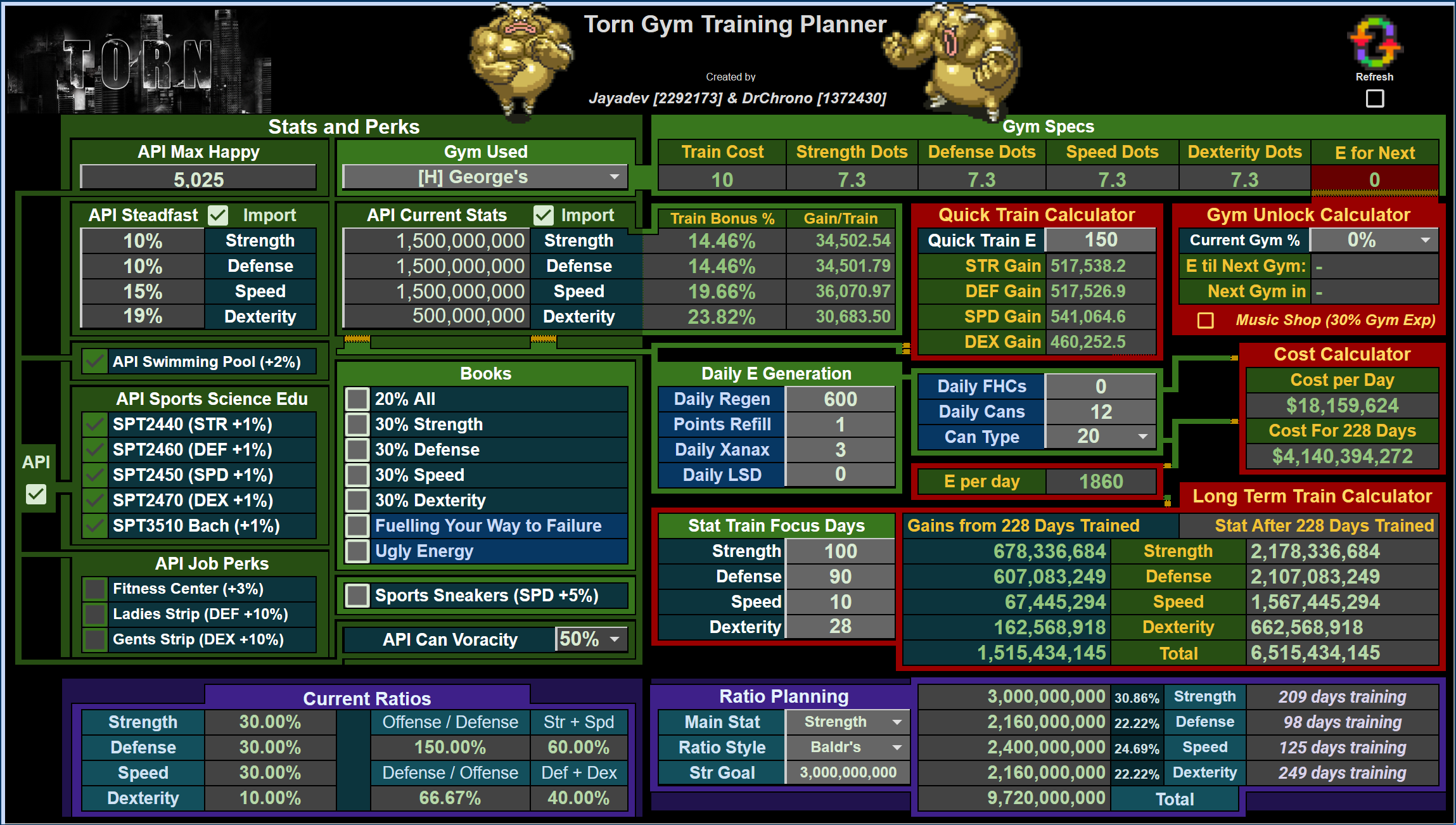

On this sheet, you can utilize the following sub-areas:

  • Quick Train, with an amount of E up to 1000 (nice for Happy Jumps)
  • Gym Unlocks, where you can add your current gym's % complete and, using your E per Day, estimate how many days you have left until your next gym unlocks
  • Long Term Train Calculator, where your E & Items per Day can be iterated out up to 1096 days to show gains as well as costs
  • Quick Ratios & Ratio Planning, where you can see your current breakdown between your stats as well as plan towards a goal that either conforms to Baldr, Hank, or your own Manual ratio to see your upper stat limits to train towards


(Please note that variance in modifiers & Torn itself will change your gains per day in ways this sheet cannot account for - all measurements should be considered estimates with best practices behind them)

----
Energy Sheet

This has a checkbox to import your stats & training gain amounts from the Gym tab.

Outlines all Energy and Stat Gain items you might want to use, comparing their efficiency across multiple categories.

Determine the most cost efficient or gain efficient items, when rehab becomes prohibitively expensive, when to use stat enhancers instead of E Drinks/FHCs, and when to sell energy towards using SEs.

[Use SE Instead] and [Using Energy for SE $] areas utilize an iterative script to compare cost efficiencies until your inputs reach a threshold for when each action is fiscally wise to pursue.
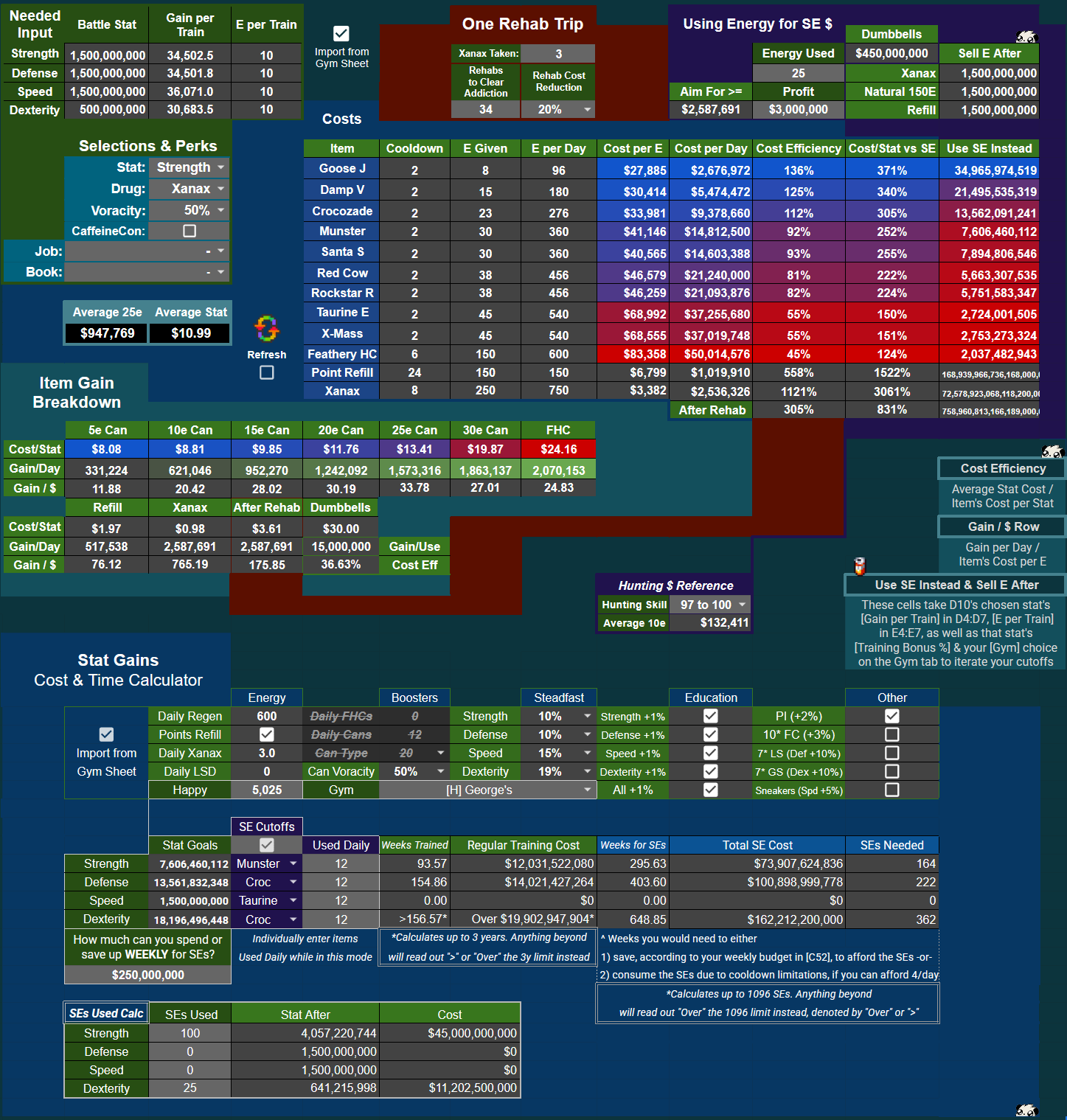


Narrowing in on [One Rehab Trip] and [Using Energy for SE $]:

[image: file.garden]
For Rehab:

  • As addiction has timed interactions with Natural Decay (subtracting 20 addiction points every day around 3:30tct), the sheet ships with the max addiction (with Tol) & Xanax for 1 day's use:
  • 3 Xanax at max Toleration = 54 addiction points, minus 20 from Natural Decay = 34 addiction points from 3 Xanax each day. Adjust as you see fit, as 2.7 Xanax/day is more in line with normal usage


For Using Energy for SE $:

  • This takes a variable amount of energy you use (say, 25e for a revive) as well as the profit from that action ($845,000 per revive) and looks at the stats you would have gained training that energy vs. the amount of stats you would gain from that profit's % of an SE to tell you when that amount of energy for that specific profit is worth pursuing
  • For an easy "profit target", the [Aim for >=] cell gives you the minimum profit you'd want to make for your chosen stat's SE


Below the main energy sheet calcs, you can find a quick training vs. SE consumption calculator to check budgeting for SEs against time needed to train.

Keep in mind this is a snapshot of your current situation, and does not take into account training during your SE saving period - but it's a clever reference to return to if you have interest in starting to pound SEs like some other citizens.
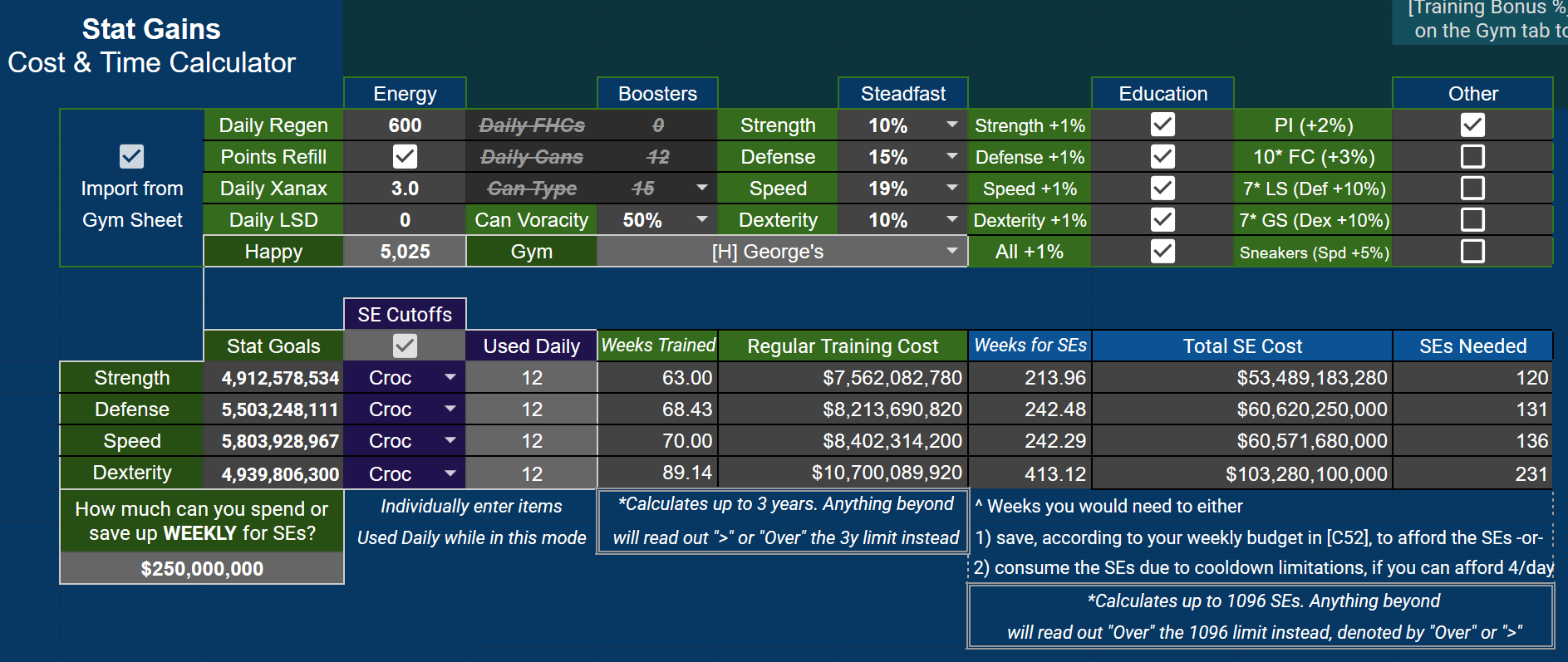

These fields have an import checked to pull from the Gym tab, but please note that Happy and Gym choice are both independent, allowing for a bit more customization & comparison. The ability to import SE Cutoffs for specific items is also present for regular training, allowing you to see the specific costs of items utilized up until SEs become more effective.

This sub-area uses iterations up to 1096 days trained (separate from the Gym tab's iterations) as well as 1096 SEs taken to give you estimates. Anything over these numbers will be denoted in fields, as explained in notes in the sub-area.

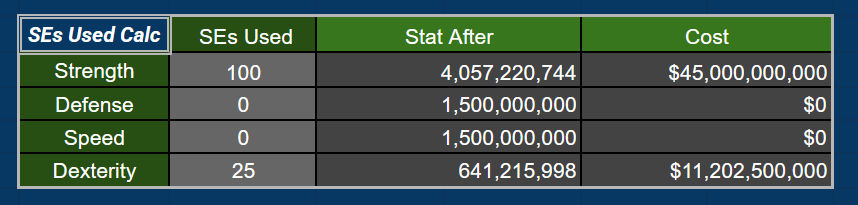
Finally, at the bottom of this tab there is a quick SEs Used Calc for easy referencing regarding your stats after taking an amount of SEs, as well as the associated cost:


----
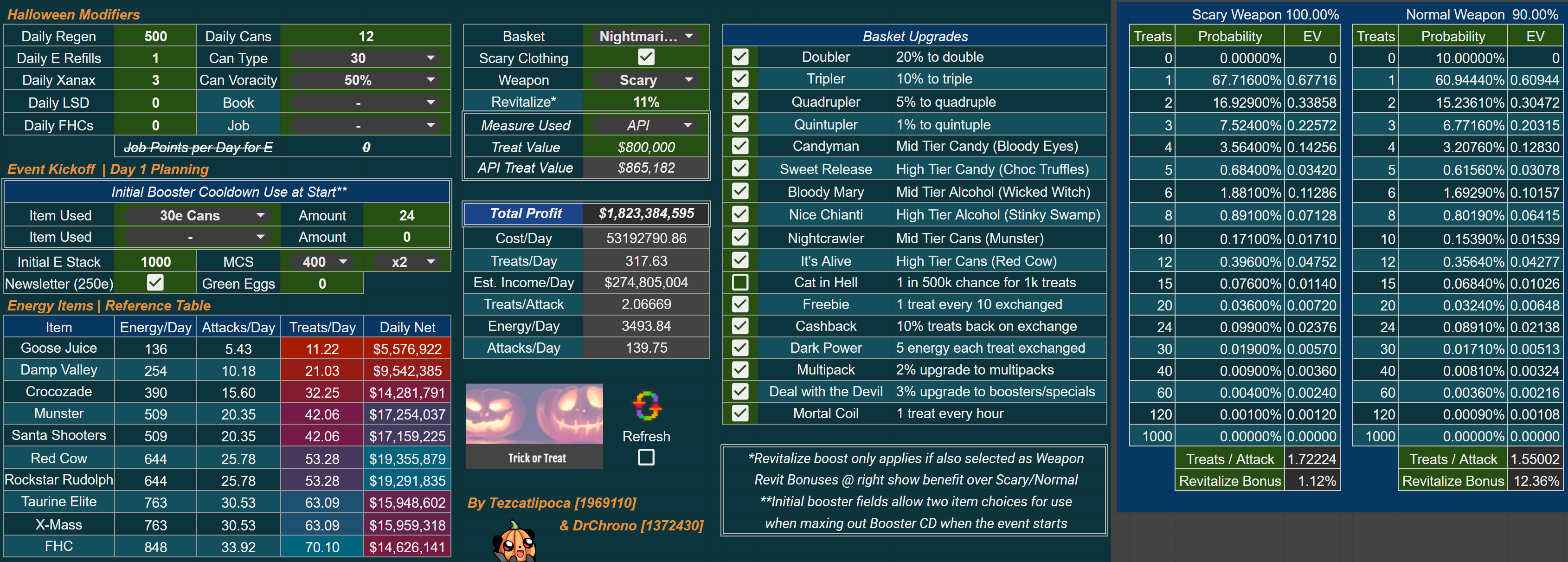
Halloween Sheet
(cheers to Tezcatlipoca for the massive work here!)

Compare every modifier available for Halloween.

Want to see how much better a revitalize weapon would be?
How much more profit using only FHCs would bring, perhaps while running Ugly Energy?

Let loose for the best event (so far).

----
Budget Sheet

Shows stock ROIs and your average income expected over time, alongside other fiscal tools.

Stocks owned are defaulted to import into the sheet. Flip this off to edit the fields yourself.

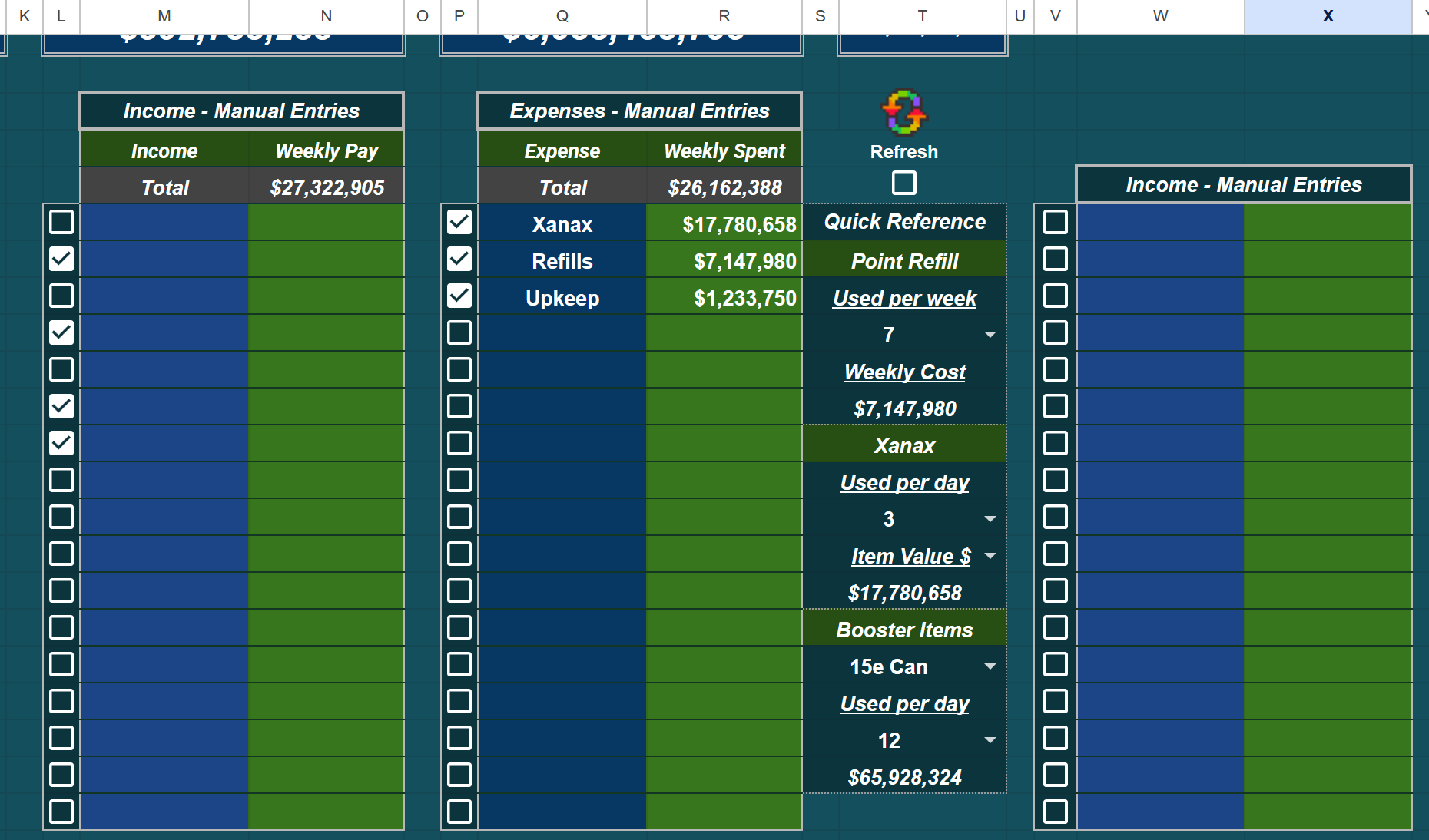
Manual input fields for both income and expense to the right of this section, which will only add to your totals when their checkboxes are selected.
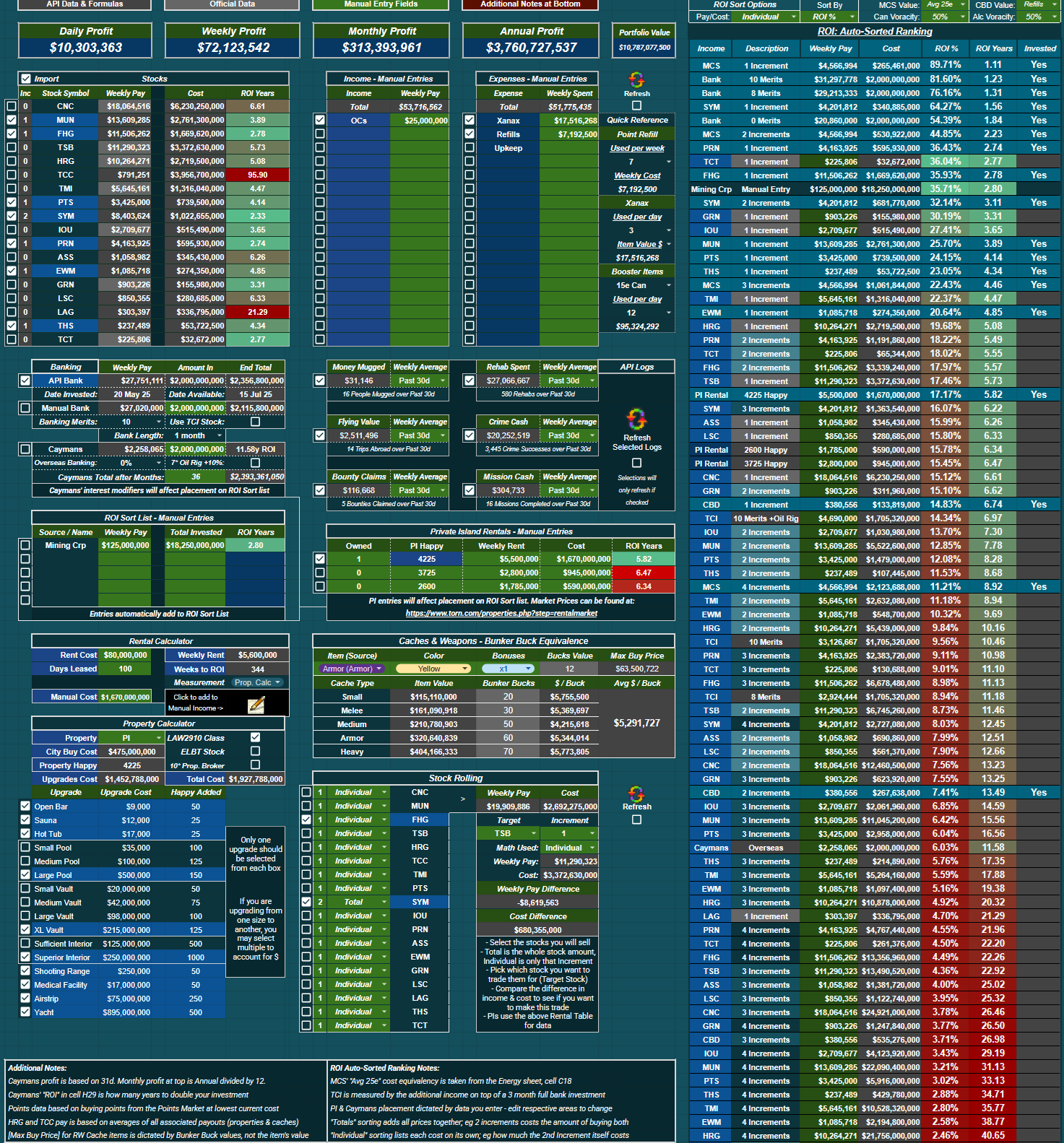

To the right of everything, there is an auto-sorting ROI chart with toggles to view stock pay & costs by up to four

  • individual increments (the cost & pay per increment level), or
  • total increments (the combination of all levels' pay and costs)
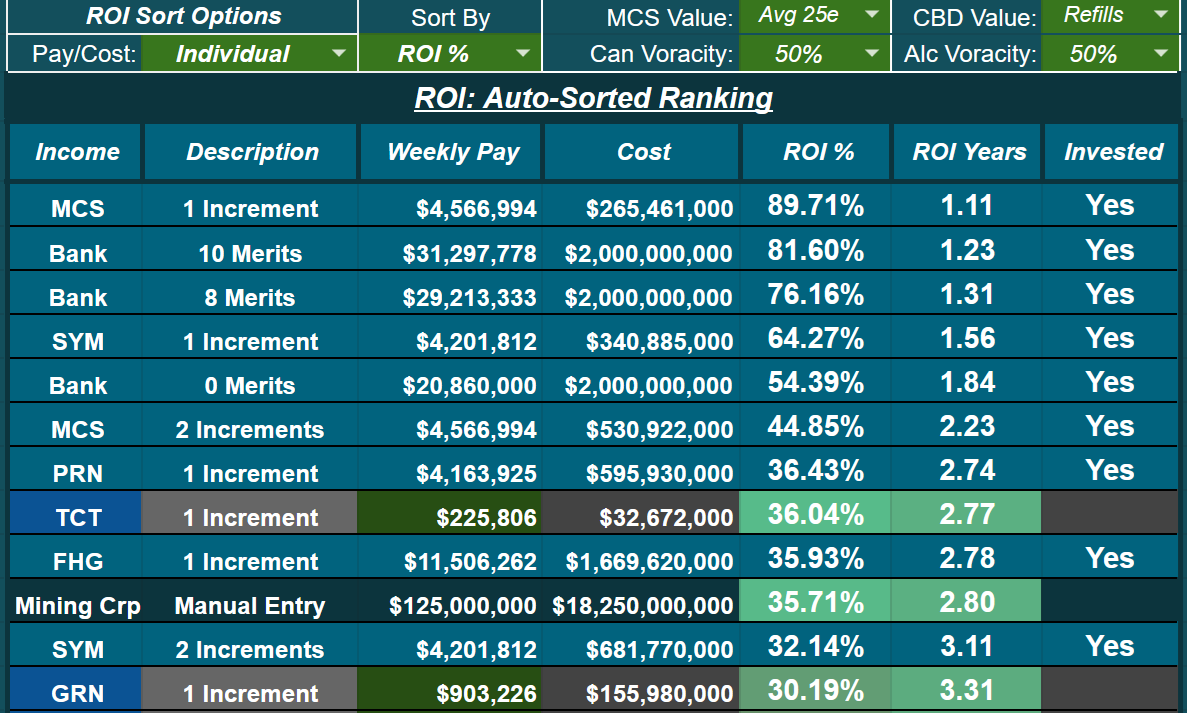


Sorting has multiple options for ordering of investment options - ROI % is set initially. You can choose how you want to measure MCS & CBD via dropdowns, as well. The sheet ships with what I find the most reasonable for valuation.

Caymans, Private Islands, as well as the [ROI Sort List - Manual Entries] in their requisite areas of the Budget tab will sort themselves in this list according to your edits/data entered & modifiers selected.

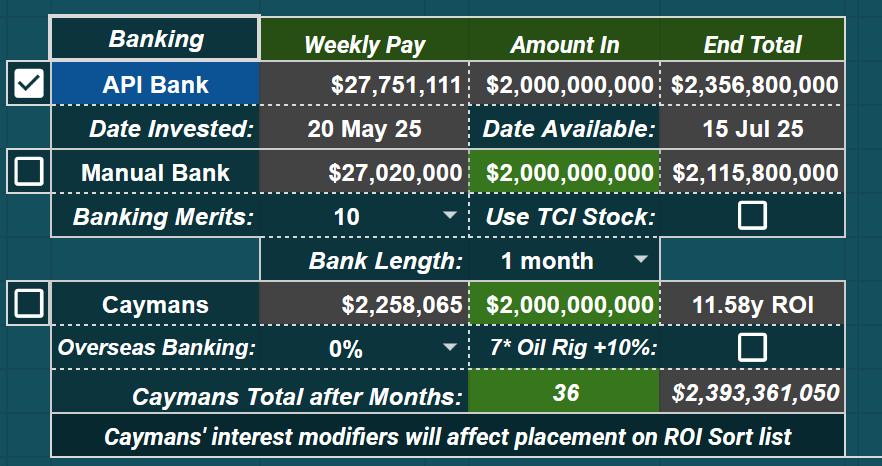
For Banking, a small area under the Stocks table has two different ways of measuring your bank - a fully automated API method, or manual method - as well as a Caymans calculator (thanks Tezcatlipoca for the Caymans formula!)

  • For [Manual Bank], insert your [Amount In] & choose your [Banking Merits], check if you're using TCI, and select [Bank Length] for the readout to give you the [End Total] and [Weekly Pay] using the APR of the day from the API
  • For [Caymans], note that the [Overseas Banking] faction perk and [7* Oil Rig +10%] selections will affect Cayman's placement on the ROI Auto-Sort list to the right. A value needs to remain in the green cell for Caymans to correctly slot into the ROI sort table


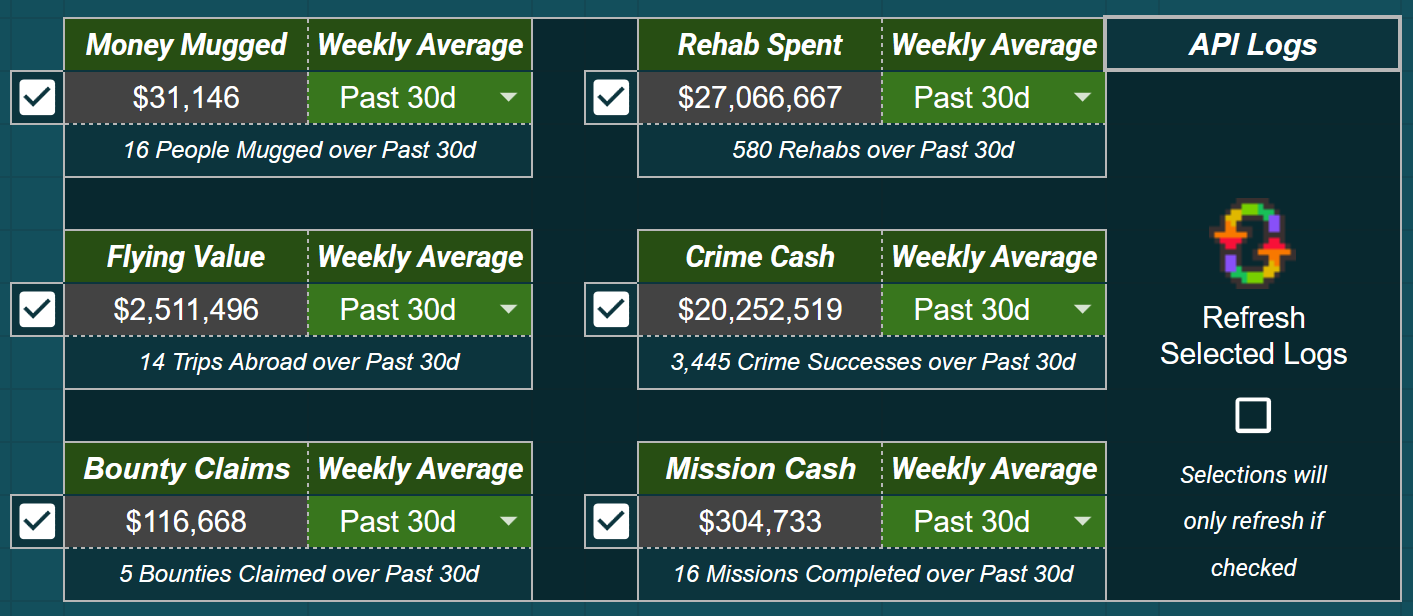
API Logs, to the right of banking and under Manual Entries for Income and Expenses, enables lightweight log parsing. These log categories will only refresh if selected, saving calls if you do not participate in any of the listed activities. When selected, categories refresh as well as either add to Manual Income in cell N8, or add to Manual Expenses in cell R8. You can flip the Weekly Averages to either the past 30 days or just the past week, depending on if you want to narrow to recent changes in approaches or have a longer-term routine you follow.
 

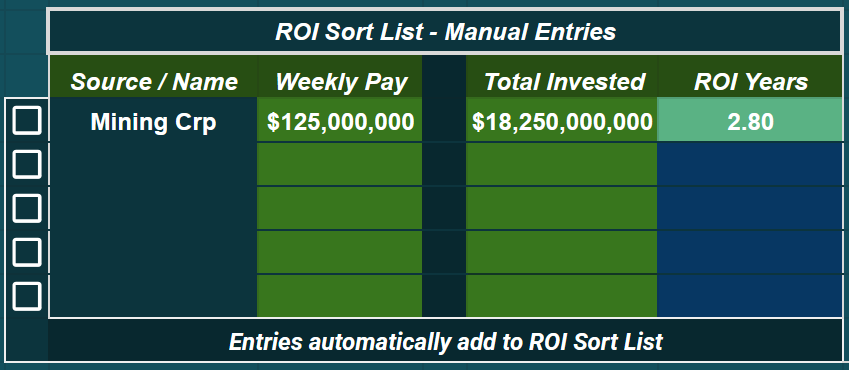
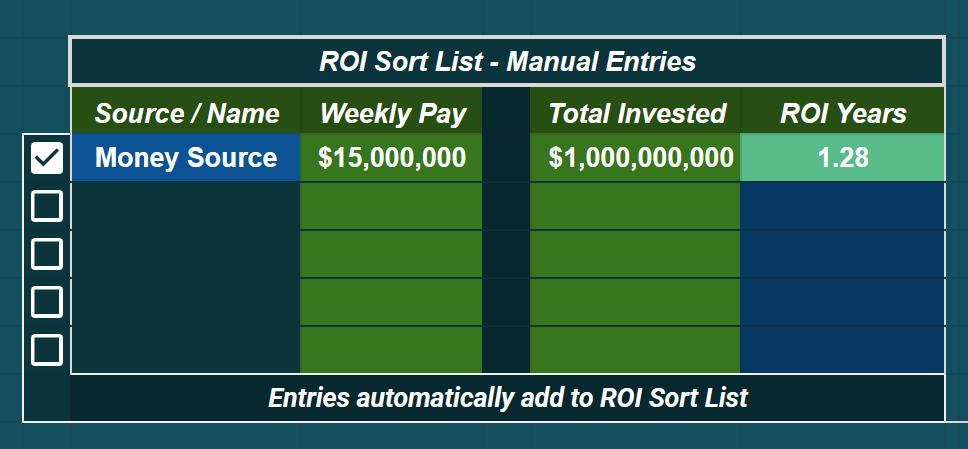
Directly underneath banking lays the ROI Sort List - Manual Entries sub-area.

  • Name your source of income, place in the weekly pay, place in the total invested. ROI in Years will read out to the right
  • Entries automatically slot into the ROI Auto-Sort table for an easy comparison on investments
  • Toggle a row's checkbox to mark it as Invested on the ROI Auto-Sort table


Useful if you invest in companies, faction stock funds, et cetera.
 

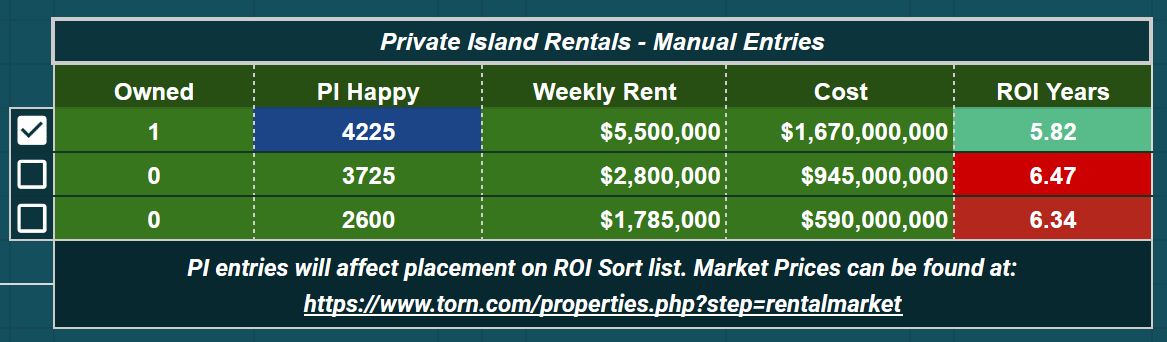
To the right you can find the Private Island Rentals - Manual Entries section, where you can change the number owned, Happy amount, weekly rent, and purchase cost of the given properties, also affecting each PI's placement on the ROI Auto-Sort list. Ticking the checkbox beside each row will add these entries to your Manual Weekly Pay cell in N8 (multiplied by the Owned number), as well as highlight the option on the Auto-Sort list as Invested.
 

A Property & Rental Calculator exists as well, if you're in the market to buy or rent out a Palace, Castle, or Private Island.

  • Select pertinent modifiers for costs as well as property upgrades for happy
  • Contains a calc that takes days leased and price of lease and outputs weekly rent
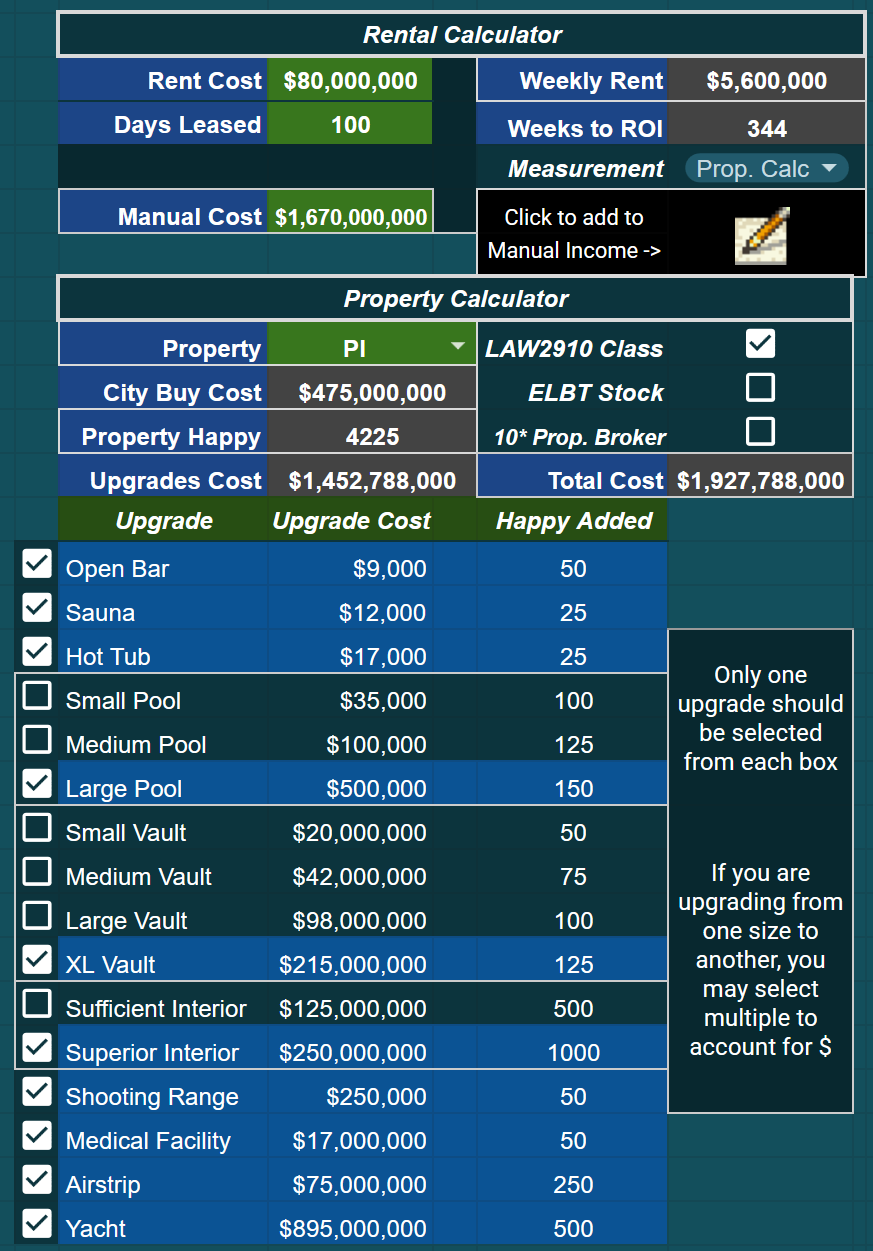


If you would like to add a Rental's output to the Manual Entries fields, the script button in this area will take:
"[Property] - [Property Happy]" & "[Weekly Rent]" to fill out the next empty row in Manual Entries for ease of transposing your rental.

[image: file.garden]
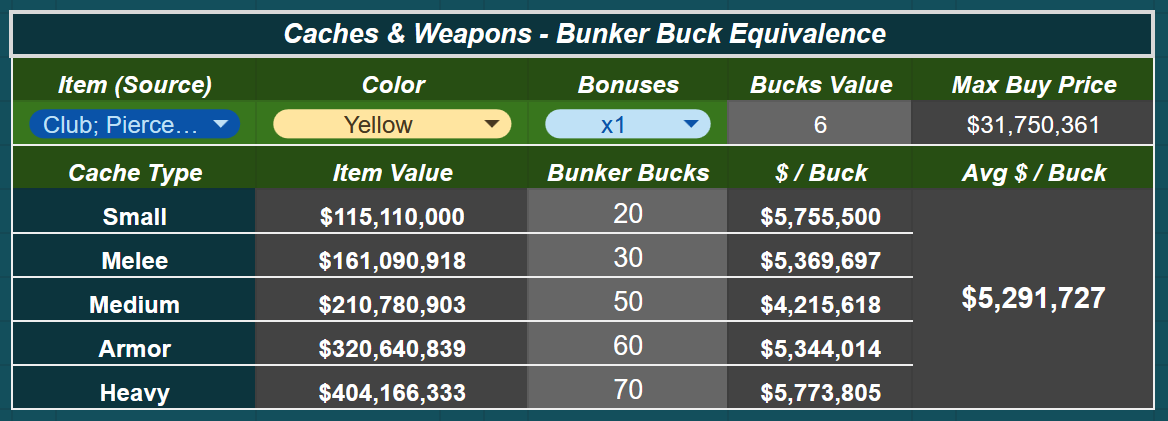
Next up, we have Bunker Bucks calculations.

  • This sub-area takes each cache's item values as well as Bunker Bucks valuations of item + color + amount of bonuses to read out a "Max Buy Price" if you're looking to buy weapons or armor to turn in for Bunker Bucks


This "flip" should net you caches from the Bunker cheaper than buying a cache off the market (on average).

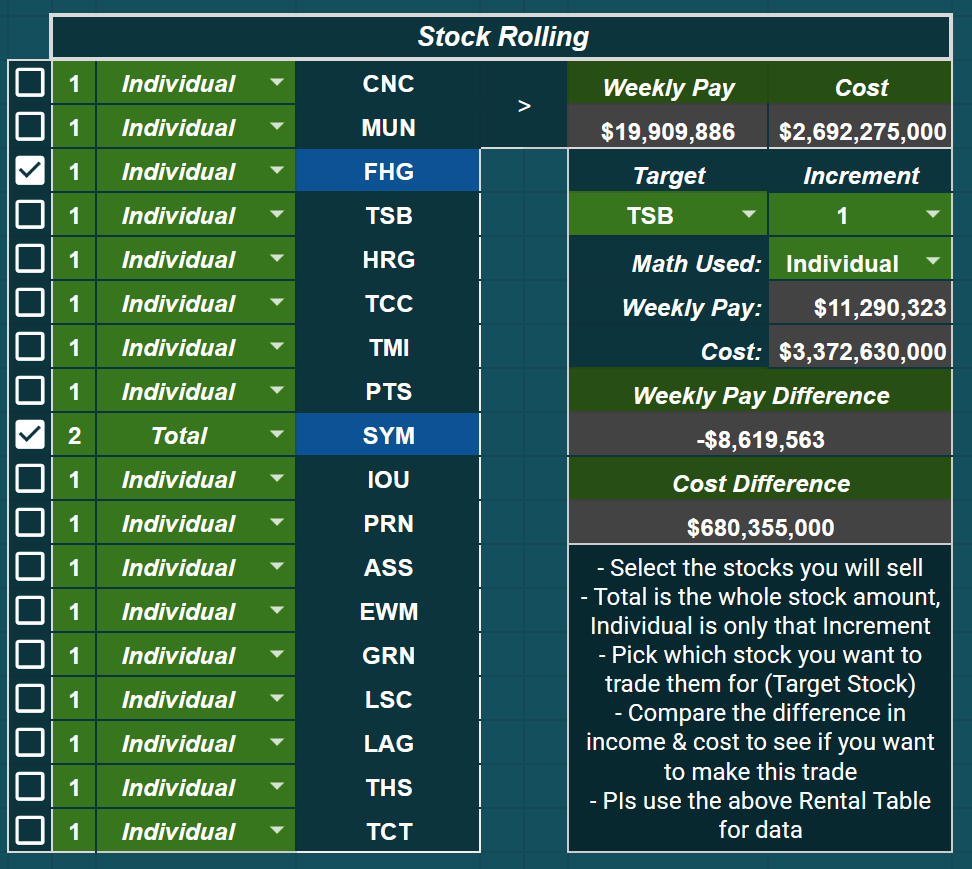
Below this, there lies a Stock Rolling table.

  • You can select the stocks, their increment level, and whether a specific stock will use the total block of increments or just the individual selected increment to group up and sell towards a "target stock" that you can choose to the right
  • Data readouts on how much extra/short you'll be for the purchase as well as how much your weekly income would change due to the "stock roll" are beneath the target stock selection
  • The option to roll stocks into Private Islands is present as well, utilizing Happy, Weekly Pay, and Cost amounts generated from the Private Island Rentals table


Useful when you want to sell easily-reacquired stocks (eg. SYM, ASS, etc) towards more "out of reach" stocks (eg. TSB). Grab the higher cost stock and then target the cheaper stocks used to roll into it, snowballing profit.

----
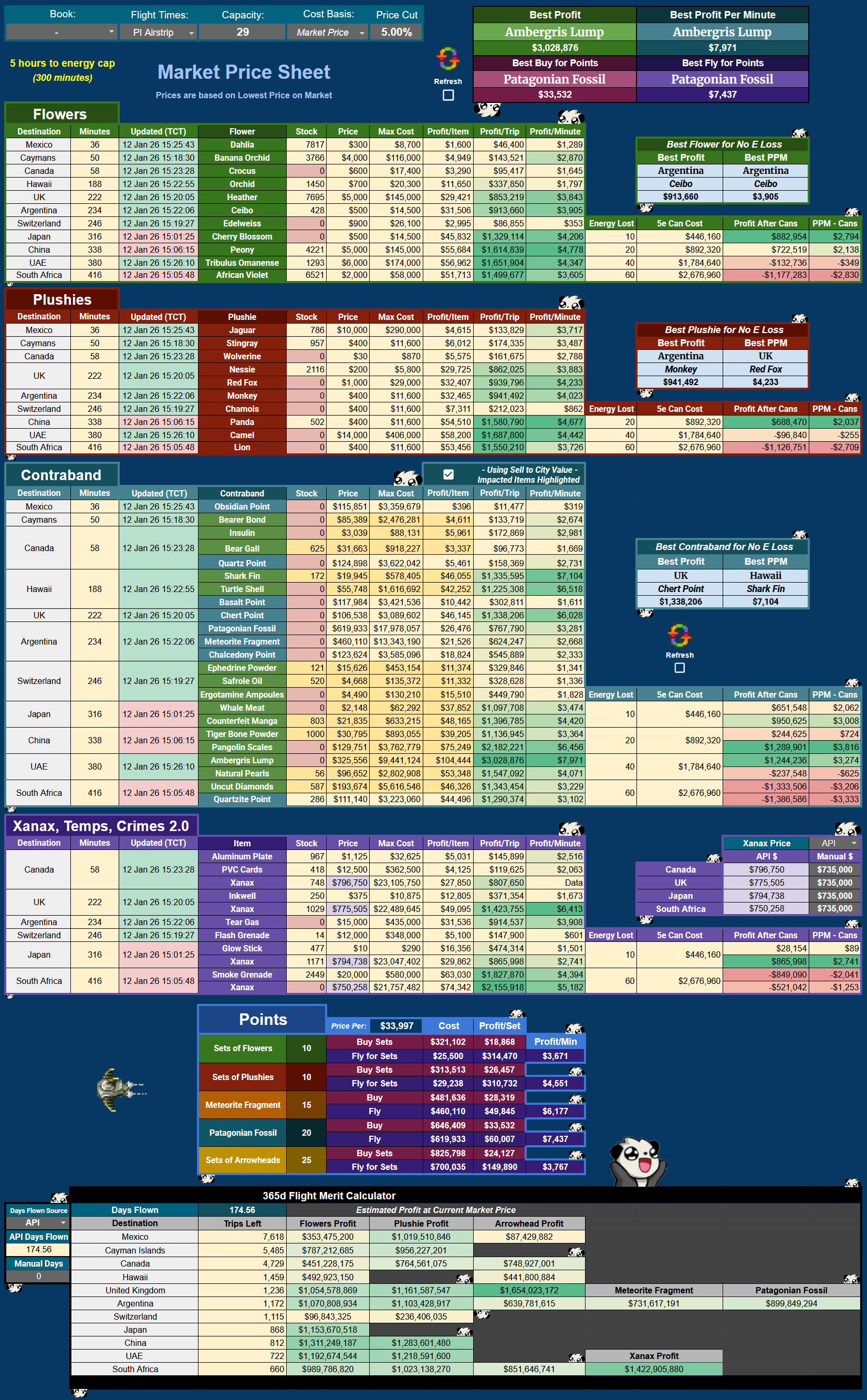
Flying Sheet

Easy compare for flyers.

  • Modifiers for Lingerie, WLT, and the two relevant flying books - Ugly Energy (fly longer without e capping) & Mailing Yourself Abroad
  • Toggle between Item Value and Market Prices as wanted. By default, Item Values are displayed and pulled via the OnOpen trigger you can install on the Cover tab
  • For Market Price view, please use the Refresh button (on PC) or Checkbox (PC & mobile) on the sheet
  • Compare buying items for points trading, as well as a simple '365d in the air' merit calc at the bottom
  • Utilizes YATA's Overseas Stock API to give you stock abroad with timestamps for the most recent data available


----
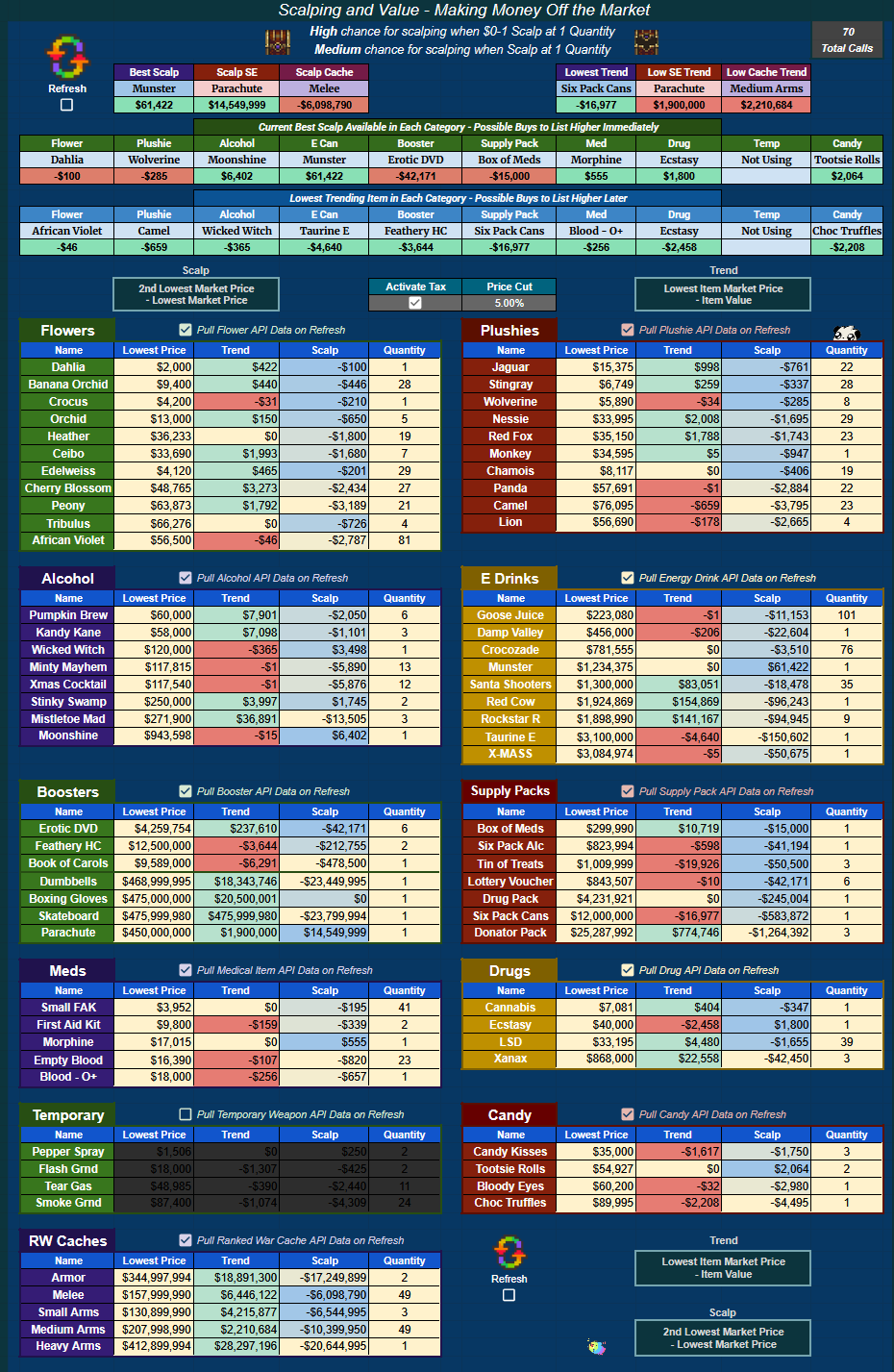
Scalp Sheet

Check out commonly requested items that are on the market for immediate deals and glanceable trends.

This sheet is not on the auto-refresh script - has to be manually refreshed, due to the amount of API calls it makes. The ability to exclude item categories is present via checkboxes above each separate category; if you uncheck one, it will grey out and not utilize any API calls, allowing you to focus specific categories you are interested in watching.

Please note:

  • Scalp cells are [2nd lowest Market Price] - [lowest Market Price] to show what you could theoretically make snatching up that lowest price item and relisting for the higher 2nd price
  • Value cells are [Lowest Item Market Price] - [Item Value] to show what items are currently going for on-market compared to the last 24h Item Value generated by Torn. Negative means current market price is below the Item's API value
  • Trend cells are [Lowest Item Market Price] - [Item Value] to show the same as Value but in a different context: How is this item moving today, is it gaining in value (positive value) or diminishing (negative value)?


----
Bank Sheet

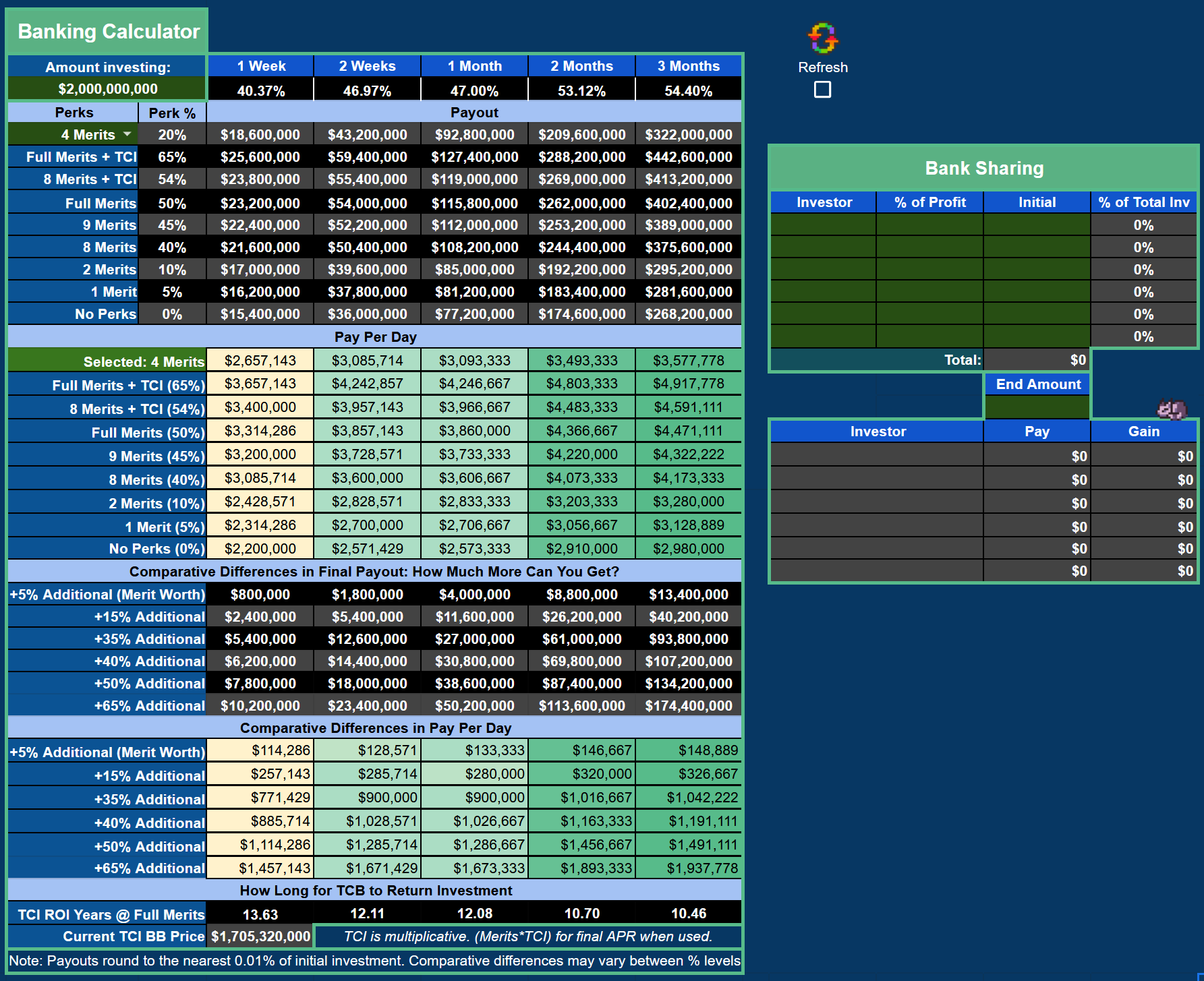
  • Manually select your bank modifiers and compare interest across the board
  • Also includes a bank sharing calculator, with % modifying fields if you do not split evenly for bank shares
  • APR percentages at the top (1 Week through 3 Months) are the bank's base rates of the day delivered by Torn's API
[Request] Member CE Rankings · · 52 likes

Would it be possible to have members' relative CE rankings added to the faction API?

This was addressed in a previous thread here, where Ched said he wasn't sure about how it could be helpful information.

Edit for visualization of how API data could be returned (thank you for the clean example, DKK):

By having the API return the XIDs of faction members in order of their CE from highest to lowest, we could mimic the functionality already built into Torn when all participants are out and available to be placed into OCs.

A return consisting of

{
"crimerank": [
1583290,
1124215,
211440
]
}

would be easy to work with.

To outline why it would be useful:

Factions routinely have dead time between OCs to re-rank participants as well as slot in newly recruited members.

This assists templates for OC role assignment, as well as allowing members to view if what they have been doing between ranking periods may be beneficial or detrimental to their CE.
eg. It's always nice seeing yourself pass any number of other members in the faction-given CE rank.

Currently, the process (here at DA) is to manually copy the entire list after everyone is out of an OC:
[image: cdn.discordapp.com]

& paste it into an excel/google sheet:
[image: cdn.discordapp.com]

for a reference to return to. If you want to measure rank changes, there's a few more steps involving copying the previous ranking to another sheet to use to measure.

----

With member CE rankings available through the API, we could minimize OC downtime for this "ranking check/maintenance" process, as well as assist OC planning - seeing where a new member may slot into a PA or PH may change your approach to multiple teams, allowing time to plan and adjust without having members sitting around asking why they aren't in an OC.

Appreciate your time.

[Full] 10* Logistics · · 10 likes

Currently looking for positions with a minimum of:
  • Procurement Manager
  • 150,000 Intelligence / 100,000 Endurance
Pay for Proc up to 3m a day depending on stats
  • Supply Chain Manager
  • 200,000 Intelligence / 80,000 Endurance
Pay for Supply Chain up to 3m a day depending on stats.
  • Forklift Operator
  • 115,000 Endurance / 60,000 Manual
Pay for Fork Op up to 2.75m a day depending on stats.
  • Transport Coordinator
  • 90,000 Intelligence / 42,500 Endurance
Pay for Transport Coord up to 2.5m a day depending on stats.
  • Lumper
  • 80,000 Manual / 40,000 Endurance
Pay for Lumpers up to 2m a day depending on stats.

Prefer staff who are active & pass a Captcha at least once a day.
Rehab expected if drugs are used.
Rotational trains, no employee skipped unless 2+ days inactive.
Willing to train in a different position if wanted. Have gotten a few staff's work stat merits this way :)

Always listening for other positions, though I do not fire unless 2+ days inactive.

Feel free to chat me or apply!

Employee Housing Offers

Select rental properties are offered to employees for either half off market price, or for free.

Currently offering half off market rate 2600 happy Private Island leases for staff who have been in the company for over 15 days.

For free rentals, properties up to fully upgraded 1200 happy Ranches are available after the first day of work.


Dark mode bugs · · 8 likes

Rehab slider, below

[image: cdn.discordapp.com]

Logistics Reports 30m · · 8 likes

Have a few staff interested in selling Logistics Reports to boost a company's earnings.

Please contact me if you're interested, I'll work with the employees to get you set :)

Recent archived posts

[v7.1.3] Books+Gym, SEs, Flying, $, Halloween ·

Negative, we believe the revit recursion internal to the sheet is off by a small factor, and it is being refactored at present.

[v7.1.3] Books+Gym, SEs, Flying, $, Halloween ·

Nope, not missing anything. The revitalize section is being rebuilt by Tezcatlipoca after being flagged for the same by Qfiffle.

[v7.1.3] Books+Gym, SEs, Flying, $, Halloween · · 4 likes

Faction payout is tricky / impossible really, as balance adjustments could be for many different reasons and can't be targeted specifically for RWs or OCs. If OCs are paid out via the native Torn functionality, someone called that out a while back and I have it on the agenda for the next update

City finds are also problematic as you can collect them all at once and severely impact an average. I'll poke at which log they come from and check it out, however it's a pretty flexible (on when you pick them up) and generally low value mechanic to add into the sprawl of the budget sheet. For example, finding an SE (or really, even an FHC) will change your projections when it is more a low chance bonus than something to use for planning forward

Appreciate the asks, I'll take a look but both are broad asks that either can't be implemented easily/at all, or may skew forward budgeting to a degree I don't necessarily agree with, at an admittedly superficial first-thought glance

Tamirys's Marketplace -- I will buy all your items · · 1 like

great comms, good availability, rec+

C39 Mercenaries // 39th + Carbon = W · · 2 likes

Strong service, good communication. Allowed NS2 to rest easy knowing we were tucked in well while facing 3 trillion+ stat opponents.

Thanks all, highest of compliments, will return!

[v7.1.3] Books+Gym, SEs, Flying, $, Halloween · · 8 likes

Yet another API change presents itself.

This has been pushed to the copy available in the main post, linked again here.

TornAPI.gs was the lucky recipient for the change today, where if you want to fix your own copy, you'll replace line 12:

OLD

  const bankRates = ['1w', '2w', '1m', '2m', '3m'].map(period => data.bank[period] / 100);


with

NEW

  const bankDays = [7, 14, 30, 60, 90];

  const bankRates = bankDays.map(days => (data.bank.find(b => b.days === days)?.rate ?? 0) / 100);


Versioning updated to 7.1.3 to reflect the update.

Thanks all, sorry for the trouble

[v7.1.3] Books+Gym, SEs, Flying, $, Halloween · · 5 likes

Fix has been pushed to the copy linked in the main post (and right here!), and versioning has been updated to 7.1.2

If you would rather fix this on your own copy, only UserAPI.gs received small changes to lines 37-40:

OLD

  const factionPerks = userData.faction_perks || [];

  const propertyPerks = userData.property_perks || [];

  const educationPerks = userData.education_perks || [];

  const jobPerks = userData.job_perks || [];


can be replaced by

NEW

  const factionPerks = userData.perks?.faction || [];

  const propertyPerks = userData.perks?.property || [];

  const educationPerks = userData.perks?.education || [];

  const jobPerks = userData.perks?.job || [];


Thanks all <3

[v7.1.3] Books+Gym, SEs, Flying, $, Halloween · · 2 likes

API changes occurred - will fix tomorrow. 


Outside of a fix posted tomorrow, small updates planned for release sometime in the next month or so, pending time. Always happy to take requests as long as they fall in line with use case for the sheet (relatively lightweight and/or no database necessary, eg company tracking or multiple gyms selected are a bit too heavy to implement).


Current agenda:

  • Faction Payout Balance Receive for users in factions with OCs paid out natively through Torn OC functionality into budget
  • Add premium alcohols to Quick Reference Booster item dropdown
  • Adjust flight times down to new values


Couple other things I'd like to do but can't commit to just yet - we'll see.


As always, thanks for using, for feedback, for your time. Enjoy your days

[v7.1.3] Books+Gym, SEs, Flying, $, Halloween · · 2 likes

Glad the second part got solved easily!


If the unable to read errors continue, please reach out by mail or discord - I'd like to go over your 'workflow' and see if it's something we can fix / buff out together. Schedule at the moment is kind of packed so don't feel bad if you have to poke me twice disclaimer


Enjoy your day, my friend

[script] Arson Bang for Buck · · 1 like

Thanks much!

[v7.1.3] Books+Gym, SEs, Flying, $, Halloween · · 2 likes

Certainly an interesting idea, but moves away from the 30 days of log parsing I have to maintain a lightweight sheet. Would have to poke at the idea to see how heavy it may be


No timeline on such at the moment to do so on my end. Perhaps more towards the summer w/ more free time - appreciate the idea!

[v7.1.3] Books+Gym, SEs, Flying, $, Halloween · · 6 likes

Updated for stock parsing after an API change earlier today.

Both TornAPI.gs as well as UserAPI.gs received small modifications. These changes have been pushed to the copy available in the first post, and versioning has updated to 7.1.1 to maintain clarity.

Shout to Blakeii for the swift notification regarding functionality breaking on 7.1!

[Graved] Monarch's Premier Mercenary Services · · 2 likes

Solid service, lovely support.Thalnks again!


[RW] SA vs NSII · · 8 likes

booked for havin' your babies

[v7.1.3] Books+Gym, SEs, Flying, $, Halloween · · 3 likes

This was changed in 7.0 to accommodate the log parsing section being added

To note, this area also files into the Manual Entries section as well:


However it will post the data over to the ROI Auto-Sort table, which may not be clean depending.

If you need overflow, you can always insert columns between the Auto-Sort table and the rest of the sheet, then either if sum for checkboxes in N8, or just sum the whole range if you don't care about checkboxes:


That space between shouldn't impact scripts or formulae.

As this is a fairly easy add, here's one just for you that does such, with checkbox functionality

Not gonna make it into the main sheet since it throws off "design" by a little, but hope this helps!

[v7.1.3] Books+Gym, SEs, Flying, $, Halloween · · 1 like

Main post updated with pictures that include 7.1's new additions.

[v7.1.3] Books+Gym, SEs, Flying, $, Halloween · · 11 likes

7.1 Change Log


Sheet

  • Pandas have invaded the sheet and can be spotted lurking in many places on different tabs. If one is found, please contact LouisCross [2881495] to negotiate return


Scripts

  • Fixed issue with API return being changed for Days Flown data in UserAPI.gs
  • Added in new Contraband items to both TornAPI.gs (Torn Item values & Sell to City values) & FlightMarketAPI.gs (Item Market values)
  • Added Item Market query for Goose Juice into FlightRefresh


Gym

  • Lightly rearranged to enable adding Totals for stats in Long Term Train Calculator subarea


Energy

  • Added in "SEs Used Calc" at bottom of Energy tab to calculate your total stats & cost associated after using X number of SEs


Budget

  • Added ROI Years as a sort option for ROI Auto-Sorted Ranking table


Flying

  • Added in Contraband items area
  • Created toggle to utilize Sell to City pricing on applicable items, which will highlight when toggled
  • Added in Price Cut field at the top, which will cut off the manually entered % in cell H3 from both Torn Item Values as well as Market Values when calculating profit - will not impact Sell to City values
  • Updated "Best" readouts at the top of the page for better indexing
  • Fixed issue where "Best X for No E Loss" subareas would index(match()) to an empty cell reference in a merged area, outputting no Location
  • Added Xanax to all four overseas locations available
  • Adjusted Xanax Pricing subarea to enable either API or Manual pricing for all locations
  • Added new Arrowhead Set, Fossil, and Meteorite into Points conversion income subarea
  • Expanded 365d calculator to include Arrowheads, Fossil, Meteorite
  • Increased readability of formulas by inserting line breaks
  • Changed item costs to be adaptive in profit calculations for all listed items, running off YATA's last value posted
  • Fixed cell reference for Market Price toggle looking at incorrect cell for Goose Juice


Scalp

  • Fixed energy drink supply pack utilizing alcohol supply pack pricing for trend cell
  • Added in Price Cut / Market Tax toggle
  • Added in conditional formatting for top row $ values now that market tax can mean many items are a net loss to buy and relist at the second lowest value


Math

  • Removed REF error for CBD when utilizing 5 Nerve as Cost Basis; Previously referenced Green Stout versus Moonshine for lowest cost, however Green Stout was removed as a call in 7.0


Will update pictures in thread soon, link in main post is now active for 7.1


Requests that didn't make the cut (apologies!):


  • Add in different gyms for each stat on the Long Term Train Calc days trained area. Reason: would need too many arrays in the back end, and design space thanks to my lovely spouse's design work is at a premium on the Gym sheet. A nice request, but after investigating, out of scope for this sheet
  • Add API sensing for Speed Shoes and Caymans' Rig job bonus. Reason: looking for API text when utilizing a pair of speed shoes, and time. Still interested in exploring this, hunting for the return if anyone is able


Thanks for your patience, reach out if you run into any errors or have any questions!

[v7.1.3] Books+Gym, SEs, Flying, $, Halloween ·

Are you using the most recent sheet in the first post of the thread, as well as a full access API key?

There was a stretch there where API changes hit back to back to back, that sounds like when the "bars" return got changed for either max happy or max nerve. Might need a fresh copy

[v7.1.3] Books+Gym, SEs, Flying, $, Halloween · · 4 likes

On the agenda! Schedule hasn't allowed much time for a bit, but my curiosity has been piqued and perhaps I'll find a way to make the time


Will come, just no timelines I can stick to at the moment

[v7.1.3] Books+Gym, SEs, Flying, $, Halloween · · 1 like

Nah, was updated to uncapped gains when the change dropped. Good to go