Skip to content
TORNLIFE More

Psilly: forum

Psilly [2117495] Level 98 Spinning Fish FISH Leader

Forum posts (Torn's count)
143 observed
Archived posts
123
Threads started (archived)
15

Boards

From the 124 newest archived posts.

Threads started

Most-liked posts

Likes as archived at fetch time, adjusted for how long each post had been up. Scored posts only; the full score pass runs after the import.

Psilly Guide: How to Setup TornPDA with FFScouter · · 155 likes

Check out my other guide, Shortcut to Level 15 with Ffscouter, HERE. 


If you are having difficulty with something specific, find your way to the developer's discord server where they have a help channel, as I don't always check this thread.

https://discord.gg/dpdfYysW56 


If you already have a key registered with FFScouter.com, copy it and start at Step 10.


This guide covers how to register a new API key at ffscouter.com and get it working with the TornPDA mobile browser.  It's only 15 or 16 easy steps!  It also includes a very short discussion of how the TornPDA browser UI works, as it seems to confuse many new players.


It may be helpful to view this guide in an ordinary browser (as opposed to in TornPDA, itself), so that you can switch between it and what you are trying to do in TornPDA.


First make sure you have TornPDA on your mobile thingy, check your local app store. 


Open it.


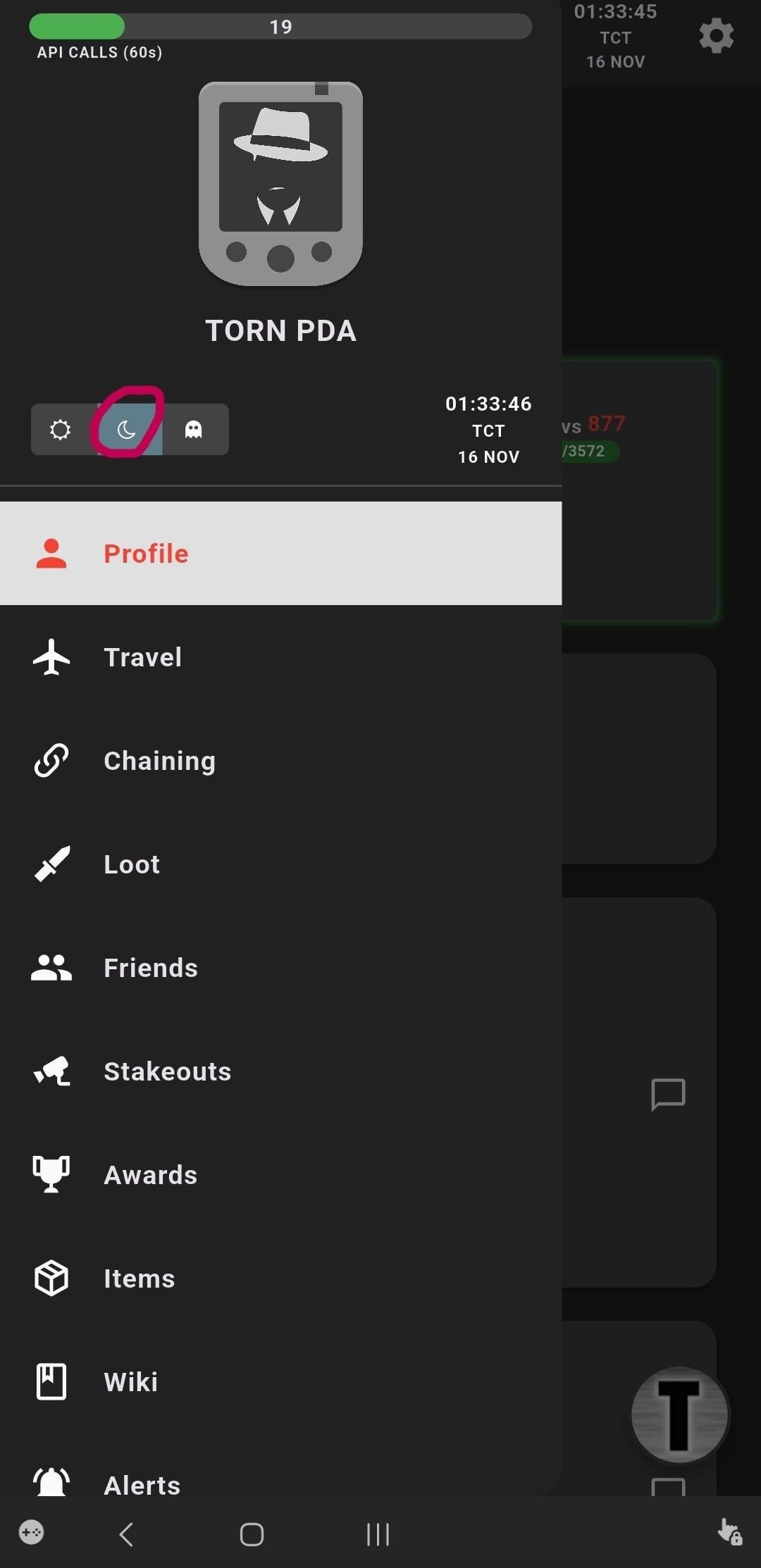
You end up here, this is the settings for TornPDA, there's maybe some setup instructions, do them...I'm not going to go into more detail for this, as it's not the focus of the guide.


The circled button is for dark mode, worth a tap, before we get started...  Then, tap the right side of the screen to close the menu.
 

------------------------------------------------


STEP 1


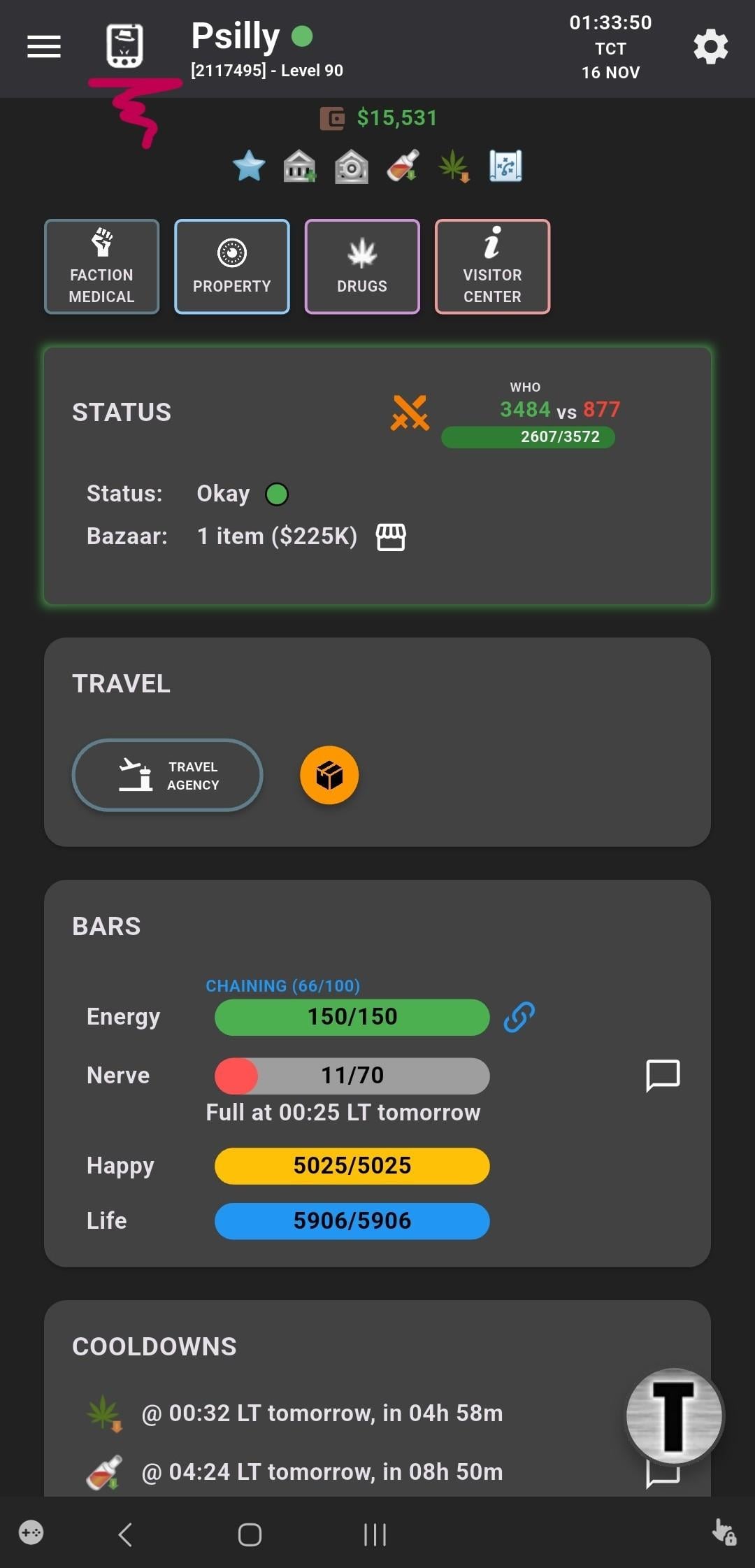
This will get you here, tap the PDA icon to open the built-in web browser, this is what you will push when you open TornPDA to be able to play the game.  The other buttons do other stuff, also not the focus of the guide, but they're pretty neat so spend some time, it's a very useful app.
 

------------------------------------------------


STEP 2


This big underlined box is the address bar.  Like any browser, you can tap it to put in a web address.
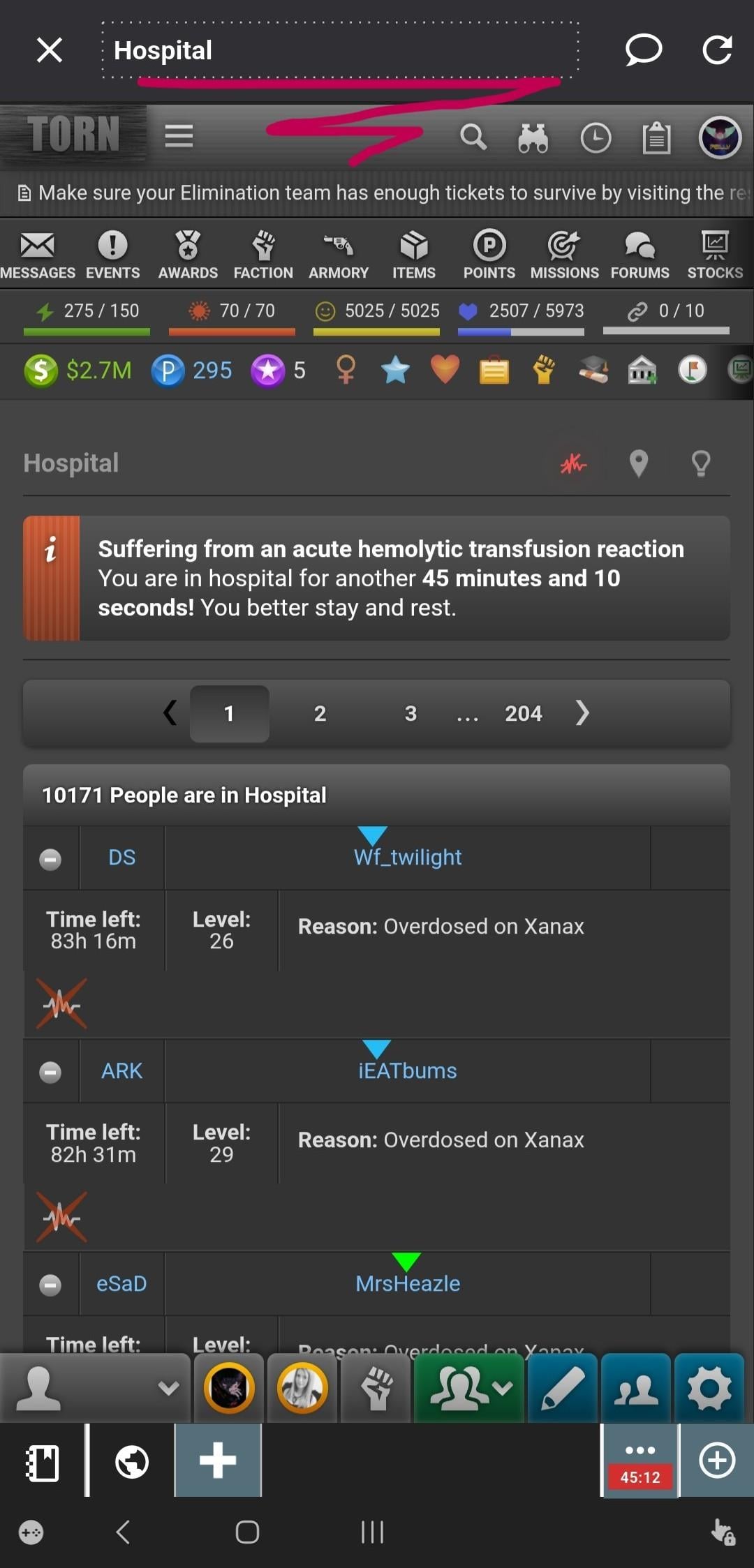
------------------------------------------------


STEP 3


Time to tap it and...put in a web address...


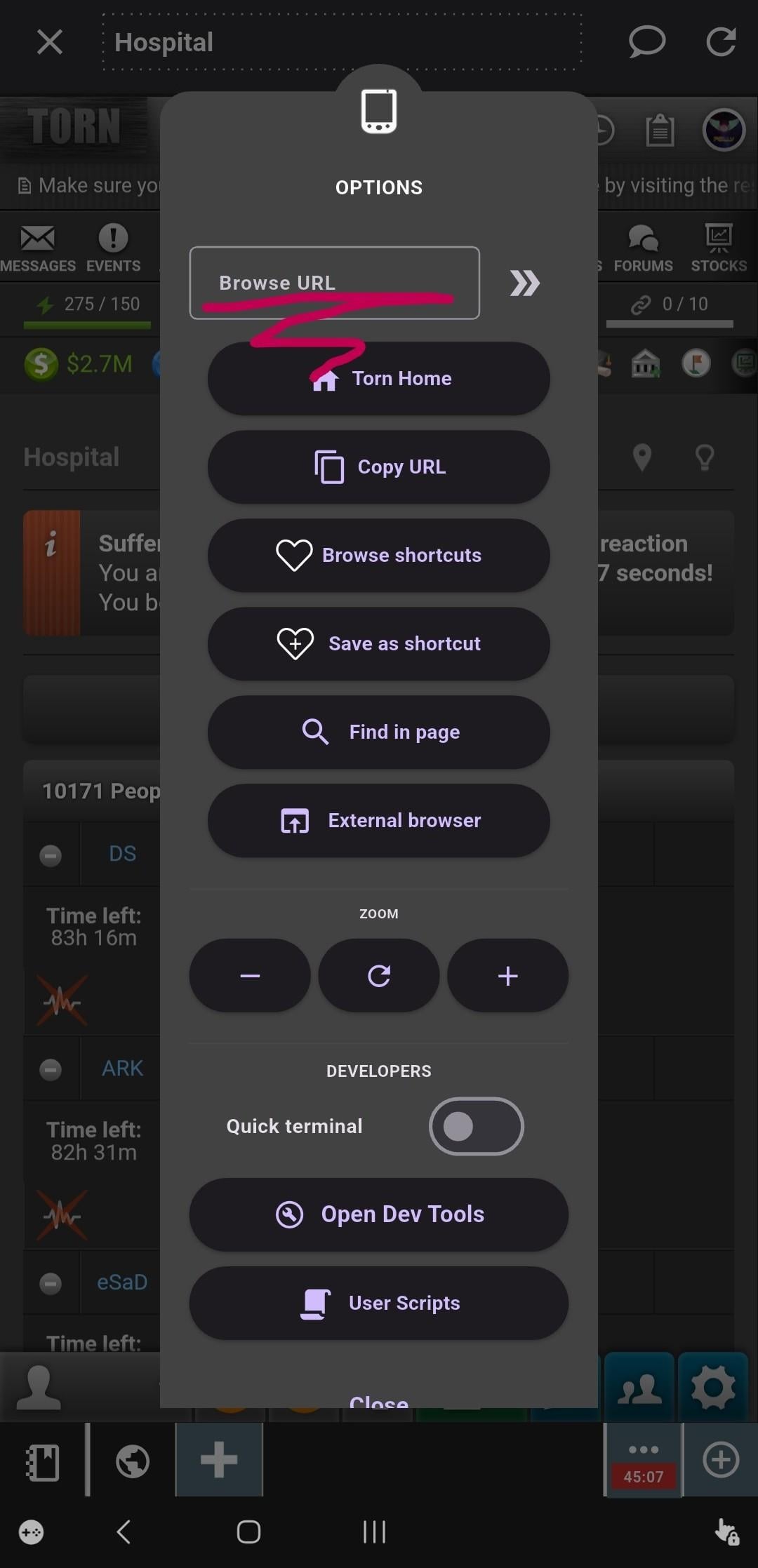
Below you can see what happens after you tap it.  The underlined browser URL box is what you gotta hit to...put in the web address...


Ffscouter.com


Push your enter button on the mobile thingy keyboard.
 

------------------------------------------------


STEP 4


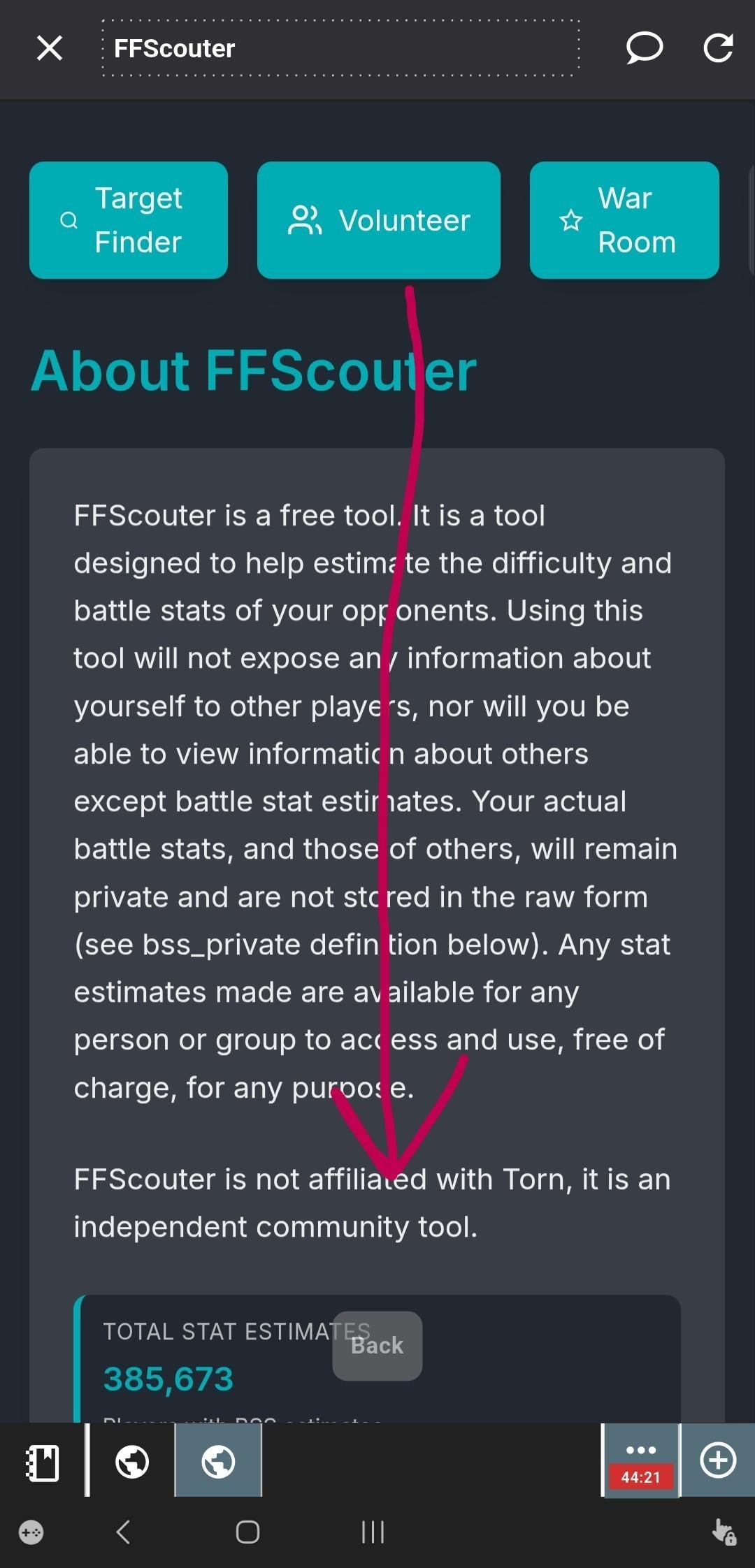
If you don't end up here, go back up to the previous step and do it right this time : P  Then, scroll down.
------------------------------------------------


STEP 5


Okay, hold on, we're gonna get a little wild here, if you notice in the ABOVE screenshot, there are some tabs at the bottom (little notebook icon and two globes are showing for me because I had some tabs open).  Yours will probably look a little different, perhaps just one globe icon will be highlighted for a single tab.


Now, we don't need to actually do anything with these tabs just yet, we're just trying to get an idea of what's going on as the UI in TornPDA is a little different than your standard web browser—but it works pretty much the same.


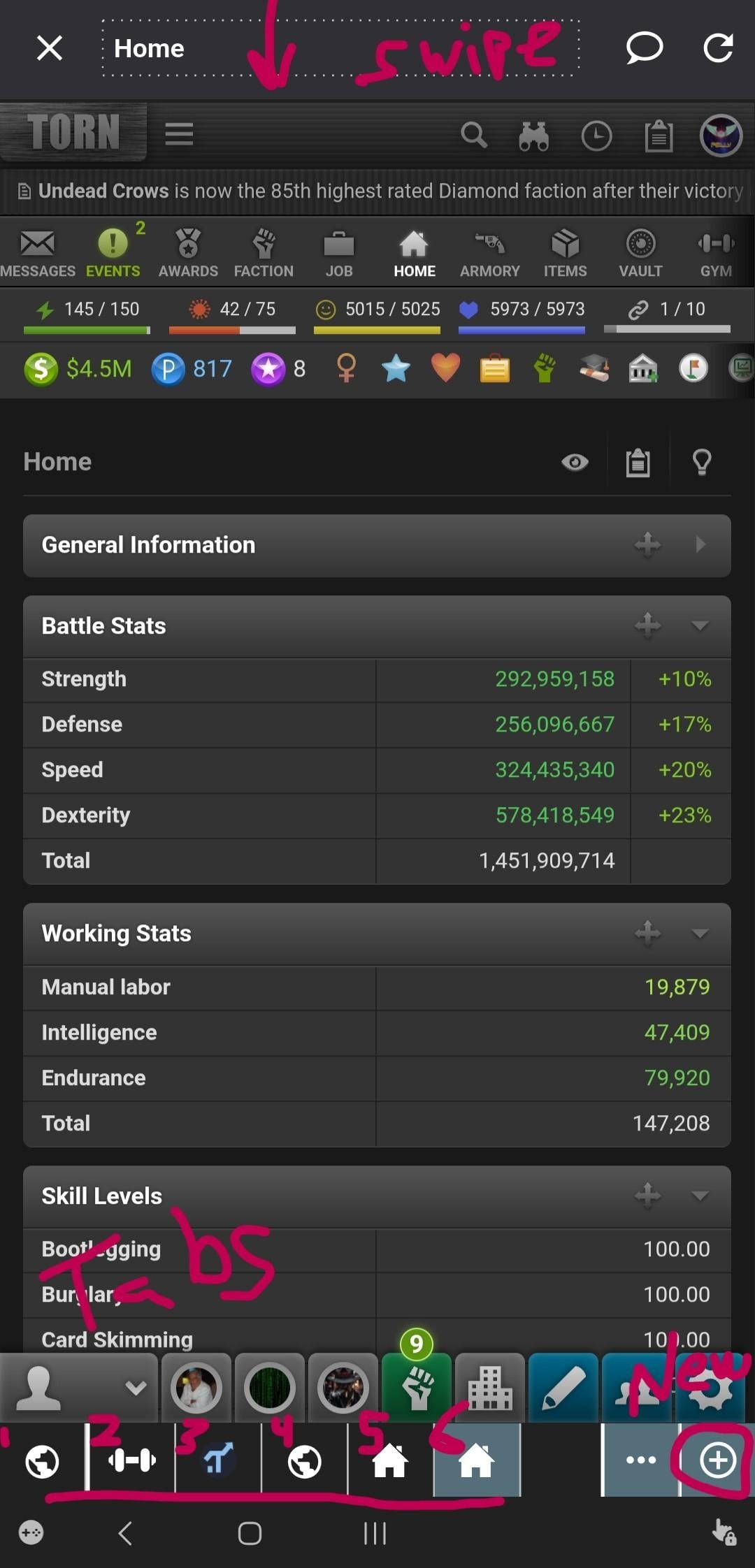
To further illustrate how this app works...In the screenshot BELOW, you can see another session where I have 6 tabs loaded.  It's this Tabs-System that seems to confuse a lot of players.  Because, you can accidentally hide these tabs...


If you don't see these tabs at the bottom, swipe DOWN on the address bar at the top of the screen, this is how you toggle the tabs on and off in TornPDA (unless you changed your default settings in the menus seen in the very first screenshot in this guide...I'm not going to cover fixing that, ask someone for help or shout at it or something).


You can close these tabs by TRIPLE tapping them, or double-tapping and using the close button (neat, more stuff to look at).  Don't do this, now.

Again, these are just some examples; if you get lost and can't find how to get back to where you were...it's probably because the tabs got hidden.  Just swipe down.
 

------------------------------------------------


STEP 6


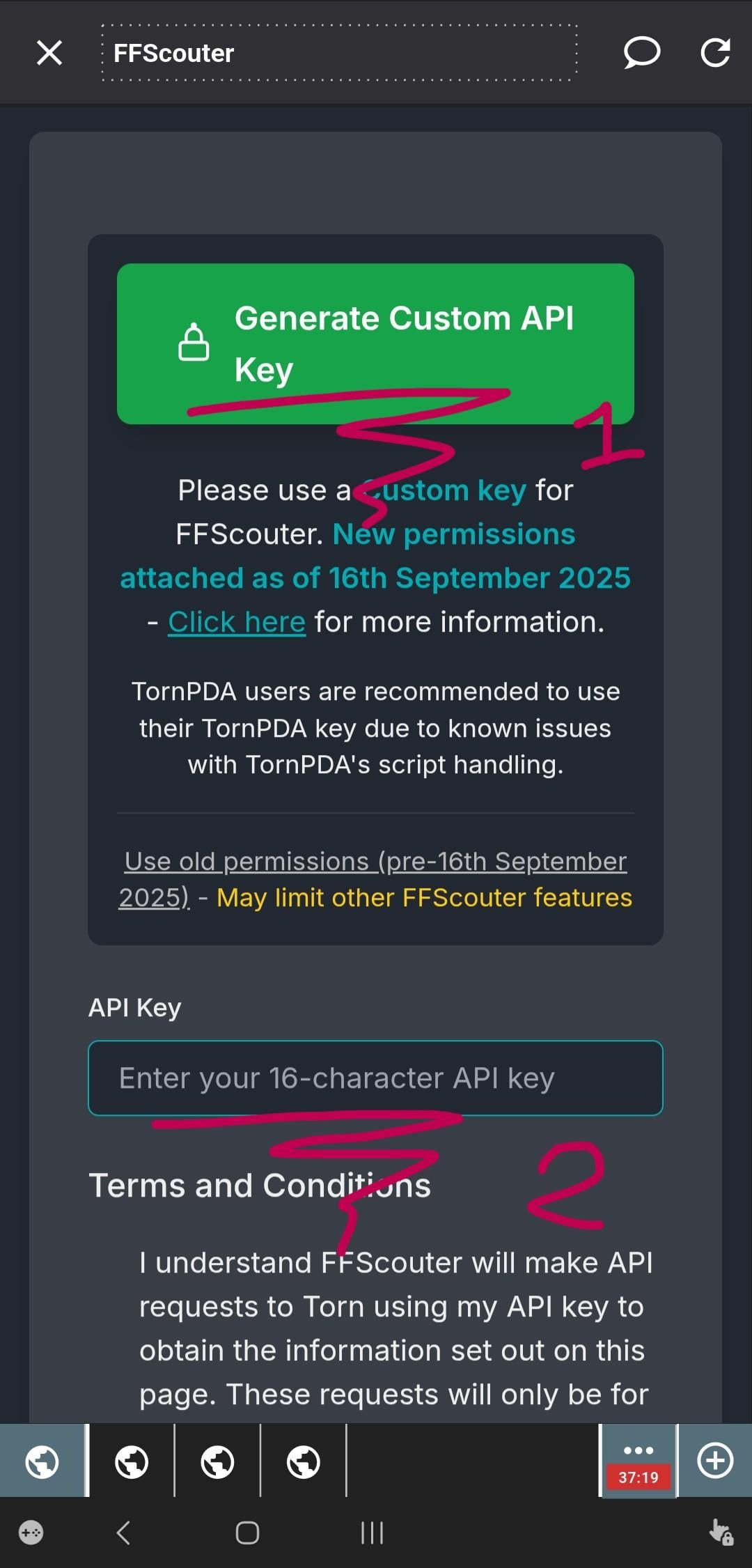
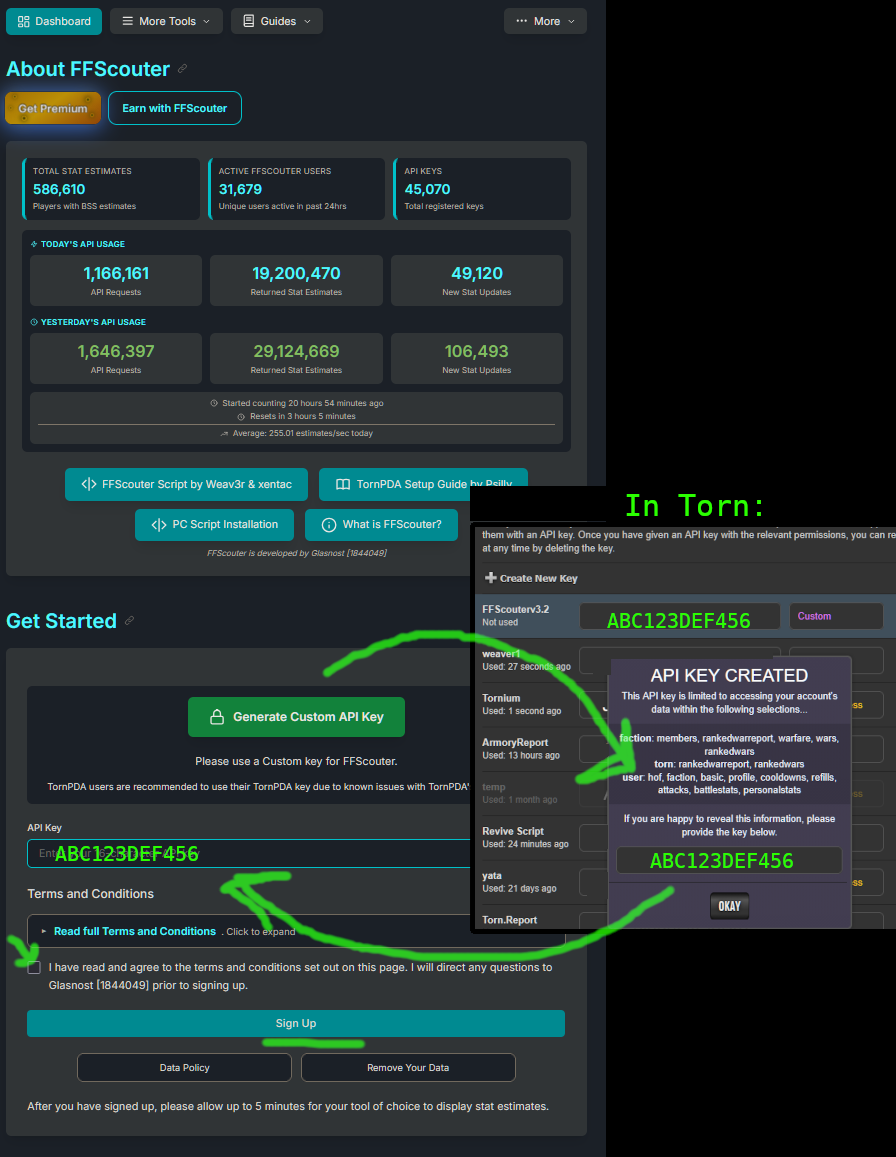
Okay, back to the ffscouter.com site we navigated to.  You should have scrolled down...to the giant green button, as below.  When you click it, it will open a new tab and take you to Torn's settings where it will create a new API key to be used for this site.
------------------------------------------------


STEP 7


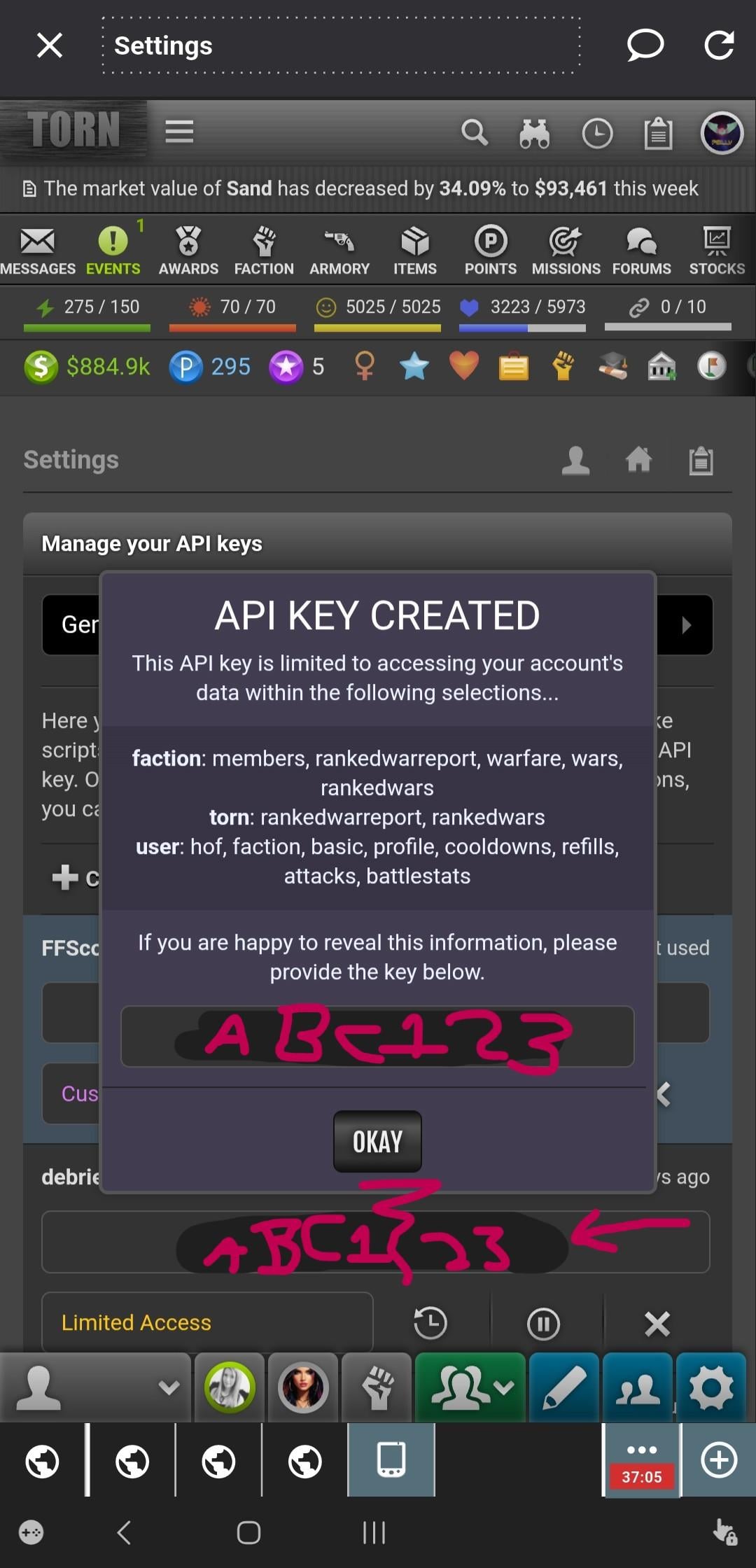
That settings screen should look something like below.  You can see on the far right, at the bottom, there's a new tab with a little PDA icon that it has opened.  My original tab, where ffscouter is, is on the far left. 


On this screen you need to push okay to save the key it created (which will appear where you see ABC123 in pink).  The top menu will disappear and somewhere below (see the arrow pointing to it) will be the same key.  Tap it once to copy it to your clipboard.  We are done with this tab, I suggest leaving it open until we finish all the steps, but later you can TRIPLE tap it to close it.


For now, just tap the other tab you came from (probably the far-left globe tab, there on the bottom).
 

------------------------------------------------


STEP 8


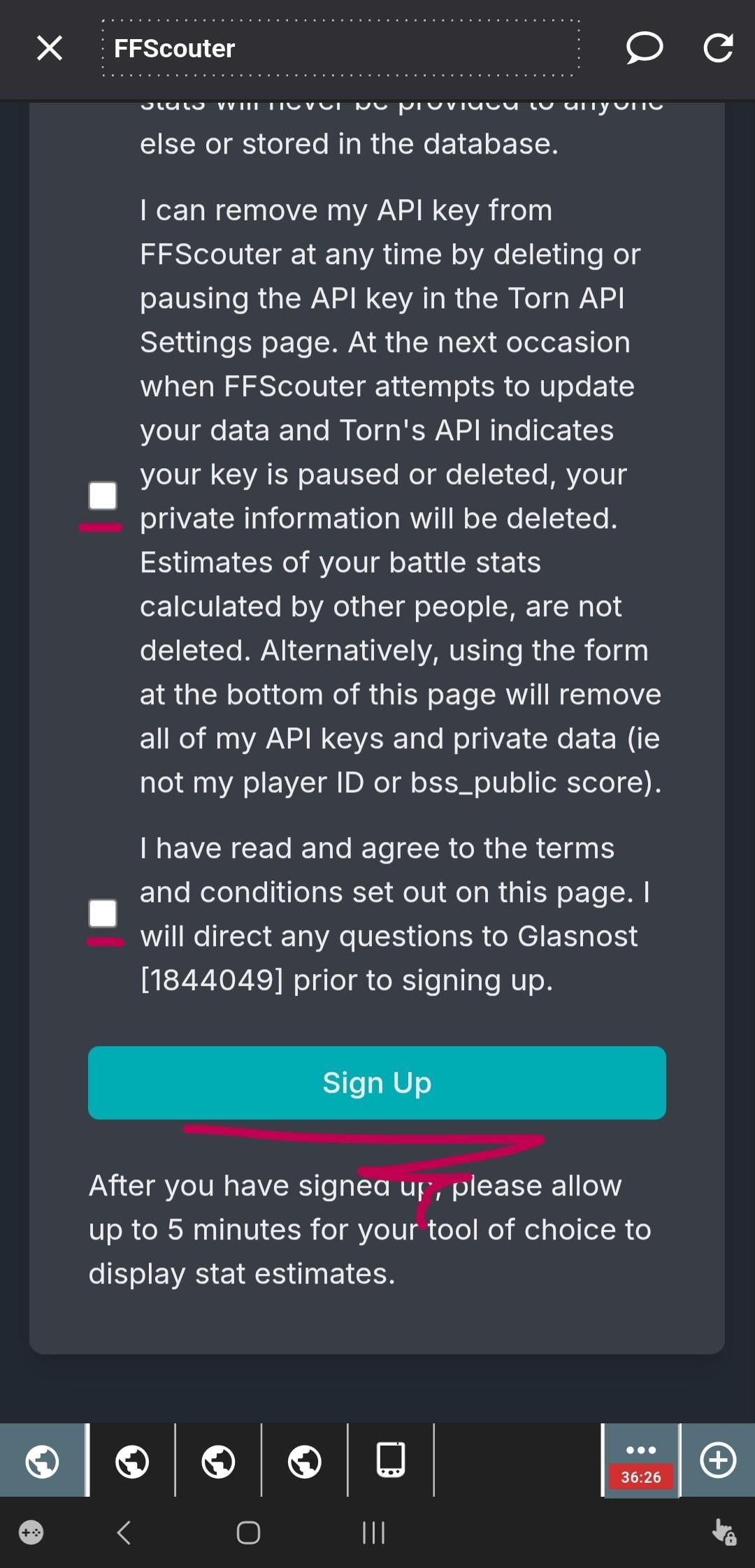
Once you find the ffscouter tab you came from, paste the key into the box that says "Enter your 16-character API key," as seen two screenshots above, labeled with the big pink 2.  Then, scroll down, making sure to read and tick all the little boxes, then hit the sign up button, as below:
 

------------------------------------------------


STEP 9


This will take you back to the top of the ffscouter website where you should see, in green:
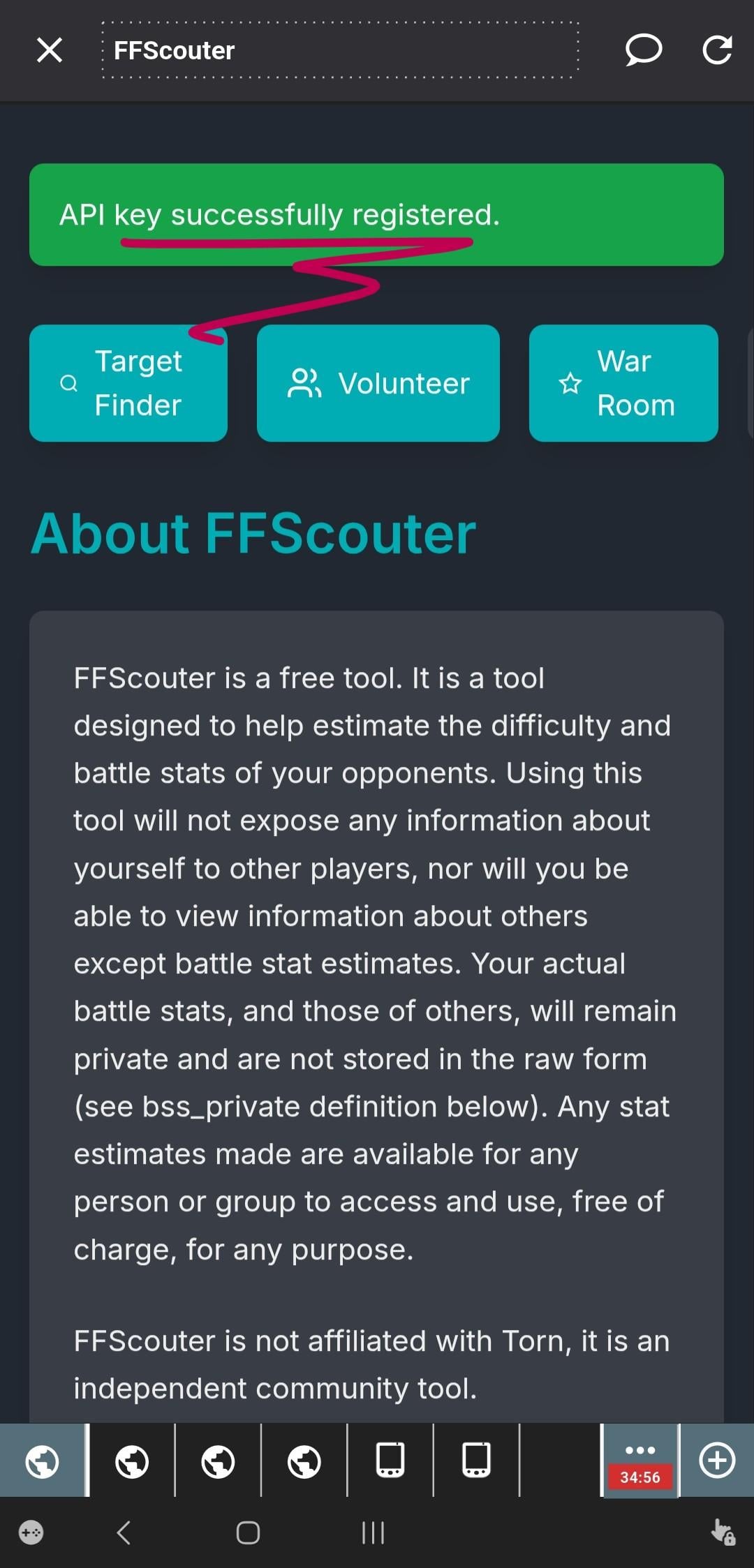
If you don't see this happy green box, you need to go back and figure out what you did wrong.  This main FFScouter page CHANGES sometimes, but since the beginning of time there has always been a big green GENERATE button, make sure that's what you're clicking.  The page that button takes you to is Torn's API settings tab...it has the key you want with a nice little FFScouter name for it (assuming you were brave and clicked the green button)....Make sure the correct key is copied (tap it/click it/bop it...) and then paste it into the text box on ffscouter, tick all the boxes, etc. 


***If needed, try deleting the key you made and starting again from the big green generate button (Step 6).

------------------------------------------------


STEP 10


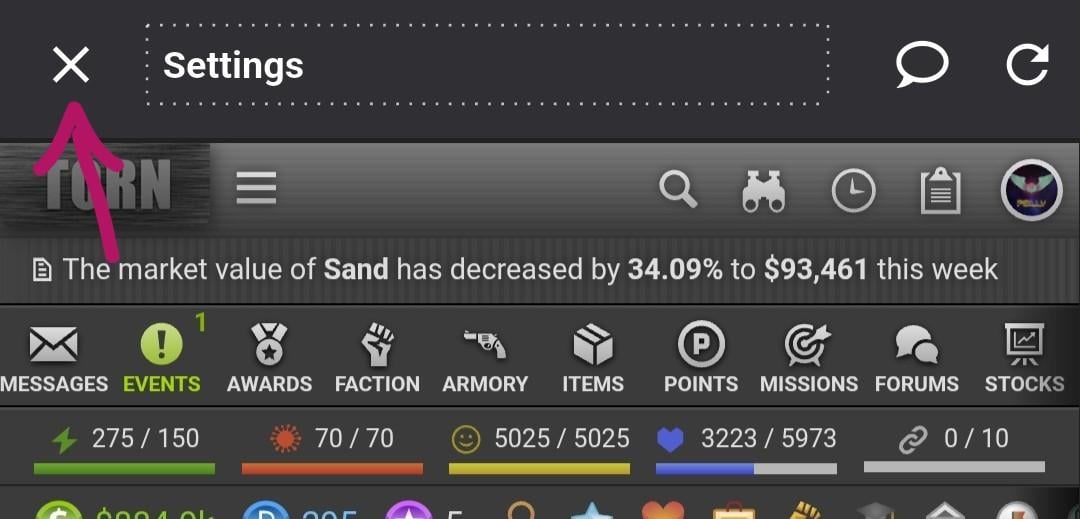
We are nearly done.  Now, let's close the TornPDA browser to get back to the main profile page where you can access TornPDA's settings and feed it this new key you just made and configure the browser to display stat estimates for your targets automatically.


Click the close button, top left.


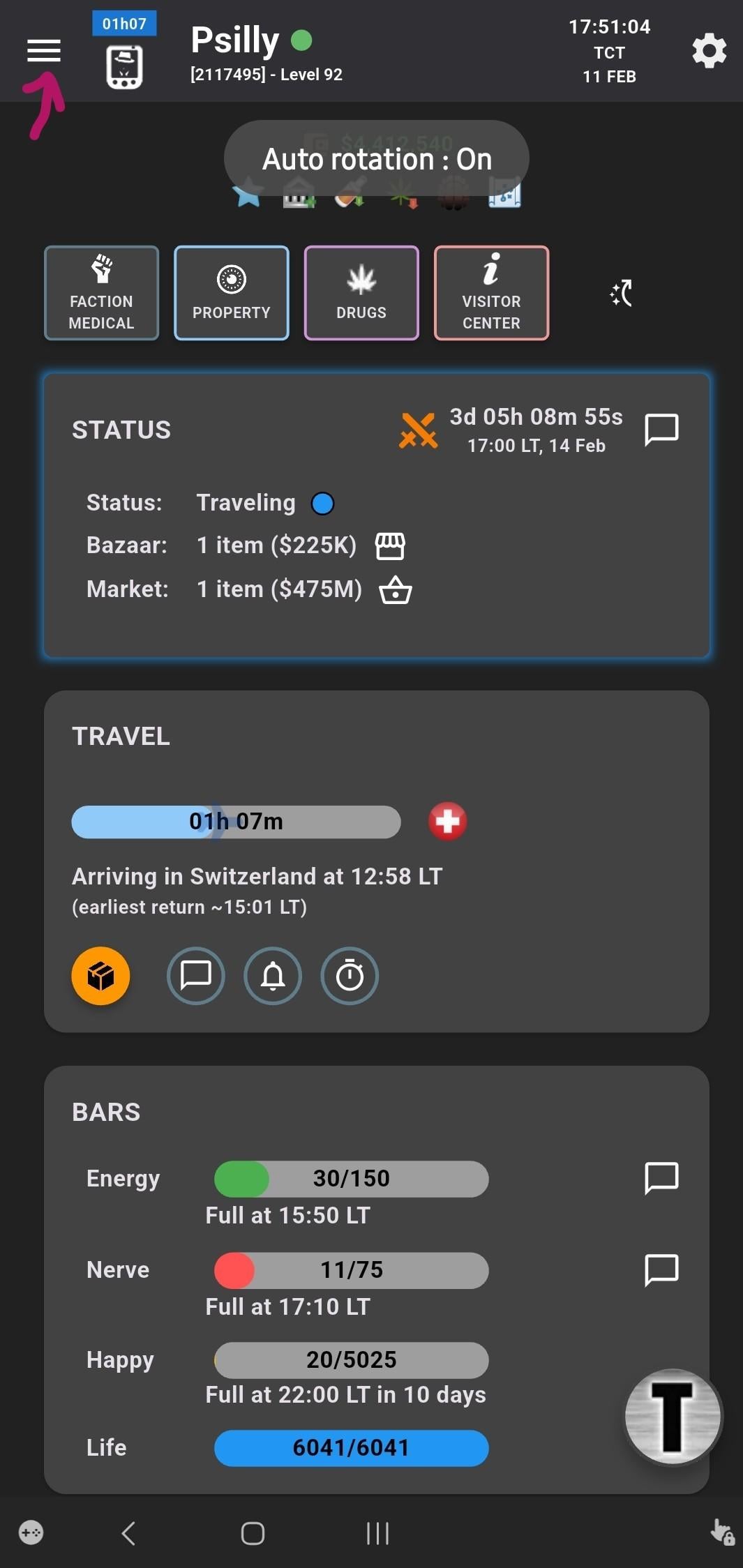
This get's you back to the profile screen.  Hit the three lines, top left again.


-----------------------------------------------


STEP 11


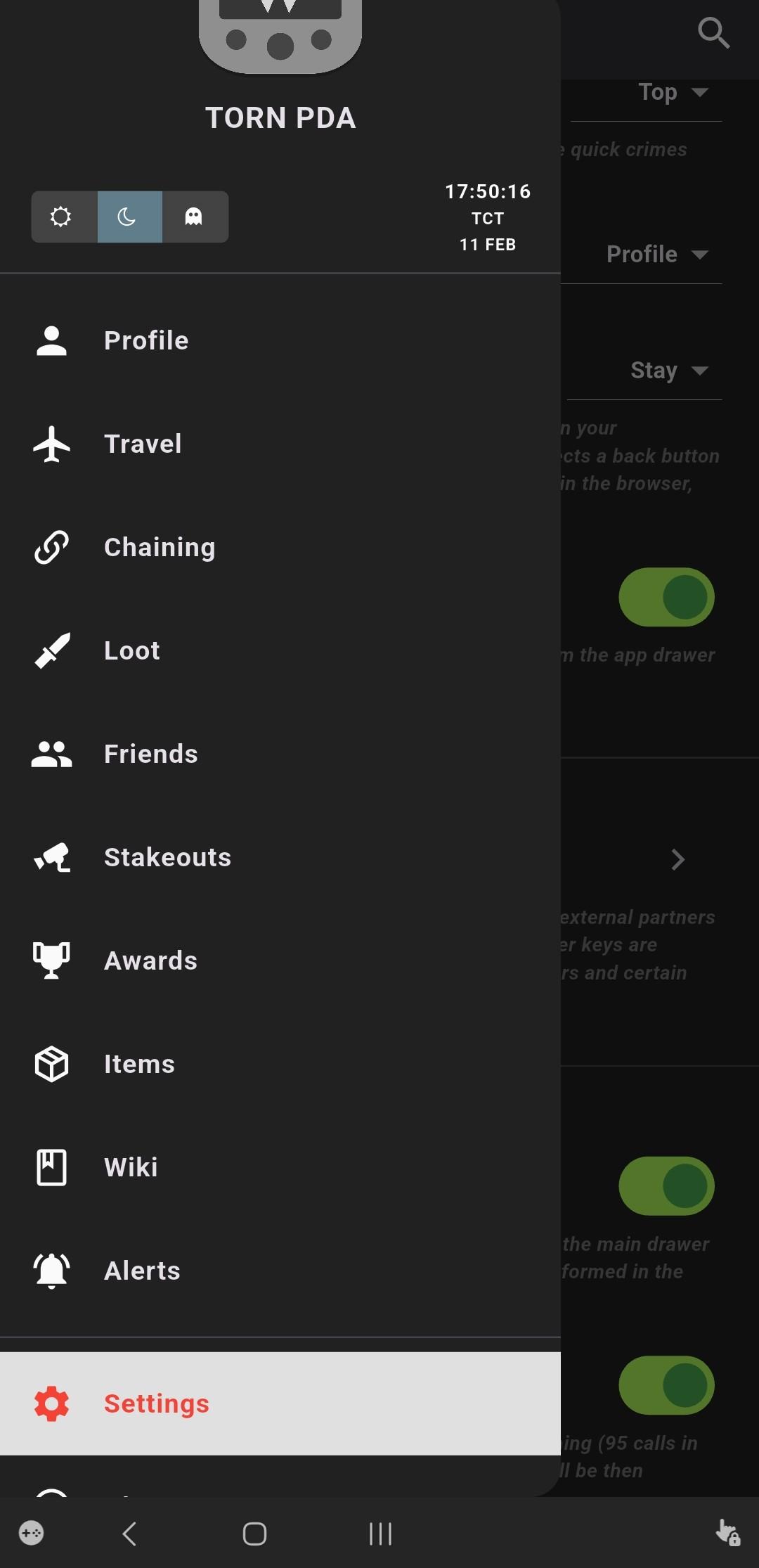
Scroll down to settings, and tap that:


-----------------------------------------------


STEP 12


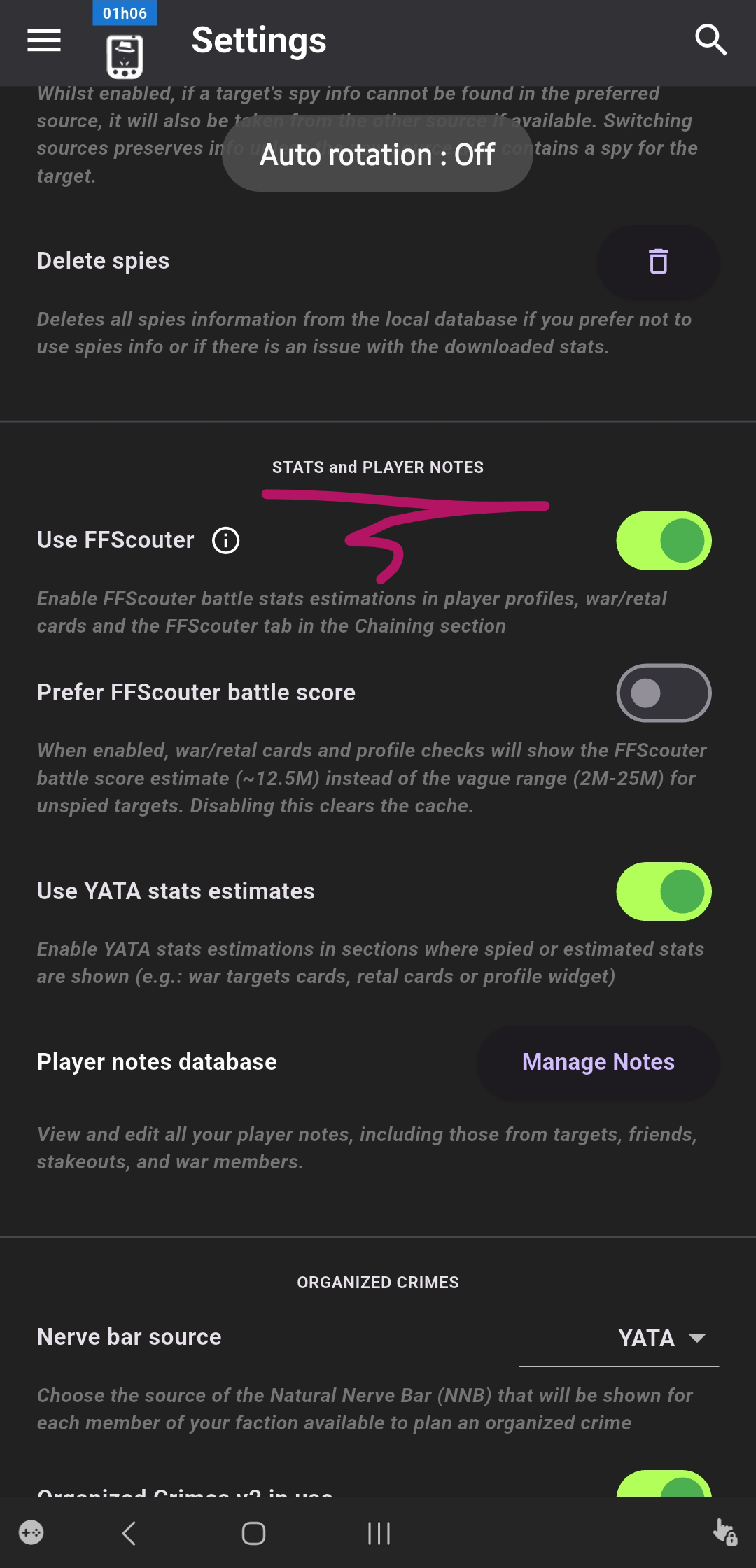
Scroll waaaay down, again (Torn PDA is kind of a nighmare of settings windows, but it's why it's good, so spend some time in them when you're trying to go to sleep...)


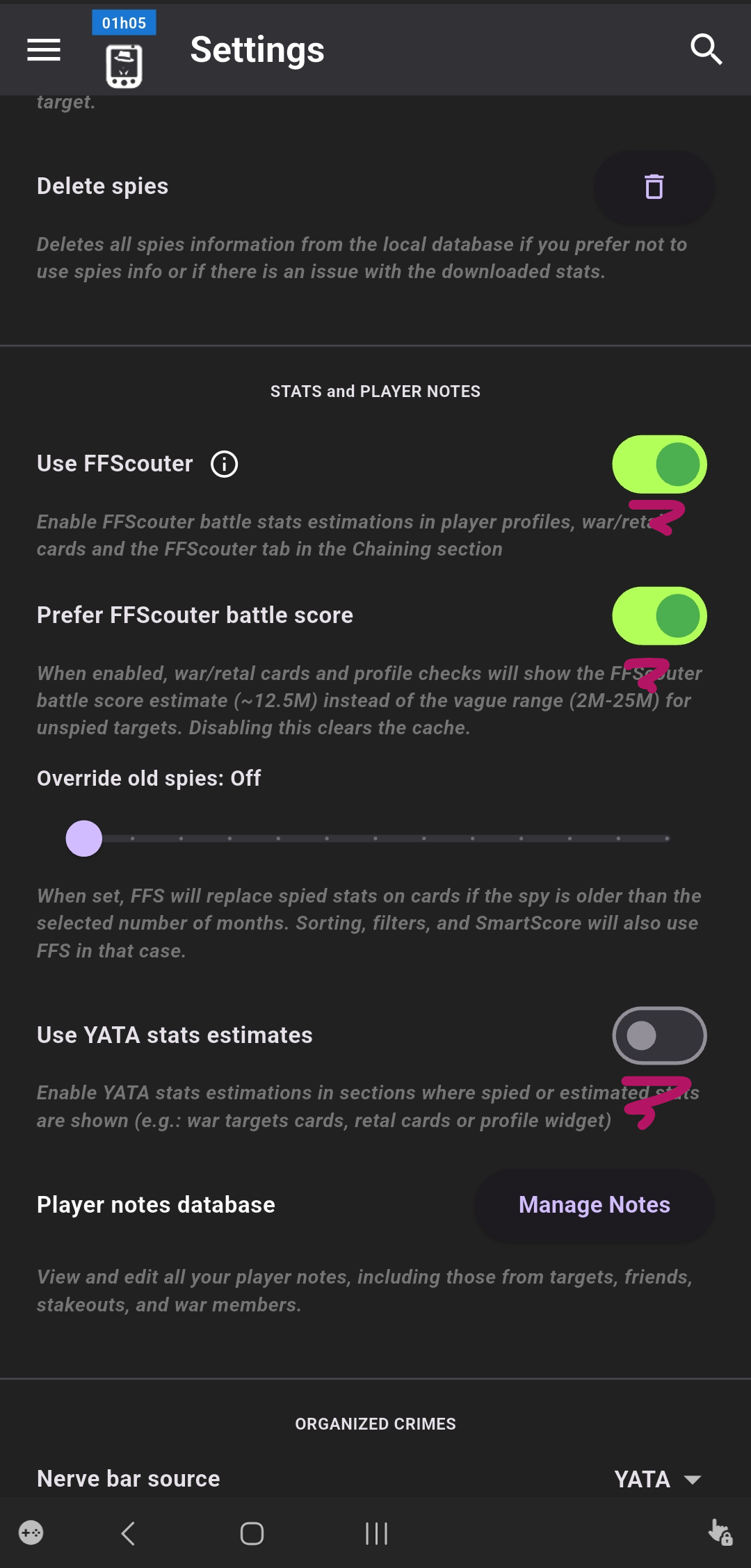
We're looking for STATS and PLAYER NOTES


-----------------------------------------------


STEP 13


You want to toggle:

  • Use FFScouter ON
  • Prefer FFScouter battle score ON
  • Use YATA stats estimates OFF

As seen below:


-----------------------------------------------


STEP 14


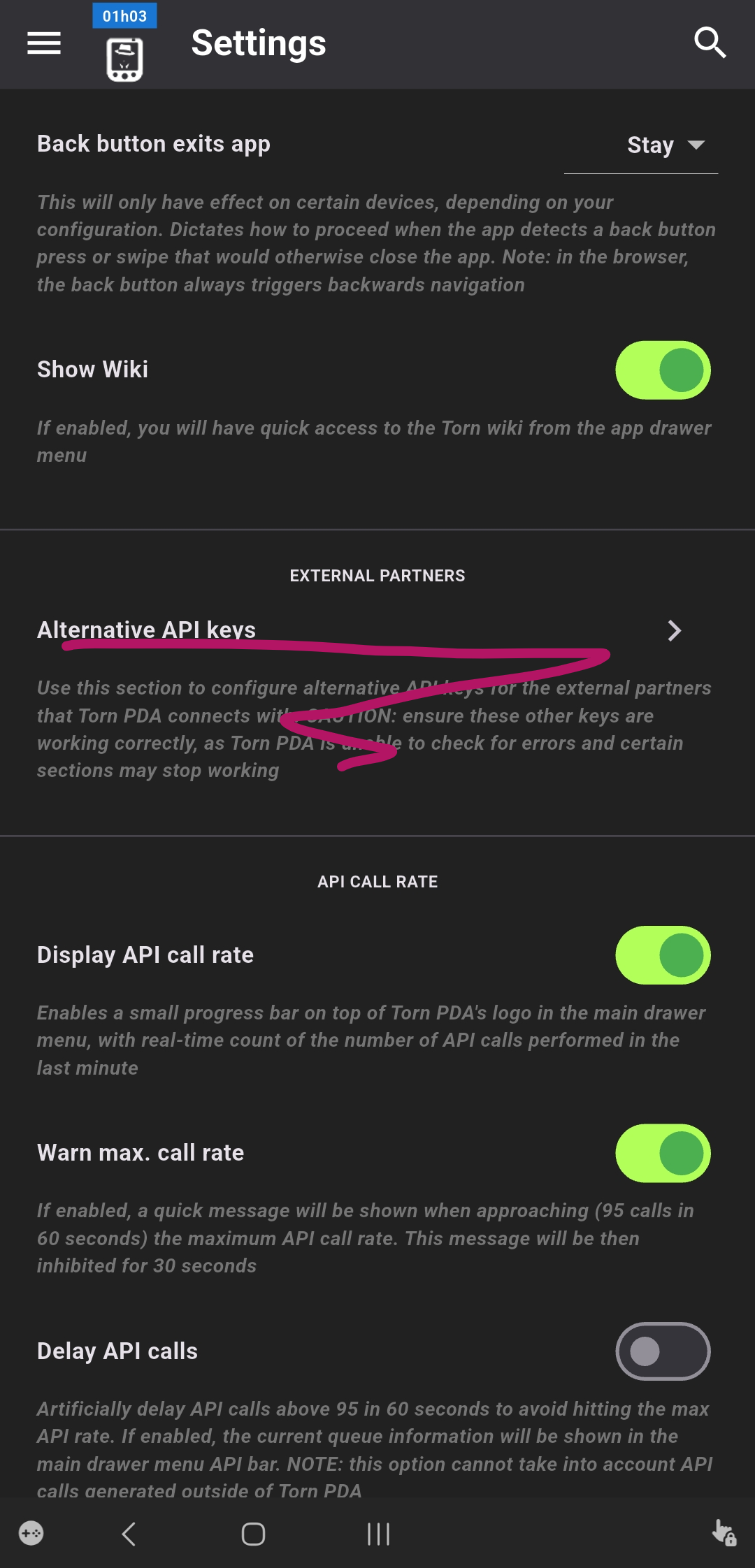
Now scroll down down, even further...

..find External Partners and tap Alternative API keys


-----------------------------------------------


STEP 15


This gets you here...
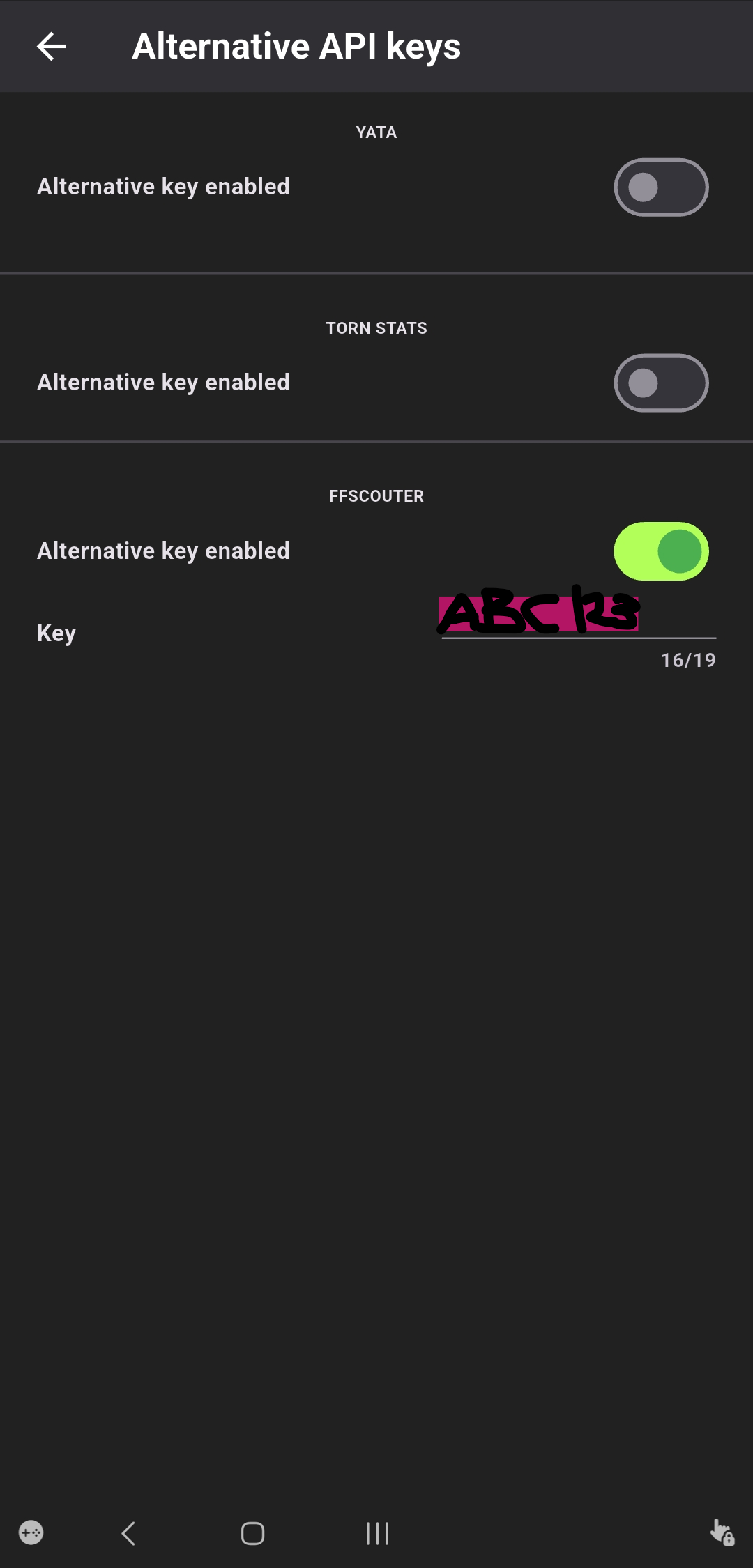


You need to paste in the SAME KEY you just created and registered on FFScouter.com.  It should still be in your clipboard, so just tap-hold and paste....if you got distracted and copied over it, you gotta go back up to the instructions above where we found your Torn API key settings and copy the key again from that page (step 7).  I believe in you.


There's no save button or anything, just back out of the settings, use the PDA button (same one in Step 1) to get back to the web browser part of the app. 


-----------------------------------------------


STEP 16


Find your favorite target.
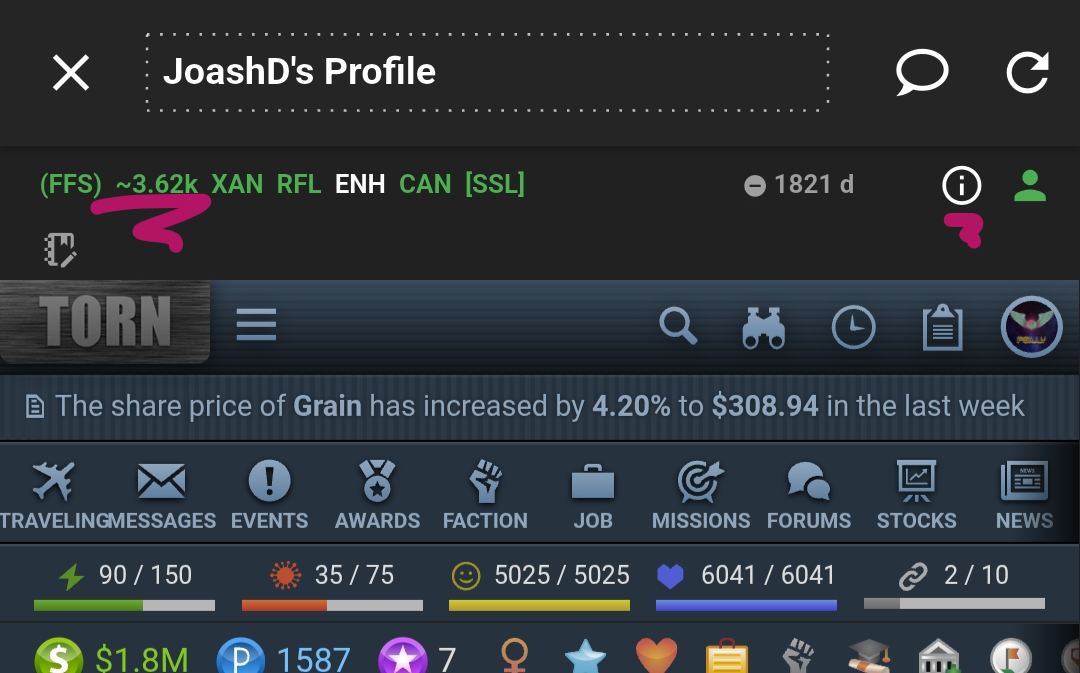


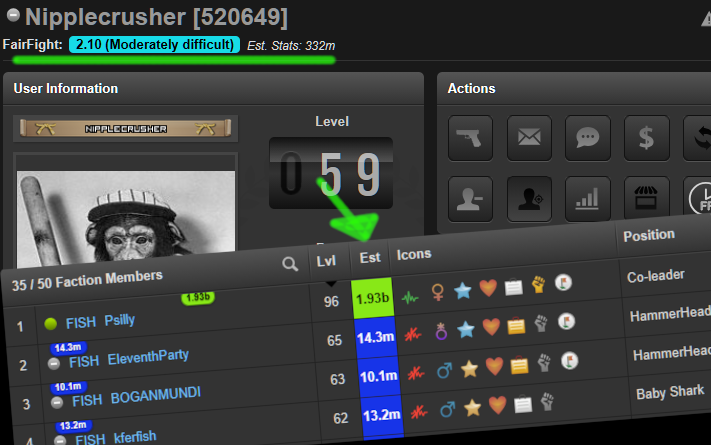
Stat estimate in top left.  Tiny little i has a FFS tab with more other info.  Back in the main Torn PDA menu (Steps 10 and 11 to get there...) you can find a chaining menu.  In there if you hit options (top right) then scroll down to FFSCOUTER and enable the slider, back in the main chaining screen there's a search magnifier in the bottom right (there's also one at the top, but that's not the right one)...if you use the bottom right magnifier you get a FFScouter search dialog to find good targets.  Increase or decrease the maximum Fair Fight value (default 3.0) to get easier or harder fights for less or more respect.  This same search is available at FFScouter.com under target finder if you prefer to fight from PC.


The last thing I will say is that the FFS scores don't immediately replace YATA estimates if you have cached pages.  To test it, look at a target you have never looked at before.  They seem to update over time and I haven't found a way to force it to recache, so be patient and use the FFS tab in the info portion of the PDA card (the tiny little i).  Maybe someone will comment a better solution, but so far it only seems to take a few minutes to update.


-----------------------------------------------

BELOW IS THE OLD INSTRUCTIONS TO SETUP WEAV3R's Script.  This script is no longer needed on Torn PDA, but there is not a quick reference for how strong people are on the ranked war page or on a faction's profile page. Installing this will give you little arrows  NUMBERS! over player's names in the faction list of names to indicate strength relative to yourself.  I imagine Torn PDA will add this display at some point, but for now I recommend using the script just for this QoL feature.
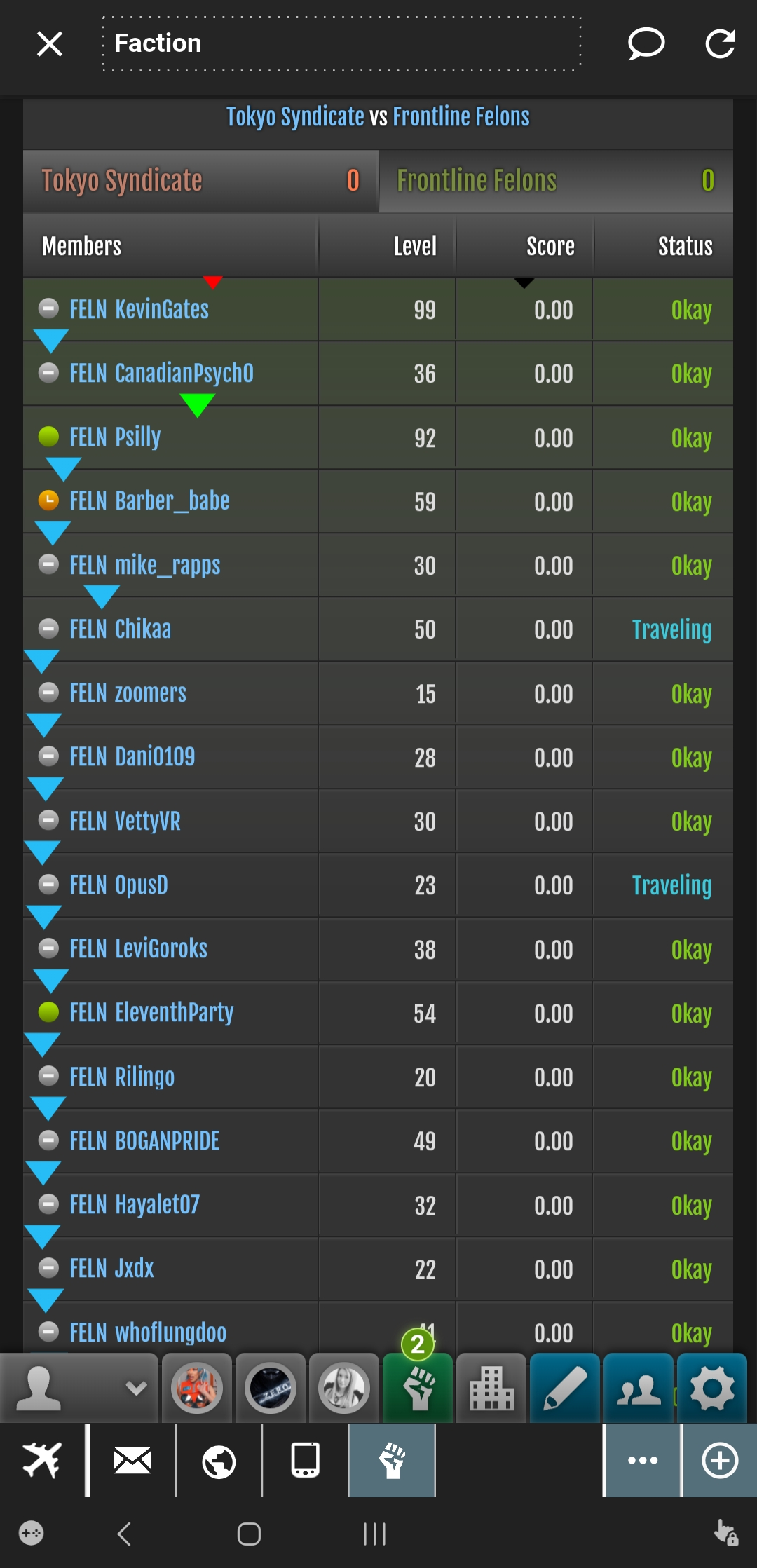
 

The little arrows above the name quickly show how strong a player is compared to you...If this looks nice, follow instructions below.


We are nearly done.  Now, from the top of ffscouter.com, where you got the happy green message, scroll down to the FFScouter Script by Weav3r button, seen below:
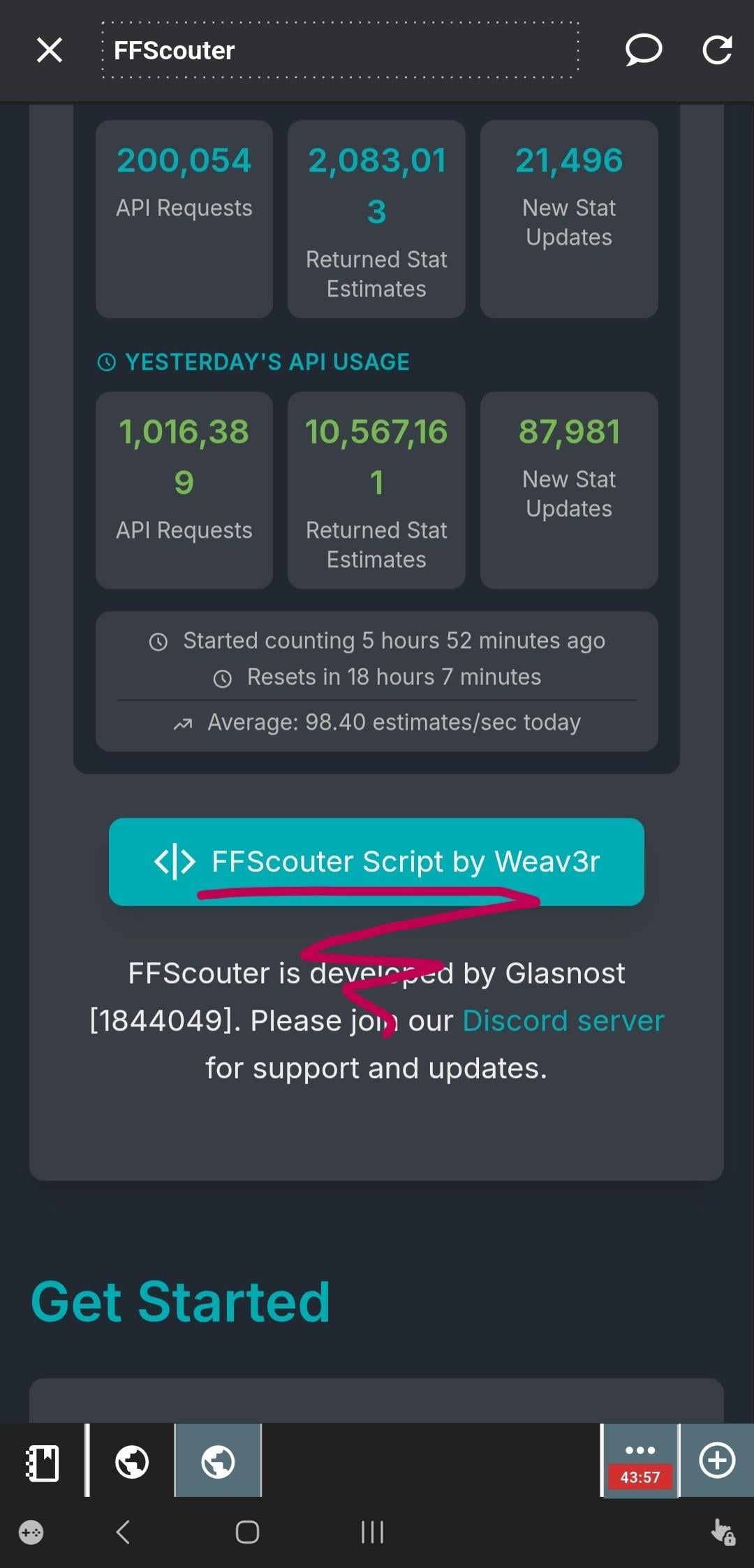
------------------------------------------------


Tippy tappy, you end up here:
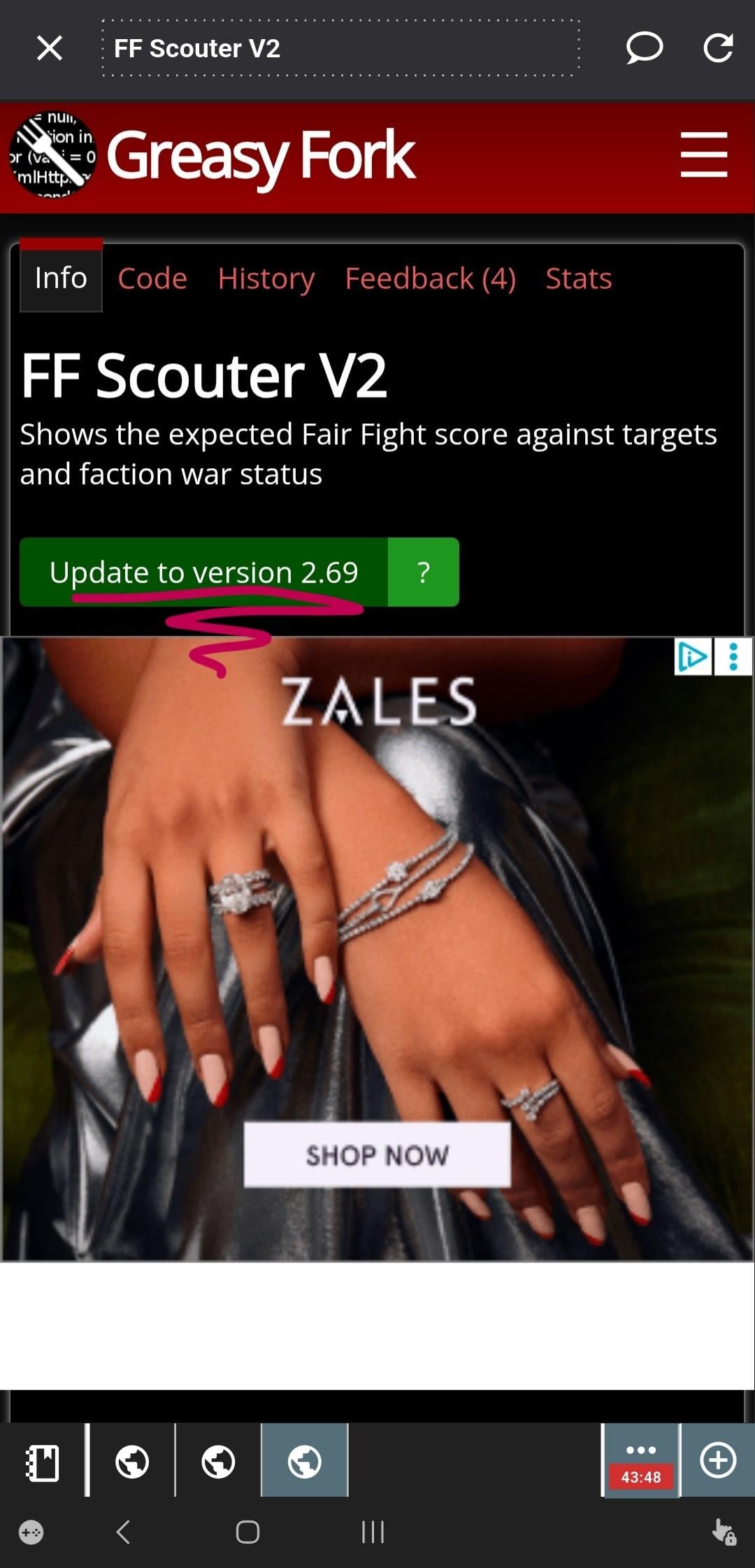
------------------------------------------------


Tippy Tappy again, you end up here:
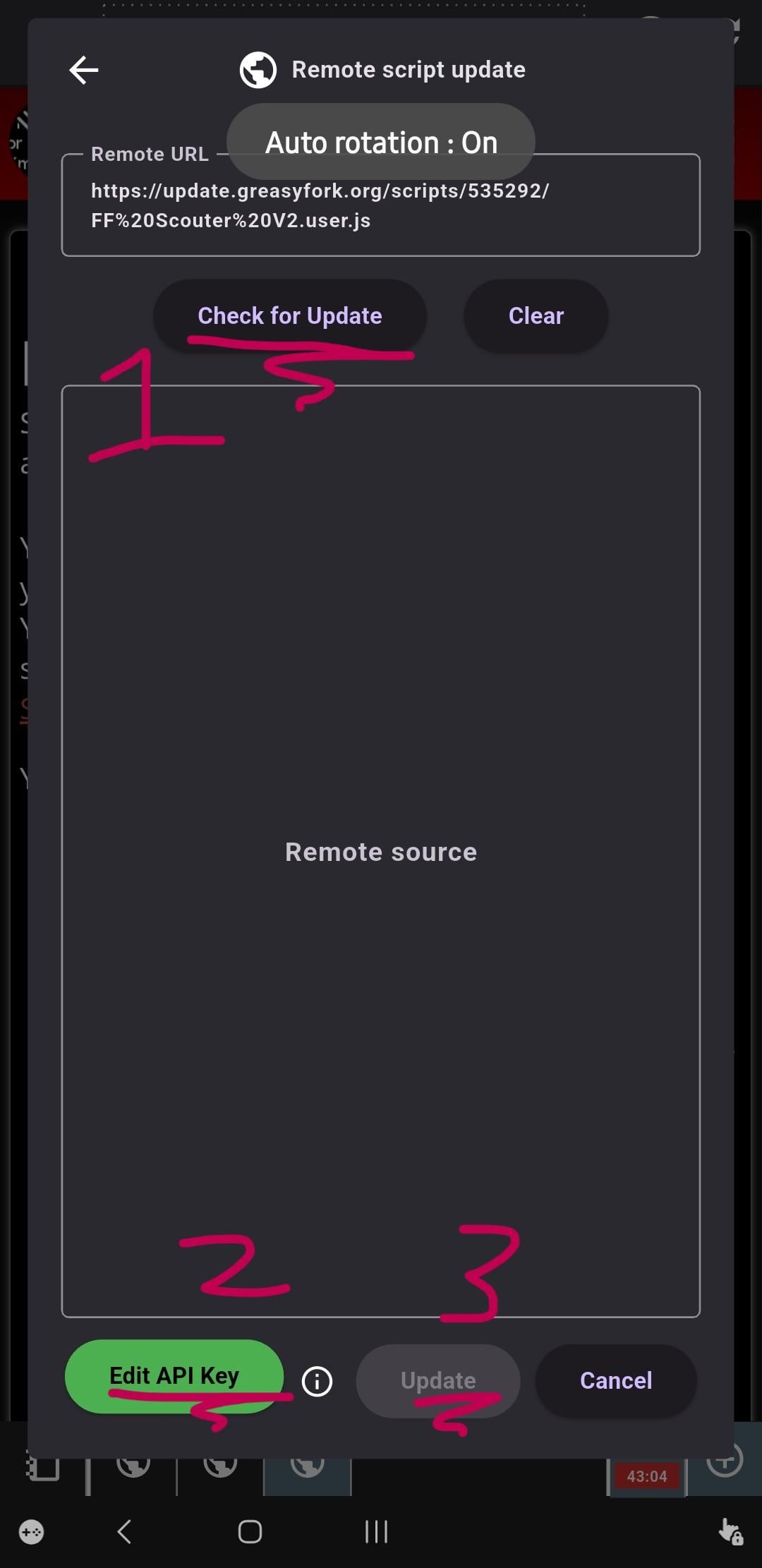
1: Your button will say "Fetch" instead of update, if this is your first time. Tap.

2: Your button probably says Input API Key, if this is your first time.  So exciting.  Tap.

  • In here you need to paste the same API key, which should still be in your device clipboard.  Nearly there...
  • I think in recent version the key needs to be set in TornPDA settings instead of here, make sure you did through Step 15, above
  • OMG, THE KEY DOESNT WORK...see below....These steps should fix key issues for ANY FFscouter use (PC, Mobile, potato, etc...), as long as you're sticking the key in the right hole for the thing that you want...this will fix the standalone script. Above, the PDA menu settings has a place for this same key, it will fix PDA issues (don't get confused: PDA can run the standalone script just like PC can, PDA's FFScouter display is in the little top right i info menu on a player's profile.  If you see or want to see the numbers over a player's name in their profile or on the ranked war page or a faction page...that comes from the standalone script (see the blue link for it just below).
  • If THAT doesn't work, go to ANY player's profilfe, scroll below their status (Okay, Hosp, Mugged...) and there should be a FFScouter Settings....paste the FFScouter key there.  If you don't have ffscouter settings on any player profile, you don't have the script installed correctly, try reinstalling (this link is current version in Sept 2026 ffscouter.com may have a more recent one), otherwise call a professionall....If you get an error, you're probably pasting the wrong key.  You made this in Step 6, above.  Go back to Torn Settings (https://www.torn.com/preferences.php#tab=api) and copy THAT key (it has a name that should say FFScouter...).  If you can't get it right, go ALL THE WAY BACK to step 6 above and do it again.  Keep track of what key you are making and seeing in Steps 6 & 7.  This is the key you need to paste anywhere it asks for a FFScouter key.  You can always make and register a new one to be sure you have a good key...Delete the other ones in your settings (blue link just up there ^^^^) before you do this so it's  not confusing next time.

3: Your button, again first timer, probably says something else. Don't be afraid.  Tap.


You are done.  You need to use your mobile thingy's app switcher to kill TornPDA and reopen it.  Now, when you open a player's page, at the top, you should see their estimated battlestats.
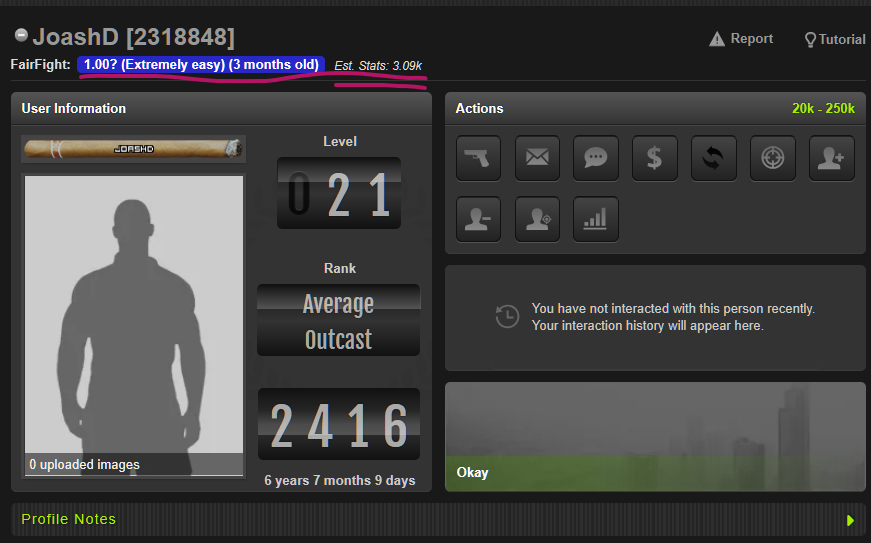
 

If you don't, you probably didn't kill the app and restart it, or you did something else wrong.  Do it right, instead.


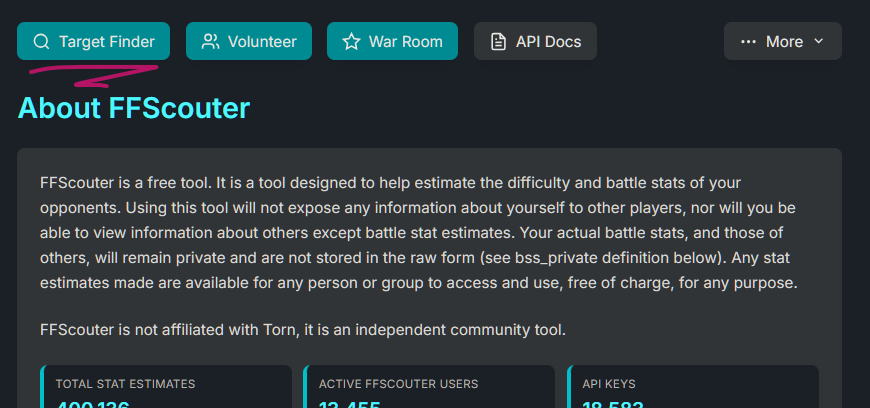
Finally, below is the ffscouter.com site again.  You can see the target finder at the top.  This is an excellent place to find targets to level with, for new players, or to chain on, for the old-hats.(Target FInder is now hidden behind a menu drop down at top of page, look for buttons in same place as below screenshot).


This guide was written for the benefit of my new faction members, I just got tired of reposting in various faction forums; if you're not in my faction and need help, please reply here and try to include screenshots.
10 Star AN Hiring End/Int. *No Tax* · · 3 likes

I need high END and Int ...20k++ Plz dm your work stats and EE merits.


I sell trains, but they are all spoken for, for now.  However, I do not charge a dvd tax : )


If this is up, I am looking.  This is not for the company on my profile, solid 10* AN


Ez money...

Send me PM's : D

Huge Kitten Plushie RW Weapon and Donator Pack Raffle! · · 1 like

You sent 30x Red Fox Plushie to kferfish with the message: But, everyone knows dogs are better than cats.....

!R! +10 Gym +9 Nerve +10 Items +Drugs Max · · 5 likes

Looking for nerds

Chat 3.0 Notes Scrolling Jump to Bottom · · 4 likes

I'm currently posting this with TornTools enabled.

But I can reproduce the issue with TornTools disabled.

I can reporduce the issue on PC (windows, firefox) and TornPDA on mobile.


When I type in a note that is longer, and I need to scroll down to reach the line I am looking for, the current entry line will automatically jump to the bottom of the window.  For chat, it should do this.  When typing in notes, it is incredibly disruptive.


This may be related to the linked report, below, though I think it's a separate issue, hence the new thread:

I also have strange behavior when I am writing in chat, where it can scroll.  Often it jumps to one line above the bottom, so i need to scroll down to see most recent messages, as I am typing.

https://www.torn.com/forums.php#/p=threads&f=19&t=16461625&b=0&a=0


Recent archived posts

[SERVICE] Ranked War Enemy Intelligence Reports | Know Who Actually Turns Up · · 1 like

Quite useful.

Huge Kitten Plushie RW Weapon and Donator Pack Raffle! · · 1 like

You sent 30x Red Fox Plushie to kferfish with the message: But, everyone knows dogs are better than cats.....

4* Logistics Bonus Pay (Speed for Job Points) ·

^^^

4* Logistics Bonus Pay (Speed for Job Points) ·

^^

4* Logistics Bonus Pay (Speed for Job Points) ·

Offering 30x Highest Stat + 50k/EE
Up to around 6m/ day, depending.

Need minimum:
45k Man
or
60k End
or
90 Int

Feel free to apply if you're close.
Company Link
https://www.torn.com/joblist.php#/p=corpinfo&ID=127801

[API] Ranked War Attack ends after Ranked war ends ·

I found what appears to be a related timestamp issue, except with chain end, not war end.
Instead of api showing war ending timestamp < triggering attack's ending timestamp, I see a chain end reported from server with a timestamp < triggering attack's ending time stamp.
In the example above, the attack log records the fight as won before the war-end timestamp, while the Leave action and attack ended timestamps occur afterward.

An older bug report shows the same general behavior even more explicitly. Torn staff explained that the hit had already been registered as ranked and triggered the war finish, while the attack itself did not finish until two seconds later.

Source: RW: not consistent timestamps in ending seconds — Bugs & Issues, thread 16309777
https://www.torn.com/forums.php?a=0&b=0&f=19&p=threads&t=16309777

I have now run into the same general pattern with /v2/faction/chains.

For chain ID 69955231, /v2/faction/chains returned:

Chain ID: 69955231
Start: 12:00:04 - 17/09/26
End: 08:23:33 - 18/09/26
End Unix timestamp: 1789719813
Chain length: 1000
Respect: 7189.48

However, /v2/faction/attacks identifies the actual 1,000th hit as:

Attack ID: 515954649
Code: 655ddcc55cda4619ab537c40bcf20c65
Started: 1789719806
Ended: 1789719814
Attacker: whoflungdoo [3872051]
Result: Attacked
Respect gain: 640
Chain: 1000
is_ranked_war: false

So Torn itself assigns this attack chain: 1000 and the 640-respect chain bonus, but its attack ended timestamp is 1789719814 — one second after /faction/chains reports the chain ending at 1789719813.

This was a problem because when I tried to get log of attacks that covered the war period and through to the end of the last chain, omitted the last chain hit because fetch was based on it's ending timestamp which did not match the ending timestamp that was found for the chain itself.

This means I have to arbitrarily extend the attacks request beyond the timestamp that is shown for the chain, in order to get all the attacks.  This is problematic because I first get the war report, to get end of war time stamp (which could be a few seconds before the last hit), then I get chain reports to find the end of the last chain and use that to bound the attacks pull (which fixes the above possibility for error with war end, but not gives a missing hit for the chain).


There is also a recent chain-specific bug report where the hit shown as the 2,500th chain hit in the chain report did not appear where expected in the faction's recent attacks. The attacks were effectively simultaneous, and the discussion suggests the order in which Leave/Mug/Hospitalize was finalized may affect which attack receives the chain position. That case isn't identical to this one, but it does show that chain-position assignment and attack-record timing/order can diverge around a chain boundary.

Source: Last hit of 2500 chain not showing on last 10 attacks? — Bugs & Issues, thread 16557145
https://www.torn.com/forums.php?a=0&b=0&f=19&p=threads&t=16557145


Something is obviously different about how a war or chain are decided to be finished and when the attack that triggered this end result is decided as finished...which is not immediately obvious and I'm guessing a lot of factions may not be paying the last hit of the war...what a jip, small potatoes, but still potatoes.


I don't know if leave/mug/hosp decision is actually related but there is some evidence in older discussion for that, too:


For ranked wars, that would explain why the war can be awarded and ended before the Leave/Mug/Hospitalize processing is fully finalized.

For chains, the same kind of sequencing could explain why Torn has already assigned an attack chain: 1000 and the 640 bonus while /faction/chains.end is still one second earlier than that attack's final ended timestamp.

I don't know whether /faction/chains.end is intentionally reporting the earlier registration time, or whether this is simply an off-by-a-few-seconds inconsistency between Torn's API data sources.


Either way, it means an API consumer cannot safely use /faction/chains.end as the exact upper to boundary when fetching all attacks belonging to that chain, because doing so can deterministically omit the chain-ending bonus hit.


There is also an older API-development discussion where users treated the last attack's timestamp_ended as the effective chain-end timestamp, adding five minutes if the chain timed out. That isn't an API specification, but it provides some historical context for why API consumers might reasonably expect the terminal attack timestamp and the reported chain boundary to correspond.

Source: Torn API Development discussion, thread 16070142
https://www.torn.com/forums.php?a=0&b=0&f=63&p=threads&t=16070142

Psilly Guide: How to Setup TornPDA with FFScouter ·

That means you are not pasting the correct key from Torn settings.  Click teh generate button on the site, that creates a key, it will be named appropriately.  Paste that key.

My faction is hard stuck in silver 0 despite win after win - New Matchmaking · · 2 likes

When you beat a faction we expected to beat you, your performance rises and future opponents get a little tougher. When you lose to a faction we expected you to beat, it falls. Performance is capped in both directions: there's a limit to how far above or below your stat strength you can drift. It’s also self-correcting: a faction that has climbed higher than it deserves will take a large correction the first time it loses a war it "should" have won.

From HERE.


Part of the result you're talking about was clear from the announcement.  What wasn't clear, though it probably could have been inferred, was that it meant you'd frequently win and not get a rank out of it...nor did I pick up on the idea that a LOSS also wouldn't necessarily result in a rank change.


From a sense of immediate progress, sure it feels cheap to win 3 times in a row and not go up.  But our recent loss was a pretty killer war so not going down goes quite a ways to making that feel less bad.


K cool, got it: it's hard to change rank.  Long term this could actually get a little boring, even.  But, maybe less termed wars, since not so many will be impossible, will help and make things feel better overall.   And, when we do finally go up, that might feel a little special, so there's that to look forward to.


What your post doesn't account for is the ability to win multiple wars in a row : P  Two months ago it was pretty cool to go on a 3 or 4 game winning streak. We actually not only got stuck in silver because of the changes, but we were Gold I before the patch (a shell change was also involved, which was interesting on its own....10 minutes after I joined, the bronze faction gets a message: 12:00:18 - 25/08/26 JRF RELOADED has been reassessed as a Silver III division faction due to current rating.  I was the only person who had joined/left and that was definitely my stats at work).  So, 30% loss in income, can't move up to regain it, at least not yet.  But, instead of getting 50% pay every other week, we get the whole thing.  The shit icing on the shitty cake is kinda tasty, Randy.


Devs are also not done with the changes, so I'm down to sit tight and see where things go.


I am a little concerned because Ched recently said that he would like to balance ranked war earnings with other methods of income generation in the game (see the Andyman interview with Ched during Torncon).  But, so far we makin' a little more $$ even with a rank hit we didn't exactly earn.


For your specific situation: it looks like you are ranked above where it expects you to be.  Read the linked descriptions of the system, it says there's a cap on how far you can deviate from that rank.  It is possible that you are there, in which case you got the tough beans. If not, you're just waiting for the hard fight you have to win to go up.  It has only been 4 weeks, we only have a glimpse into how it works, so far, and it's going according to the description.  Patience and keep recruiting, takes time.  Took them 18 years to even get a ranked war going at all.


For the ppl buying shells, this auto rank thing is pretty cool.  Spent like 4 stupid weeks ranking down, begging friends of friends to enlist with us to unlock enlist because we bought one that was bigger than us.  This seems much less punishing for the folks who want to plow their hard-earned cash into an upgrade.

Last, an interesting thing did happen this last war: Not only did our rank not change because the system expected us to lose, but it was a match against a team that couldn't match my stats in a straight out fight, instead it gave us a 6100 lead target.  Big deal, but the previous week the lead target was like 4000; I laughed when I saw the points we were supposed to make.  We'd added 3 ppl but it feels like the new match system is using points and activity to compensate for lack of stats—I'm a single large anchor player and compared to them they couldn't do much in a team fight, so it just gave us a points target that would a have really stretched our resources...and it sure did, unfortunately.

Psilly Guide: How to Setup TornPDA with FFScouter ·

you don't, ffscouter is a stat estimation service.  it looks at your fights to try to guess your stats, the number will become more accurate over time.  it's probably a good thing if it's less accurate, then ppl trying to attack you don't know what your stats are.

Psilly Guide: How to Setup TornPDA with FFScouter ·

Where are you seeing N/A?  Did you install the standalone script per the instrucctions?  Did you relaunch TornPDA?  Did you give it some time to get working (it's noted that sometimes it takes  minute to get going).


If you don't have the correct API key type registered for and added to the TornPDA/the standalone script you installed, this is the most likely reason that I can think of.

Click on your own name to see your own profile, there is a settings section in there to look at....this will NOT work if you didn't also install the standalone script into TornPDA.

Verify you have a working key registered:
Go to ffscouter.com and to the Target Finder (check the menus at the top of the site)....paste what you think is your correctly registered API key and hit the red live update button (you might need to select one of the list types below first).  If the button does not turn green and you can't get any of the lists to generate player links....go back to the beginning of the guide and use their generate button on ffscouter main page and ensure you're registering correct key and pasting it to the correct places.

Sea Yu Soon Company Hiring (30x Highest 50k/EE no cap) ·

^^

Sea Yu Soon Company Hiring (30x Highest 50k/EE no cap) ·

This is a startup company and  I am offering higher than average pay for lower than usual bonuses.


Looking mainly for high MAN/end.  20k+ manual labor required.


Over 100k Intelligence also considered.

Paying at 30x highest stat and 50k/EE up to around 6m per day, though I am, at present, not capping pay at any particular number,

particularly if you have exceptionally high stats....

...and you are welcome to send salary requests/demands : )

-P

Company Link
https://www.torn.com/joblist.php#/p=corpinfo&ID=127801


Discrepancy between Chain Report Assists and Attac ·

Interestingly, the inability to tell if something useful happened in an assist pretty much hinges around the use of a temp or not, and which one.  I would also like to be able to use the API to see into a fight for needles used, rather than relying only on loans from the Armoury....so I can pay for ppl that use their own needles in fights that matter.

But, more directly related to this issue with the Chain Report, if it's left as-is, it needs to be made a whole lot more clear that the inconsistency even exists.  I spent 2 hours with someone who found this discrepancy between data I got from the API and her chain reports.  The only reason I was able to finally nail down the answer to the problem was when I found this thread...I thought I had holes in the data being pulled from Torn.

After finding this thread, I now realize that when I relied only on the chain reports for pay, I was double paying losses because I would add them back in for people I knew were good team fighters.  As was the other person I was working with when she discovered this issue in the data...for two years she double paid her losses without realizing.

A fix with minimal impact on existing pay systems would be to simply rename the column on the chain report something like assist-joins with a clarification on the wiki.

Psilly Guide: Shortcut to Level 15 Using Ffscouter ·

.

Psilly Guide: Shortcut to Level 15 Using Ffscouter · · 8 likes

Check out my other guide, How To Setup TornPDA with Ffscouter, HERE.

Get to level 15, they say.  It's easy, they say.  Sure, no problem, just a couple of days and then you're done, just use This List, they say....


But then you get started and you got no Energy and the list is all farmed out and you could use some Xanax to hit more ppl, but it's $850k a pop and what's the hurry anyways?


(For the completely new players, Xanax is a drug you take that gives you 250 energy and a 6-7 hour cool down along with a 35% penalty to stats...it's worth the trade off.  Your first goal in Torn is to figure out how to always take Xanax.  This guide can get you there)


This guide is written to help bridge these gaps and get you over the hump to level 15 just a little bit faster.  It has the added bonus of also opening up a temporary solution to the $ earning problem as well as pointing you in the direction of getting a script setup that can show you how strong players are BEFORE you attack them and die a horrible death.


First, why level 15?  In short, it lets you fly.  This gives you your first method of earning money in game (fly overseas, buy low; return to Torn, sell high).  But more importantly, and why most faction leads want their players to hit level 15 ASAP....when you are in the air, nobody can attack you.  This is important during ranked wars, because if the enemy team can't attack you then they can't make points from your death...so, l2 fly, get lvl 15, after that, forget about levels completely (levels in Torn don't make you stronger, like in other MMO's.  Instead they only give you a small increase in HP...which is important, but it's not worth rushing, save your E for the gym after lvl 15).


Okay, so how does this guide help you get to level 15? The method has 2 sides:

  1. Sell Losses to buy Xanax to get more E to hit more targets.
  2. Use ffscouter's Target Finder to find more ppl to kill for XP


We'll start with Ffscouter and Target Finder. 

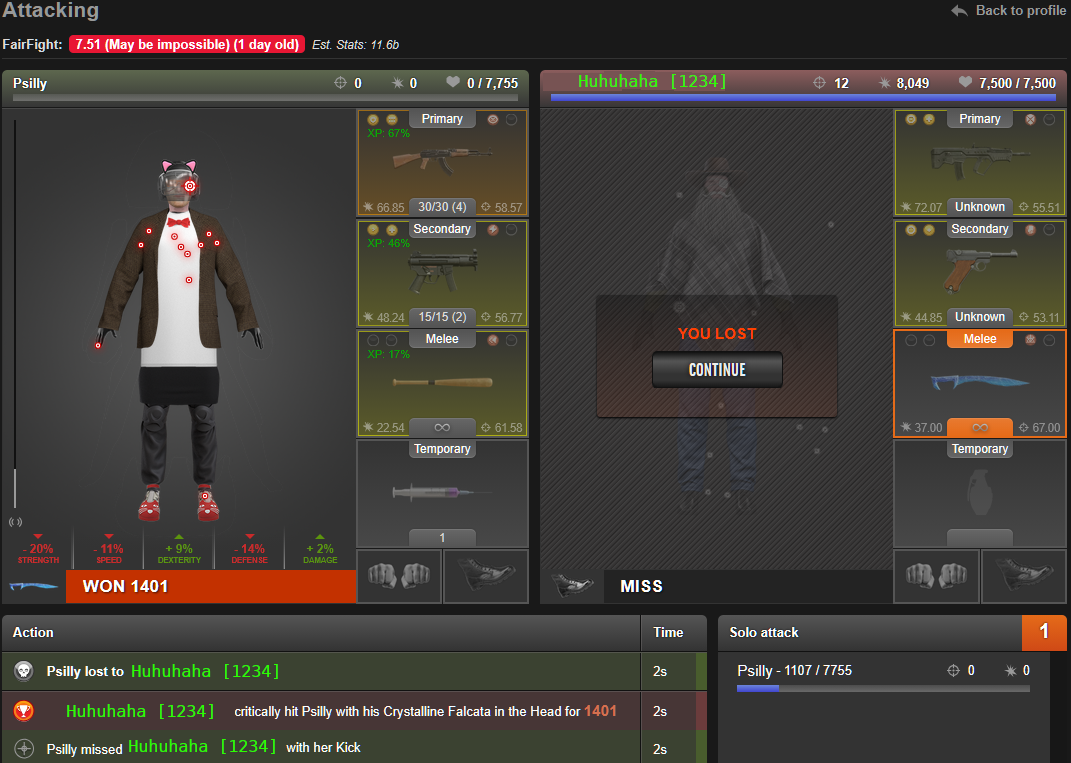
What is Ffscouter?  It's a service run by player Glasnost [1844049] with the primary goal of estimating player's total stats.  Once you register, you can then install a script that will show an easy-to-read estimate of a player's total stats on their profile or in the faction and/or ranked war overview pages:


Okay, enough bullshit, how do we actually do it?

Register for Ffscouter.  Go to the website ffscouter.com, click the button there to generate an custom API key in Torn's settings.  Copy it into the box back on the ffscouter page, accept the terms, and click sign up.


EZ.  But, if it's hard, there are more thorough guides:  Here for PC or Here for mobile (TornPDA) setup guides.  These guides also cover how to get the script working to see the stats estimates, like in the first image above.  Just registering a key is not enough, so give them a click, later.

Target Finder is the next piece to this puzzle and the main focus of this guide.  It is a feature on the ffscouter website that can be used to search for more leveling targets.  There's a Leveling List feature, which is pretty much what it sounds like, as well as a Custom Search where you can exercise some control over the strength and, more importantly, the level of the targets you attempt to murder.  


I mentioned earlier that Level does not increase your power in Torn, the same as it does in other games.  Rather, your total stats (str, def, dex, spd) are what make you a badass.  However high level DOES make a player worth more XP.  So, what you're looking for is targets who are both high level and low total stats.  The very first link in this guide is to Baldr's famous leveling list, which is a compilation of targets who meet this high level/low stats description.  The problem is it can get pretty farmed out.  Which is where Target Finder comes in:

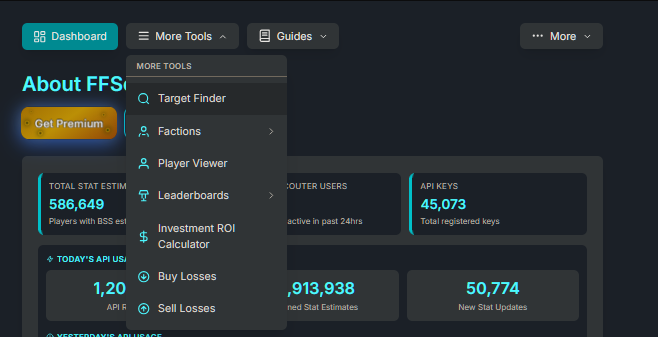
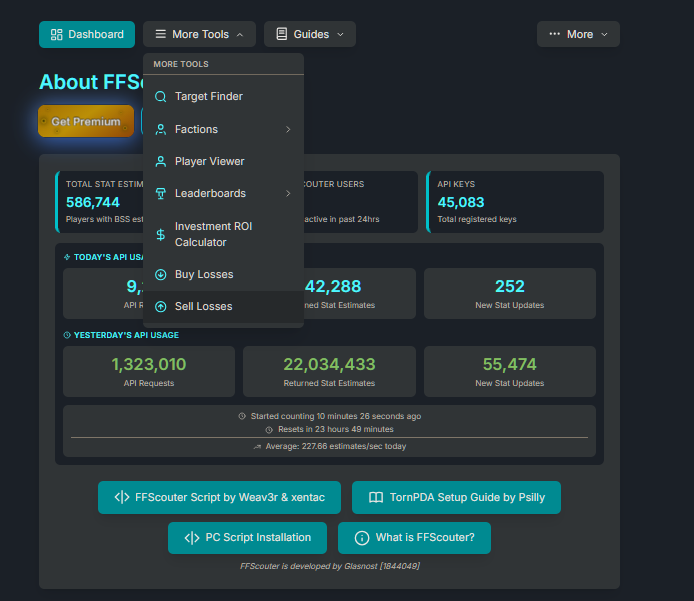
To find it, go back to ffscouter.com and clicky the things in the picture (More Tools > Target Finder):


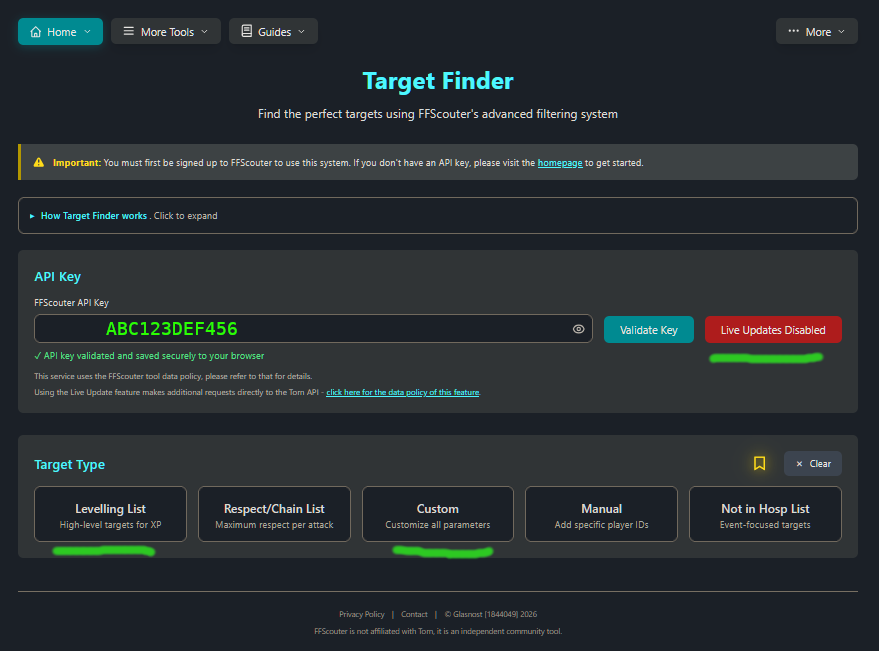
This brings you here:


Paste your API key (the one you registered before) into the box, click Use Live Updates, so it turns green and says enabled and then choose either Leveling List or Custom.

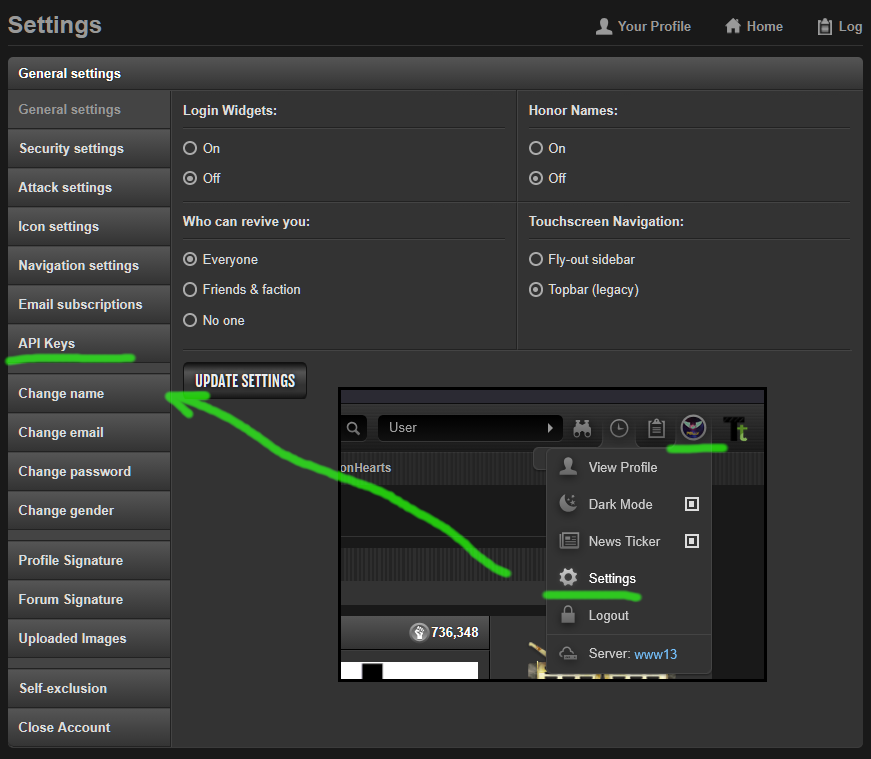
Aww fuck, the API key?  What API key?  The one we used before...if you're having trouble finding it, or if you've registered for Ffscouter before and just want to retrieve it, go to Torn and click your little profile pic in the top right (for example, see the inset picture below), then hit Settings in the drop down.  Then hit Api Keys on the left.  Then find the one labled Ffscouter and tap/click it to copy, then go back to your Ffscouter tab...pics below:


Okay, that done, if you hit leveling list, you should get a list of targets.  Kill.  If you suck at killing, make sure you 're at least 500 total stats (like 125 in each stat) up to a max of around 1k total stats (extra Str and Spd really help).  If you still suck at killing, throw a HEG first.  Or, pepper spray if they're too hard to hit.  If you STILL suck at killing, buy a macana or a Enfield rifle or a Diamond Bladed Knife.  If you are STILL having trouble after doing all of this...find a faction to help you : )  I might be recruiting, you're welcome to message me, otherwise post Here.  More respect = more resources to help you, generally, but there are small factions out there that are excellent with new players (Ffscouter will show you if they have a couple big-bad 2 or 10 billion stat players, those are usually the ones to look for).

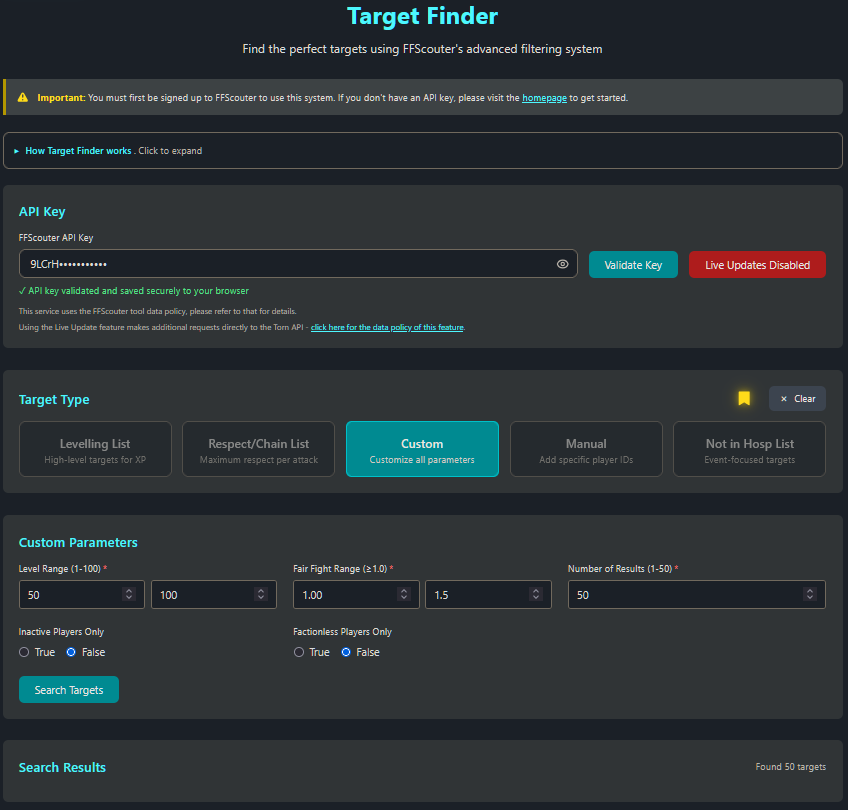
Alright, the only other ting about Target Finder is the Custom Search.  You can use this to fine-tune your leveling list.

Remember, we want High Level, Low Stats.  The level part is EZ.  I put 50 as the minimum.  You can try 30 or 40....experiment.  And I'll repeat it one more time: level means NOTHING in Torn.  The weakest player in the game, famously, is level 100.  You can probably beat them right now with a single HEG.  Ask around, I won't link the name here.  The point is to put the minimum level as high as you can.  The other thing to control is the maximum Fair Fight Range.  Fair Fight is complicated, Glasnost has an explanation of it Here.  In short, it's a formula that gives a single number that tells you how strong a target is COMPARED TO YOUR STATS.  1.0 is the same as you or lower, or something....it's good for EZ fight.  15.0 is super fucking hard and don't bother....it's not good for EZ fight.  Realistically you should be looking for below 3.0 and probably below 2.0 unless you went up the stats ladder to around 1k (not recommended, 500 should be good).  Again, experiment.  Change the FF range and the Level range to try to find more targets if you need them. 

The last is the two toggles: inactive and factionless.  If you kill active players and/or ppl in factions you will invite drama into your Torn-life.  Set these to true for minimum friction or to false for maximum number of targets.  Factionless = True is generally safer than Inactive = False, if you need more targets.

The last topic is Selling Losses To Fund Your Xanax Habit.  I will begin with a preface/warning/disclaimer:  There is nothing wrong with selling losses, it's an excellent way to earn money early-on IF you do it in moderation and for very specific reasons.  My advice to all of my new players is to sell just enough losses to max out Xanax intake while you level to 15 and then forget about doing it forever–your energy is too valuable to turn into $ that way; after level 15 all energy goes to the war or to the gym.

But, How 2 Make Money?  Ffscouter has a service where ppl can list buy orders for loss contracts and where fledgling Torn citizens can find them to make some ez $.


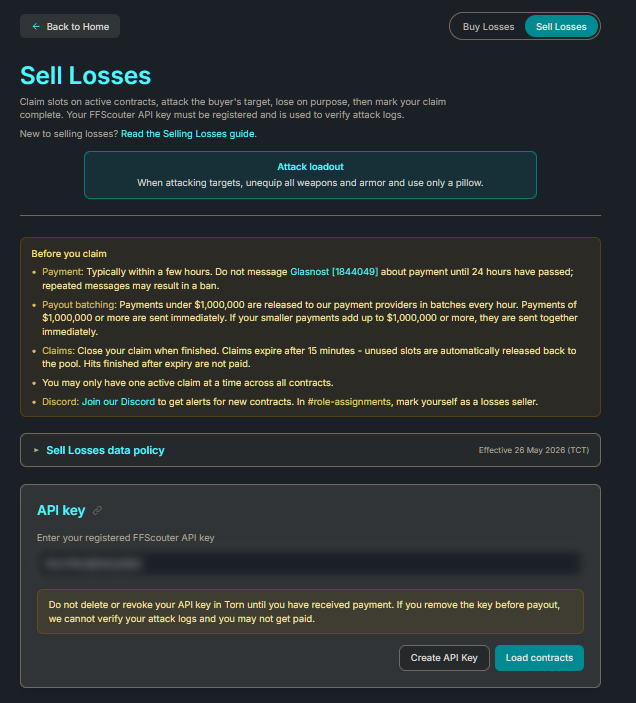
So, back to ffscouter.com, with you...I mean, why would you ever leave?  (More Tools > Sell Losses)

Damn! This place is better than Torn!

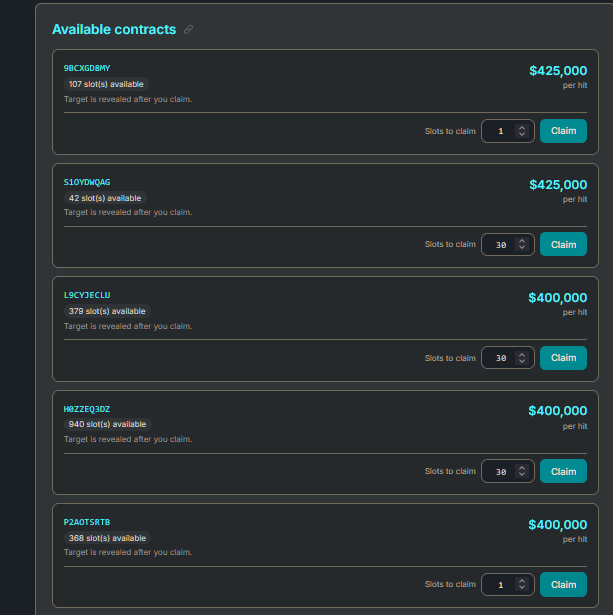
Paste the good ol' Ffscouter API key into the box (here mine is blurred out by default), scroll up to "Aww Fuck," if you can't find your API key.  Then, click Load Contracts.  You will get a list that looks like this:


Find your moola, pick a quantity you want to fill and click claim.  You get 15 minutes to fill your claim or the hits go back into the pot, so be greedy, or not, you won't be able to sit on them for hours while you wait for E to regen.

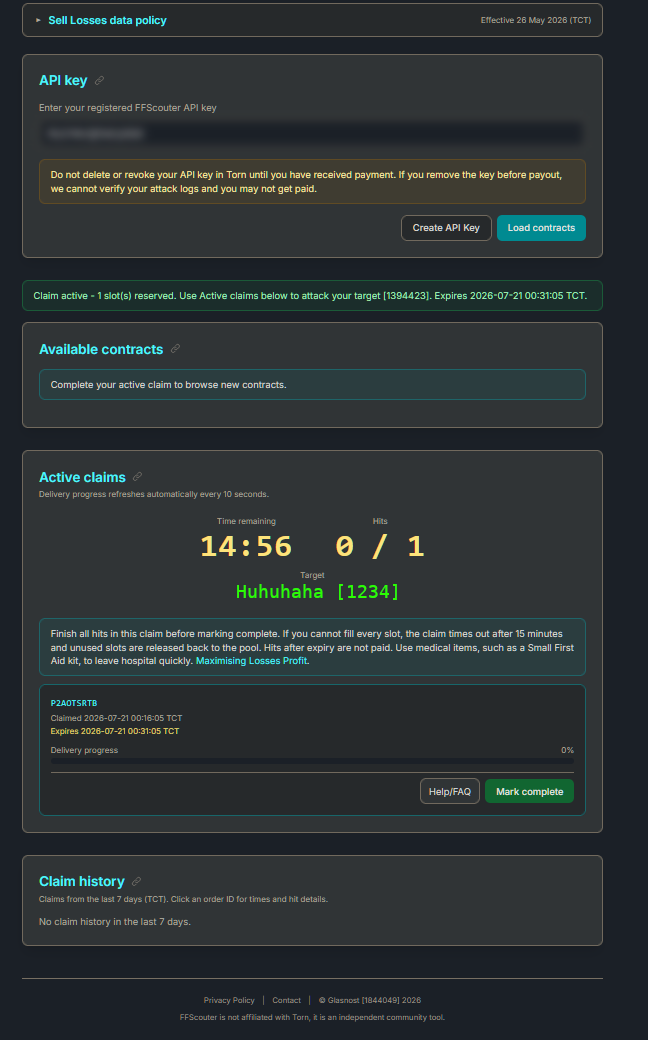
Below is the example contract I got, after clicking Claim:


There's the target, there's the timer.  I dunno what the mark complete button does...I just did the loss in Torn....

...Oh dear....

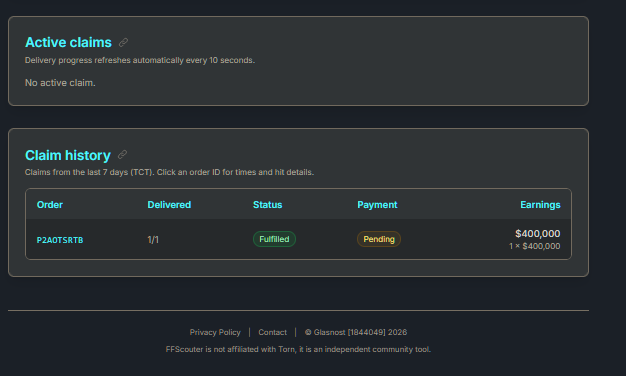
...and by the time I got back to the Ffscouter page, the bottom, in the picture up there, below the other things on the ffscouter page, had the summary (see above).

And a few minutes later...

So Rich...

The site does note that payments under 1 million are done in a batch every hour....the timestamp above for the pay event seems like it was a bit faster for me....but don't panic.  Don't bug me.  I'm just the messenger and have no monetary interest in all of this.  Don't bug Glasnost, either.  The site asks you wait at least 24 hours before complaining....don't worry, you gonna be so rich... 

This is not an elaborate scam and you'll get paid : )  I promise : D


Discord Invite, if you have problem: https://discord.gg/Gzr7Rb3Y5f


...And that's really it.  Don't get carried away.  I would not sell losses for anything besides enough Xanax to maximize your drug cool down, whether it be for training or, ideally, for leveling to 15.  Any decent faction should have you earning enough to fund your day-to-day Xanax within a couple few weeks, if not faster...Some even provide free training Xanax, in which case, you don't NEED to sell losses, so don't : )

All told, this should get you to 15 within a week if you put in the very minimum of effort. 


Just don't forget to setup the Ffscouter script, too.  It really is worth it:
PC Guide
TornPDA Guide


**If this guide is helpful, leave a comment to bump the thread so that others may find it <3

10 * AN Need High Int and/or End ·

.

10 * AN Need High Int and/or End ·

1

Psilly Guide: How to Setup TornPDA with FFScouter ·

try their warstuff script.
https://greasyfork.org/en/scripts/529238-torn-war-stuff-enhanced
you can also make sure you're up to date on the ffscouter mod
https://greasyfork.org/en/scripts/535292-ff-scouter-v2
but, warstuff is the timer script, i believe.  it has a neat new floating panel that shows your and their chain timer, too.

10 * AN Need High Int and/or End ·

+

10 * AN Need High Int and/or End ·

bump