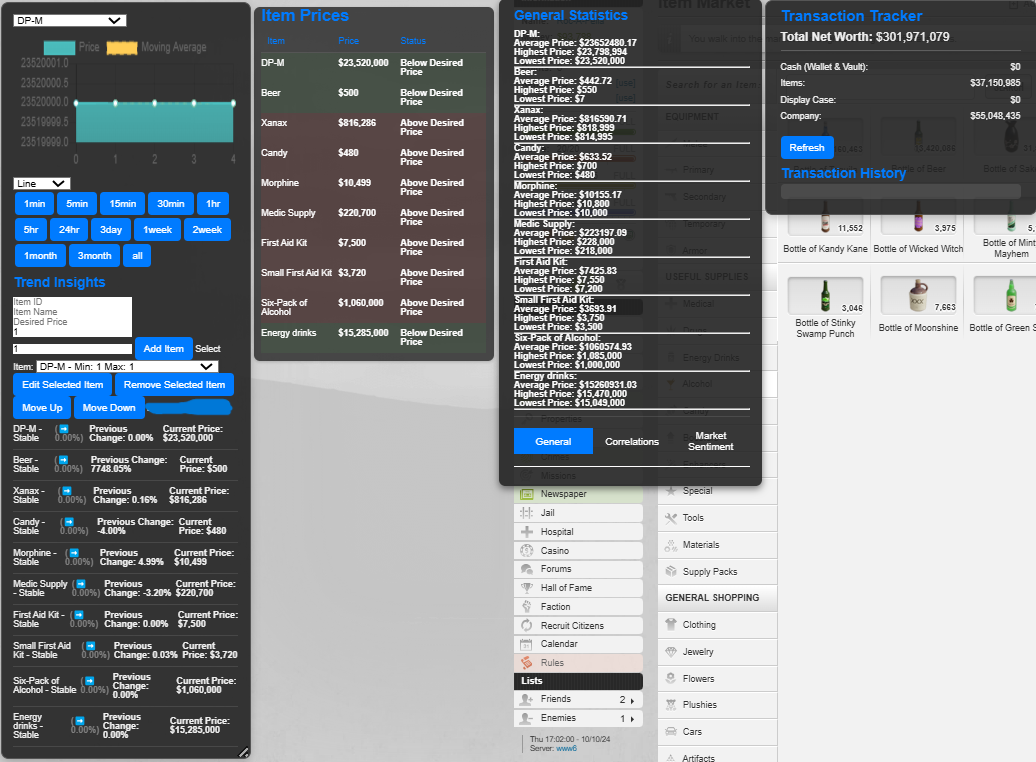
The Torn City Market Tracker is a powerful user script designed to help Torn City players track the prices of specific items in the market. This script allows users to monitor price fluctuations, analyze trends, and maintain a visual chart of prices, aiding players in making informed trading decisions.
Purpose
The primary purpose of the Torn City Market Tracker is to provide real-time pricing information for various items within the game. Users can set their desired prices for items and receive alerts if market prices deviate above or below these thresholds. Additionally, the script generates historical data and visualizes price trends, allowing players to see how prices change over time.
Key Features
Real-Time Price Tracking: Automatically fetches item prices from the Torn API every 5 seconds.
Historical Data Storage: Keeps track of historical price data for trend analysis.
Trend Analysis: Provides insights on market trends based on moving averages of prices.
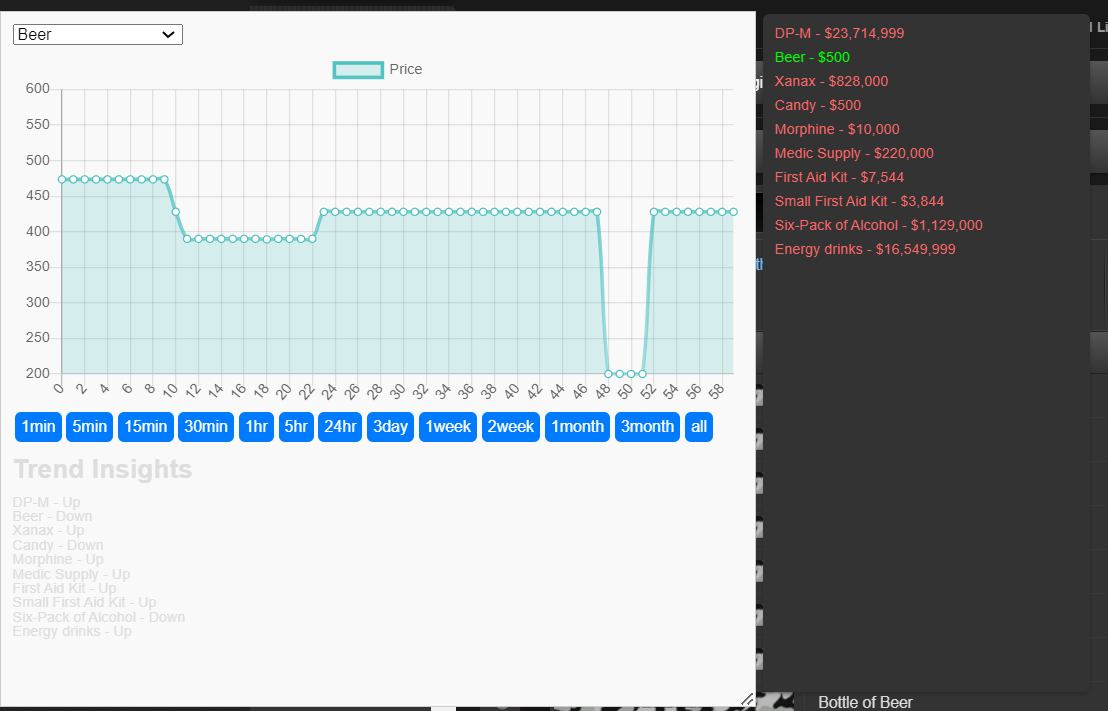
Interactive Charting: Visualizes price data using Chart.js, allowing users to see price trends graphically.
Customizable Alerts: Highlights items based on user-defined price thresholds.
Installation Guide
To use the Torn City Market Tracker script, follow these steps:
Install a User Script Manager: Use a browser extension like Tampermonkey or Greasemonkey.
Create a New Script:
Open the User Script Manager dashboard and create a new script.
Copy the Script:
Paste the complete script provided in this guide into the editor.
Save the Script: Save the script and ensure it is active.
Usage Instructions
Setting Up the API Key
When you first load the script, a prompt will appear asking for your Torn API key.
Input your Torn API key to unlock data fetching capabilities.
If your key is incorrect, the script will prompt you to re-enter it.
Navigating the Interface
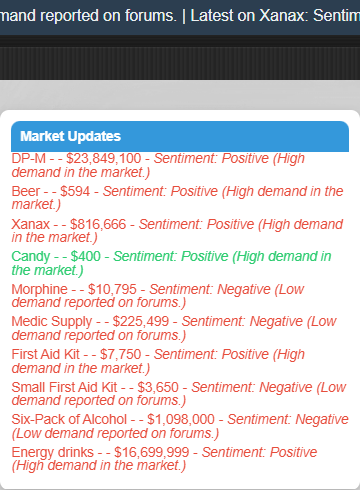
Price Display: Item prices will appear in a floating panel, showing each item's current market price along with a link for purchasing.
Trend Panel: It can be toggled on/off using the "Toggle Trend Analysis" button. This panel provides insights and displays historical trends in chart form.
Item Selection: A dropdown menu allows you to select any tracked item for detailed analysis.
Analyzing Prices
Once the item is selected from the dropdown, the current price and the historical trend displayed will update accordingly.
You can select a time period (like 1 minute to 1 month) to view the corresponding data.
Pricing Structure
The Torn City Market Tracker is offered within the Torn community for a priced access ranging from 200 million to 500 million Torn Cash (TC).
Price Breakdown
Basic Tier (200m TC): Access to real-time price tracking and trend insights.
Premium Tier (500m TC): Extended features including priority API access and enhanced data visualization options.
Troubleshooting
Script Not Working: Ensure that the user script manager is enabled and the script is active.
Invalid API Key: Re-enter the API key if you encounter permission issues.
No Data Displayed: Check your internet connection and ensure that Torn is operational. Refresh the page if necessary.
Conclusion
The Torn City Market Tracker is an essential tool for avid Torn City players aiming to optimize their market dealings. By tracking price trends and providing useful analytics, it empowers users to make informed decisions, thereby enhancing their gameplay experience. Happy trading!
Note: My Tools Are 100% accurate It Give you REAL DATA To make the best decision and I'm happy and ready to improve the torn city trade world
🌟 Exclusive Offer: Item Stalker with Detailed Market News 🌟
Attention Torn City Players!
Are you tired of missing out on market trends and opportunities in Torn City? Do you want to gain a competitive edge over your rivals? Look no further!
Introducing the Item Stalker with Detailed Market News Script!
This revolutionary tool is tailored for serious players aiming to maximize their profits and stay ahead in the bustling Torn marketplace. Here’s why you need this script:
🚀 Key Features:
Real-Time Market Insights Get instant updates on item prices and market sentiment, allowing you to make informed purchasing decisions!
Dynamic Item Tracking Monitor specific items of your choice and receive notifications on price changes.
Sentiment Analysis Understand the market pulse with insights on whether demand is increasing or decreasing for your chosen items.
User-Friendly Interface Easily drag, drop, and navigate the informative dashboard placed conveniently on your screen.
Exclusive Membership Updates As a member, you’ll receive weekly/monthly updates that enhance functionality and keep the script aligned with Torn’s ever-changing economy.
💎 Why You Should Invest:
Proven Success: Players utilizing this script have reported significant gains in their trading efficiency and profits. It pays for itself in no time!
Exclusive Access: By joining now, you’ll be part of a select group of players enjoying first-hand market data before anyone else.
Ongoing Support: I am dedicated to providing continuous support and necessary updates tailored to our members, ensuring you’re always equipped with the best tools.
💰 Pricing:
Exclusive Membership: 200m - 500m TC
Update Access: Receive continuous improvements for just 25m - 50m TC per update.
🔒 How to Join:
Comment Below to express your interest.
Send Me a Private Message to finalize your purchase and gain immediate access.
Don’t miss out on this opportunity to elevate your Torn City experience and enhance your success! This is your chance to join a community of elite traders.
Invest in your future today with Item Stalker!
Act fast - slots are limited!
Player User Guide for Item Stalker
Introduction
The Item Stalker with Detailed Market News script enhances your experience on Torn City by providing real-time market insights, item pricing, and sentiment analysis. This guide will help you navigate its features efficiently.
Features
Market Ticker
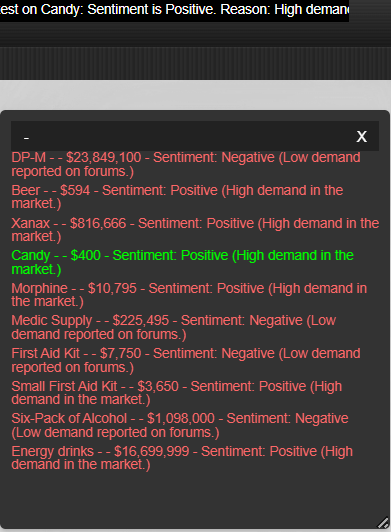
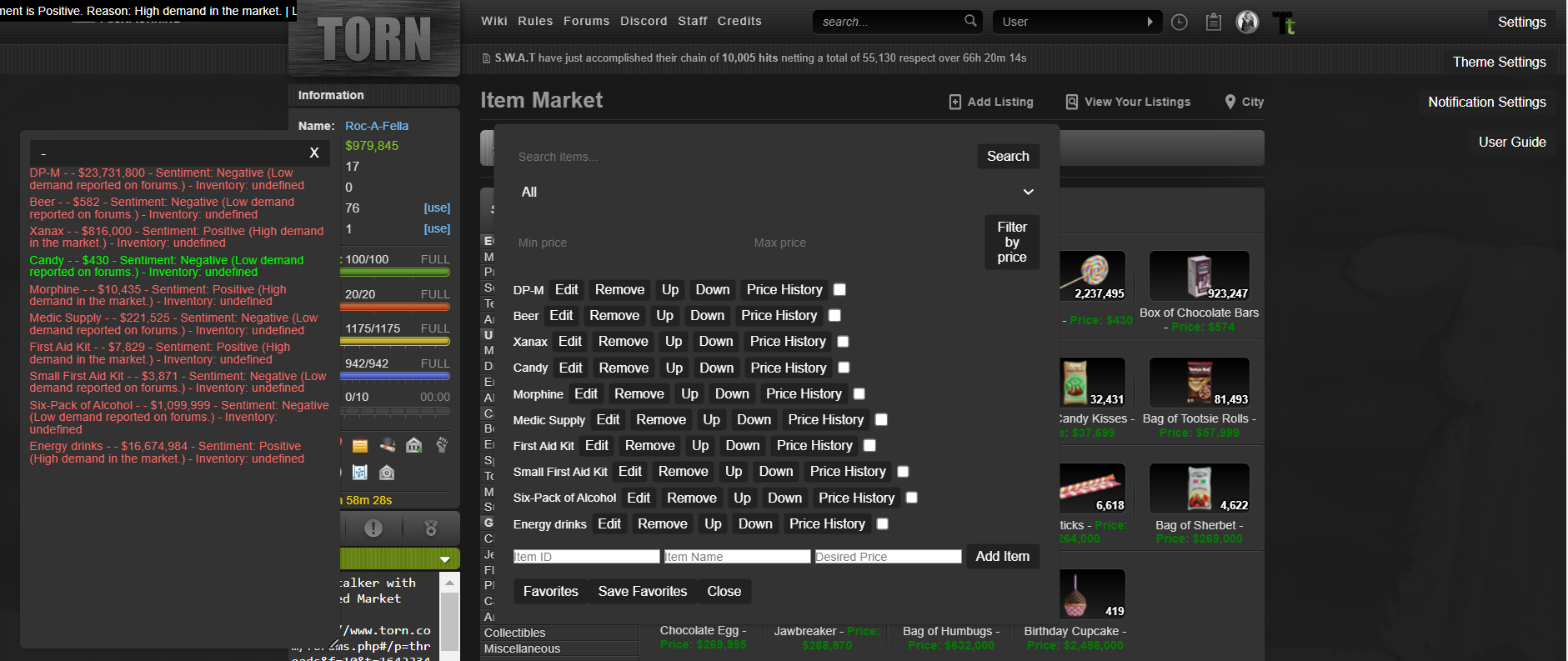
A fixed ticker that scrolls across the top of the screen displaying the latest market news and sentiment for tracked items.
Item Tracking
Monitor specific items (e.g., DP-M, Beer, Xanax) with predefined IDs, names, and desired prices.
Sentiment Analysis
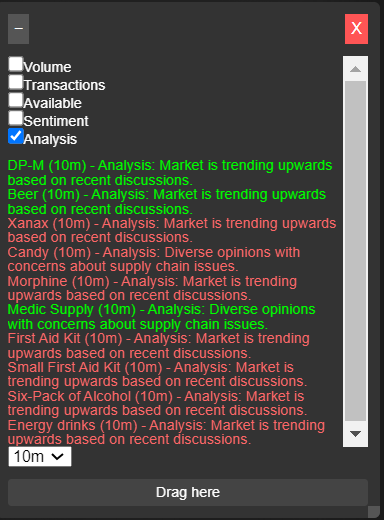
Get sentiment ratings (positive or negative) for items based on market demand, along with reasons for each sentiment.
User Interaction
A prompt to enter your public API key to fetch real-time market data.
Dynamic Pricing Info
Prices are indicated in green (below desired price) or red (above desired price) to easily identify bargains or expensive items.
Installation
Install a Userscript Manager:
Use extensions like Tampermonkey or Greasemonkey based on your browser.
Add Script:
Create a new script and copy the entire user script provided above.
Save and Activate:
After saving, ensure the script is active and refresh your Torn City game page.
How to Use
Setting Your API Key:
Upon first use, a yellow square will prompt you to enter your public API key.
Click the square, input your API key, and the script will fetch market data.
Market News Ticker:
Observe market updates on the ticker scrolling at the top.
This ticker refreshes periodically to show the latest news.
Price Display:
Price listings in the text box will change color based on current market prices against your desired prices.
Moving the Info Box:
Drag the text container using the header area to reposition it on your screen.
Closing/Minimizing Info Box:
Use the ‘X’ button to close the info box or the ‘-’ button to minimize it.
Detailed Functionality
Item IDs: The script tracks specific items identified by their IDs.
Market News: The script fetches market updates and sentiments, displaying reasons for market fluctuations.
Dynamic Updates: Data updates happen every 5 seconds to keep you informed about the market.
Troubleshooting
No API Key Prompt:
Ensure you refresh the page after installing the script. If it fails, recheck your script installation.
Market Data Not Loading:
Ensure your API key is valid and check for internet connection issues.
Text Container Not Draggable:
Ensure your cursor is on the right area to drag. If issues persist, refresh the page.
Conclusion
The Item Stalker with Detailed Market News script is a powerful tool for Torn City players to make informed market decisions. Regular updates and sentiment analysis give you an edge in the marketplace. For any further queries or feature requests, contact the author, Adobi.
This structured guide covers installation, features, and troubleshooting to help players effectively utilize the script.
This Is Just The Entry Level I Got Highly Advance ones to release soon !
Don't Message me if your not ready to pay don't send me the money with out my approval Dm Me first Please Thanks. I Got the best Tool that can give you the best user experience ever !!
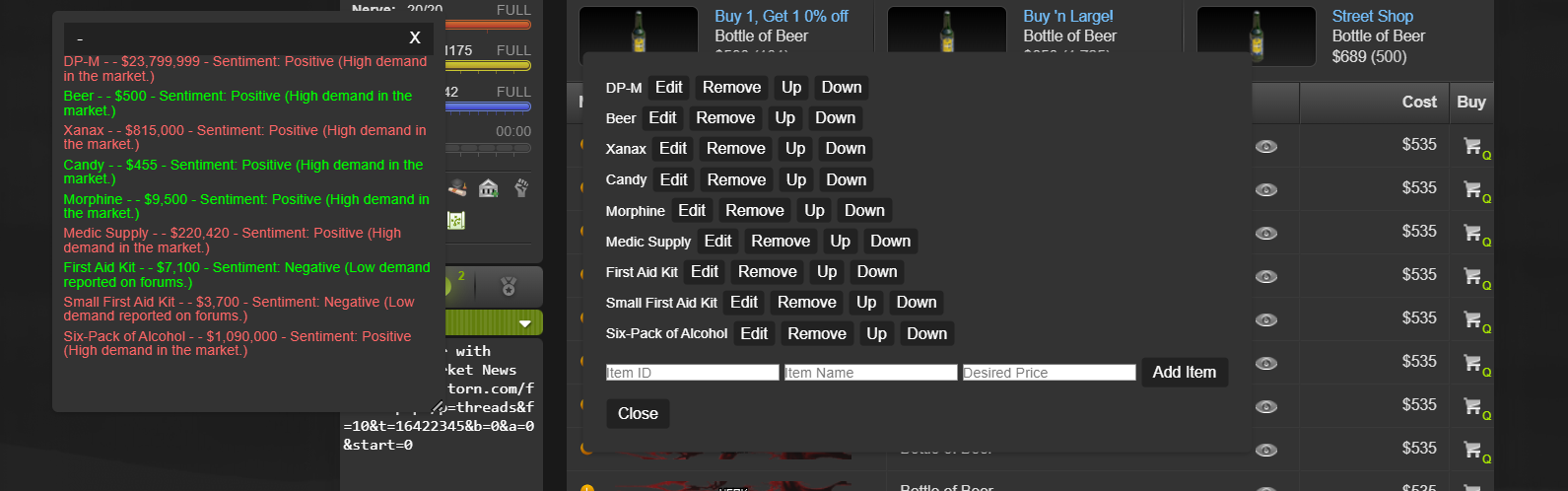
New Update To Entry Level
You Can now add and remove directly from torn no need to input nothing in the script
Torn City Market Tracker Enhanced Analytics Overview
Welcome to the Torn City Market Tracker Enhanced Analytics, a powerful tool designed to help you navigate the complex world of Torn City's market. With this tool, you'll gain unparalleled insights into market trends, prices, and statistics, making it easier to make informed decisions when buying, selling, or trading items.
Key Features
Real-time Price Tracking: Get instant updates on the prices of your desired items, including their current market value, highest and lowest prices, and average price.
Historical Price Data: Access a comprehensive database of historical prices for each item, allowing you to analyze trends and make informed decisions.
Market Sentiment Analysis: Understand the overall sentiment of the market, including positive, negative, and neutral sentiments, to help you make more accurate predictions.
Trend Insights: Receive detailed insights into the current trend of each item, including its direction, percentage change, and previous change.
Item Management: Easily add, edit, and remove items from your tracking list, and manage their desired prices, min and max quantities.
Advanced Statistics: Calculate moving averages, correlations, and other advanced statistics to gain a deeper understanding of the market.
Customizable Dashboard: Personalize your dashboard to display the information you need, with options to customize the layout, colors, and more.
How it Works
Our tool utilizes a combination of web scraping and API calls to gather real-time data from the Torn City market. This data is then processed and analyzed using advanced algorithms to provide you with accurate and up-to-date information.
Correlations Feature
Correlations Feature
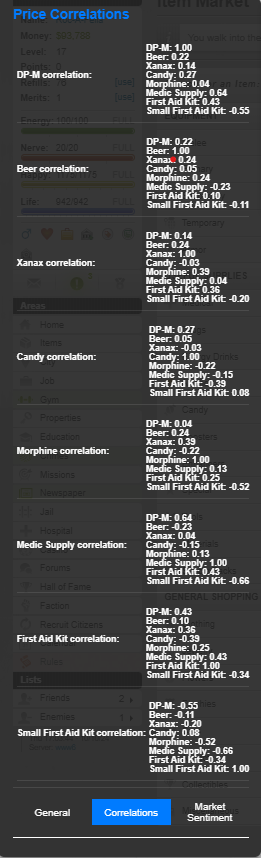
The Correlations feature in the Torn City Market Tracker Enhanced Analytics allows you to analyze the relationships between different items in the market. This feature provides valuable insights into the market's dynamics, helping you make more informed decisions when buying, selling, or trading items.
What Players See
When accessing the Correlations feature, players will see a table displaying the correlation coefficients between different items. The table will show:
Item A: The item you have selected as the base item for the correlation analysis.
Item B: The item you want to analyze in relation to Item A.
Correlation Coefficient: A value ranging from -1 to 1, indicating the strength and direction of the correlation between the two items.
Understanding Correlation Coefficients
A correlation coefficient of:
1: Indicates a strong positive correlation between the two items. When the price of Item A increases, the price of Item B also tends to increase.
-1: Indicates a strong negative correlation between the two items. When the price of Item A increases, the price of Item B tends to decrease.
0: Indicates no correlation between the two items. The prices of Item A and Item B are unrelated.
Values between -1 and 1: Indicate a weaker correlation between the two items. The relationship between the prices of Item A and Item B is not as strong as a correlation of 1 or -1.
Interpreting Correlation Coefficients
To interpret the correlation coefficients, consider the following examples:
Strong positive correlation (1): If you notice a strong positive correlation between two items, such as a rare item and a common item, it may indicate that the demand for both items is increasing. This could be a good opportunity to buy the rare item and sell the common item to take advantage of the rising prices.
Strong negative correlation (-1): If you notice a strong negative correlation between two items, such as a high-end item and a low-end item, it may indicate that the demand for the high-end item is decreasing while the demand for the low-end item is increasing. This could be a good opportunity to sell the high-end item and buy the low-end item to take advantage of the falling prices.
No correlation (0): If you notice a correlation coefficient of 0 between two items, it may indicate that the prices of the items are unrelated. This could be a good opportunity to buy and sell the items separately, as the prices are not affected by each other.
Tips and Tricks
Use multiple correlations: To get a better understanding of the market, try analyzing multiple correlations between different items.
Look for patterns: Identify patterns in the correlation coefficients, such as a strong positive correlation between two items and a weak negative correlation between the same two items.
Consider the item's rarity: The rarity of an item can affect its correlation with other items. For example, a rare item may have a stronger positive correlation with a common item than a low-end item.
Keep an eye on market trends: Correlation coefficients can change over time due to market trends and seasonal fluctuations. Stay up-to-date with the latest market trends to make informed decisions.
By understanding and using the Correlations feature, you'll be better equipped to navigate the Torn City market and make more informed decisions when buying, selling, or trading items.
Membership Packs
We offer various membership packs to suit your needs and budget. Our basic pack includes:
Access to real-time price tracking and historical price data
🌟 Exclusive Offer: Item Stalker with Detailed Market News 🌟
Attention Torn City Players!
Are you tired of missing out on market trends and opportunities in Torn City? Do you want to gain a competitive edge over your rivals? Look no further!
Introducing the Item Stalker with Detailed Market News Script!
This revolutionary tool is tailored for serious players aiming to maximize their profits and stay ahead in the bustling Torn marketplace. Here’s why you need this script:
🚀 Key Features:
Real-Time Market Insights Get instant updates on item prices and market sentiment, allowing you to make informed purchasing decisions!
Dynamic Item Tracking Monitor specific items of your choice and receive notifications on price changes.
Sentiment Analysis Understand the market pulse with insights on whether demand is increasing or decreasing for your chosen items.
User-Friendly Interface Easily drag, drop, and navigate the informative dashboard placed conveniently on your screen.
Exclusive Membership Updates As a member, you’ll receive weekly/monthly updates that enhance functionality and keep the script aligned with Torn’s ever-changing economy.
💎 Why You Should Invest:
Proven Success: Players utilizing this script have reported significant gains in their trading efficiency and profits. It pays for itself in no time!
Exclusive Access: By joining now, you’ll be part of a select group of players enjoying first-hand market data before anyone else.
Ongoing Support: I am dedicated to providing continuous support and necessary updates tailored to our members, ensuring you’re always equipped with the best tools.
💰 Pricing:
Exclusive Membership: 200m - 500m TC
Update Access: Receive continuous improvements for just 25m - 50m TC per update.
🔒 How to Join:
Comment Below to express your interest.
Send Me a Private Message to finalize your purchase and gain immediate access.
Don’t miss out on this opportunity to elevate your Torn City experience and enhance your success! This is your chance to join a community of elite traders.
Invest in your future today with Item Stalker!
Act fast - slots are limited!
Player User Guide for Item Stalker
Introduction
The Item Stalker with Detailed Market News script enhances your experience on Torn City by providing real-time market insights, item pricing, and sentiment analysis. This guide will help you navigate its features efficiently.
Features
Market Ticker
A fixed ticker that scrolls across the top of the screen displaying the latest market news and sentiment for tracked items.
Item Tracking
Monitor specific items (e.g., DP-M, Beer, Xanax) with predefined IDs, names, and desired prices.
Sentiment Analysis
Get sentiment ratings (positive or negative) for items based on market demand, along with reasons for each sentiment.
User Interaction
A prompt to enter your public API key to fetch real-time market data.
Dynamic Pricing Info
Prices are indicated in green (below desired price) or red (above desired price) to easily identify bargains or expensive items.
Installation
Install a Userscript Manager:
Use extensions like Tampermonkey or Greasemonkey based on your browser.
Add Script:
Create a new script and copy the entire user script provided above.
Save and Activate:
After saving, ensure the script is active and refresh your Torn City game page.
How to Use
Setting Your API Key:
Upon first use, a yellow square will prompt you to enter your public API key.
Click the square, input your API key, and the script will fetch market data.
Market News Ticker:
Observe market updates on the ticker scrolling at the top.
This ticker refreshes periodically to show the latest news.
Price Display:
Price listings in the text box will change color based on current market prices against your desired prices.
Moving the Info Box:
Drag the text container using the header area to reposition it on your screen.
Closing/Minimizing Info Box:
Use the ‘X’ button to close the info box or the ‘-’ button to minimize it.
Detailed Functionality
Item IDs: The script tracks specific items identified by their IDs.
Market News: The script fetches market updates and sentiments, displaying reasons for market fluctuations.
Dynamic Updates: Data updates happen every 5 seconds to keep you informed about the market.
Troubleshooting
No API Key Prompt:
Ensure you refresh the page after installing the script. If it fails, recheck your script installation.
Market Data Not Loading:
Ensure your API key is valid and check for internet connection issues.
Text Container Not Draggable:
Ensure your cursor is on the right area to drag. If issues persist, refresh the page.
Conclusion
The Item Stalker with Detailed Market News script is a powerful tool for Torn City players to make informed market decisions. Regular updates and sentiment analysis give you an edge in the marketplace. For any further queries or feature requests, contact the author, Adobi.
This structured guide covers installation, features, and troubleshooting to help players effectively utilize the script.
This Is Just The Entry Level I Got Highly Advance ones to release soon !
Don't Message me if your not ready to pay don't send me the money with out my approval Dm Me first Please Thanks. I Got the best Tool that can give you the best user experience ever !!
Torn City Market Tracker Enhanced Analytics Overview
Welcome to the Torn City Market Tracker Enhanced Analytics, a powerful tool designed to help you navigate the complex world of Torn City's market. With this tool, you'll gain unparalleled insights into market trends, prices, and statistics, making it easier to make informed decisions when buying, selling, or trading items.
Key Features
Real-time Price Tracking: Get instant updates on the prices of your desired items, including their current market value, highest and lowest prices, and average price.
Historical Price Data: Access a comprehensive database of historical prices for each item, allowing you to analyze trends and make informed decisions.
Market Sentiment Analysis: Understand the overall sentiment of the market, including positive, negative, and neutral sentiments, to help you make more accurate predictions.
Trend Insights: Receive detailed insights into the current trend of each item, including its direction, percentage change, and previous change.
Item Management: Easily add, edit, and remove items from your tracking list, and manage their desired prices, min and max quantities.
Advanced Statistics: Calculate moving averages, correlations, and other advanced statistics to gain a deeper understanding of the market.
Customizable Dashboard: Personalize your dashboard to display the information you need, with options to customize the layout, colors, and more.
Correlations Feature
Correlations Feature
The Correlations feature in the Torn City Market Tracker Enhanced Analytics allows you to analyze the relationships between different items in the market. This feature provides valuable insights into the market's dynamics, helping you make more informed decisions when buying, selling, or trading items.
What Players See
When accessing the Correlations feature, players will see a table displaying the correlation coefficients between different items. The table will show:
Item A: The item you have selected as the base item for the correlation analysis.
Item B: The item you want to analyze in relation to Item A.
Correlation Coefficient: A value ranging from -1 to 1, indicating the strength and direction of the correlation between the two items.
Understanding Correlation Coefficients
A correlation coefficient of:
1: Indicates a strong positive correlation between the two items. When the price of Item A increases, the price of Item B also tends to increase.
-1: Indicates a strong negative correlation between the two items. When the price of Item A increases, the price of Item B tends to decrease.
0: Indicates no correlation between the two items. The prices of Item A and Item B are unrelated.
Values between -1 and 1: Indicate a weaker correlation between the two items. The relationship between the prices of Item A and Item B is not as strong as a correlation of 1 or -1.
Interpreting Correlation Coefficients
To interpret the correlation coefficients, consider the following examples:
Strong positive correlation (1): If you notice a strong positive correlation between two items, such as a rare item and a common item, it may indicate that the demand for both items is increasing. This could be a good opportunity to buy the rare item and sell the common item to take advantage of the rising prices.
Strong negative correlation (-1): If you notice a strong negative correlation between two items, such as a high-end item and a low-end item, it may indicate that the demand for the high-end item is decreasing while the demand for the low-end item is increasing. This could be a good opportunity to sell the high-end item and buy the low-end item to take advantage of the falling prices.
No correlation (0): If you notice a correlation coefficient of 0 between two items, it may indicate that the prices of the items are unrelated. This could be a good opportunity to buy and sell the items separately, as the prices are not affected by each other.
Tips and Tricks
Use multiple correlations: To get a better understanding of the market, try analyzing multiple correlations between different items.
Look for patterns: Identify patterns in the correlation coefficients, such as a strong positive correlation between two items and a weak negative correlation between the same two items.
Consider the item's rarity: The rarity of an item can affect its correlation with other items. For example, a rare item may have a stronger positive correlation with a common item than a low-end item.
Keep an eye on market trends: Correlation coefficients can change over time due to market trends and seasonal fluctuations. Stay up-to-date with the latest market trends to make informed decisions.
By understanding and using the Correlations feature, you'll be better equipped to navigate the Torn City market and make more informed decisions when buying, selling, or trading items.
I Will Be Releasing this Tool Soon Its A Game Changer
I forgot to say we also working on a new update we will have a new panel added that will tell users when to buy/sell what price to buy at and what price to sell at not only that when to do it and not to as it collects data
Me and my group of traders have been working on this tool for a while now and its surprising to receive the hate as expected.
The script relies on real-time data fetched from Torn's API, which is generally reliable and up-to-date. Errors in data collection (due to API issues or network errors) are handled gracefully with notifications for the user.
The historical data is stored in the browser's storage, ensuring persistence and the ability to reference past data for trend analysis.
The script allows for data updates at intervals of 5 seconds, 10 seconds, or 30 seconds, enabling a reasonably high frequency of data collection. Ideally, with frequent updates, the script can quickly amass a substantial amount of data for analysis. The script stores historical price data for selected items, enabling the collection of a significant number of data points over time.
Solid data may necessitate a few weeks to a few months of data accumulation, providing a robust foundation for trend analysis and price forecasting.
The time required to gather solid data also depends on the stability and activity within the Torn market.
If the market experiences consistent day-to-day stability with steady price trends, solid data can be acquired relatively quickly.
In contrast, if the market is volatile with frequent price fluctuations, it may take longer to distinguish significant trends from noise and that's not the case my guy so the hate is real you haven't seen a tool like this and there's none like this out.
The duration to collect data for correlation analysis may vary depending on the number of item pairs you wish to analyze and the frequency of data updates. Generally, a longer data collection period ranging from several weeks to a few months would provide more robust and reliable correlation insights.
It Collects the data and displays it 100% accurately this is for serious traders that's trying to collect solid data on the market to make the best trading decision 100
While basic correlations can sometimes lack depth, they provide a quick look at price relationships. We can enhance this by providing deeper insights into items with significant historical transactions to refine the relevance of this analysis.
I aim to supplement, not replace, existing data. Our focus is to provide a visual and analytical approach to the data, displaying market trends and alerts in real-time, which compliments the static historical price descriptions.
I also understand the concern and can add disclaimers that sentiment analysis should be combined with other data points. We will also consider making this feature optional to suit more risk-averse traders.
I am committed to enhancing the user experience. We'll simplify the UI and add tooltips or an onboarding tutorial for new users. I believe our tool can complement existing methods by offering unique visualizations and alerts tailored to user preferences. We will highlight these differentiators more clearly in our next update.
And i can investigate more competitive pricing models, including tiered subscriptions or trial periods to attract a broader user base. And I ensure my script operates effectively for all users, regardless of net worth. User testimonials and successful trader stories will be showcased to demonstrate the script's utility across different trading experiences.
Torn City Market Tracker Enhanced Analytics Overview
Welcome to the Torn City Market Tracker Enhanced Analytics, a powerful tool designed to help you navigate the complex world of Torn City's market. With this tool, you'll gain unparalleled insights into market trends, prices, and statistics, making it easier to make informed decisions when buying, selling, or trading items.
Key Features
Real-time Price Tracking: Get instant updates on the prices of your desired items, including their current market value, highest and lowest prices, and average price.
Historical Price Data: Access a comprehensive database of historical prices for each item, allowing you to analyze trends and make informed decisions.
Market Sentiment Analysis: Understand the overall sentiment of the market, including positive, negative, and neutral sentiments, to help you make more accurate predictions.
Trend Insights: Receive detailed insights into the current trend of each item, including its direction, percentage change, and previous change.
Item Management: Easily add, edit, and remove items from your tracking list, and manage their desired prices, min and max quantities.
Advanced Statistics: Calculate moving averages, correlations, and other advanced statistics to gain a deeper understanding of the market.
Customizable Dashboard: Personalize your dashboard to display the information you need, with options to customize the layout, colors, and more.
How it Works
Our tool utilizes a combination of web scraping and API calls to gather real-time data from the Torn City market. This data is then processed and analyzed using advanced algorithms to provide you with accurate and up-to-date information.
Correlations Feature
Correlations Feature
The Correlations feature in the Torn City Market Tracker Enhanced Analytics allows you to analyze the relationships between different items in the market. This feature provides valuable insights into the market's dynamics, helping you make more informed decisions when buying, selling, or trading items.
What Players See
When accessing the Correlations feature, players will see a table displaying the correlation coefficients between different items. The table will show:
Item A: The item you have selected as the base item for the correlation analysis.
Item B: The item you want to analyze in relation to Item A.
Correlation Coefficient: A value ranging from -1 to 1, indicating the strength and direction of the correlation between the two items.
Understanding Correlation Coefficients
A correlation coefficient of:
1: Indicates a strong positive correlation between the two items. When the price of Item A increases, the price of Item B also tends to increase.
-1: Indicates a strong negative correlation between the two items. When the price of Item A increases, the price of Item B tends to decrease.
0: Indicates no correlation between the two items. The prices of Item A and Item B are unrelated.
Values between -1 and 1: Indicate a weaker correlation between the two items. The relationship between the prices of Item A and Item B is not as strong as a correlation of 1 or -1.
Interpreting Correlation Coefficients
To interpret the correlation coefficients, consider the following examples:
Strong positive correlation (1): If you notice a strong positive correlation between two items, such as a rare item and a common item, it may indicate that the demand for both items is increasing. This could be a good opportunity to buy the rare item and sell the common item to take advantage of the rising prices.
Strong negative correlation (-1): If you notice a strong negative correlation between two items, such as a high-end item and a low-end item, it may indicate that the demand for the high-end item is decreasing while the demand for the low-end item is increasing. This could be a good opportunity to sell the high-end item and buy the low-end item to take advantage of the falling prices.
No correlation (0): If you notice a correlation coefficient of 0 between two items, it may indicate that the prices of the items are unrelated. This could be a good opportunity to buy and sell the items separately, as the prices are not affected by each other.
Tips and Tricks
Use multiple correlations: To get a better understanding of the market, try analyzing multiple correlations between different items.
Look for patterns: Identify patterns in the correlation coefficients, such as a strong positive correlation between two items and a weak negative correlation between the same two items.
Consider the item's rarity: The rarity of an item can affect its correlation with other items. For example, a rare item may have a stronger positive correlation with a common item than a low-end item.
Keep an eye on market trends: Correlation coefficients can change over time due to market trends and seasonal fluctuations. Stay up-to-date with the latest market trends to make informed decisions.
By understanding and using the Correlations feature, you'll be better equipped to navigate the Torn City market and make more informed decisions when buying, selling, or trading items.
Membership Packs
We offer various membership packs to suit your needs and budget. Our basic pack includes:
Access to real-time price tracking and historical price data
Torn City Market Tracker Enhanced Analytics Overview
Welcome to the Torn City Market Tracker Enhanced Analytics, a powerful tool designed to help you navigate the complex world of Torn City's market. With this tool, you'll gain unparalleled insights into market trends, prices, and statistics, making it easier to make informed decisions when buying, selling, or trading items.
Key Features
Real-time Price Tracking: Get instant updates on the prices of your desired items, including their current market value, highest and lowest prices, and average price.
Historical Price Data: Access a comprehensive database of historical prices for each item, allowing you to analyze trends and make informed decisions.
Market Sentiment Analysis: Understand the overall sentiment of the market, including positive, negative, and neutral sentiments, to help you make more accurate predictions.
Trend Insights: Receive detailed insights into the current trend of each item, including its direction, percentage change, and previous change.
Item Management: Easily add, edit, and remove items from your tracking list, and manage their desired prices, min and max quantities.
Advanced Statistics: Calculate moving averages, correlations, and other advanced statistics to gain a deeper understanding of the market.
Customizable Dashboard: Personalize your dashboard to display the information you need, with options to customize the layout, colors, and more.
Correlations Feature
Correlations Feature
The Correlations feature in the Torn City Market Tracker Enhanced Analytics allows you to analyze the relationships between different items in the market. This feature provides valuable insights into the market's dynamics, helping you make more informed decisions when buying, selling, or trading items.
What Players See
When accessing the Correlations feature, players will see a table displaying the correlation coefficients between different items. The table will show:
Item A: The item you have selected as the base item for the correlation analysis.
Item B: The item you want to analyze in relation to Item A.
Correlation Coefficient: A value ranging from -1 to 1, indicating the strength and direction of the correlation between the two items.
Understanding Correlation Coefficients
A correlation coefficient of:
1: Indicates a strong positive correlation between the two items. When the price of Item A increases, the price of Item B also tends to increase.
-1: Indicates a strong negative correlation between the two items. When the price of Item A increases, the price of Item B tends to decrease.
0: Indicates no correlation between the two items. The prices of Item A and Item B are unrelated.
Values between -1 and 1: Indicate a weaker correlation between the two items. The relationship between the prices of Item A and Item B is not as strong as a correlation of 1 or -1.
Interpreting Correlation Coefficients
To interpret the correlation coefficients, consider the following examples:
Strong positive correlation (1): If you notice a strong positive correlation between two items, such as a rare item and a common item, it may indicate that the demand for both items is increasing. This could be a good opportunity to buy the rare item and sell the common item to take advantage of the rising prices.
Strong negative correlation (-1): If you notice a strong negative correlation between two items, such as a high-end item and a low-end item, it may indicate that the demand for the high-end item is decreasing while the demand for the low-end item is increasing. This could be a good opportunity to sell the high-end item and buy the low-end item to take advantage of the falling prices.
No correlation (0): If you notice a correlation coefficient of 0 between two items, it may indicate that the prices of the items are unrelated. This could be a good opportunity to buy and sell the items separately, as the prices are not affected by each other.
Tips and Tricks
Use multiple correlations: To get a better understanding of the market, try analyzing multiple correlations between different items.
Look for patterns: Identify patterns in the correlation coefficients, such as a strong positive correlation between two items and a weak negative correlation between the same two items.
Consider the item's rarity: The rarity of an item can affect its correlation with other items. For example, a rare item may have a stronger positive correlation with a common item than a low-end item.
Keep an eye on market trends: Correlation coefficients can change over time due to market trends and seasonal fluctuations. Stay up-to-date with the latest market trends to make informed decisions.
By understanding and using the Correlations feature, you'll be better equipped to navigate the Torn City market and make more informed decisions when buying, selling, or trading items.
I Will Be Releasing this Tool Soon Its A Game Changer
Torn City Market Tracker Enhanced Analytics Overview
Welcome to the Torn City Market Tracker Enhanced Analytics, a powerful tool designed to help you navigate the complex world of Torn City's market. With this tool, you'll gain unparalleled insights into market trends, prices, and statistics, making it easier to make informed decisions when buying, selling, or trading items.
Key Features
Real-time Price Tracking: Get instant updates on the prices of your desired items, including their current market value, highest and lowest prices, and average price.
Historical Price Data: Access a comprehensive database of historical prices for each item, allowing you to analyze trends and make informed decisions.
Market Sentiment Analysis: Understand the overall sentiment of the market, including positive, negative, and neutral sentiments, to help you make more accurate predictions.
Trend Insights: Receive detailed insights into the current trend of each item, including its direction, percentage change, and previous change.
Item Management: Easily add, edit, and remove items from your tracking list, and manage their desired prices, min and max quantities.
Advanced Statistics: Calculate moving averages, correlations, and other advanced statistics to gain a deeper understanding of the market.
Customizable Dashboard: Personalize your dashboard to display the information you need, with options to customize the layout, colors, and more.
How it Works
Our tool utilizes a combination of web scraping and API calls to gather real-time data from the Torn City market. This data is then processed and analyzed using advanced algorithms to provide you with accurate and up-to-date information.
Correlations Feature
Correlations Feature
The Correlations feature in the Torn City Market Tracker Enhanced Analytics allows you to analyze the relationships between different items in the market. This feature provides valuable insights into the market's dynamics, helping you make more informed decisions when buying, selling, or trading items.
What Players See
When accessing the Correlations feature, players will see a table displaying the correlation coefficients between different items. The table will show:
Item A: The item you have selected as the base item for the correlation analysis.
Item B: The item you want to analyze in relation to Item A.
Correlation Coefficient: A value ranging from -1 to 1, indicating the strength and direction of the correlation between the two items.
Understanding Correlation Coefficients
A correlation coefficient of:
1: Indicates a strong positive correlation between the two items. When the price of Item A increases, the price of Item B also tends to increase.
-1: Indicates a strong negative correlation between the two items. When the price of Item A increases, the price of Item B tends to decrease.
0: Indicates no correlation between the two items. The prices of Item A and Item B are unrelated.
Values between -1 and 1: Indicate a weaker correlation between the two items. The relationship between the prices of Item A and Item B is not as strong as a correlation of 1 or -1.
Interpreting Correlation Coefficients
To interpret the correlation coefficients, consider the following examples:
Strong positive correlation (1): If you notice a strong positive correlation between two items, such as a rare item and a common item, it may indicate that the demand for both items is increasing. This could be a good opportunity to buy the rare item and sell the common item to take advantage of the rising prices.
Strong negative correlation (-1): If you notice a strong negative correlation between two items, such as a high-end item and a low-end item, it may indicate that the demand for the high-end item is decreasing while the demand for the low-end item is increasing. This could be a good opportunity to sell the high-end item and buy the low-end item to take advantage of the falling prices.
No correlation (0): If you notice a correlation coefficient of 0 between two items, it may indicate that the prices of the items are unrelated. This could be a good opportunity to buy and sell the items separately, as the prices are not affected by each other.
Tips and Tricks
Use multiple correlations: To get a better understanding of the market, try analyzing multiple correlations between different items.
Look for patterns: Identify patterns in the correlation coefficients, such as a strong positive correlation between two items and a weak negative correlation between the same two items.
Consider the item's rarity: The rarity of an item can affect its correlation with other items. For example, a rare item may have a stronger positive correlation with a common item than a low-end item.
Keep an eye on market trends: Correlation coefficients can change over time due to market trends and seasonal fluctuations. Stay up-to-date with the latest market trends to make informed decisions.
By understanding and using the Correlations feature, you'll be better equipped to navigate the Torn City market and make more informed decisions when buying, selling, or trading items.
Membership Packs
We offer various membership packs to suit your needs and budget. Our basic pack includes:
Access to real-time price tracking and historical price data
The Torn City Market Tracker is a powerful user script designed to help Torn City players track the prices of specific items in the market. This script allows users to monitor price fluctuations, analyze trends, and maintain a visual chart of prices, aiding players in making informed trading decisions.
Purpose
The primary purpose of the Torn City Market Tracker is to provide real-time pricing information for various items within the game. Users can set their desired prices for items and receive alerts if market prices deviate above or below these thresholds. Additionally, the script generates historical data and visualizes price trends, allowing players to see how prices change over time.
Key Features
Real-Time Price Tracking: Automatically fetches item prices from the Torn API every 5 seconds.
Historical Data Storage: Keeps track of historical price data for trend analysis.
Trend Analysis: Provides insights on market trends based on moving averages of prices.
Interactive Charting: Visualizes price data using Chart.js, allowing users to see price trends graphically.
Customizable Alerts: Highlights items based on user-defined price thresholds.
Installation Guide
To use the Torn City Market Tracker script, follow these steps:
Install a User Script Manager: Use a browser extension like Tampermonkey or Greasemonkey.
Create a New Script:
Open the User Script Manager dashboard and create a new script.
Copy the Script:
Paste the complete script provided in this guide into the editor.
Save the Script: Save the script and ensure it is active.
Usage Instructions
Setting Up the API Key
When you first load the script, a prompt will appear asking for your Torn API key.
Input your Torn API key to unlock data fetching capabilities.
If your key is incorrect, the script will prompt you to re-enter it.
Navigating the Interface
Price Display: Item prices will appear in a floating panel, showing each item's current market price along with a link for purchasing.
Trend Panel: It can be toggled on/off using the "Toggle Trend Analysis" button. This panel provides insights and displays historical trends in chart form.
Item Selection: A dropdown menu allows you to select any tracked item for detailed analysis.
Analyzing Prices
Once the item is selected from the dropdown, the current price and the historical trend displayed will update accordingly.
You can select a time period (like 1 minute to 1 month) to view the corresponding data.
Pricing Structure
The Torn City Market Tracker is offered within the Torn community for a priced access ranging from 200 million to 500 million Torn Cash (TC).
Price Breakdown
Basic Tier (200m TC): Access to real-time price tracking and trend insights.
Premium Tier (500m TC): Extended features including priority API access and enhanced data visualization options.
Troubleshooting
Script Not Working: Ensure that the user script manager is enabled and the script is active.
Invalid API Key: Re-enter the API key if you encounter permission issues.
No Data Displayed: Check your internet connection and ensure that Torn is operational. Refresh the page if necessary.
Conclusion
The Torn City Market Tracker is an essential tool for avid Torn City players aiming to optimize their market dealings. By tracking price trends and providing useful analytics, it empowers users to make informed decisions, thereby enhancing their gameplay experience. Happy trading!
Note: My Tools Are 100% accurate It Give you REAL DATA To make the best decision and I'm happy and ready to improve the torn city trade world
The Torn City Market Tracker is a powerful user script designed to help Torn City players track the prices of specific items in the market. This script allows users to monitor price fluctuations, analyze trends, and maintain a visual chart of prices, aiding players in making informed trading decisions.
Purpose
The primary purpose of the Torn City Market Tracker is to provide real-time pricing information for various items within the game. Users can set their desired prices for items and receive alerts if market prices deviate above or below these thresholds. Additionally, the script generates historical data and visualizes price trends, allowing players to see how prices change over time.
Key Features
Real-Time Price Tracking: Automatically fetches item prices from the Torn API every 5 seconds.
Historical Data Storage: Keeps track of historical price data for trend analysis.
Trend Analysis: Provides insights on market trends based on moving averages of prices.
Interactive Charting: Visualizes price data using Chart.js, allowing users to see price trends graphically.
Customizable Alerts: Highlights items based on user-defined price thresholds.
Installation Guide
To use the Torn City Market Tracker script, follow these steps:
Install a User Script Manager: Use a browser extension like Tampermonkey or Greasemonkey.
Create a New Script:
Open the User Script Manager dashboard and create a new script.
Copy the Script:
Paste the complete script provided in this guide into the editor.
Save the Script: Save the script and ensure it is active.
Usage Instructions
Setting Up the API Key
When you first load the script, a prompt will appear asking for your Torn API key.
Input your Torn API key to unlock data fetching capabilities.
If your key is incorrect, the script will prompt you to re-enter it.
Navigating the Interface
Price Display: Item prices will appear in a floating panel, showing each item's current market price along with a link for purchasing.
Trend Panel: It can be toggled on/off using the "Toggle Trend Analysis" button. This panel provides insights and displays historical trends in chart form.
Item Selection: A dropdown menu allows you to select any tracked item for detailed analysis.
Analyzing Prices
Once the item is selected from the dropdown, the current price and the historical trend displayed will update accordingly.
You can select a time period (like 1 minute to 1 month) to view the corresponding data.
Pricing Structure
The Torn City Market Tracker is offered within the Torn community for a priced access ranging from 200 million to 500 million Torn Cash (TC).
Price Breakdown
Basic Tier (200m TC): Access to real-time price tracking and trend insights.
Premium Tier (500m TC): Extended features including priority API access and enhanced data visualization options.
Troubleshooting
Script Not Working: Ensure that the user script manager is enabled and the script is active.
Invalid API Key: Re-enter the API key if you encounter permission issues.
No Data Displayed: Check your internet connection and ensure that Torn is operational. Refresh the page if necessary.
Conclusion
The Torn City Market Tracker is an essential tool for avid Torn City players aiming to optimize their market dealings. By tracking price trends and providing useful analytics, it empowers users to make informed decisions, thereby enhancing their gameplay experience. Happy trading!
Note: My Tools Are 100% accurate It Give you REAL DATA To make the best decision and I'm happy and ready to improve the torn city trade world
What Im developing Will Definitely Change Change how you play and understand the market I Develop a Highly Advance A.I That can tell you whats going on in the market 100% accurate Information no one has or know it can track any item and provide Analysis for you to make a solid Choice
And Much More Becoming a member give you access to whats ahead
I Know but none of those provide data that mines can do and especially The interface is right in the same place while you trade or doing something else my tool still provide that data And if you read My POST THIS IS ENTRY LEVEL I HAVE HIGHLY ADVANCE TOOL THAT NO ONE HAS Heres A Slight View Of other extensions
My Hard Work Aint Free The Amount off data I input for the highly advance ones no one haven't done it as yet
And im showing you Entry level of the UI interface INMAGING THE BETTER ADVANCE ONES
🌟 Exclusive Offer: Item Stalker with Detailed Market News 🌟
Attention Torn City Players!
Are you tired of missing out on market trends and opportunities in Torn City? Do you want to gain a competitive edge over your rivals? Look no further!
Introducing the Item Stalker with Detailed Market News Script!
This revolutionary tool is tailored for serious players aiming to maximize their profits and stay ahead in the bustling Torn marketplace. Here’s why you need this script:
🚀 Key Features:
Real-Time Market Insights Get instant updates on item prices and market sentiment, allowing you to make informed purchasing decisions!
Dynamic Item Tracking Monitor specific items of your choice and receive notifications on price changes.
Sentiment Analysis Understand the market pulse with insights on whether demand is increasing or decreasing for your chosen items.
User-Friendly Interface Easily drag, drop, and navigate the informative dashboard placed conveniently on your screen.
Exclusive Membership Updates As a member, you’ll receive weekly/monthly updates that enhance functionality and keep the script aligned with Torn’s ever-changing economy.
💎 Why You Should Invest:
Proven Success: Players utilizing this script have reported significant gains in their trading efficiency and profits. It pays for itself in no time!
Exclusive Access: By joining now, you’ll be part of a select group of players enjoying first-hand market data before anyone else.
Ongoing Support: I am dedicated to providing continuous support and necessary updates tailored to our members, ensuring you’re always equipped with the best tools.
💰 Pricing:
Exclusive Membership: 200m - 500m TC
Update Access: Receive continuous improvements for just 25m - 50m TC per update.
🔒 How to Join:
Comment Below to express your interest.
Send Me a Private Message to finalize your purchase and gain immediate access.
Don’t miss out on this opportunity to elevate your Torn City experience and enhance your success! This is your chance to join a community of elite traders.
Invest in your future today with Item Stalker!
Act fast - slots are limited!
Player User Guide for Item Stalker
Introduction
The Item Stalker with Detailed Market News script enhances your experience on Torn City by providing real-time market insights, item pricing, and sentiment analysis. This guide will help you navigate its features efficiently.
Features
Market Ticker
A fixed ticker that scrolls across the top of the screen displaying the latest market news and sentiment for tracked items.
Item Tracking
Monitor specific items (e.g., DP-M, Beer, Xanax) with predefined IDs, names, and desired prices.
Sentiment Analysis
Get sentiment ratings (positive or negative) for items based on market demand, along with reasons for each sentiment.
User Interaction
A prompt to enter your public API key to fetch real-time market data.
Dynamic Pricing Info
Prices are indicated in green (below desired price) or red (above desired price) to easily identify bargains or expensive items.
Installation
Install a Userscript Manager:
Use extensions like Tampermonkey or Greasemonkey based on your browser.
Add Script:
Create a new script and copy the entire user script provided above.
Save and Activate:
After saving, ensure the script is active and refresh your Torn City game page.
How to Use
Setting Your API Key:
Upon first use, a yellow square will prompt you to enter your public API key.
Click the square, input your API key, and the script will fetch market data.
Market News Ticker:
Observe market updates on the ticker scrolling at the top.
This ticker refreshes periodically to show the latest news.
Price Display:
Price listings in the text box will change color based on current market prices against your desired prices.
Moving the Info Box:
Drag the text container using the header area to reposition it on your screen.
Closing/Minimizing Info Box:
Use the ‘X’ button to close the info box or the ‘-’ button to minimize it.
Detailed Functionality
Item IDs: The script tracks specific items identified by their IDs.
Market News: The script fetches market updates and sentiments, displaying reasons for market fluctuations.
Dynamic Updates: Data updates happen every 5 seconds to keep you informed about the market.
Troubleshooting
No API Key Prompt:
Ensure you refresh the page after installing the script. If it fails, recheck your script installation.
Market Data Not Loading:
Ensure your API key is valid and check for internet connection issues.
Text Container Not Draggable:
Ensure your cursor is on the right area to drag. If issues persist, refresh the page.
Conclusion
The Item Stalker with Detailed Market News script is a powerful tool for Torn City players to make informed market decisions. Regular updates and sentiment analysis give you an edge in the marketplace. For any further queries or feature requests, contact the author, Adobi.
This structured guide covers installation, features, and troubleshooting to help players effectively utilize the script.
This Is Just The Entry Level I Got Highly Advance ones to release soon !
Don't Message me if your not ready to pay don't send me the money with out my approval Dm Me first Please Thanks. I Got the best Tool that can give you the best user experience ever !!
New Update To Entry Level
You Can now add and remove directly from torn no need to input nothing in the script