I tried coding another OC 2.0 "who's slacking?" script before realizing there's at least two other OC 2.0 scripts that already do that.
Let's just add this to the pile.
Features
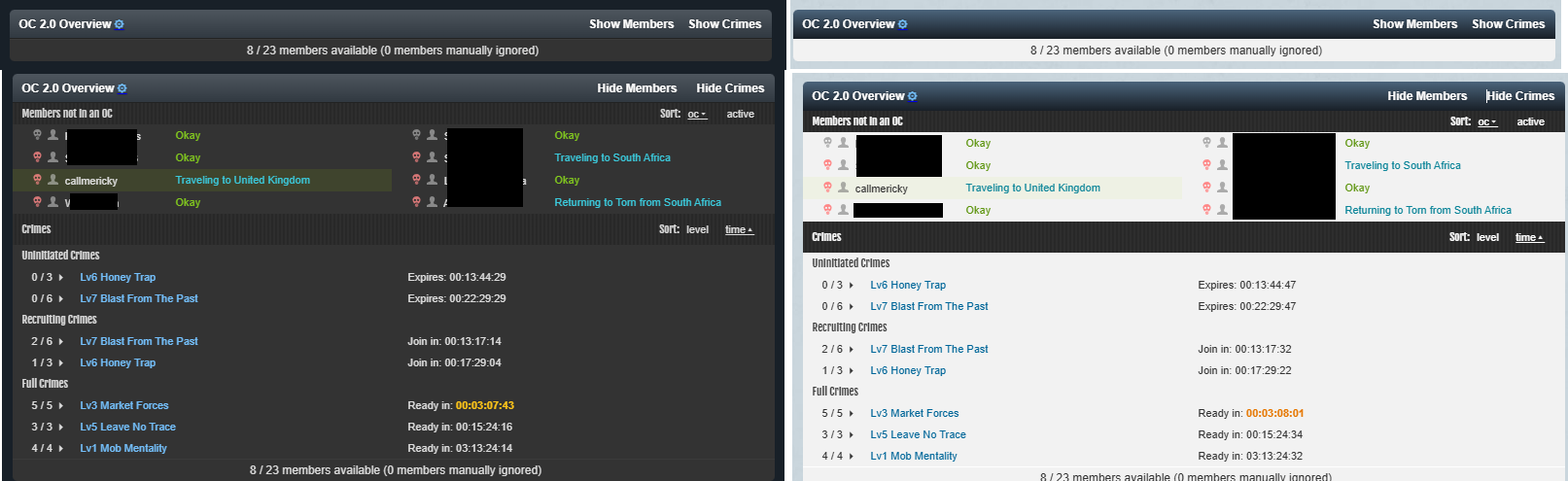
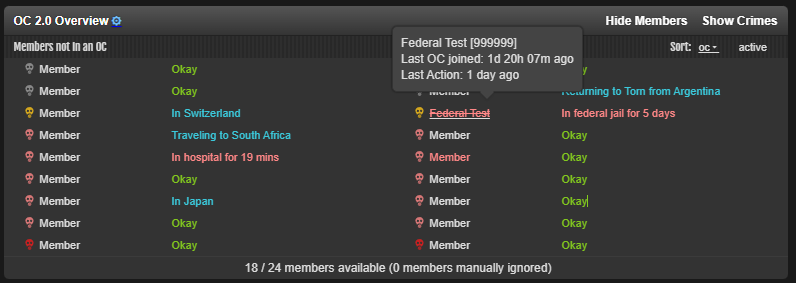
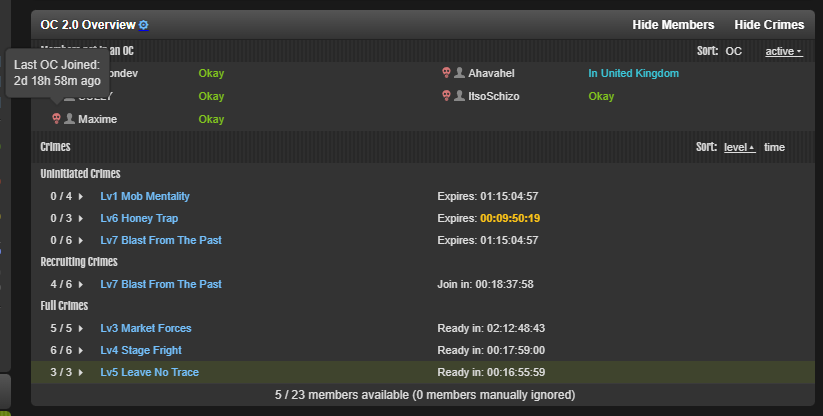
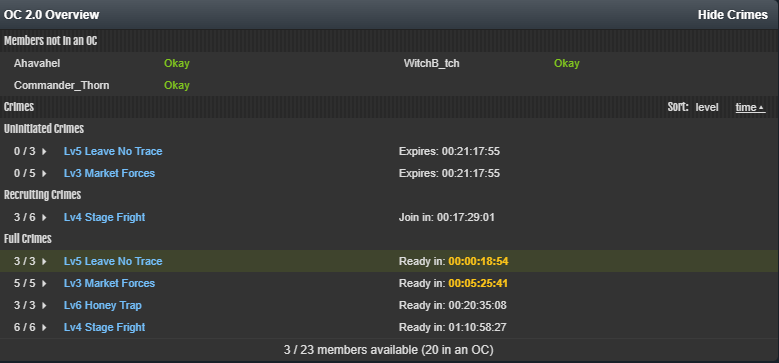
Adds a list of members available for OC 2.0 (optional toggle to view crimes + members in each crime).
Allows you to exclude members from the available member lists from the settings page (eg members away for long periods of time)
View crime timers, member's item availability, member success rate, and member status all in one spot, even when traveling.
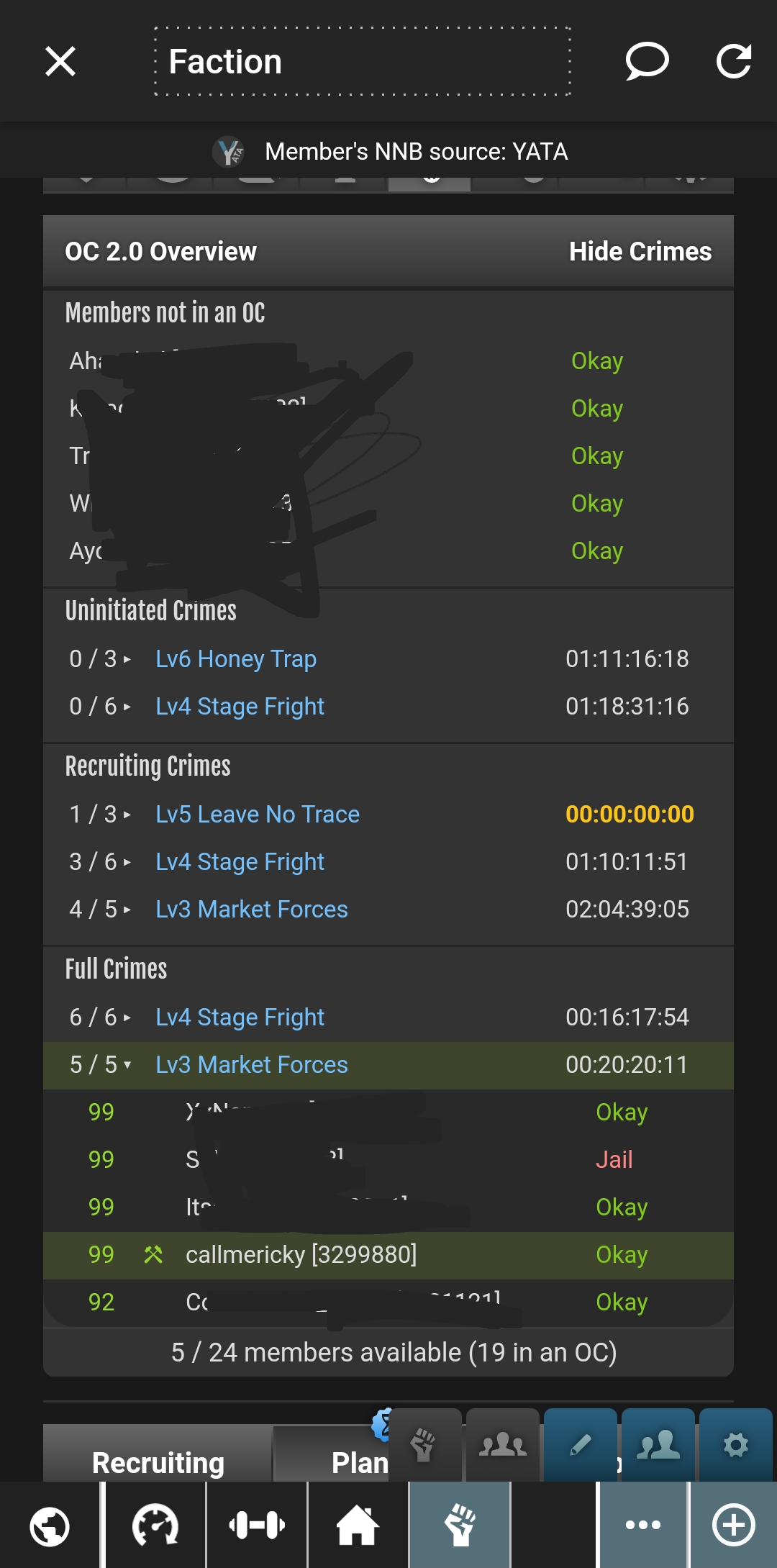
While travelling, this list is added to the top of your faction page. So you don't need to wait until you land to get lazy butts into OCs.
Adds an optional TornTools-like notifier to the sidebar if you are not in an OC.
Highlights yourself in the OC list with a nice green colour because reading is hard.
Will potentially break horrendously when the unstable v2/faction/crimes endpoint is changed
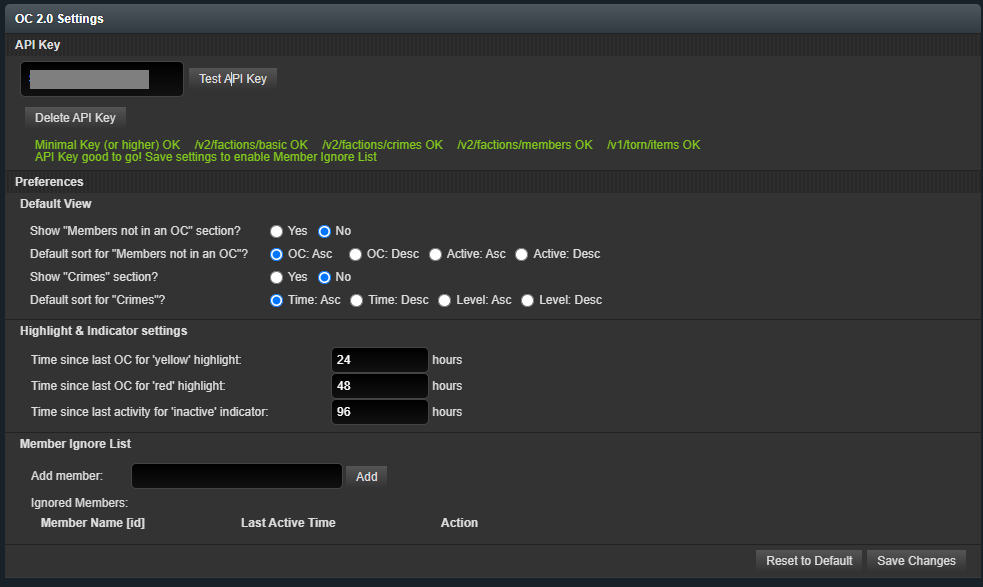
Instructions: Requires Minimal API key with faction access. Browser Users: Input the API key in the settings menu. TornPDA Users: Script will use the API Key provided to TornPDA.
Compatibility Should work on most modern browsers
Works independently as well as together with TornTools extension. Works on tornPDA.
Styled to work with both light and dark mode (refresh after changing modes to fix styles).
API calls per page load: 2 when viewing faction/crimes page (1 to get member+crime info, 1 to load item names) 1 when viewing other pages (for the sidebar notifier)
0 API calls if the sidebar is not visible
Legality:
This script only uses information available from the API, and does not make any non-API requests to Torn.
Added the ability to sort the OC's displayed by level or time (click on the relevant option to swap between ascending/descending order)
Made the member list more compact on to save screen real estate (2 columns instead of 1)
TornPDA users: unfortunately the small screen stays because devices have small screens
If anyone is using TornPDA on a device with a large enough screen such that the styles are broken, please let me know! I do not have such a device and am unable to test how the styles work on it!
Removed the [12345] id number next to member names to allow for more compact styling, and made the member name itself a link. Please let me know if this is annoying.
[13:10:00 21/01/25 TCT] v5.0: Settings page added, new indicator and sorting features added. See link for more info.
[07:52:00 22/01/25 TCT] v5.0.1: Fixed a bug preventing the inserted table from working properly during travel
[09:31:00 22/01/25 TCT] v5.0.2: Fixed some test placeholder text when hovering over available member names (oops)
Fixed a bug that counted recruits in the number of available members. A list of recruits (if you have any) now show up if you hover over the "x/y members available" text.
Changed the hover text for members not in crimes - now shows last OC joined and last activity in one single hover instead of in separate hovers.
Improved the UX for screen readers (particularly for those that navigate using keyboard)
Please reach out if anyone using a screen reader still has issues with using the script!
[03:27:00 08/02/25 TCT] v5.1.1: Added a setting option to toggle the sidebar information on/off
Added a button to toggle open/shut all crimes in that sub-section
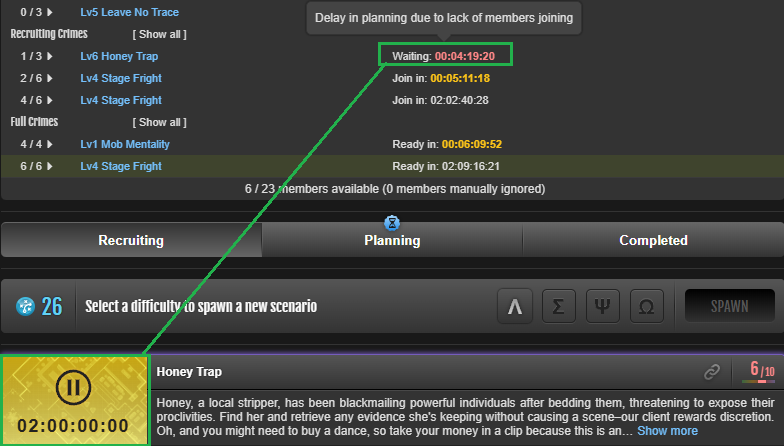
Added an option to allow the timer to continue counting down after reaching 0. After reaching 0, the timer will turn red and start counting up. This can be used to see how long a crime has been waiting for a player to join, or to be executed.
Enable this option in the settings page!
I have not had a chance to bugtest this as much as I'd like, so please let me know if it breaks!
Added the option to view the crime preparation status of each member in a crime. It is written as a percentage, in parenthesis after the member's name.
Enable this option in the settings page.
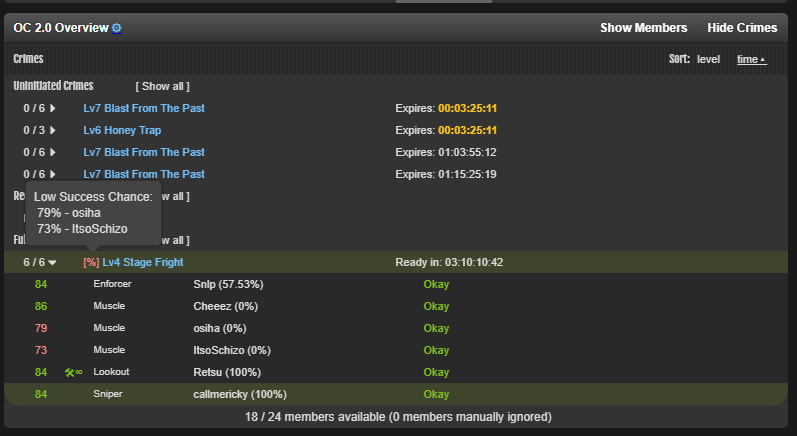
Added indicators to crimes if members are either missing an item, or are below a user-set success chance.
This success chance is set in the settings page.
By default, user success chances are yellow at 51% - 75%, and red for under 50%
Setting a minimum success chance will also force-color the members' success chance as red if they are under your set chance.
Set this the value to 0 to disable the success chance indicator
Changed the API test wording to better explain when the user does not have access to faction API
Removed the 'user inactive' icon (looks like a person) next to member names, as this was not very useful.
Instead, member names will turn red if they are inactive for longer than your set threshold (set in settings)
This will hopefully stop longer names from being misaligned in small screens.
Members in federal will now correctly have their status shown as red. Additionally, fedded members' names will turn red and have a strikethrough in the member list.
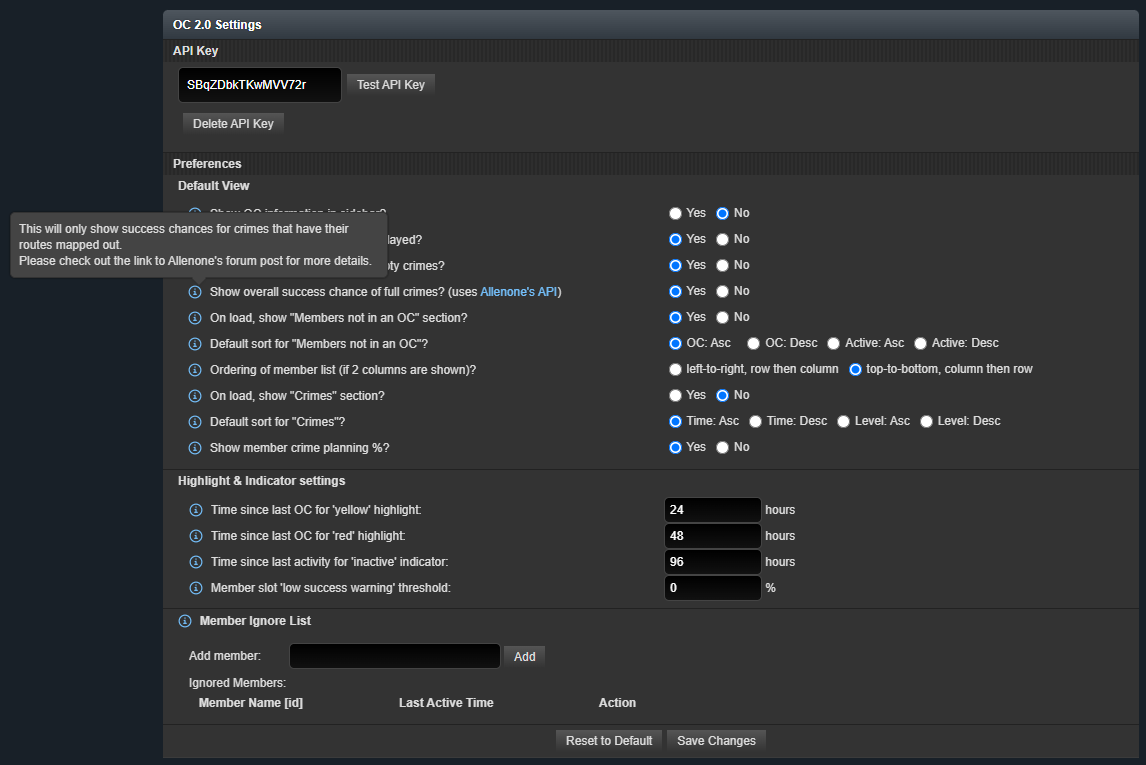
Fixed a bug where changing the display window of the browser (resizing your browser window, or swapping from portrait to landscape mode) will cause all crimes to be shown. Resizing the window now maintains your previous view.
Fixed a bug where the buttons on the settings page are sometimes rendered too far to the right of the screen in certain viewport sizes.
Fixed a bug where some browsers display a big fat ugly square next to the crime slot number, instead of the beautiful triangles that I hoped people saw.
With Easter here I've finally had some time to work on this script a little more!
Update 5.3
Updated the script to rely on 'checkpoint_pass_rate' instead of 'success_chance' or 'pass_rate' since the latter are being depreciated from the API.
Added the option to show available members down the left column, then down the right column (as opposed to the default of left, right, left right).
Look for this option in the settings page!
Added the ability for empty slots to show the API key holder's success rates for crimes that do not currently have members in them.
Look for this option in the settings page!
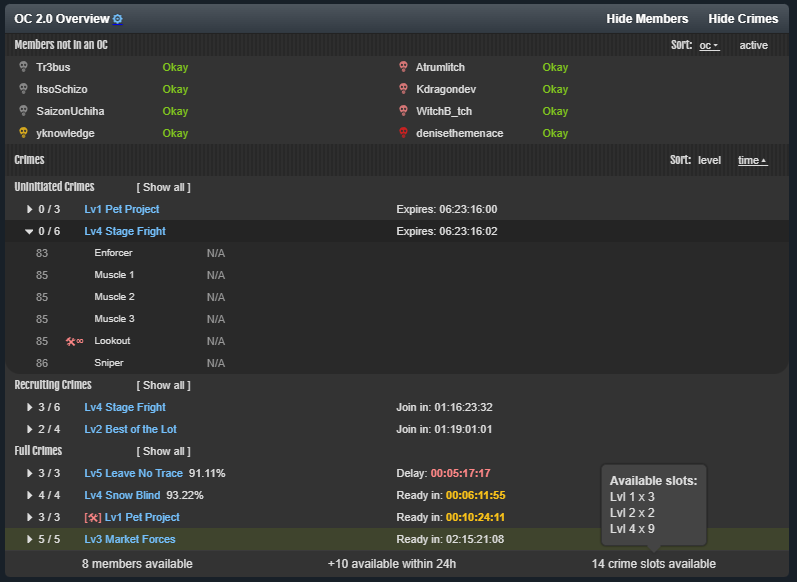
Added a summary of the number of crime slots open. Hovering/pressing on this number will tell you how many of each level crime slot you have current available.
Added a count of members in OCs that are expected to be complete within 24 hours, as well as the level of these OCs.
Added crime position numbering for crimes with more than one position with the same name (Muscle 1, Muscle 2 etc)
This will not show up on small screens or TornPDA due to the lack of available screen space
Added Allenone [2033011]'s crime success chance calculation (with their permission!). This is done via a call to their custom API (tornprobability.com).
No user information is passed on to this API endpoint. The only information provided from this script to Allenone's API endpoint are: crime name and crime slot success chance.
You are able to disable this option in the settings page. If disabled, there will be no communication with the API.
Read more on how Allenone's API works on their post.
Visual clarity improvements:
Changed the position of the arrow next to the number of slots per crime to be all the way on the left.
Increased the space between the crime icon and member names, to hopefully make it easier to click on the icon.
Added single letter indicators for crime countdown timers on small screens. Hopefully this will make it a little clearer that the timers mean different things if these indicators are different.
Changed 'Waiting' to 'Delay' for crimes that are stalled or not able to be initiated for various reasons (Hint: it's your member's fault)
Slightly changed all yellow colours to have increased contrast and better readability on light mode.
Slightly changed the wording on some settings to improve clarity (hopefully).
Added hoverable/clickable information popups to each setting on the settings page.
Added console.log messages to appear when API calls are made to torn.com (if you want to monitor how frequently these calls are made.
Bugfixes:
Improved some under-the-hood logic to stop the script from calling item names from torn's API if crimes are re-sorted.
The 'show/hide members' and 'show/hide crimes' buttons should now only appear once they are actually interactable. Maybe. I hope.
Fixed some alignment issues (I love css)
Stopped accidentally counting fallen members as available (even though they are not shown at the top of the window/widget)
Screenshots:
What Next:
I do not currently have any immediate plans to improve this script as it is already getting quite bulky for a userscript. I will continue to fix bugs that pop up, and update the script if the API changes / the needs of crime managers change.
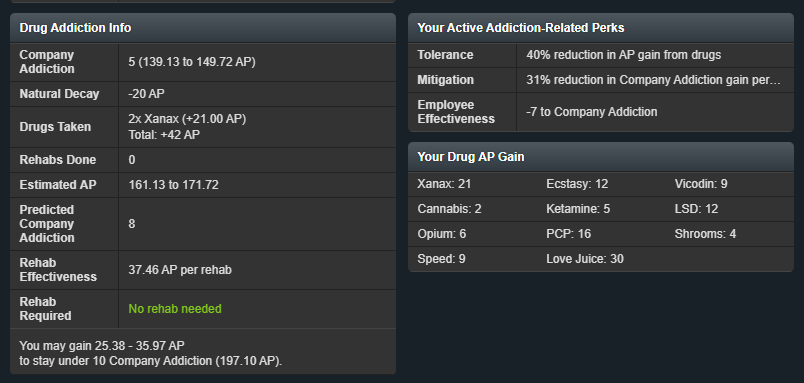
I have instead been working on a script to estimate your current addiction points (mainly to determine if you need to rehab to stay under your company director's addition level limit. Maybe I'll get it to estimate if you'll hit the 5% brain icon too so you don't risk getting kicked out of your education course?)
Sneaky pre-alpha screenshot (much subject to change):
Closing Remarks:
Please feel free to contact me via in-game chat, message, or even by endlessly bountying me. I am also on the torn discord and loot rangers discord, so you may also ping me there if you want to. I may not respond quickly due to IRL being an unpredictable mess, but I will read everything that is sent!
Thank you for your patience everyone! It's been a while since the last update due to IRL interfering with my torn life.
There's a few requested features and bugfixes in this update - I hope this will make continue to help you yell at manage your OC 2.0 members :)
Update 5.2.0
Added a button to toggle open/shut all crimes in that sub-section
Added an option to allow the timer to continue counting down after reaching 0. After reaching 0, the timer will turn red and start counting up. This can be used to see how long a crime has been waiting for a player to join, or to be executed.
Enable this option in the settings page!
I have not had a chance to bugtest this as much as I'd like, so please let me know if it breaks!
Added the option to view the crime preparation status of each member in a crime. It is written as a percentage, in parenthesis after the member's name.
Enable this option in the settings page.
Added indicators to crimes if members are either missing an item, or are below a user-set success chance.
This success chance is set in the settings page.
By default, user success chances are yellow at 51% - 75%, and red for under 50%
Setting a minimum success chance will also force-color the members' success chance as red if they are under your set chance.
Set this the value to 0 to disable the success chance indicator
Changed the API test wording to better explain when the user does not have access to faction API
Removed the 'user inactive' icon (looks like a person) next to member names, as this was not very useful.
Instead, member names will turn red if they are inactive for longer than your set threshold (set in settings)
This will hopefully stop longer names from being misaligned in small screens.
Members in federal will now correctly have their status shown as red. Additionally, fedded members' names will turn red and have a strikethrough in the member list.
Fixed a bug where changing the display window of the browser (resizing your browser window, or swapping from portrait to landscape mode) will cause all crimes to be shown. Resizing the window now maintains your previous view.
Fixed a bug where the buttons on the settings page are sometimes rendered too far to the right of the screen in certain viewport sizes.
Fixed a bug where some browsers display a big fat ugly square next to the crime slot number, instead of the beautiful triangles that I hoped people saw.
Roadblocks
Unfortunately, I have not been able to implement a way to check the online status of members. Although Torn does send a request to https://www.torn.com/chat/online-status at regular intervals, this is surprisingly difficult to intercept.
I am able to easily intercept XMLHttpRequests fairly easily (as is done for what I believe is the chat), but the online-status endpoint uses fetch - which is harder to intercept. I have tried implementing something like previously shown, and it works for small scripts. However I can't get it to work with this script. I haven't had the time to dig further into investigating what the root cause of it not working in this script is. I may look into this further, but no promises at this point in time.
What next:
I'd love to get Allenone's OC Success Chance API integrated into this script, so you are able to view a full crime's success chance. Shoutout to Allenone in reaching out and letting me know it's a thing! Can't wait to play around with it.
In regards to changing the order of the members being shown - from a left, right, left, right to down the left column and down the right column:
This is more difficult to implement then I thought. The list uses a flexbox that flexes in a row direction to create two columns. Swapping it to flex in the column direction will require a fair bit of changes to the table structure.
It is still very much on the table for a future update, but I wanted to get the above changes out first before I started tackling this in earnest.
Please feel free to contact me via in-game chat, message, or even by slowly sending a message word-by-word through a bunch of bounties. I may not respond quickly due to IRL being an unpredictable mess, but I will read everything that is sent.
I think I figured out why - it seems the API endpoint for faction/crimes (which is what the script has historically run on) no longer gives you your personal pass rate for recruiting crimes.Instead it was moved to user/organizedcrimes
I think I can work with this, but it means the script will need to make an additional API call.
However as a bonus, I think I can make this script work for non-faction API key owners to highlight available crimes + their current crime in the UI ... guess i"ll be making an update after all
Fixed settings page (it now appears at the bottom of TORN's settings page), fixed a couple of bugs.
I apologize to everyone for taking forever to fix the settings page and the previously reported bugs. I have not been able to actively continue development of this tool due to irl being busy.
Honestly I do not think I will be able to actively continue to add features, but I can commit to fixing bugs again.
(Hopefully at least, because I will not have faction API access for long. I will be moving from a leadership role in my current faction to a different faction that will mean slightly less of a commitment to TORN from me so I can focus on irl stuff. I doubt my new faction will give me faction API access immediately)
While you are flying you are able to see which roles are empty and which ones are filled - is this what you mean?
Perhaps I am misunderstanding what you are asking for. Could you please give an example of what you would like to see?
(also, a few quickfixes are coming related to clearing the member ignore list for members that have left the faction, as well as the settings page not loading properly on iOS devices)
As Allenone said above, it is the custom API endpoint that I mentioned in the patch notes.
In hindsight I should have clarified that the URL is tornprobability.com. I will edit the patch notes to include this information.
If you disable the success rate option in the settings menu, all API calls to tornprobability.com will be skipped (in return you won't get the success rate of crimes that have their paths mapped out)
With Easter here I've finally had some time to work on this script a little more!
Update 5.3
Updated the script to rely on 'checkpoint_pass_rate' instead of 'success_chance' or 'pass_rate' since the latter are being depreciated from the API.
Added the option to show available members down the left column, then down the right column (as opposed to the default of left, right, left right).
Look for this option in the settings page!
Added the ability for empty slots to show the API key holder's success rates for crimes that do not currently have members in them.
Look for this option in the settings page!
Added a summary of the number of crime slots open. Hovering/pressing on this number will tell you how many of each level crime slot you have current available.
Added a count of members in OCs that are expected to be complete within 24 hours, as well as the level of these OCs.
Added crime position numbering for crimes with more than one position with the same name (Muscle 1, Muscle 2 etc)
This will not show up on small screens or TornPDA due to the lack of available screen space
Added Allenone [2033011]'s crime success chance calculation (with their permission!). This is done via a call to their custom API (tornprobability.com).
No user information is passed on to this API endpoint. The only information provided from this script to Allenone's API endpoint are: crime name and crime slot success chance.
You are able to disable this option in the settings page. If disabled, there will be no communication with the API.
Read more on how Allenone's API works on their post.
Visual clarity improvements:
Changed the position of the arrow next to the number of slots per crime to be all the way on the left.
Increased the space between the crime icon and member names, to hopefully make it easier to click on the icon.
Added single letter indicators for crime countdown timers on small screens. Hopefully this will make it a little clearer that the timers mean different things if these indicators are different.
Changed 'Waiting' to 'Delay' for crimes that are stalled or not able to be initiated for various reasons (Hint: it's your member's fault)
Slightly changed all yellow colours to have increased contrast and better readability on light mode.
Slightly changed the wording on some settings to improve clarity (hopefully).
Added hoverable/clickable information popups to each setting on the settings page.
Added console.log messages to appear when API calls are made to torn.com (if you want to monitor how frequently these calls are made.
Bugfixes:
Improved some under-the-hood logic to stop the script from calling item names from torn's API if crimes are re-sorted.
The 'show/hide members' and 'show/hide crimes' buttons should now only appear once they are actually interactable. Maybe. I hope.
Fixed some alignment issues (I love css)
Stopped accidentally counting fallen members as available (even though they are not shown at the top of the window/widget)
Screenshots:
What Next:
I do not currently have any immediate plans to improve this script as it is already getting quite bulky for a userscript. I will continue to fix bugs that pop up, and update the script if the API changes / the needs of crime managers change.
I have instead been working on a script to estimate your current addiction points (mainly to determine if you need to rehab to stay under your company director's addition level limit. Maybe I'll get it to estimate if you'll hit the 5% brain icon too so you don't risk getting kicked out of your education course?)
Sneaky pre-alpha screenshot (much subject to change):
Closing Remarks:
Please feel free to contact me via in-game chat, message, or even by endlessly bountying me. I am also on the torn discord and loot rangers discord, so you may also ping me there if you want to. I may not respond quickly due to IRL being an unpredictable mess, but I will read everything that is sent!
Top! is it possible to add a Button to copy the names from members who arent in a crime? Or maybe create an automatic faction message including there names? right now its not easy to copy the names on my Smartphone!
I was halfway making something like this, but it seems that you can now send faction mail to people who are not in OCs. Does this solve your want? If so I won't keep working on this.
I'm showing a *severe* mismatch between crime countdown in the API and user interface. Is this an issue with the API or the script?
The OC I'm in (red pen, OC that spawned, not purchased) shows 4 days 9 hours on UI but 2 days 9 hours on script.
Spawned OCs (yellow highlight) are showing a countdown on the script but are not showing a countdown on the page (apparently we're the only faction experiencing this, I am wondering if a faction member joined each one and then left it...?). The script-visible countdowns match the countdowns that were visible this morning before they suddenly stopped showing a countdown.
Purchased OCs that were purchased today are showing timers consistent with a 3 day timer, but are not showing a timer on the user interface (they may show a timer later on? Idk.) - that is unless someone has joined them in which case they are showing less than 24 hours (purple highlight).
This may be poor communication from my script, and I apologize for it. On a wider screen, there is enough screen space to have a little extra text that explains what these timers mean.
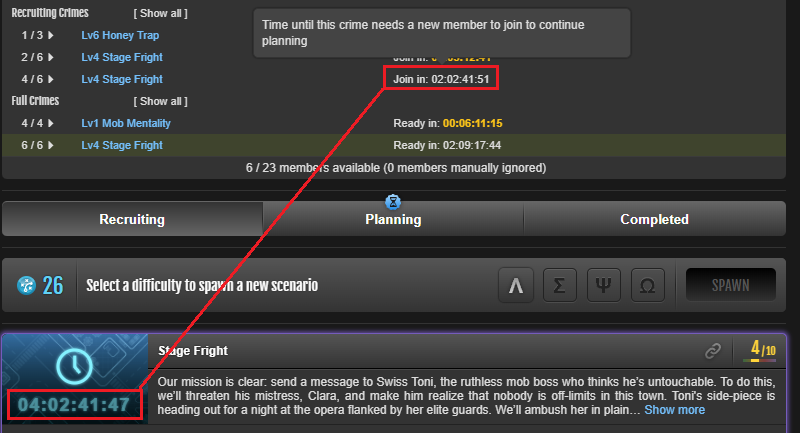
red OC/purple OC: The built in UI's script's timer is a countdown to the estimated start time of the crime, assuming that enough members join said crime. If not enough members join, the timer will pause and will stop counting down.
On the other hand, the script shows how much time there is until a member needs to join to continue planning the crime.
In this case, the crime needs another 4:02:41:47 to run if members join on time. If the crime stays at 4/6 when there is 2:00:00:00 left on the clock, the UI timer will pause.
The script instead shows that a member needs to join in 2:02:41:51 in order for the crime to not stall.
In the case that a crime does stall, the timer will instead either pause at 0:00:00:00 (denoting that a member needs to join this crime) or will turn red and start counting up (depending on your settings)
----------------------
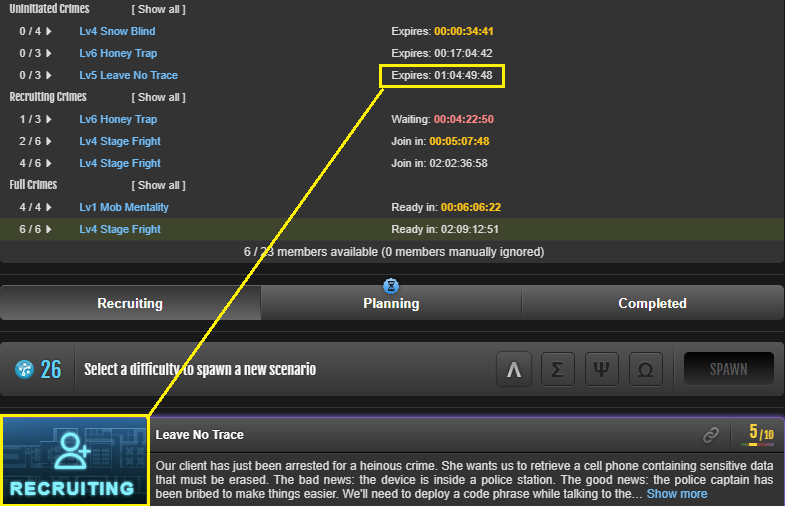
yellow OC: The script does pull data directly from the API, so I suspect that this is just similar to previously randomly spawned crimes where crimes with > 24h of expiry simply doesn't show its expiry time, instead showing 'Recruiting'.
I am unsure why these spawned crimes showed an expiry timer earlier today but no longer do. It could be a change on torn's side when they patched in purchased crimes which caused the timers to show before another quick patch then removed the timer again. Or maybe your suspicions are correct and it is because someone joined and left.
----
In any case, you can tap the timer which hopefully should bring up some text that explains what the timer is counting down to.
If you feel that these texts can be worded better, I'm very open to suggestions!
Thank you for your patience everyone! It's been a while since the last update due to IRL interfering with my torn life.
There's a few requested features and bugfixes in this update - I hope this will make continue to help you yell at manage your OC 2.0 members :)
Update 5.2.0
Added a button to toggle open/shut all crimes in that sub-section
Added an option to allow the timer to continue counting down after reaching 0. After reaching 0, the timer will turn red and start counting up. This can be used to see how long a crime has been waiting for a player to join, or to be executed.
Enable this option in the settings page!
I have not had a chance to bugtest this as much as I'd like, so please let me know if it breaks!
Added the option to view the crime preparation status of each member in a crime. It is written as a percentage, in parenthesis after the member's name.
Enable this option in the settings page.
Added indicators to crimes if members are either missing an item, or are below a user-set success chance.
This success chance is set in the settings page.
By default, user success chances are yellow at 51% - 75%, and red for under 50%
Setting a minimum success chance will also force-color the members' success chance as red if they are under your set chance.
Set this the value to 0 to disable the success chance indicator
Changed the API test wording to better explain when the user does not have access to faction API
Removed the 'user inactive' icon (looks like a person) next to member names, as this was not very useful.
Instead, member names will turn red if they are inactive for longer than your set threshold (set in settings)
This will hopefully stop longer names from being misaligned in small screens.
Members in federal will now correctly have their status shown as red. Additionally, fedded members' names will turn red and have a strikethrough in the member list.
Fixed a bug where changing the display window of the browser (resizing your browser window, or swapping from portrait to landscape mode) will cause all crimes to be shown. Resizing the window now maintains your previous view.
Fixed a bug where the buttons on the settings page are sometimes rendered too far to the right of the screen in certain viewport sizes.
Fixed a bug where some browsers display a big fat ugly square next to the crime slot number, instead of the beautiful triangles that I hoped people saw.
Roadblocks
Unfortunately, I have not been able to implement a way to check the online status of members. Although Torn does send a request to https://www.torn.com/chat/online-status at regular intervals, this is surprisingly difficult to intercept.
I am able to easily intercept XMLHttpRequests fairly easily (as is done for what I believe is the chat), but the online-status endpoint uses fetch - which is harder to intercept. I have tried implementing something like previously shown, and it works for small scripts. However I can't get it to work with this script. I haven't had the time to dig further into investigating what the root cause of it not working in this script is. I may look into this further, but no promises at this point in time.
What next:
I'd love to get Allenone's OC Success Chance API integrated into this script, so you are able to view a full crime's success chance. Shoutout to Allenone in reaching out and letting me know it's a thing! Can't wait to play around with it.
In regards to changing the order of the members being shown - from a left, right, left, right to down the left column and down the right column:
This is more difficult to implement then I thought. The list uses a flexbox that flexes in a row direction to create two columns. Swapping it to flex in the column direction will require a fair bit of changes to the table structure.
It is still very much on the table for a future update, but I wanted to get the above changes out first before I started tackling this in earnest.
Please feel free to contact me via in-game chat, message, or even by slowly sending a message word-by-word through a bunch of bounties. I may not respond quickly due to IRL being an unpredictable mess, but I will read everything that is sent.
Thank you everyone for your continued interest, and to Allenone in answering the API key error!
Amazing script, thanks a ton! Any chance of a setting to highlight crimes where somebody is missing a required item in the overview?
Good idea! I'll work on adding this in the next update.
I would LOVE to have a way to see the current online status of my faction members in the "Members not in an OC" list. I sort the list by Active:Asc but it would be great to just have a one look way to see who is online/idle as those are the people I would like to ping to get into a crime.
I've toyed with this idea, but kept coming back to one problem: the online status will be based on when the page loads since it needs an API call. As such, it won't be accurate after a minute or so. I really don't want to make a call every ~30 seconds if possible. Perhaps I could add in a toggle with a disclaimer that the information is only accurate at the time of page load - I'll play around with it and see how it turns out.
In the Crimes sections, it would be awesome to have an "Expand All" function to expand all crimes in a particular section. Maybe a hotlink on the "Uninitiated Crimes", "Recruiting Crimes", and "Full Crimes" text themselves (or just next to them) that expands all the crimes in the respective section would be REALLY handy. I find myself having to click a lot of times to expand them all when a one click would be incredibly helpful.
I like this idea 👀 and will work to implement it.
In the Crimes section, it would be great to be able to see the current status of the preparation for each member. (Knowing the percent complete or completely complete for their crime slot would be good to know as sometimes I would like to contact that member to swap into a different crime/slot, but I don't want to do that if their preparation is in progress.
Also a good idea, didn't consider that this information could be useful! Will be adding this in the next update.
Next update might take a little bit longer since I'm hitting a busy period at work, and Valentine's is this weekend. Will still be reading the forums and any messages sent, so feel free to contact me!
Lewri is correct, unfortunately this will end up bloating the number of API calls due to needing to get the personalstats of each member for this information.
It's doable but expensive for this script. Maybe some sort of spreadsheet where you can see members' stats might be more suitable?
Apologies for the late response, lunar new year has been a busy period!
Update v 5.1.0
Fixed a bug that counted recruits in the number of available members. A list of recruits (if you have any) now show up if you hover over the "x/y members available" text.
Changed the hover text for members not in crimes - now shows last OC joined and last activity in one single hover instead of in separate hovers.
Improved the UX for screen readers (particularly for those that navigate using keyboard)
Please reach out if anyone using a screen reader still has issues with using the script!
Don't suppose you could do a standalone script for the OC countdown on the sidebar? I like the default crimes screen but having the countdown just adds a little QoL.
Thanks :)
Edit: Thought it changed the crimes page. Makes sense now after installing. My bad! It's a really nice overview :)
Thank you very much!
I will be releasing a small script for people without OC permissions to be able to view their OC status on the sidebar. It will quickly become obsolete once the status icon is released though...
Hello, the script says I have 10 members available for OCs, but I have 9, I do have 1 recruit, maybe it is including recruits, if so, could that be altered to not include recruits?
This has been fixed in the latest update v5.1.0! Recruits now don't show up when calculating the number of available members. If you hover over the number of members available, a list of recruits (if any) that are unavailable for OCs will now show up.
I seem to have messed up the page loading logic for this case when rearranging the script before releasing it. Will work on a fix when i get back from work later today :)
Added extra indicators in the member list (shoutout to Lewri [1762864] for helping with the logic behind this!)
Indicator for members that have been inactive for X amount of time
Indicator for members that have not participated in an OC for X amount of time
Indicator for members that have not participated in ANY recent OCs
Time since last OC should account for OCs that were stalled, by using the executed_at data from crimes where available
Added the ability to sort members by time since last OC or time since last activity.
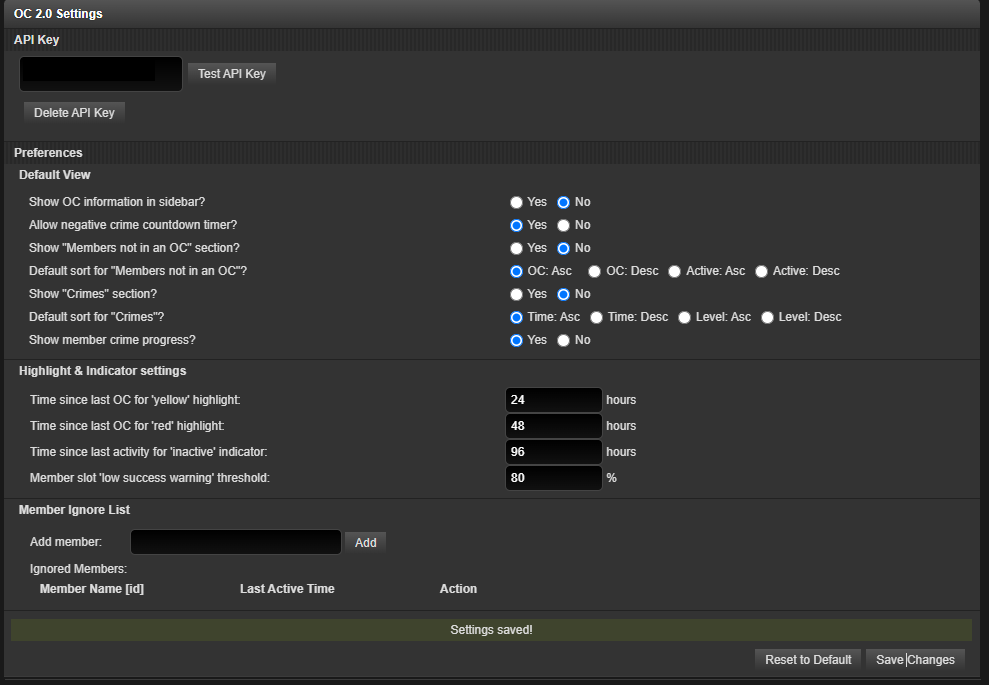
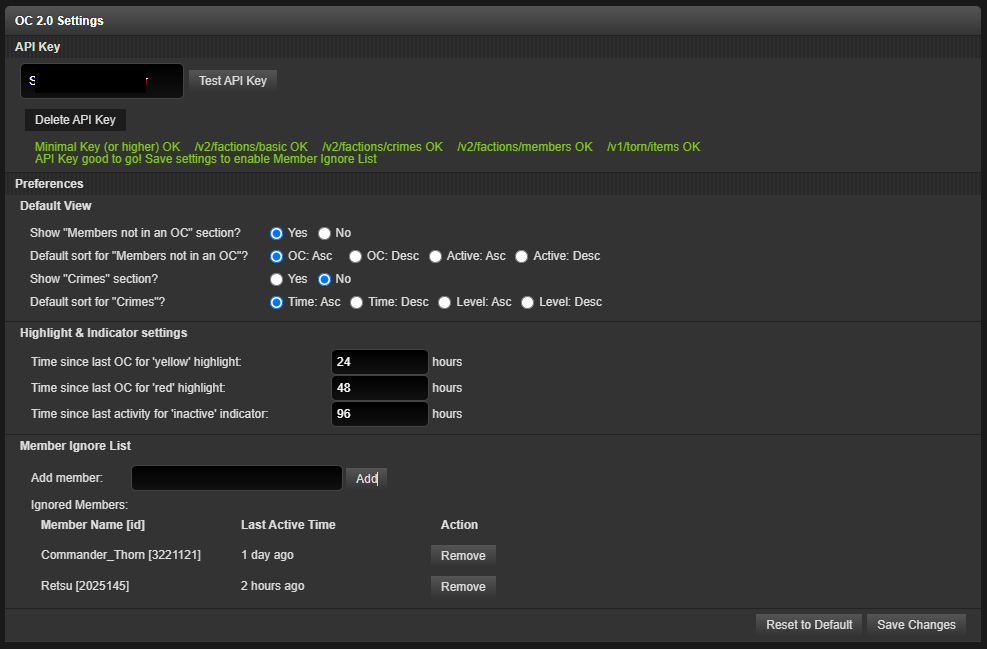
Added a settings page where you can set your preferences for the above amount of time, as well as default sort
Settings page can be accessed by the dropdown menu OR a cog icon on the OC 2.0 overview section
The settings page may take a second or two to load. If you see the 404 page pop up please don't immediately panic! If the page doesn't load for over a minute, feel free to panic and post about how useless I am.
Added the ability to add members to an ignore list so that they do not show up in the list of slacking members.
You will need to manually add and remove members from this list in the settings page.
Hitting 'reset to default' will remove all members in your ignore list.
Changed the logic of the API key saving so that you can actually change your API key now. API key changing is also moved to the settings page
Added the ability to test an API key before saving it to make sure it works
Added the ability to delete the API key that was previously saved
The 'reset to default' button does NOT delete your saved API key. You must press the 'Delete API Key" button in the API Key section.
TornPDA users: Since this userscript uses the API key given to TornPDA, you will be unable to modify or delete the saved API key from the settings screen. Please let me know if you have concerns about this!
The OC 2.0 overview section now shows up even if the API key returns an error, and will tell you to set an API key (please note that it will still only show up at the factions#crimes page when in torn, and on the faction page when traveling.
Slightly changed the sidebar OC 2.0 text - your position and success rate is now shown on mouseover (still unsure how to best deal with this)
Fixed a tornPDA bug where the table is sometimes rendered multiple times. At least I hope I did...
There is a known bug where swapping between tabs in the faction page too quickly may sometimes cause a duplicate of all crimes to appear. A refresh fixes it. Still trying to figure out how to stop it from happening.
API v2 calls now use pass the API key in as an Authorization header instead of the query parameter. Auth headers don't seem to work for v1 calls so they are still passed in the old way.
Screenshots
(sorry its all dark mode screenshots this time, but rest assured that I did test it for light mode compatibility)
Re: other requests
So I was looking around for something that might display my personal OC CSR on occupied OC roles. (Potentially next to or near the role occupants OC CSR, not replacing it)
I would like to document my CSR and monitor changes and growth without waiting for OCs to spawn with open roles so I can document the % in my notes before someone steps into the spot and thus replacing my CSR with theirs, would this potentially help with my spreadsheet and OC 2 research paper? Or might it be something you would consider adding to your script?
Unfortunately this is outside the original scope of the original intent of my script. I can look into this further and see if I can make something different for you, but not promises at this point in time.
Would love to see an icon showing when you are in an OC but i can understand the limitation with this script being on a single page only, and the need for API calls - wouldn't want an API call on every page to insert the image. Hopefully torn add this themselves soon
This... may be doable, but I feel it will be redundant quickly once Torn adds this themselves. I remember seeing a staff member mention that it's on their to-do list. However I don't recall where that reply was.
Closing Remarks
As usual, please feel free to reach out in any way you'd like if you have any questions/suggestions/concerns. I promise I do read them although I may not reply straight away.
Sometimes a direct message in Torn might be better since I keep forgetting to check the forums.
Thanks again to everyone for giving this script a try!
It was a large update this time around and although I did give it a good shot at testing all the features, there is a very good chance that I missed a few bugs. Please let me know if you encounter them and I will try my best to fix them ASAP!
Added the ability to sort the OC's displayed by level or time (click on the relevant option to swap between ascending/descending order)
Made the member list more compact on to save screen real estate (2 columns instead of 1)
TornPDA users: unfortunately the small screen stays because devices have small screens
If anyone is using TornPDA on a device with a large enough screen such that the styles are broken, please let me know! I do not have such a device and am unable to test how the styles work on it!
Removed the [12345] id number next to member names to allow for more compact styling, and made the member name itself a link. Please let me know if this is annoying.
Future goals:
Ability to add members to a manually maintained 'ignore' list so that they don't show up in the members not in OCs list.
Some sort of settings/preferences page that allows you to slightly tweak your experience (eg. default sort mode, the aforementioned ignore list, number of columns for non-participating members etc.)
An indicator to highlight non-participating members who have not joined an OC for X amount of time
An indicator for members that have been offline of X time and are not on the ignore list
[...] as a suggestion if possible at last time online next to status or change color to red if offline more than 1day.
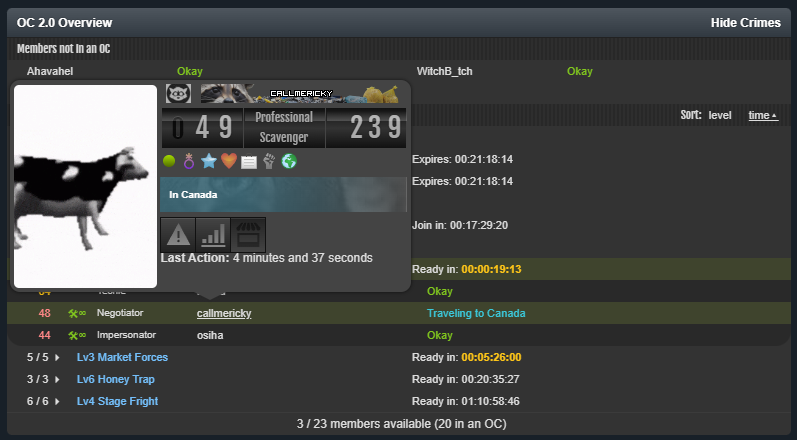
You can sort of do this by long-pressing on the member name. It will produce a small window that shows the last action.
Torn does this by default on anything that links to a user's profile!
I do plan to have some sort of indicator for members that have been away for a while, look forward to a future update!
Thanks everyone for giving my script a try!
Feel free to reach out in any way you'd like if you have any questions/suggestions/concerns. I promise I do read them although I may not reply straight away.
By default, the script should ignore Recruits and Fallen members, but I can't test it directly. If your faction has any of those and they are showing up on the non-participating list, please let me know!


![[image: greasyfork.org]](https://greasyfork.org/rails/active_storage/blobs/redirect/eyJfcmFpbHMiOnsiZGF0YSI6MTYxNjgwLCJwdXIiOiJibG9iX2lkIn19--3e242b521b98872edcde0c54d2c1c931999628e3/sidebar%20notification.png)