Skip to content
TORNLIFE More

xentac: forum

xentac [3354782] Level 90 Hospital Aquarius AQUA Captain

Forum posts (Torn's count)
90 observed
Archived posts
78
Threads started (archived)
7

Boards

From the 78 newest archived posts.

Threads started

Most-liked posts

Likes as archived at fetch time, adjusted for how long each post had been up. Scored posts only; the full score pass runs after the import.

Torn War Stuff Enhanced · · 139 likes

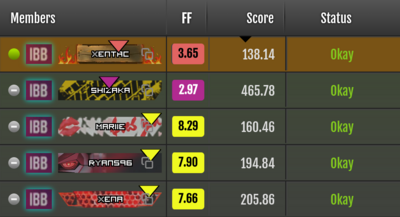
TL;DR - Install Torn War Stuff Enhanced for even better war monitoring! This script only affects the Ranked War and Raid box at the top of the faction pages.


[image: reallybad.ninja]


Do you already use the Torn War Stuff script to monitor your wars and wish it just did more? Do you wish you could see who is coming out of the hospital next or which targets can be hit to keep a chain going?


Check out Torn War Stuff Enhanced by me, xentac! Features adopted from the original Torn War Stuff script

  • Sort opposing faction members by time left in hospital
  • Add traveling information
  • Highlight targets with < 5 minutes left on their timers


The enhanced script adds all these features:

  • Count time down instead of giving it in TCT
  • Highlights targets in foreign hospitals (no other script seems to do this!)
  • Works on both opposing and your own faction! (most scripts don't do this)
  • Supports jail timers
  • Addresses time skew so your device time won't make you miss someone coming out of the hospital
  • Adds Tampermonkey menu for API key configuration and uses the default Torn PDA key


There are also a few technical improvements that might make people happier as well

  • Doesn't use setInterval, so processing only happens when the tab is visible (shouldn't overload the torn api with multiple tabs open, torn pda is happier too)
  • Doesn't rewrite the DOM except to add data variables and sort rows so Torn's react auto-updating should be less affected (Torn still sometimes breaks their auto-updating all by themselves so this will not be perfect)
  • Uses a single purpose update loops, so rows should only be in one state and not flick back and forth between numbers.
  • Properly handles error codes returned by Torn API (don't get your IP blocked for entering an incorrect API key)


I've also worked with Weav3r so FF Scouter V2 works with as many war scripts as I can find (except Potato War Timer, talk to me if you want to make it compatible!). Feel free to install this one and it will automatically disable Weav3r's updates.


Setup


Torn PDA will automatically use your Torn PDA key to poll faction data. The script should make about 12 req/minute and updates status within about 9 seconds of changes.


Use the tampermonkey menu to enter your key while on the faction page.


[image: reallybad.ninja]


Improvements and bug reports


Feel free to reach out if you find any problems or anything you'd like to add. I've been using this script personally every week (in my previous faction) for a few months as has everyone else in a few other factions. I expect most of the bugs have been worked out, but I'm sure people will find many more.


I do have less time to work on this now, but the script is also available on github if anyone wants to submit pull requests!
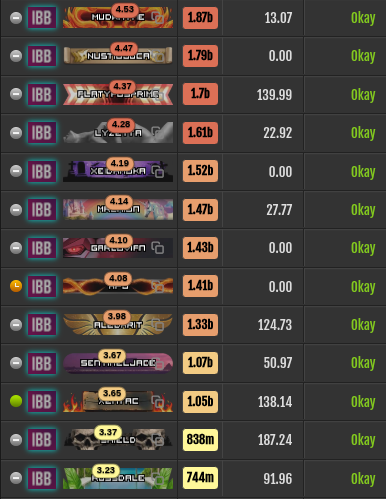
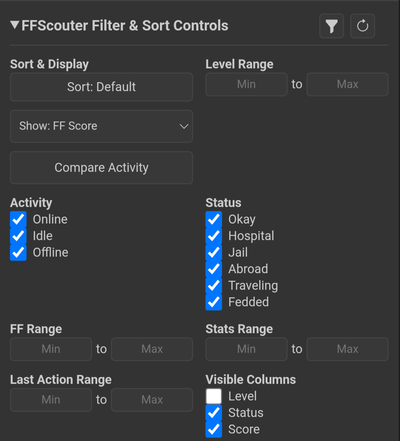
FF Scouter V2 (3.0) and Torn War Stuff Enhanced (2.0) released! · · 49 likes

Today I am pleased to announce that FF Scouter V2 and Torn War Stuff Enhanced have new stable releases.


These releases are the culmination of more than 7 months of development to nearly fully rewrite both scripts. Not only do both scripts receive a whole pile of new features, they are also more efficient!


Install them here:


https://greasyfork.org/en/scripts/535292-ff-scouter-v2
https://greasyfork.org/en/scripts/529238-torn-war-stuff-enhanced


FF Scouter Features

  • FF/Est display on profile pages, faction member lists, ranked war pages, attack pages, the item market, mini-profiles, and the Russian Roulette page
  • Faction and ranked war sorting and filtering
  • A floating "FF" button to cycle through chain targets matching your filters
  • Flight estimates for traveling players on profiles and mini-profiles (FF Scouter Premium)
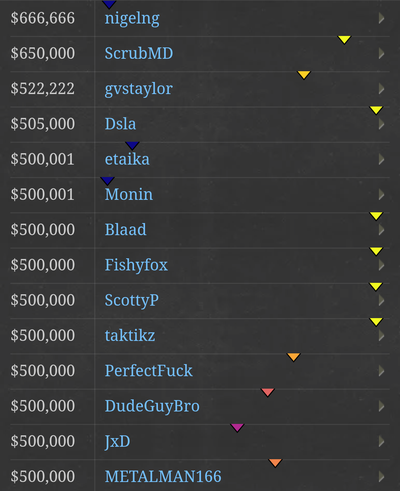
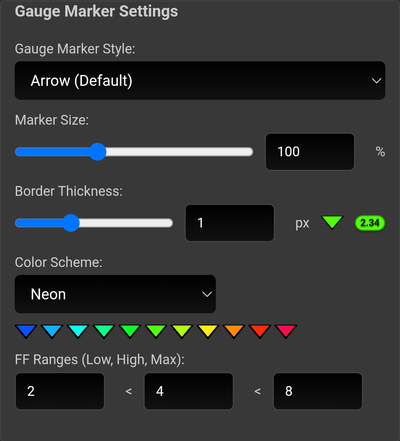
  • Configurable gauge marker style (arrow or bubble) and color scheme for FF/Est values
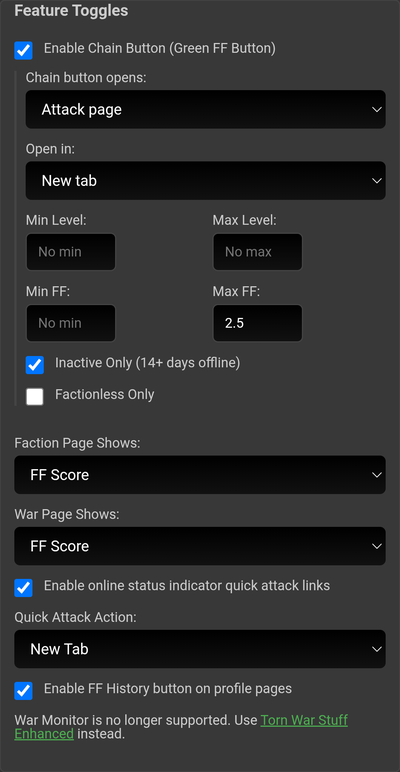
  • Quick-attack links from online/idle/offline status indicators
  • A link from player profiles to their full FF history on ffscouter.com
  • Install both FF Scouter and Torn War Stuff Enhanced to enable additional features:
    • Filter by last action
    • Sort ranked war member lists by hospital timers


Screenshots

Faction war box with Est columns and FF bubbles


Faction filter settings


Plasma colour theme with arrows


Premium estimates on profile pages


FF gauge settings


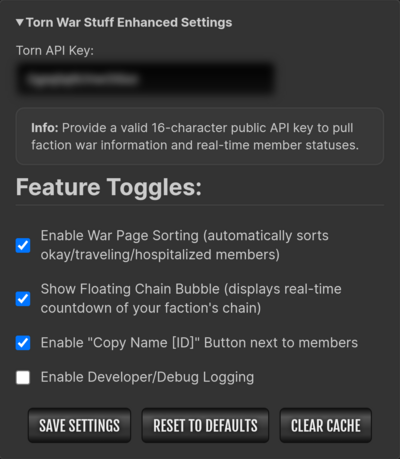
Feature settings


Torn War Stuff Enhanced Features

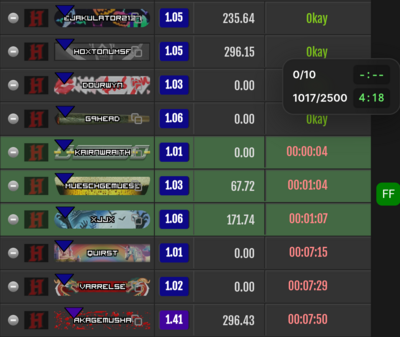
  • Real-time hospital countdown timers and travel destinations overlaid on each member's row
  • Sorts faction members by Okay/Hospital/Departing/Abroad/Returning
    Members who land or med/revive early are sorted to the top of the Okay section and highlighted (if window focused)
  • Chain count and timers always on screen
  • Quick copy `Name [ID]` of a player by clicking on the right side of their honor bar
  • Optional Torn API status sharing (via the TWSE Server) to ensure up-to-date timers
  • Tuned for efficiency: the most features and lowest performance impact of any war monitoring script!
  • Install both FF Scouter and Torn War Stuff Enhanced to enable additional features:
    • Premium users can see flight estimates
    • Filtering by last action
    • Sorting by FF/Est


Screenshots


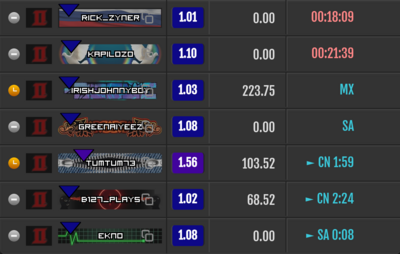
Hospital timers (including < 5 minute green highlight) with chain bubble


Orange med out/landed highlight


Settings panel


FF Scouter Premium flight estimates


Conclusion


The greasyfork pages have additional details and documentation.


I hope everyone enjoys the new updates!

Torn PDA Chaining section · · 45 likes

I've had some questions about how to use the Torn PDA Chaining area, so I figured I'd write up some notes.


This is not a guide on how to chain (Chaining Guide (Infographic), Chaining 2.0: A Guide to Respect), where to find targets (TAC Targets Updated, https://www.torntargets.com/), or how to chain watch (Undo's Guide to Chain Watching, [GUIDE] Chain Watching). There are many great guides for those topics that I won’t be covering.


First of all, why not just use the browser to chain? It's entirely possible to do that, but Torn PDA offers a lot of things to help make chaining easier that can't be done easily with just a browser:


  • Monitoring hospital status
  • Panic mode
  • Notes
  • Historic Respect and Fair Fight numbers
  • Sorting by location, activity, hospital status, or remaining life
  • Monitor both factions and an arbitrary list of chaining targets


There are some downsides to depending on Torn PDA only for managing chains, the biggest being that it has to poll for its updates so it can't show you if people med out of the hospital or if the chain has been saved already (until it asks the servers for the updates). Full coverage is only possible using all available tools.


How to get to the Chaining area


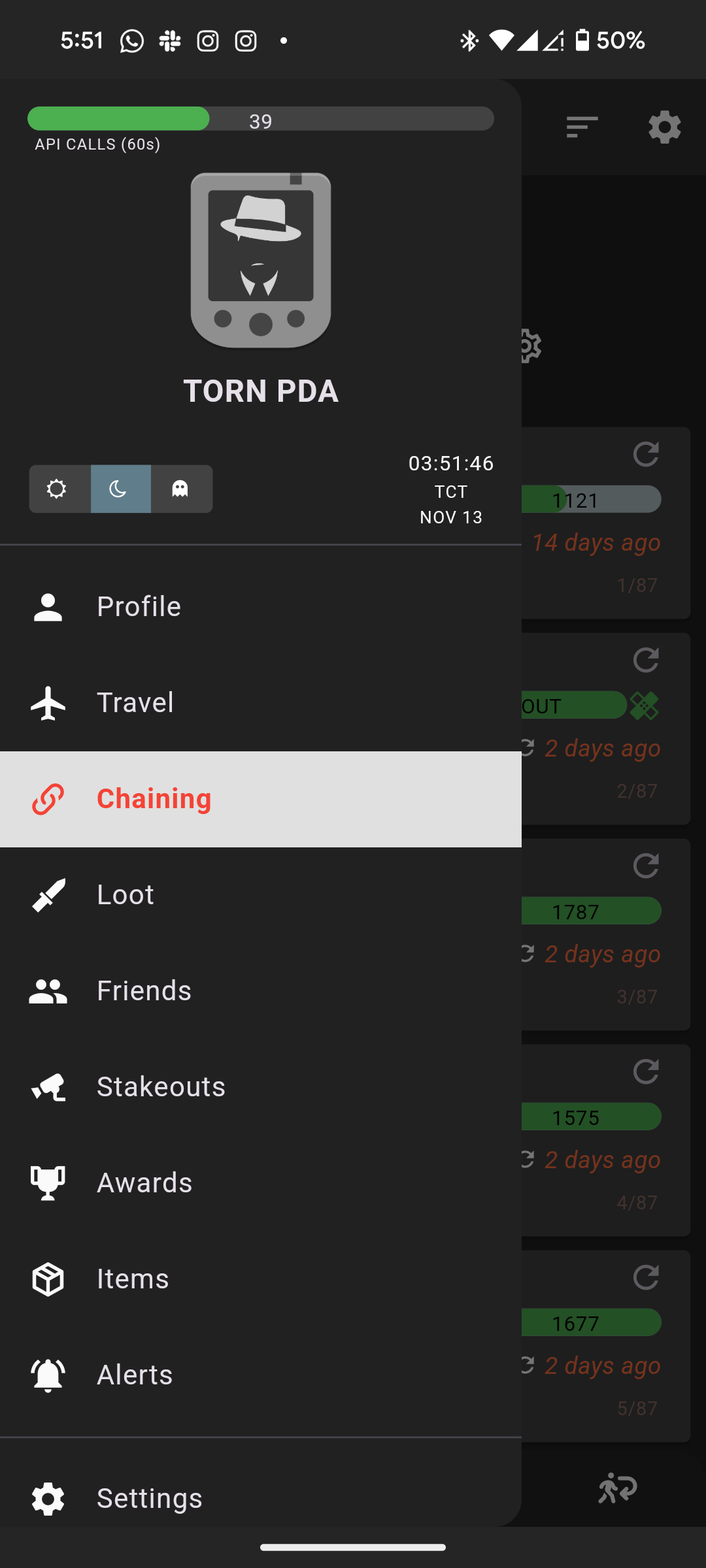
Click the hamburger menu (three bars) in the top left and click Chaining.


Targets chaining tab


The Targets Chaining Tab has a lot of information on it. Don't be afraid, we'll walk through it. When doing a regular chain, this is where you'd spend a lot of your time.


[image: reallybad.ninja]


Navigation is at the bottom. We're currently on the Targets tab, but there is also Attacks, War, and Retaliation. I'll mention them a bit, but let's stay focused.


  1. This is one of the ways you can add new targets. Just paste their player id and they'll be added to your chaining list. I don't normally add targets this way, but it's there if you need it. I'll go over a few other ways later.
  2. This is the global refresh button. It does a "quick" refresh of everyone's status. It doesn't refresh stat estimates. After you've burned through your chaining targets, you'll hit this to see who is available to be hit again.
  3. This is the attack button. When you have an appropriate target, touch it and you'll be brought directly to their attack screen with the browser in "attack" mode (more on this in the Attacking section).
  4. This shows your previous Respect and Fair Fight score so you can pick the best targets for the right times
  5. This shows their last activity (not sure if this is updated when you click the global refresh)
  6. You can write any notes you want about your chaining targets. You can also assign colours to them, red being hardest, green being easiest.
  7. Refreshes the individual card. Do this to check additional information not updated by the global refresh or to just update that individual row.
  8. Shows when the last refresh was. How fresh is the data.
  9. Sort the target list. Ones I might use regularly are "respect (des)" (high respect is good for chains), "life (des)" (who will be easiest to kill because they're already weakened), "hosp. time (des)" (who comes out of the hospital next).
  10. Yata sync. You have Yata hooked up to Torn PDA right? This way you will have a backup of your chaining list in case your phone is crushed in an accident on a construction site.
  11. Chain timer, how much time is left on the chain (this is one of the values that isn't updated as quickly as the website. You will get the correct value after you click the global refresh button).
  12. Chain length, including the next bonus target. Also not updated except when requested.
  13. Energy level, can I even attack anymore?
  14. Does anyone know what this line means? I thought it meant progress to next 5 energy increment, but I'm not 100% sure on that.
  15. Watch mode. This is useful for chain watching, but also only works while the phone screen is on. Your phone should be plugged in when you use this. The sides of the screen will change colour based on how much time is left on the timer, it will also have an audio and vibrate alert depending on how close the chain is to ending.
  16. Panic mode. I've only used this a bit. I believe you select panic targets and if the chain gets too low your phone will open the attack screen on a random panic target of your choosing.


Each row can be swiped left or right. Swiping right lets you remove the target and swiping left lets you add them to your panic list.


The "i" with a circle around it gives you information about the opponent.


Attacks tab


This tab lists all your most recent attacks and gives you a quick button to add them to your chaining list (green plus with a circle around it) or remove them from your chaining list (red minus with circle).


War tab


This is where we war. It gives you quick information about the opposing faction, but a lot of it is the same as the Targets tab.


You probably don’t want the warring faction on your chaining list because some of them might be too strong for you or you might be saving them for your lower level faction mates to attack. This is why I don’t add these targets to my chain list and use the pin feature instead.


[image: reallybad.ninja]


  1. This is the quick add for factions and also where you filter out factions from the list (touch the eye to make them visible or invisible).
  2. Oh look, the refresh button moved.
  3. The Ranked Wars area. I didn't realize, but you can add the opposing faction here by going to the "Upcoming" section and touching the green plus with a circle around it.
  4. Filters, very important. Green/red is active/inactive. Checkmark/plus is Okay/in hospital. Pin is only pinned opponents (more on this below). Airplane/no airplane is outside torn/inside torn. Chain hides or shows the chain info at the top of the screen. Clicking any of them requires a refresh, so be patient.
  5. This position is the quick torn pda estimate data. The highlighted one estimates their battle stats between 200k and 2.5M (this is using a fairly accurate method, but there's no way to reduce the range) and they have taken more Xanax than me (red), about the same amount of energy Refills (orange), exactly the same amount of stat Enhancers (white), and more Cans than me. If there were any that were less, they'd be green. The i with a circle around it brings up the various estimators. If it says "unk stats" press the circle arrow to refresh them. These are only refreshed once.
  6. Travel and idle status. If someone is flying from or to somewhere, it will show up there. It will also show when they were last active (now vs. inactive vs. idle). These statuses aren't updated until you refresh, so it can't show you someone who has medded out or become active since your last refresh.


You can swipe these rows right to Hide or Pin them or left to add them to your panic list. I will Pin all opponents that I can hit in the faction and they will get a green box around them and be brought to the top of the list. I can still see the other scary people in the faction but I won't accidentally think I can attack them.


Something else I like to do is add my own faction to this area. That way if I need a quick way to see where everyone has flown to or if anyone is coming out of the hospital soon, I can hide the opposing faction and make my own faction visible (tap the eye under the faction + button (1)). Great for situational awareness on mobile.


You can also add someone to your chaining list with the green plus with a circle around it, if they piss you off.


Retaliation tab


If you end up on a tab that gives you a big red API error, you have reached the Retalation tab. Given Faction API (AA) access, you will see targets who have recently hit your faction mates. Without Faction API access, you will just see an error. Go to one of the other tabs.


Attack screen


Now you actually want to attack someone, let's see what it looks like.


[image: reallybad.ninja]


  1. Shows and hides the chain info, like on the other tabs.
  2. Opens your medical item area. Only works when you're not actively in a fight. Touch it, then choose Personal or Faction, tap your quick items, then tap the back arrow in the top left to get back to your target. Really great for a quick heal between fights.
  3. The Next Target button. Really useful for chaining, it will switch to the next available chaining target (based on the previous refreshed data, so popular chaining targets might have been hospitalized since).
  4. Quick add/link popup. Add the opponent to your target, stakeout (something not covered here), panic, or war faction lists. Also easily copy their id or a link to their profile.
  5. The Torn PDA stats estimate for the target. Same as the short one, a little easier to read, and also include networth.
  6. This is where the accurate chain timer would show up. Trust this one to show you when other people have completed a hit. It might still lag a bit, but it's as up to date as you can get.
  7. X back to the chaining area. Don't use your phone back button because it'll go back to the previous browser page.


If you ever get stuck in the chaining UI, hold down on the play/pause button to disable it. This used to trip me up all the time.


The "Fair Fight" estimate in the top left under the Attacking heading is rDacted's FF Scouter script. Highly recommended!


Hopefully with this guide you'll be able to use most or all of Torn PDA's chaining features.

Memory leak on My Faction page · · 3 likes

Repeatedly switching between tabs on a faction's Ranked War page (War <-> Members, War <-> Info, etc.) causes browser memory to grow steadily and never come back down. The effect is visible with all user scripts and extensions related to Torn disabled.


Specifically the #faction_war_list_id element is held in some closure indefinitely.


Steps to reproduce


1. Open a Faction's war box during an active ranked war (https://www.torn.com/factions.php?step=your&type=1#/war/rank).
2. Open Chrome DevTools → Memory tab → "Heap snapshot" → take a snapshot.
3. Switch to a different tab on the same page (e.g. Info) and back to Faction opening the war box each time, about 10 times.
4. Take a second heap snapshot.
5. Repeat step 3 (another ~10 switches) and take a third snapshot.
6. In the Memory panel, select the third snapshot, switch the view to "Comparison" against the second snapshot, and type "Detached" into the class filter box.


Observed


The number of detached DOM nodes keeps growing with each round of tab-switching. In my own testing (all extensions/userscripts disabled): 2 detached war-list containers after the first round of ~10 switches, 4 after the second round — and each one drags along the entire old war list's markup with it (every row: member cell, level, status, attack, points, honor bar, faction tag) rather than just the empty container. None of this should still be reachable once the war box is closed (opening chain box or another Faction tab).


What I (and Claude) found tracing it


Looking at the raw heap snapshot, one of these detached

  • containers is kept alive by a closure inside the page's own application bundle — the enclosing scope also holds a large number of your own Redux action-type strings (e.g. factionWars/UNSET_GRAPH_DATA, factionProfile/CONFIRM_RAID, router/LOCATION_CHANGE) and utility references (jQuery, numberFormat, a chart-init function called initialiseTCChart), so this is squarely inside Torn's own client code, not a browser extension. It looks like something (a stored DOM reference, an event listener, or a component that isn't cleaned up) keeps pointing at the old war list instead of letting it go when the tab's content is replaced.


Impact


On its own this is a fairly slow leak, but for anyone who keeps a war page open and checks it frequently during an active war (completely normal behavior during ranked wars), it accumulates over the course of a session and contributes to steadily rising browser memory use the longer the tab stays open. Mobile devices will be particularly affected by this because of their limited memory.


Environment


Reproduced in Chrome; should reproduce in any Chromium-based browser.


Happy to share the heap snapshot files or the exact retainer-chain trace if it would help track down the specific line of code.

Time synchronization problems · · 4 likes

I've been trying to debug why torn timers disagree across tabs and within Torn War Stuff Enhanced and I've uncovered some improvements that could be made.


Overview


Time synchronization between two points is an impossible problem in physics, in computer science we have approximations we can use but it will never be perfect.


However, the Torn frontend's time synchronization code has a number of common errors in it that can cause timers to be out of sync by a second or more as well as counting faster or slower than a second.


TL;DR


Don't count ticks, calculate the server offset by sampling over time and apply it to `new Date().getTime()` in a function called `this.timeNow()`. Call that function from `window.getCurrentTimestamp()`.

Current implementation


```javascript

function ServerTimeService() {
  var self = this;
  var serverSyncFrequency = 120000;
  this.timeNow = Date.now();


  window.addEventListener("focus", function () {
    self.syncTimeWithServer();
  });


  this.startClock = function () {
    if (window.Worker) {
      var worker = new Worker("/js/script/lib/custom/timers_web_worker.js");

      worker.addEventListener("message", function (e) {
        if (e.data === "tick") {
          self.timeNow += 1000;
        }
      });

      worker.postMessage("run the timer");
    } else {
      setInterval(function () {
        self.timeNow += 1000;
      }, 1000);
    }
  };


  this.syncTimeWithServer = function () {
    if (typeof getAction === "function" && getCookie("isLoggedIn") === "1") {
      var start = Date.now();
      var action = "/sidebarAjaxAction.php?action=servertime&t=" + start;
      getAction({
        type: "get",
        action,
        success: function (resp) {
          try {
            var data = JSON.parse(resp);
            var latency = (Date.now() - start) / 2;

            self.timeNow = data && data.time + latency;
          } catch (e) {
            console.error("Some error happen during JSON parsing: ", resp);
          }
        },
      });
    }
  };


  self.syncTimeWithServer();


  setInterval(function () {
    if (document.hidden === false) {
      self.syncTimeWithServer();
    }
  }, serverSyncFrequency);
}


var serverTimeService = new ServerTimeService();


serverTimeService.startClock();


function getCurrentTimestamp() {
  return serverTimeService.timeNow;
}```


Don't look inside `/js/script/lib/custom/timers_web_worker.js` unless you want to be saddened by another setInterval.

Problems

  • The actual offset value is thrown away inside syncTimeWithServer. This is the MOST IMPORTANT part of time synchronization.
  • Offset is only calculated with a single value instead of being sampled over time. This means that one delayed response can cause the clock to be out of sync.
  • Calculating time by counting seconds will always cause drift. NEVER count time with an interval. Not only will it force you to have more synchronization points (like every focus, for example), it will also mean the clock doesn't support millisecond precision.
  • Clocks aren't shared across tabs. This means that every tab is guaranteed to have a different time, varying by as much 2 seconds or more.

Solutions (sorted by easiest to hardest)

Calculate time based on browser time + offset

Instead of making your own javascript-based ticker, store the offset as an instance variable (`this.offset`). Create a function called `timeNow` that calculates current time plus offset.


```javascript
this.timeNow = function () {
  return new Date().getTime() + this.offset;
};
```


Call `timeNow()` in `getCurrentTimestamp()`. Now your clock will be synchronized with millisecond precision and you save yourself a useless interval timer.

Use NTP-style offset calculations

There are actually two variables you're trying to account for when synchronizing a clock `offset` and `round trip delay`. To make it possible to calculate each of those independently, `/sidebarAjaxAction.php?action=servertime&t=...` needs to return both its packet acceptance time `t1` and its packet response time `t2`. Once you have those two values you can calculate `θ` (theta) and `δ` (delta). Even just storing theta would be an improvement over what you have now.


An additional improvement would be to store the last X theta and delta values, throw away outliers, and take the average theta.

Put ServerTimeService in a SharedWorker so all tabs can share the same offset

Really, the only thing your `ServerTimeService` exists to do is calculate how the offset changes over time. The rest is just math against `Date.now()`. Why not do the synchronization and calculation in a SharedWorker so that all tabs can benefit from the same calculation and get the same time? This would make hospital timers on mini-profiles and profile pages in different tabs agree.


Bonus points if you store the offset data for some amount of time so that browser restarts can benefit from the synchronization work you already did. Don't store it for too long because clocks drift though!

Only ever compare server time to getCurrentTimestamp

I just found another example in the same file `checkClientAndServerTime(selector)`. It reads server time from a data attribute called `stime` but then it compares that time to `$.now()` (browser time). This is a no-no and will always give an incorrect result. At the very least it should compare to `getCurrentTimestamp()`. Luckily I couldn't find any `.countdown` elements on the page, so maybe this is just dead code that can be deleted. I'm sure I'd find more examples in your code if I looked harder.

Recent archived posts

Torn War Stuff Enhanced · · 1 like

Check your system time. TWSE tries to use the synced torn time but if they're too far out of sync it has trouble or something.


https://greasyfork.org/en/scripts/585293-torn-ntp-style-time-sync


You can also try installing this other script to improve the torn time syncing.

Status Okay do not change to Hospitalised live in war tab ·

That being said, both methods would benefit from periodic full sync to catch up on any missed messages.

Status Okay do not change to Hospitalised live in war tab · · 2 likes

Online/offline status is updated through an entirely different path than member status in the war box. The war box updates come through over the websocket but I don't see the same online/offline status messages through there.

Torn War Stuff Enhanced ·

I think you don't appreciate how little room there is in that field. I just added a feature in beta to show whether someone has revives on, it's just a red plus, and it already gets overlapped by things.


I'm going to dispute the slowing things down a bit point, hospital timers are on the order or 15+ minutes when they first happen. That's plenty of time to hold down for 3 seconds to get a mini-profile.


I'll keep thinking about it though.

FF Scouter V2 (3.0) and Torn War Stuff Enhanced (2.0) released! ·

There is no filter for bounties...

FF Scouter V2 (3.0) and Torn War Stuff Enhanced (2.0) released! · · 1 like

I have added an option to do this in the beta version. Expect it to be released soonish.

Torn War Stuff Enhanced ·

This is weird and shouldn't be the case. Can you reach out to me on discord and I'll get you to send me some screenshots.

Torn War Stuff Enhanced ·

FF is supplied by FF scouter v2. TWSE is only for hospital timers and other data you can get from the torn api.

Torn War Stuff Enhanced ·

I use it in torn pda all the time.

Torn War Stuff Enhanced · · 1 like

I would love to do that, but I don't know how I will fit it in the cell. I'm open to suggestions.


You know you can hold on a person's name/honor bar and see their location in their mini profile?

Torn War Stuff Enhanced ·

The script makes an API call every 10 seconds, sharing it with a cache service I run. It also queries the cache every second for everyone else's API updates.

FF Scouter V2 (3.0) and Torn War Stuff Enhanced (2.0) released! ·

You also don't have arrows. Make sure that you entered your registered FF scouter API key in the "FF Scouter Settings" on your profile page.


If you need more help, head over to https://ffscouter.com/discord and file a ticket.

Memory leak on My Faction page ·

I also noticed this if you open the chain box with the .chain-attacks-list element.

Memory leak on My Faction page · · 3 likes

Repeatedly switching between tabs on a faction's Ranked War page (War <-> Members, War <-> Info, etc.) causes browser memory to grow steadily and never come back down. The effect is visible with all user scripts and extensions related to Torn disabled.


Specifically the #faction_war_list_id element is held in some closure indefinitely.


Steps to reproduce


1. Open a Faction's war box during an active ranked war (https://www.torn.com/factions.php?step=your&type=1#/war/rank).
2. Open Chrome DevTools → Memory tab → "Heap snapshot" → take a snapshot.
3. Switch to a different tab on the same page (e.g. Info) and back to Faction opening the war box each time, about 10 times.
4. Take a second heap snapshot.
5. Repeat step 3 (another ~10 switches) and take a third snapshot.
6. In the Memory panel, select the third snapshot, switch the view to "Comparison" against the second snapshot, and type "Detached" into the class filter box.


Observed


The number of detached DOM nodes keeps growing with each round of tab-switching. In my own testing (all extensions/userscripts disabled): 2 detached war-list containers after the first round of ~10 switches, 4 after the second round — and each one drags along the entire old war list's markup with it (every row: member cell, level, status, attack, points, honor bar, faction tag) rather than just the empty container. None of this should still be reachable once the war box is closed (opening chain box or another Faction tab).


What I (and Claude) found tracing it


Looking at the raw heap snapshot, one of these detached

  • containers is kept alive by a closure inside the page's own application bundle — the enclosing scope also holds a large number of your own Redux action-type strings (e.g. factionWars/UNSET_GRAPH_DATA, factionProfile/CONFIRM_RAID, router/LOCATION_CHANGE) and utility references (jQuery, numberFormat, a chart-init function called initialiseTCChart), so this is squarely inside Torn's own client code, not a browser extension. It looks like something (a stored DOM reference, an event listener, or a component that isn't cleaned up) keeps pointing at the old war list instead of letting it go when the tab's content is replaced.


Impact


On its own this is a fairly slow leak, but for anyone who keeps a war page open and checks it frequently during an active war (completely normal behavior during ranked wars), it accumulates over the course of a session and contributes to steadily rising browser memory use the longer the tab stays open. Mobile devices will be particularly affected by this because of their limited memory.


Environment


Reproduced in Chrome; should reproduce in any Chromium-based browser.


Happy to share the heap snapshot files or the exact retainer-chain trace if it would help track down the specific line of code.

Time synchronization problems ·

Since it's been a month and no fix, I got AI to write a monkey patch to the serverTimeService: https://greasyfork.org/en/scripts/585293-torn-ntp-style-time-sync


Anyone who installs it will get the benefit of synchronized time across all tabs as well as their seconds will be much closer to real second length instead of long and short seconds. They will also send fewer requests to /sidebarAjaxAction.php. It would be very easy to borrow the ideas from this code directly into the ServerTimeService.

FF Scouter V2 (3.0) and Torn War Stuff Enhanced (2.0) released! ·

I would love to do it, but how will we fit all that data in such a tiny cell? When I have to check, I use the mini-profile. It's not ideal though, so I'm open to suggestions.

FF Scouter V2 (3.0) and Torn War Stuff Enhanced (2.0) released! ·

These are the sorts of things I want to track down! I'll see what I can do to address it. Most likely it's a combination of firefox's JavaScript engine and torntools.


I ended up switching my primary browser for torn to chrome because of Firefox memory issues when combined with torntools. I'll still see what I can do.

FF Scouter V2 (3.0) and Torn War Stuff Enhanced (2.0) released! ·

The custom key gives less permission than a limited key but more than a public key. It only gives the permissions that are necessary for FF scouter to run.

Torn War Stuff Enhanced ·

Right now, there is not an option to disable it. It's described in the data policy. The information isn't traceable back to your account, your API key isn't sent, you only send the exact data that the public torn API returned to you.


I will consider adding an option to not benefit from the service and faster API updates.

Torn War Stuff Enhanced ·

By default twse makes a request with your API key every 10 seconds. This means hospital timers can only be set every 10 seconds. I developed a simple cache service that takes the torn api output and shares it with everyone else viewing the same page so you can get updates as quickly as every second.


The system works better the more people are sending cache data.