🎮 KENNY'S IN FLIGHT ENTERTAINMENT - Minigames for Travel


What is it?
We all hate having to sit and witing on the plane to land, this is a userscript that adds 4 fun, minimalist games to play while you're traveling in Torn City.
Perfect for those long travel times!


Games Included:
━━━━━━━━━━━━━━━━━━━━━━━━━━━━━━━━━━━━


🐍 SNAKE
Classic snake gameplay. Use arrow keys or WASD to move, eat food, and avoid yourself.
Goal: Get the highest score possible.


🦖 DINO JUMP
Jump obstacles and lava coming toward you. Press SPACE to jump. Game gets harder as you progress.
Challenge: Can you beat the AI speed increase?


🏓 PONG
Play against an AI opponent. Move your mouse up and down to control your paddle.
Strategy: Keep the ball in play and outsmart the AI.


⌨️ TYPING SPRINT
60-second typing challenge. Words fall from the top - type them exactly to clear them.
Twist: Each correct word adds 2 seconds to your timer!


Features:


━━━━━━━━━━━━━━━━━━━━━━━━━━━━━━━━━━━━
✓ Game Boy styled interface (retro vibes)

✓ Persistent high score tracking (saves your best)

✓ Auto-updates when new versions release

✓ Clean, minimalist design

✓ No permissions needed

✓ Works on travel page only (doesn't clutter your game)


How to Use:

━━━━━━━━━━━━━━━━━━━━━━━━━━━━━━━━━━━━

1. Install from Greasy Fork link below
2. Go to travel page in Torn City
3. Look for Game Boy button in top right
4. Click to open menu and select a game
5. Use R to restart, TAB to go back to menu

Installation:

→ https://update.greasyfork.org/scripts/565421/Kennys%20In%20Flight%20Entertainment.user.js


Questions or bugs? Check my profile: KennyBuilds [3393345]


Enjoy! 🎮KennyBuilds: forum
KennyBuilds [3393345] Level 45 The North Stand TNS Council
- Forum posts (Torn's count)
- 31 observed
- Archived posts
- 30
- Threads started (archived)
- 7
Boards
From the 30 newest archived posts.
- Tools & Userscripts
- Discord
- Company Recruitment
- API Development
Threads started
- SCRIPT - Turn Sidebar Notifications back to Green
- [script] FLIGHT ENTERTAINMENT minigames when flyin
- [BOT] Custom ALL IN ONE faction Discord Bot
- [BOT] Custom ALL IN ONE faction Discord Bot
- [BOT]TORN DISCORD PERSONAL & FACTION BOT Pilot
- [BOT]TORN DISCORD PERSONAL & FACTION BOT Pilot
- API Historical stats Question
Most-liked posts
Likes as archived at fetch time, adjusted for how long each post had been up. Scored posts only; the full score pass runs after the import.
Ladies and Gentlemen WELCOME TO THE BOT YOU HAVE BEEN WAITING FOR!!
For the past year and a half i have been working on a TORN DISCORD BOT, i have been lucky enough to work with some amazing players and factions to help turn this into something that i believe can truly up not only your faction engagement but also give you the tools you need to get that extra advantage in wars :)
There are so many commands and features it would be too much of a mind numb to have them all in one big wall of text, so i have split them into separate text channels in this discord server [ https://discord.gg/ZH2S5tFw7P ] you will be able to see on them on the side, these cover pretty much everything; some commands have their own channel some fit nicely under the one banner so are combined in the one. Please have a look around, and any questions please feel free to give me a message on discord or on torn: KennyBuilds [3393345]
Onto the nitty Gritty!!
The price for this bot is ***50M per month*** this should be sent as a trade, if you're one of these druggies who stockpile Xan and send your mules off to SA then i am also happy to accept ***50M worth of Xanax*** at the price the day of the trade.
***SET UP***
Upon requesting the bot you will have 1 week free, this is to make sure the bot is a good fit for your faction and gives you plenty time to get your members registered and try it out:)
The bot can have a custom name and image **free of charge**, yeh I'm cool like that
I can send you a link to add the bot to your server, or if you would like to add me i can come in and create the channels, set the commands to register the different notifications and set you up
***API USAGE***
Each bot has its own environment and data files, this ensures that you and your factions API keys are stored separately, With this there are some commands that rotate through*** ONLY YOUR FACTIONS AP***I Key, this is specifically mentioned at the point of registration with a second conformation button to ensure the terms are clear and coincide with TORNS GUIDELINES
The bot is hosted locally by myself, so there is no concern of anything being stored on the cloud.....or being disrupted when Cloudflare/AWS/AZURE have their annual meltdowns🙃
As mentioned some commands rotate through api keys to get the most up to date info, With this it is recommended you have ATLEAST 5-10 people registered before using these commands, The bot will rate limit the calls to prevent your key calling over the limit, however this could lead to some sub par results
A Quick rundown of some of the commands some of the cooler ones first;)
ACTIVITY TRACKER:
The activity watch command is a Kenny special;)
We have all been there, preparing for and dominating at the start of a war only to be taken by surprise overnight as the other faction is in a completely different time zone....
Not all factions big or small have the benefit of having a 'night shift' meaning it usually takes the first 24h to understand when the other faction will be online, WELL NOT ANYMORE
when you match up with a faction for a war simple use the command
!watch faction_id (faction id of the other faction)
This will start watching the enemy faction and record when their members are online, and how long for
Use the command !activitytracker faction_id to produce a excel and fancy HTML page for you to easily view a list of the enemy faction member, and a by hour break down of how many minutes that user has been online in that hour
This gives you a clear picture of the factions activity, from that you will be able to plan pushes and never be took by surprise again!
To View the factions you are currently watching use the command !watching
To stop watching a faction use the command !stopwatching faction_id
[image: profileimages.torn.com]
WHEREABOUTS:
Another one of our vital war commands, get a quick overview of any factions whereabouts with the !whereabouts faction_id command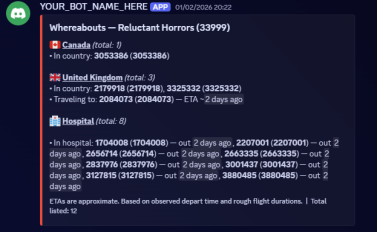
OC MANAGER:
Use the !ocm command to pull up a list of your current organised crimes Select the crime you want to load with players If the players have signed up to the bot (and in doing so agree to the terms of use of the api) It will show their CPR for each role You can select the users and confirm the selection this will then ping the users in a channel you decide with the command !ocsethere and alert them to join that oc
[image: profileimages.torn.com]
ARMORY NOTIFICATIONS:
Finding it hard to keep track of who is taking what from the armory? Want an easier way to see how may items people have taken Well look no further:) Use the command !setarmorynotificationshere faction_id in a dedicated channel, this will then post all the armoury notifications in that channel Use the command !logs / !logs days action_text to get a summary of the logs
[image: profileimages.torn.com]
RETAL NOTIFICATIONS:
Retal notifications can be one of the most useful features of many Torn bots Use the command !setretaliationhere in a designated channel this will alert once a member in your faction has been hit The notification will ping the role @retal but there is also a tick and cross recat to add yourself as a specific ping, and remove yourslef the role pings can get annoying, some like it some dont, so here is both:)
[image: profileimages.torn.com]
LOTTERY SYSTEM
Everyone loves a good lottery, they are a great way to keep members engaged and a change for some of youre little (or big) guys to win something nice! A
![[image: profileimages.torn.com]](https://profileimages.torn.com/377X283_42a884c9-9d78-4403-9c02-634ff79397f7-3393345.png?v=29192697673)
![[image: profileimages.torn.com]](https://profileimages.torn.com/377X283_4ad8c5a0-8916-4a49-afd4-ee414e185846-3393345.png?v=29192697673)
![[image: profileimages.torn.com]](https://profileimages.torn.com/377X283_9771fceb-7cc7-4392-b1ef-7f61142c17d2-3393345.png?v=29192697673)
![[image: profileimages.torn.com]](https://profileimages.torn.com/377X283_6d8fd3ba-4fdf-4c46-a852-6bf6f4aa6f2d-3393345.png?v=29192697673)
lotto role should be set up for this
To start a lotto use !sl lottoname
To start a lotto with hidden doors use !doors item1 item2 ect
To alert users the draw will be coming soon call !lc (last call)
To Draw a lotto call !dl To draw a lotto with a countdown use !cd
To remove an active lotto use !rl To list the current lotto use !ll
[image: profileimages.torn.com]
ITEM LOOKUP
Use the command !item Itemname to see info about a specific item, including the current market price (live, lowest price on the item market)
[image: profileimages.torn.com]
FOFF!!
We have all been there, wanting to tell that special someone to F*** OFF in a colourful way, well with the command !foff @user the bot will send an insult in the channel to that person (deleting your message so you stay anom)
(images unavailable as language do be ~expressive~
STATS:
Theres a few option for stat commands:
![[image: profileimages.torn.com]](https://profileimages.torn.com/377X283_60264ce0-a6f8-49c9-add3-fbe1b7c26808-3393345.png?v=29192697673)
![[image: profileimages.torn.com]](https://profileimages.torn.com/354c3bfe-9760-4c57-b090-4efdbcbcbf18-3393345.png?v=1940629196397)
!s this will show you your current battle stats
!fs this will show your base and effective stats
!sc this will show your stat change (from the last time you called your stats)
!sh days this will show your stat change in that date range
!ws show your current work stats !v show your current vitals
[image: profileimages.torn.com]
PROFILE INFO- See information about your profile/account such as profile info, merits, eta
[image: profileimages.torn.com]
FACTION INFO COMMANDS:
We have a few commands to view differend faction stats here: !fb (faction basic) view basic info about your faction !fhoh view your factions Hall of fame stats !war view your factions current war info
[image: profileimages.torn.com]
FACTION MEMBER CALLS:
Keeping track of your faction members item usage and current e right in a discord channel can save you so much time and keeps everything in the same place (users are prompted about this usage and other usage prior to registration to comply with API guidelines) use !memberinfo @user This will pull up a menu allowing you to select what you would like to see
[image: profileimages.torn.com]
FACTION BALANCE:
![[image: profileimages.torn.com]](https://profileimages.torn.com/377X283_92d1d93c-816b-4b7f-9258-ba5d29e584b9-3393345.png?v=29192697673)
![[image: profileimages.torn.com]](https://profileimages.torn.com/377X283_3cb394ea-3645-483d-a4c7-1ede533e4483-3393345.png?v=29192697673)
![[image: profileimages.torn.com]](https://profileimages.torn.com/377X283_200a51e5-97f5-4727-8ef1-defbda136e20-3393345.png?v=29192697673)
![[image: profileimages.torn.com]](https://profileimages.torn.com/377X283_72e5e020-895a-498d-bf66-4aa7be7be598-3393345.png?v=29192697673)
To view your current faction balance use the command !balance
[image: profileimages.torn.com]
NOTIFICATIONS:
Managing a server can be hard, keeping members up to date with info while not having it lost in a channel can be a royal pain so with the !notification command you can set reoccurring messages and set what channel you want them in A useful example is for banking chanels where you might want to have your rules resent at specific times or if you have a pre planned push, don't leave it to last minute, get ahead to open up the notification menue use the command !notification
[image: profileimages.torn.com]
![[image: profileimages.torn.com]](https://profileimages.torn.com/377X283_a8fcc72c-fb6d-4bf7-afe8-b57c4e3460e4-3393345.png?v=29192697673)
![[image: profileimages.torn.com]](https://profileimages.torn.com/377X283_a44e924b-02c9-4046-82f1-b3f594d6e58b-3393345.png?v=29192697673)
MINIGAMES:
This bot includes lots of minigames to keep your faction engaged and having fun
!trivia askes a trivia question
!triviascores
!unscramble unscramble a word
!unscramblescores !typerace race to type the word, paste proof;)
!typeracescores !ttt @user play a game of tick tac toe against the user
!geolite play a game of geoguesser
!geoscores
!HiLo play a game og higher or lower
!wordchainstart letter users must send in words beginning with that letter
!wordchainstop stop the word chain
!countstart users must count up from 1, 1 at a time
!counthighscore
!idrace first to type their id !fts first to say the phrase
There are a few other commands so if your intrested please check out the discord for a full run down:)
Happy to answer any questions, thanks for getting this far!
Ladies and Gentlemen WELCOME TO THE BOT YOU HAVE BEEN WAITING FOR!!
For the past year and a half i have been working on a TORN DISCORD BOT, i have been lucky enough to work with some amazing players and factions to help turn this into something that i believe can truly up not only your faction engagement but also give you the tools you need to get that extra advantage in wars :)
There are so many commands and features it would be too much of a mind numb to have them all in one big wall of text, so i have split them into separate text channels in this discord server [ https://discord.gg/ZH2S5tFw7P ] you will be able to see on them on the side, these cover pretty much everything; some commands have their own channel some fit nicely under the one banner so are combined in the one. Please have a look around, and any questions please feel free to give me a message on discord or on torn: KennyBuilds [3393345]
Onto the nitty Gritty!!
The price for this bot is ***50M per month*** this should be sent as a trade, if you're one of these druggies who stockpile Xan and send your mules off to SA then i am also happy to accept ***50M worth of Xanax*** at the price the day of the trade.
***SET UP***
Upon requesting the bot you will have 1 week free, this is to make sure the bot is a good fit for your faction and gives you plenty time to get your members registered and try it out:)
The bot can have a custom name and image **free of charge**, yeh I'm cool like that
I can send you a link to add the bot to your server, or if you would like to add me i can come in and create the channels, set the commands to register the different notifications and set you up
***API USAGE***
Each bot has its own environment and data files, this ensures that you and your factions API keys are stored separately, With this there are some commands that rotate through*** ONLY YOUR FACTIONS AP***I Key, this is specifically mentioned at the point of registration with a second conformation button to ensure the terms are clear and coincide with TORNS GUIDELINES
The bot is hosted locally by myself, so there is no concern of anything being stored on the cloud.....or being disrupted when Cloudflare/AWS/AZURE have their annual meltdowns🙃
As mentioned some commands rotate through api keys to get the most up to date info, With this it is recommended you have ATLEAST 5-10 people registered before using these commands, The bot will rate limit the calls to prevent your key calling over the limit, however this could lead to some sub par results
A Quick rundown of some of the commands some of the cooler ones first;)
ACTIVITY TRACKER:
The activity watch command is a Kenny special;)
We have all been there, preparing for and dominating at the start of a war only to be taken by surprise overnight as the other faction is in a completely different time zone....
Not all factions big or small have the benefit of having a 'night shift' meaning it usually takes the first 24h to understand when the other faction will be online, WELL NOT ANYMORE
when you match up with a faction for a war simple use the command
!watch faction_id (faction id of the other faction)
This will start watching the enemy faction and record when their members are online, and how long for
Use the command !activitytracker faction_id to produce a excel and fancy HTML page for you to easily view a list of the enemy faction member, and a by hour break down of how many minutes that user has been online in that hour
This gives you a clear picture of the factions activity, from that you will be able to plan pushes and never be took by surprise again!
To View the factions you are currently watching use the command !watching
To stop watching a faction use the command !stopwatching faction_id
[image: profileimages.torn.com]
WHEREABOUTS:
Another one of our vital war commands, get a quick overview of any factions whereabouts with the !whereabouts faction_id command
OC MANAGER:
Use the !ocm command to pull up a list of your current organised crimes Select the crime you want to load with players If the players have signed up to the bot (and in doing so agree to the terms of use of the api) It will show their CPR for each role You can select the users and confirm the selection this will then ping the users in a channel you decide with the command !ocsethere and alert them to join that oc
[image: profileimages.torn.com]
ARMORY NOTIFICATIONS:
Finding it hard to keep track of who is taking what from the armory? Want an easier way to see how may items people have taken Well look no further:) Use the command !setarmorynotificationshere faction_id in a dedicated channel, this will then post all the armoury notifications in that channel Use the command !logs / !logs days action_text to get a summary of the logs
[image: profileimages.torn.com]
RETAL NOTIFICATIONS:
Retal notifications can be one of the most useful features of many Torn bots Use the command !setretaliationhere in a designated channel this will alert once a member in your faction has been hit The notification will ping the role @retal but there is also a tick and cross recat to add yourself as a specific ping, and remove yourslef the role pings can get annoying, some like it some dont, so here is both:)
[image: profileimages.torn.com]
LOTTERY SYSTEM
Everyone loves a good lottery, they are a great way to keep members engaged and a change for some of youre little (or big) guys to win something nice! A
lotto role should be set up for this
To start a lotto use !sl lottoname
To start a lotto with hidden doors use !doors item1 item2 ect
To alert users the draw will be coming soon call !lc (last call)
To Draw a lotto call !dl To draw a lotto with a countdown use !cd
To remove an active lotto use !rl To list the current lotto use !ll
[image: profileimages.torn.com]
ITEM LOOKUP
Use the command !item Itemname to see info about a specific item, including the current market price (live, lowest price on the item market)
[image: profileimages.torn.com]
FOFF!!
We have all been there, wanting to tell that special someone to F*** OFF in a colourful way, well with the command !foff @user the bot will send an insult in the channel to that person (deleting your message so you stay anom)
(images unavailable as language do be ~expressive~
STATS:
Theres a few option for stat commands:
!s this will show you your current battle stats
!fs this will show your base and effective stats
!sc this will show your stat change (from the last time you called your stats)
!sh days this will show your stat change in that date range
!ws show your current work stats !v show your current vitals
[image: profileimages.torn.com]
PROFILE INFO- See information about your profile/account such as profile info, merits, eta
[image: profileimages.torn.com]
FACTION INFO COMMANDS:
We have a few commands to view differend faction stats here: !fb (faction basic) view basic info about your faction !fhoh view your factions Hall of fame stats !war view your factions current war info
[image: profileimages.torn.com]
FACTION MEMBER CALLS:
Keeping track of your faction members item usage and current e right in a discord channel can save you so much time and keeps everything in the same place (users are prompted about this usage and other usage prior to registration to comply with API guidelines) use !memberinfo @user This will pull up a menu allowing you to select what you would like to see
[image: profileimages.torn.com]
FACTION BALANCE:
To view your current faction balance use the command !balance
[image: profileimages.torn.com]
NOTIFICATIONS:
Managing a server can be hard, keeping members up to date with info while not having it lost in a channel can be a royal pain so with the !notification command you can set reoccurring messages and set what channel you want them in A useful example is for banking chanels where you might want to have your rules resent at specific times or if you have a pre planned push, don't leave it to last minute, get ahead to open up the notification menue use the command !notification
[image: profileimages.torn.com]
MINIGAMES:
This bot includes lots of minigames to keep your faction engaged and having fun
!trivia askes a trivia question
!triviascores
!unscramble unscramble a word
!unscramblescores !typerace race to type the word, paste proof;)
!typeracescores !ttt @user play a game of tick tac toe against the user
!geolite play a game of geoguesser
!geoscores
!HiLo play a game og higher or lower
!wordchainstart letter users must send in words beginning with that letter
!wordchainstop stop the word chain
!countstart users must count up from 1, 1 at a time
!counthighscore
!idrace first to type their id !fts first to say the phrase
There are a few other commands so if your intrested please check out the discord for a full run down:)
Happy to answer any questions, thanks for getting this far!
QUICKERHOMER — TORN DISCORD PERSONAL & FACTION BOT Pilot: first 5 factions only (direct say in what ships next)
I’m opening a small founders pilot for the first 5 factions who jump in.
Founders get:
• 10m/month pricing locked for life, Founders will get a 1 week free tryout
• Direct input into the next features (your requests go to the top)
• Priority fixes and quick iteration against your use-cases
If you want a clean, fast Discord bot for day-to-day Torn (faction intel, chains/wars, player stats, polished lotteries), this pilot is for you.
What you get (features)
Player tools
• Battle stats with saved deltas
• Effective stats + work stats
• Vitals & cooldowns shown in your local offset timezone
• Travel ETA (method, time left, local arrival)
• Quick profile card (you or a tagged user)
Faction intel
• Faction basics: name, tag, respect, rank, leaders, capacity, best chain
• Chain status: length, hits, modifier, cooldown
• Hall of Fame snapshot by category
• Wars: ranked wars shown side-by-side (scores + chains)
Lotteries (engagement)
• Start via in-channel form (optional visible prize + 0–20 mystery doors)
• Join via buttons (public confirmation)
• Last call with mentions, countdown 5→1, then auto-draw
• Door mode: winner picks Door 1..N, bot reveals all doors and highlights the prize
• Remove/clean up, plus payout logging
Commands at a glance
(Bracketed arguments are optional.)
Registration
• !register — run this in a DM with the bot
Player
• !s — battle stats (+/– since last check)
• !fs — base + effective stats
• !ws — work stats
• !sh — stat growth since ago
• !v — vitals + cooldowns (with local times)
• !eta — travel method, time left, local arrival
• !time — set your Torn Time offset
• !p [@user] — quick profile card
Faction
• !fb [faction_id] — faction basics (leaders, rank, best chain, etc.)
• !fc [faction_id] — chain status (length, hits, modifier, cooldown)
• !fhof [faction_id] — Hall of Fame categories
• !war [faction_id] — current wars (ranked shown side-by-side)
Lottery
• !sl — open form (choose 0–20 doors, optional visible prize, paste hidden prizes)
• !sl — quick create (no doors)
• !jl — join via buttons
• !ll — list all active lottos
• !lc [name] — last call (auto-select if you own one; else buttons)
• !cd [name] — countdown then auto-draw (same auto-select rules)
• !dl [name] — draw now (auto-select if you own one)
• !rl [name] — remove lotto (owners; server admins can remove any)
• !pl — record payout after sending prize
Pilot details (first 5 factions)
• Price: 10,000,000 / month , locked for life
• Access: immediate; I’ll drop the bot into your server or test channel
• Influence: founders get a private feedback channel and priority on new features/changes
• Turnaround: small tweaks usually land fast; bigger items are planned with you
How it works
-
I invite the bot to your server (or a temporary test channel)
-
You run
!registeronce (in DM with the bot) -
Use commands anywhere (or in a bot-commands channel)
-
Send 10m/month to myself on the 1st of each month
-
Tell me what to improve — founders shape the roadmap
Requirements
• A Discord channel where the bot can post embeds
• Limited access Torn API key for player commands
• Optional: a dedicated bot-commands channel to keep things tidy
Privacy & safety
• Stores only what’s needed (Discord ID, Torn ID, timezone; cached stats if you opt to track deltas)
• Uses your API key strictly for commands you run
• You can request your data be removed at any time
Roadmap (you help decide)
• Deeper faction summaries (recruit filters, activity snapshots, OCs etc)
• Smart alerts (chain cooldown up, travel arriving soon)
Does what it says on the tin, changes the sidebar notifications back to the glorious green
downloadURL https://update.greasyfork.org/scripts/584083/Kennys%20Green%20Notifications.user.js
Recent archived posts
b
Does what it says on the tin, changes the sidebar notifications back to the glorious green
downloadURL https://update.greasyfork.org/scripts/584083/Kennys%20Green%20Notifications.user.js
b
b
b
b
b
b
b
b
b
b
b
b
b
b
Updates:
OC Managment compatibility for mobile users !ocmmobile
Quick registration and name sync !r
Updates:
OC Managment compatibility for mobile users !ocmmobile
Quick registration and name sync !r
what an idea! will see what i can do
🎮 KENNY'S IN FLIGHT ENTERTAINMENT - Minigames for Travel


What is it?
We all hate having to sit and witing on the plane to land, this is a userscript that adds 4 fun, minimalist games to play while you're traveling in Torn City.
Perfect for those long travel times!


Games Included:
━━━━━━━━━━━━━━━━━━━━━━━━━━━━━━━━━━━━


🐍 SNAKE
Classic snake gameplay. Use arrow keys or WASD to move, eat food, and avoid yourself.
Goal: Get the highest score possible.


🦖 DINO JUMP
Jump obstacles and lava coming toward you. Press SPACE to jump. Game gets harder as you progress.
Challenge: Can you beat the AI speed increase?


🏓 PONG
Play against an AI opponent. Move your mouse up and down to control your paddle.
Strategy: Keep the ball in play and outsmart the AI.


⌨️ TYPING SPRINT
60-second typing challenge. Words fall from the top - type them exactly to clear them.
Twist: Each correct word adds 2 seconds to your timer!


Features:


━━━━━━━━━━━━━━━━━━━━━━━━━━━━━━━━━━━━
✓ Game Boy styled interface (retro vibes)

✓ Persistent high score tracking (saves your best)

✓ Auto-updates when new versions release

✓ Clean, minimalist design

✓ No permissions needed

✓ Works on travel page only (doesn't clutter your game)


How to Use:

━━━━━━━━━━━━━━━━━━━━━━━━━━━━━━━━━━━━

1. Install from Greasy Fork link below
2. Go to travel page in Torn City
3. Look for Game Boy button in top right
4. Click to open menu and select a game
5. Use R to restart, TAB to go back to menu

Installation:

→ https://update.greasyfork.org/scripts/565421/Kennys%20In%20Flight%20Entertainment.user.js


Questions or bugs? Check my profile: KennyBuilds [3393345]


Enjoy! 🎮