The other day I posted a suggestion called "Ideas for Chats (Pinning and Archiving)" in the Suggestions forum. After thinking about it a bit more, I decided to see if I could make it myself with a userscript, so I thought I'd share it here in case anyone else finds it useful.
If you didn't see the original suggestion, the idea was pretty simple. Wars, trades, and other temporary conversations can quickly flood your chat list, making it annoying to find the chats for players you actually talk to regularly without having to search for them.
This script adds two features:
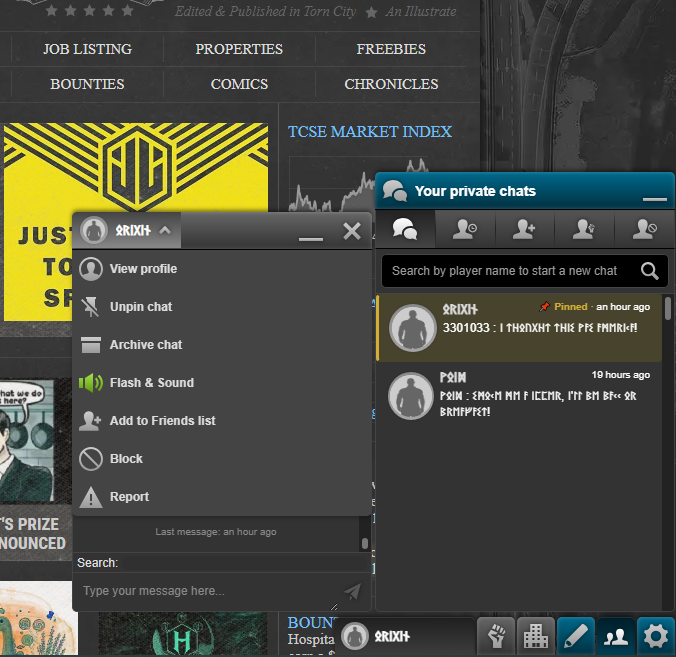
Pin chats – Keep your most important conversations near the top of your chat list. Pinned chats are highlighted with a gold border/background to make them easy to spot.
Archive chats – Hide chats you don't currently need. If that player sends you a new message, the chat automatically reappears in the list.
How to use
Open a private chat.
Click the drop-down menu.
Select Pin chat or Archive chat.
Click the option again to remove the pin or unarchive the chat.
One thing to note is that Torn only loads the chats that are currently within the scroll window. Because of this, pinned chats that are outside of the currently loaded window won't move to the top until they become loaded again, either by you scrolling to them or because a new message brings them back into the current window.
If you find any bugs or have ideas for improvements, let me know. I'm happy to keep improving it if people find it useful.
I have a couple of ideas to help clean up the Chat list and make it much faster to use. Right now, things like wars and trades completely flood the chats when you have to talk to players you normally won't talk to again, or rarely do, and it gets annoying having to scroll way down or use the search bar just to find the people you do talk to normally.
Here are two features that would help a lot:
Pinning Chats: It would be awesome to pin certain chats so they always stay at the top of the list. That way, the players you normally talk to are right there, and everyone else stays under them. Alternatively, we could just have a dedicated "pinned" tab at the top.
Archiving Chats: It would also be great to be able to archive chats to hide them from the active list. They would stay hidden until you manually search the player's name to send a message, or until that player sends you a new message.
Here is an image of what the design could look like:
The other day I posted a suggestion called "Ideas for Chats (Pinning and Archiving)" in the Suggestions forum. After thinking about it a bit more, I decided to see if I could make it myself with a userscript, so I thought I'd share it here in case anyone else finds it useful.
If you didn't see the original suggestion, the idea was pretty simple. Wars, trades, and other temporary conversations can quickly flood your chat list, making it annoying to find the chats for players you actually talk to regularly without having to search for them.
This script adds two features:
Pin chats – Keep your most important conversations near the top of your chat list. Pinned chats are highlighted with a gold border/background to make them easy to spot.
Archive chats – Hide chats you don't currently need. If that player sends you a new message, the chat automatically reappears in the list.
How to use
Open a private chat.
Click the drop-down menu.
Select Pin chat or Archive chat.
Click the option again to remove the pin or unarchive the chat.
One thing to note is that Torn only loads the chats that are currently within the scroll window. Because of this, pinned chats that are outside of the currently loaded window won't move to the top until they become loaded again, either by you scrolling to them or because a new message brings them back into the current window.
If you find any bugs or have ideas for improvements, let me know. I'm happy to keep improving it if people find it useful.
I have a couple of ideas to help clean up the Chat list and make it much faster to use. Right now, things like wars and trades completely flood the chats when you have to talk to players you normally won't talk to again, or rarely do, and it gets annoying having to scroll way down or use the search bar just to find the people you do talk to normally.
Here are two features that would help a lot:
Pinning Chats: It would be awesome to pin certain chats so they always stay at the top of the list. That way, the players you normally talk to are right there, and everyone else stays under them. Alternatively, we could just have a dedicated "pinned" tab at the top.
Archiving Chats: It would also be great to be able to archive chats to hide them from the active list. They would stay hidden until you manually search the player's name to send a message, or until that player sends you a new message.
Here is an image of what the design could look like: