‹ Woeka Players Woeka Forum
Forum posts (Torn's count) 13 observed 7 Sep 2026
Archived posts 13
Threads started (archived) 1
Boards
From the 13 newest archived posts.
Bugs & Issues 5 posts Tutorials & Guides 2 posts General Discussion 2 posts Tools & Userscripts 2 posts Fun & Games 1 post Attacking 1 post
Threads started
Most-liked posts
Likes as archived at fetch time, adjusted for how long each post had been up. Scored posts only; the full score pass runs after the import.
[SCRIPT] Torn Virus Coding Timer · 15 Jan · 11 likes
Torn Virus Timer
A Tampermonkey userscript that displays your virus coding timer in the Torn City sidebar. Shows the remaining time until your virus coding is complete, automatically updates, and integrates seamlessly with the Torn Tools sidebar.
Features
✅ Displays virus coding timer in the sidebar
✅ Auto-updates every hour
✅ Smart caching to reduce API calls
✅ Clickable error messages to edit API key
✅ Works with Torn Tools sidebar extension
✅ Clean, minimal display (time only)
[image: greasyfork.s3.us-east-2.amazonaws.com]
Installation
1. Install Tampermonkey
2. Install the Script
Alternatively, you can manually install:
Click on the Tampermonkey icon → Dashboard
Create a new script
Copy the contents of Torn Virus Timer.user.js into the editor
Save the script (Ctrl+S or Cmd+S)
Ensure the script is enabled
3. Install Torn Tools (Optional but recommended)
This script works best with the Torn Tools browser extension
Install from your browser's extension store
Setup
Getting Your API Key
Go to Torn City Preferences → API
Generate a Limited API key (not Public - virus data requires limited access)
Copy your 16-character API key
Configuring the Script
When you first load Torn City with the script installed, you'll see "Enter limited key" in the sidebar
Click on it to open the API key popup
Enter your 16-character limited API key
Click "Save"
The script will immediately start fetching your virus status.
Usage
Viewing the Timer
The timer appears in the Torn Tools sidebar under "Virus:"
Displays remaining time in format: Xd Xh Xm (e.g., "19d 9h 10m")
Updates automatically every hour
Editing API Key
Click on any of the following to edit your API key:
"Enter limited key" (when no key is set)
"No virus" (when no virus is being coded)
"Invalid key" (when API key has permission issues)
"API error" (when there's an API error)
"Network error" (when there's a network issue)
States
The timer can show:
Time remaining (e.g., "19d 9h 10m") - When a virus is being coded"No virus" - When no virus is currently being programmed"Enter limited key" - When no API key is configured"Invalid key" - When the API key doesn't have proper permissions"API error" - When there's an API error"Network error" - When there's a network connectivity issue
How It Works
API Integration : Fetches virus data from https://api.torn.com/v2/user/virus using the Torn API v2Smart Caching : Caches virus information in localStorage to reduce API callsAuto-refresh : Checks for updates every hour automaticallyImmediate Display : Shows cached timer immediately on page load
Technical Details
Storage Keys
API Key: virus_api_key (in localStorage)
Virus Info: virus_last_info (in localStorage)
API Requirements
Endpoint : /v2/user/virusAuthentication : Authorization: ApiKey {YOUR_KEY} headerKey Type : Limited API key (required for user virus data)Rate Limiting : Checks every hour (3600 seconds)
Troubleshooting
Timer Shows "No virus" but you're coding a virus
Check that your API key is set correctly
Verify your API key is a Limited key (not Public)
Click "No virus" to edit your API key
Timer Shows "Invalid key"
Your API key doesn't have permission to access virus data
Make sure you're using a Limited API key
Go to Torn City Preferences → API and verify your key permissions
Timer Not Appearing
Make sure Torn Tools extension is installed
Refresh the page
Check browser console for errors (F12)
Wrong API Key Being Used
Click on the timer display to edit the API key
The script clears cache when the key is changed
Make sure to save the new key correctly
Privacy
Your API key is stored locally in your browser's localStorage
No data is sent to any third-party servers
All API calls go directly to Torn City's API
License
MIT License
Credits
Based on the Torn War Timer script structure
Uses Torn City API v2
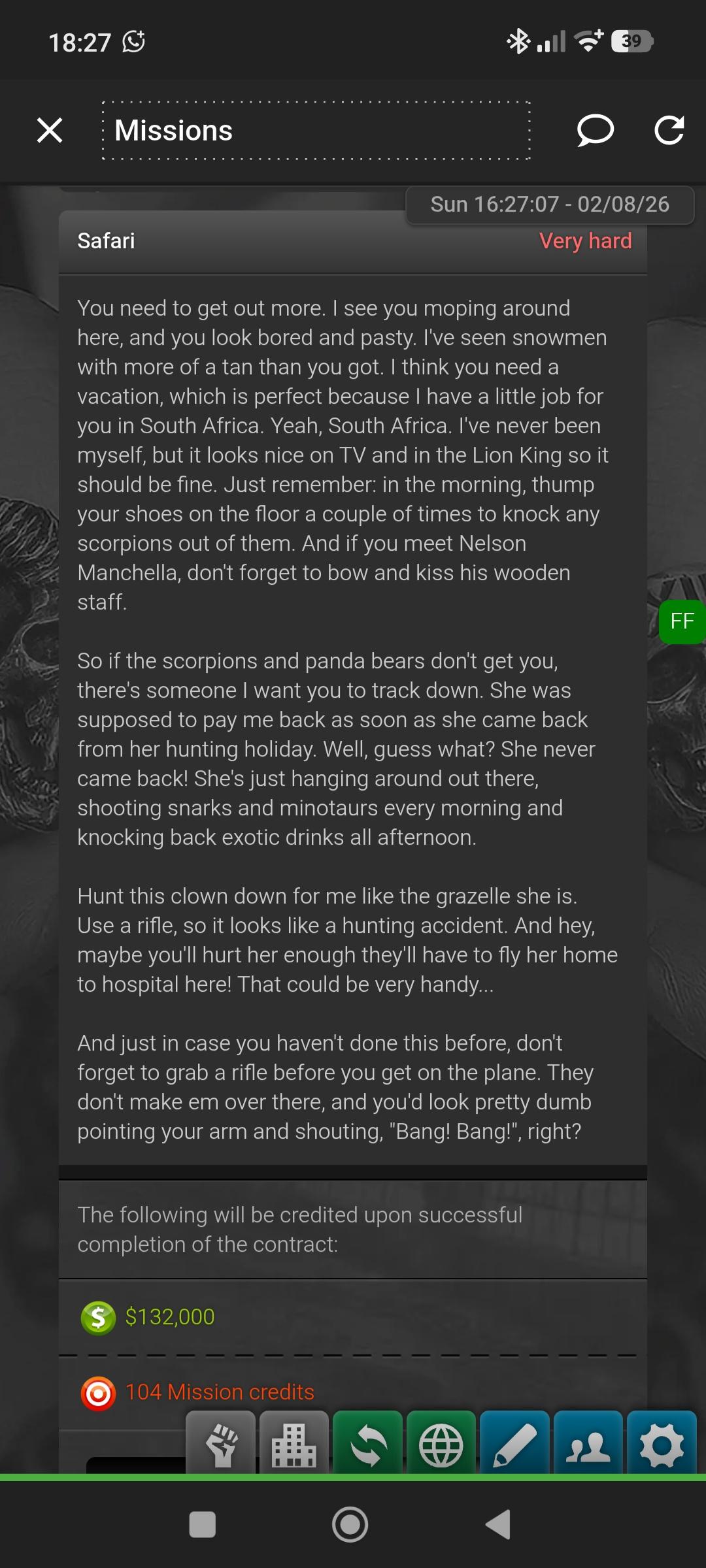
Duke Mission - hunting in south africa · 2 Aug · 2 likes
Was 1773457073 so that would be Sat Mar 14 2026 02:57:53 GMT+0000
Recent archived posts
Duke Mission - hunting in south africa · 2 Aug 2026, 17:33 TCT · 2 likes
Was 1773457073 so that would be Sat Mar 14 2026 02:57:53 GMT+0000
Duke Mission - hunting in south africa · 2 Aug 2026, 16:42 TCT
Duke Mission - hunting in south africa · 2 Aug 2026, 16:29 TCT
Duke Mission - hunting in south africa · 2 Aug 2026, 16:25 TCT · 1 like
I have the mission in question, it is probably a mission from before the change.
[SCRIPT] Torn Virus Coding Timer · 19 Feb 2026, 11:06 TCT · 1 like
Looks like TornTools thought it to be a good idea and have added it to their version as of 14th feb 2026.
[SCRIPT] Torn Virus Coding Timer · 15 Jan 2026, 19:20 TCT · 11 likes
Torn Virus Timer
A Tampermonkey userscript that displays your virus coding timer in the Torn City sidebar. Shows the remaining time until your virus coding is complete, automatically updates, and integrates seamlessly with the Torn Tools sidebar.
Features
✅ Displays virus coding timer in the sidebar
✅ Auto-updates every hour
✅ Smart caching to reduce API calls
✅ Clickable error messages to edit API key
✅ Works with Torn Tools sidebar extension
✅ Clean, minimal display (time only)
[image: greasyfork.s3.us-east-2.amazonaws.com]
Installation
1. Install Tampermonkey
2. Install the Script
Alternatively, you can manually install:
Click on the Tampermonkey icon → Dashboard
Create a new script
Copy the contents of Torn Virus Timer.user.js into the editor
Save the script (Ctrl+S or Cmd+S)
Ensure the script is enabled
3. Install Torn Tools (Optional but recommended)
This script works best with the Torn Tools browser extension
Install from your browser's extension store
Setup
Getting Your API Key
Go to Torn City Preferences → API
Generate a Limited API key (not Public - virus data requires limited access)
Copy your 16-character API key
Configuring the Script
When you first load Torn City with the script installed, you'll see "Enter limited key" in the sidebar
Click on it to open the API key popup
Enter your 16-character limited API key
Click "Save"
The script will immediately start fetching your virus status.
Usage
Viewing the Timer
The timer appears in the Torn Tools sidebar under "Virus:"
Displays remaining time in format: Xd Xh Xm (e.g., "19d 9h 10m")
Updates automatically every hour
Editing API Key
Click on any of the following to edit your API key:
"Enter limited key" (when no key is set)
"No virus" (when no virus is being coded)
"Invalid key" (when API key has permission issues)
"API error" (when there's an API error)
"Network error" (when there's a network issue)
States
The timer can show:
Time remaining (e.g., "19d 9h 10m") - When a virus is being coded"No virus" - When no virus is currently being programmed"Enter limited key" - When no API key is configured"Invalid key" - When the API key doesn't have proper permissions"API error" - When there's an API error"Network error" - When there's a network connectivity issue
How It Works
API Integration : Fetches virus data from https://api.torn.com/v2/user/virus using the Torn API v2Smart Caching : Caches virus information in localStorage to reduce API callsAuto-refresh : Checks for updates every hour automaticallyImmediate Display : Shows cached timer immediately on page load
Technical Details
Storage Keys
API Key: virus_api_key (in localStorage)
Virus Info: virus_last_info (in localStorage)
API Requirements
Endpoint : /v2/user/virusAuthentication : Authorization: ApiKey {YOUR_KEY} headerKey Type : Limited API key (required for user virus data)Rate Limiting : Checks every hour (3600 seconds)
Troubleshooting
Timer Shows "No virus" but you're coding a virus
Check that your API key is set correctly
Verify your API key is a Limited key (not Public)
Click "No virus" to edit your API key
Timer Shows "Invalid key"
Your API key doesn't have permission to access virus data
Make sure you're using a Limited API key
Go to Torn City Preferences → API and verify your key permissions
Timer Not Appearing
Make sure Torn Tools extension is installed
Refresh the page
Check browser console for errors (F12)
Wrong API Key Being Used
Click on the timer display to edit the API key
The script clears cache when the key is changed
Make sure to save the new key correctly
Privacy
Your API key is stored locally in your browser's localStorage
No data is sent to any third-party servers
All API calls go directly to Torn City's API
License
MIT License
Credits
Based on the Torn War Timer script structure
Uses Torn City API v2
Rickmas torn GET SNOWGLOBE IN UNDER 1 MIN GUIDE · 19 Dec 2025, 15:59 TCT · 1 like
Loses for sale 200k each or 4 loses for a xanax · 4 Nov 2025, 19:18 TCT
I've send this player money and got blocked.
Samaritan's Giveaway · 27 Jun 2025, 07:49 TCT
something cool
June 2025 TTT Sign Ups Closed! · 28 May 2025, 03:39 TCT
GUIDE: Notorious Merit (Crimes 2.0 Shoplifting) · 20 Apr 2025, 19:24 TCT · 1 like
Stacked nervbar up to 447 with cannabis on 4-20 (triple cannabis)
Wiki Issues · 23 Feb 2025, 20:59 TCT · 2 likes
Chedburn Speaks Out on Travel 2.0 · 9 Jan 2025, 16:25 TCT
Well .. probably not the first one: what about making bomb threads to delay planes :)