Hey everyone, I've noticed some players have items listed at $1 in their bazaar with a lock icon next to it. I read on the wiki that it's part of the "Dollar Sale system," where only a limited number of random individuals can buy it, but it doesn't explain exactly who qualifies to buy those listings. Does anyone know how it works? Is it completely random, or are there specific criteria? Thanks!
leolynn: forum
leolynn [4029815] Level 15 Frontline Felons FELN Hustler
- Forum posts (Torn's count)
- 0 observed
- Archived posts
- 4
- Threads started (archived)
- 2
Boards
From the 4 newest archived posts.
- Company Recruitment
- Trading Post
- Questions & Answers
- Tools & Userscripts
Threads started
Most-liked posts
Likes as archived at fetch time, adjusted for how long each post had been up. Scored posts only; the full score pass runs after the import.
Are you tired of squinting at those tiny weapon attachment icons in the Auction House, trying to figure out which Ranked War bonus a weapon has?
Auction House RW Bonus Visualizer fixes this by generating beautifully aligned, high-visibility text badges directly over weapon listings. Fully equipped with a built-in settings panel, it allows you to track, color-code, and add custom intense glows to the specific bonuses you are hunting for.
Key Features
- Instant Text Badges: Replaces or overlays confusing icon tokens with clean, uppercase text badges such as PLUNDER, DISARM, or BLOODLUST.
- Built-in Configuration Panel: A native, dark-themed settings panel integrated seamlessly into the Market wrapper.
- Custom Color Coding & Glows: Choose a custom hex color for your favorite bonuses. Selected bonuses will pop out with an intense glow effect, making them impossible to miss while scrolling.
- Responsive Layout: Works properly on both desktop and mobile layouts.
- One-Click Clears: Quickly reset or change your filters on the fly.
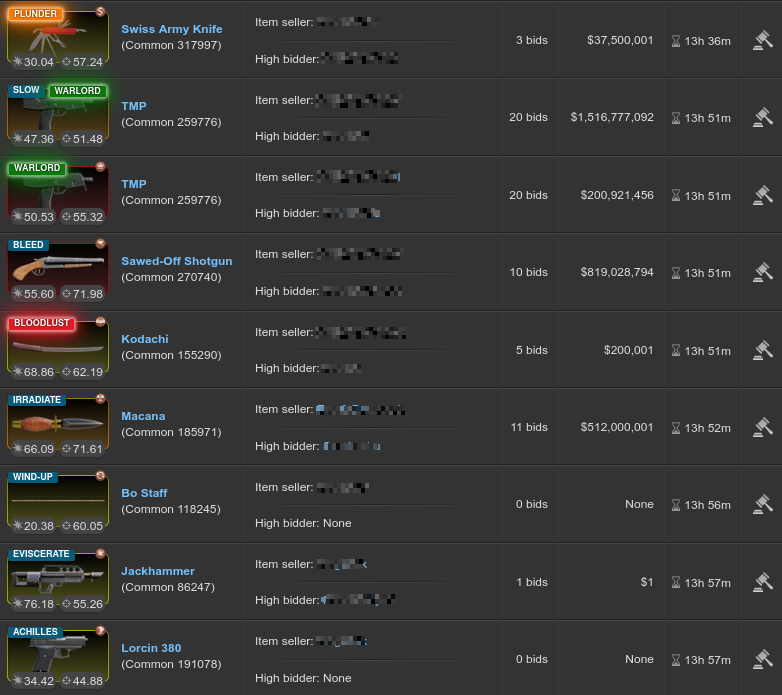
Pic1: Desktop View
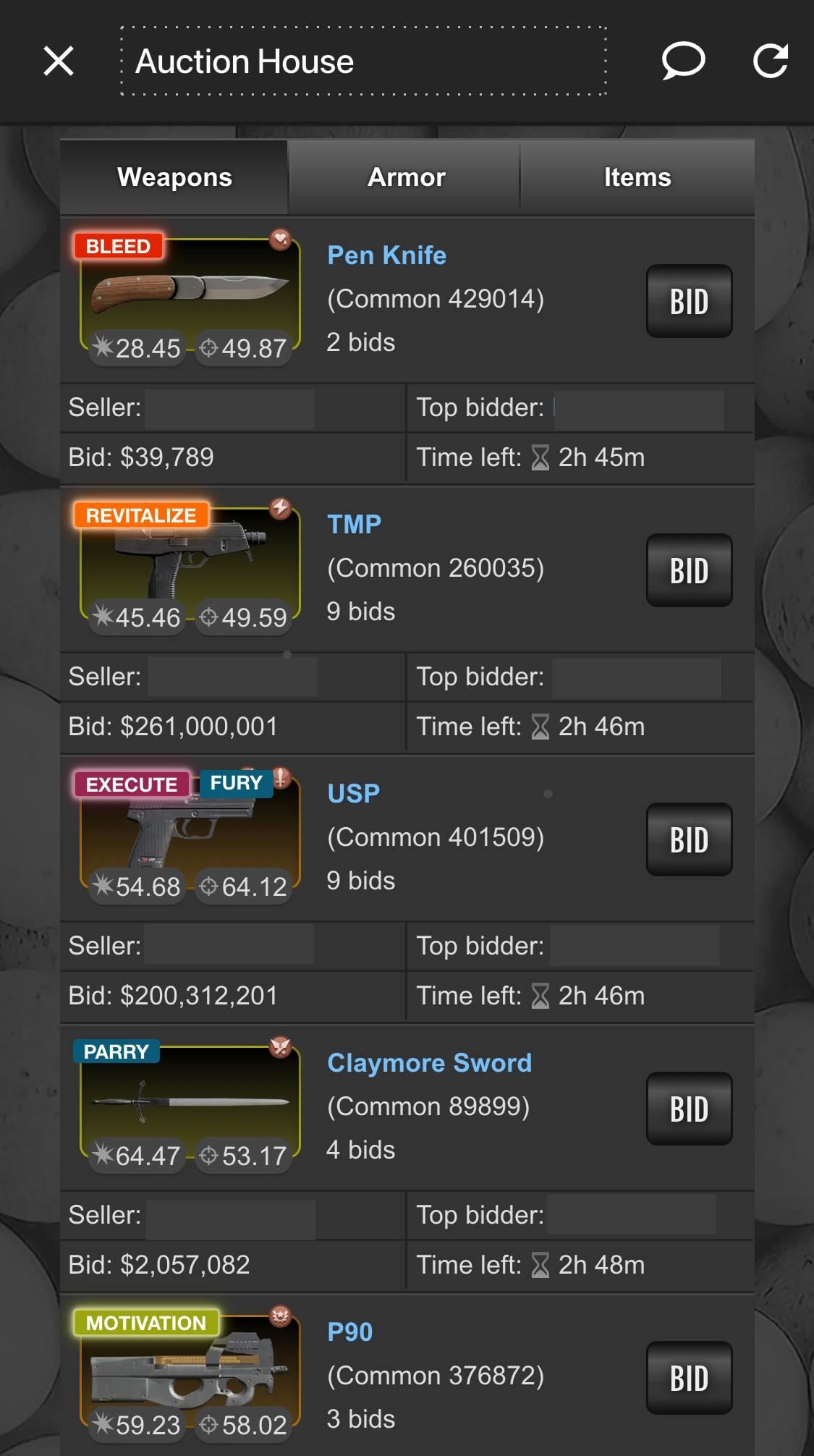
Pic 2: Mobile View
100% Safe and Secure (No API Required)
Security is a priority for everyone. You can use this script with total peace of mind:
- No API Key Needed: The script does not require, request, or store your Torn API key. It runs completely locally within your browser.
- Pure DOM Parsing: It only reads what is already visible on your screen to generate the visual text badges.
- No External Data Requests: The script does not transmit any of your gameplay data, inventory, or market selections to external servers. It is entirely safe and compliant with privacy standards.
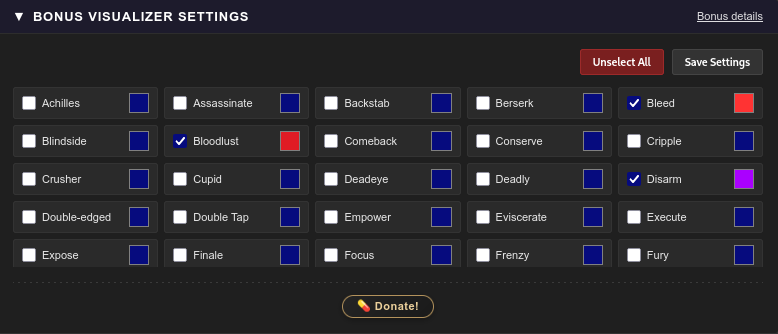
Pic 3: Settings Panel
How It Works
- When you open the Auction House, a new BONUS VISUALIZER SETTINGS panel will appear at the top.
- Expand the panel, check the boxes next to the RW bonuses you care about, and assign them custom colors using the color pickers.
- Click Save Settings.
- Any matching weapons on the market will instantly light up with your custom configurations, while non-selected bonuses remain neatly tagged in a default stealth blue.
Installation
You can install this script directly by creating a new script in your Tampermonkey or TornPDA.
Try it here: Greasy Fork
Direct link: https://greasyfork.org/en/scripts/580203-torn-auction-house-rw-bonus-visualizer
Bug Reporting & Feedback
This script is natively tailored for the default Torn interface and handles page updates asynchronously, so badges load smoothly even when switching pages or filtering.
If you encounter any formatting conflicts or bugs with other auction extensions, please drop a comment below or send me a chat message.
Good luck hunting on the market.
Please note that the current version (v1.0) only visualizes bonuses for Weapons. Support for Armor bonuses is actively being worked on and will be added in upcoming updates.
Recent archived posts
Looking for Music Store Only (5★ - 10★)
No longer looking!
Are you tired of squinting at those tiny weapon attachment icons in the Auction House, trying to figure out which Ranked War bonus a weapon has?
Auction House RW Bonus Visualizer fixes this by generating beautifully aligned, high-visibility text badges directly over weapon listings. Fully equipped with a built-in settings panel, it allows you to track, color-code, and add custom intense glows to the specific bonuses you are hunting for.
Key Features
- Instant Text Badges: Replaces or overlays confusing icon tokens with clean, uppercase text badges such as PLUNDER, DISARM, or BLOODLUST.
- Built-in Configuration Panel: A native, dark-themed settings panel integrated seamlessly into the Market wrapper.
- Custom Color Coding & Glows: Choose a custom hex color for your favorite bonuses. Selected bonuses will pop out with an intense glow effect, making them impossible to miss while scrolling.
- Responsive Layout: Works properly on both desktop and mobile layouts.
- One-Click Clears: Quickly reset or change your filters on the fly.
Pic1: Desktop View
Pic 2: Mobile View
100% Safe and Secure (No API Required)
Security is a priority for everyone. You can use this script with total peace of mind:
- No API Key Needed: The script does not require, request, or store your Torn API key. It runs completely locally within your browser.
- Pure DOM Parsing: It only reads what is already visible on your screen to generate the visual text badges.
- No External Data Requests: The script does not transmit any of your gameplay data, inventory, or market selections to external servers. It is entirely safe and compliant with privacy standards.
Pic 3: Settings Panel
How It Works
- When you open the Auction House, a new BONUS VISUALIZER SETTINGS panel will appear at the top.
- Expand the panel, check the boxes next to the RW bonuses you care about, and assign them custom colors using the color pickers.
- Click Save Settings.
- Any matching weapons on the market will instantly light up with your custom configurations, while non-selected bonuses remain neatly tagged in a default stealth blue.
Installation
You can install this script directly by creating a new script in your Tampermonkey or TornPDA.
Try it here: Greasy Fork
Direct link: https://greasyfork.org/en/scripts/580203-torn-auction-house-rw-bonus-visualizer
Bug Reporting & Feedback
This script is natively tailored for the default Torn interface and handles page updates asynchronously, so badges load smoothly even when switching pages or filtering.
If you encounter any formatting conflicts or bugs with other auction extensions, please drop a comment below or send me a chat message.
Good luck hunting on the market.
Please note that the current version (v1.0) only visualizes bonuses for Weapons. Support for Armor bonuses is actively being worked on and will be added in upcoming updates.
Hey everyone, I've noticed some players have items listed at $1 in their bazaar with a lock icon next to it. I read on the wiki that it's part of the "Dollar Sale system," where only a limited number of random individuals can buy it, but it doesn't explain exactly who qualifies to buy those listings. Does anyone know how it works? Is it completely random, or are there specific criteria? Thanks!
WARNING: PYROSTORMZ IS A CONFIRMED BUY-MUGGER
Don't let the "Safe Trader" title fool you. She mugged me exactly 12 seconds after buying from my bazaar. A real trader values reputation; she only values your wallet.
THE PROOF:
21:03:14 - 27/04/26 Someone anonymously mugged you for $2,069,203 sending you to the hospital for 0h 36m [view]
21:03:02 - 27/04/26 You sold a Donator Pack on your bazaar to Pyrostormz at $25,000,000 each for a total of $25,000,000
SHE IS NOT A SAFE TRADER. TRADE AT YOUR OWN RISK!