No, I don't sleep
(requires Tampermonkey or Violentmonkey)
Now with support for listing your items relative to the price of other bazaars that have data on weav3r.dev!
Got tired of manually having to figure prices after moving to using my bazaar. This has been in the works for a couple weeks now but I'm happy to say that it's done. I think.
Simply set your API key in the settings that are accessed here:

Which will bring a popout window with a few settings:
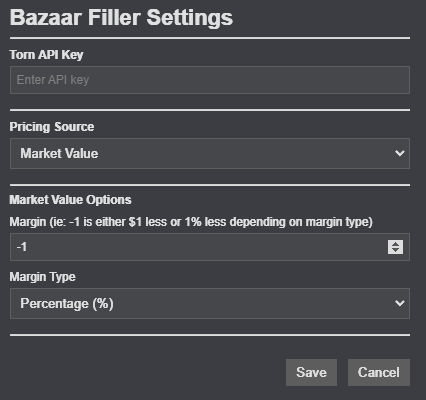
After entering your API key (public key only needed and saved to localstorage) then you can choose your pricing source which will determine what the margin uses. The options are market value, item market listings, and coming at some point in the (hopefully) near future will be bazaar listings available via TornPal.
Then you can determine whether you want to set your prices an absolute value lower than the specified value, or a percentage. Want to price your items 11% lower than the 56th item in the item market? Done. $1,000,000 above market value? Done. With a single click you have complete control over your pricing preferences.
After you have finished configuring your settings, then you simply click the checkboxes shown here.

And it will automatically fill the qty and price field or check the box on weapons/armor/temps to easily add it to your bazaar.
If you end up changing your mind, just untick the box and it'll undo the changes to restore them to how they were before you ticked the box.
As an added bonus, you will also notice that you will see a tooltip showing you the first 5 item market listings after you tick the box for any one item, and the coloring of the price changes based on how far above or below market value it is to make it easier to distinguish if you're scamming yourself.
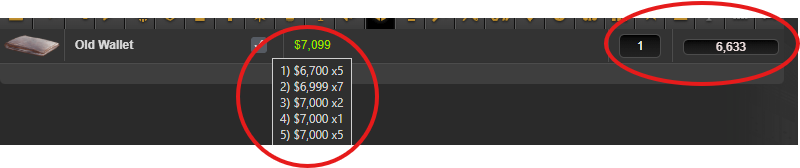

Alternatively if you want to, you can also just double-click in the quantity field and it will automatically fill the max quantity of that item.
![[image: i.imgur.com]](https://i.imgur.com/zgMgv34.png)
![[image: i.imgur.com]](https://i.imgur.com/ujDnRE4.png)

