Skip to content
TORNLIFE More

[Script] One click race start

Started by Shlefter [2901183] on in Tools & Userscripts.

20 replies · 1.36k views · thread synced · 5 days ago · View on torn.com
About this thread

Posts archived: 21 / 21 posts (100%) · the total is Torn's reply count + the opening post at the last fetch

Counted by TornLife from the archived posts.

Archived posts
21
Discussion span
→
Authority score
38 / 100
Historical score
36 / 100
Story score
49 / 100
Engagement score
68 / 100

People posting, likes and official posts are not counted for this thread yet: on threads longer than one page they come from a periodic pass over the archive, which has not covered it.

Shlefter [2901183]

Adds a link on the top of the racing page to start a custom race in 1 click.


Install link


To use this script, you need to change the carID on line 13 to your car ID. This can be found either by hovering over the select button for the desired car when starting a custom race and looking at the link on the bottom of the screen or via the api

 (https://api.torn.com/v2/user/?selections=enlistedcars&key=)


It currently is set to 1 lap speedway races called speedway but that can be changed by changing the laps, track, and title fields in the url on line 23. 


If there is interest I can make it more user friendly, it's pretty slapdash because I only needed it to do 1 lap speedways to help me get the leaderboard merit.


Credit to Ahab for helping me with the link.
ThunderBlitz [2684774]

A couple of questions;


1) Do we just replace all instances of 'Speedway', with the track we want to race on?  For example, replace each entry with 'Docks' for an overnight race?


2) Where do we get the car and track ID's?  I've looked over the info on the race pages (both during and after the race) but, other than the track name and race ID, nothing else like this jumps out at me.

Shlefter [2901183]

Speedway is the name of the race, you'd have to change the track ID. Assuming it's the same as brainslug's script uses, they are as follows:

        "6": "Uptown",       "7": "Withdrawal",  "8": "Underdog",
        "9": "Parkland",     "10": "Docks",      "11": "Commerce",
        "12": "Two Islands", "15": "Industrial", "16": "Vector",
        "17": "Mudpit",      "18": "Hammerhead", "19": "Sewage",
        "20": "Meltdown",    "21": "Speedway",   "23": "Stone Park",
        "24": "Convict"


The car ID is unique to your car and can be found by hovering over the 'select this car to join' button and looking at the url on the bottom. Here is an example with one of mine (not sure why the image doesn't load)


[image: ibb.co]

ThunderBlitz [2684774]

Cheers for that info!  I'm on mobile (exclusively), so there's no hover option, unfortunately 😅 however, I think I've grabbed the car ID from the 'choose this car' link.  I'll try it out when I'm finishing up for tonight, see if I've not completely buggered it!  🤞🏻


Btw, I noticed the 'laps' in the URL we set to 1 by default, not 100 as indicated in your main post.  Just thought I'd mention it, in case it's an oversight.


Shlefter [2901183]

Thaks, I'll change that. The alternative way to get ur car IDs is via the api v2 (link in the first post as well) with a minimal+ key

ThunderBlitz [2684774]

Good to know!  I'm not too familiar with the API side of things but, I've used API-reliant links before, so that seems pretty straightforward to me if needed (just paste the relevant API key into the end of that URL, for anyone who's not sure).


Anyway, used it a couple of times now, works as advertised after changing the relevant car and track details.  Nice work!  😎


Only downside is the editing process, could be a bit daunting for those not familiar with web code/easily put off by unfamiliar tech but, if you persevere with that, it's a pretty slick script once it's working as you want!


The "edit" is because the damn "Post" button is almost inside the main text box, so I accidentally hit that while trying to fix a typo!  🤷🏻

Shlefter [2901183]

I can try to make it a bit more user friendly when I have time :)


Btw has anyone used it on PDA? I haven't tested it bc I get all sorts of react bugs due to improper loading orders.

ThunderBlitz [2684774]

It's TornPDA I'm using it on.  Not noticed any issues at all, although, I haven't looked inside the 'Console' area (backend functionality), as that's just a constant mess of Sendbird-drama 😬 so, I can't say what's going on behind the scenes.  Seems to work fine on the front-end, though.  😎

Shlefter [2901183]

You can use the API link with your own minimal key at the end, then find the car you want to use by name. 


Link: https://api.torn.com/v2/user/?selections=enlistedcars&key=

Shlefter [2901183]

Sounds like you put the wrong id for the car. You can check if it's correct by copying the link when you get that error message. It should be a 6 or 7 digit long id.

EuSouODougras [2480891]

yes it is helping a lot of people, myself included! 

unfortunatally i didnt stop racing after i got the merit hahaha and its still helping me a lot!!

castiron [2323029]

Nice, this was a great starting point for me so R+. I've modified your script quite a bit and moved all the variables into their own, so they can be quickly edited without digging through the URL itself. In theory we could also add multiple buttons for different race options, as well! An improvement would be to create an array of trackName => trackID so that you can just specify the name and it automatically fetches the associated ID.
const carID = 956529;
const minDrivers = 2;
const maxDrivers = 2;
const trackID = 10;
const laps = 100;
const raceName = `Docks @ ${maxDrivers} driver ${laps} lap`;

...
const url = `https://torn.com/loader.php?sid=racing&tab=customrace&action=getInRace&step=getInRace&id=&carID=${carID}&createRace=true&title=${encodeURIComponent(raceName)}&minDrivers=${minDrivers}&maxDrivers=${maxDrivers}&trackID=${trackID}&laps=${laps}&minClass=5&carsTypeAllowed=1&carsAllowed=5&betAmount=0&waitTime=${Math.floor(Date.now()/1000)}&rfcv=${getRFC()}`;

Shlefter [2901183]

I do intend on adding a UI for that, I just haven't gotten around to it yet. Tbh i haven't really thought about it too much since I got the leaderboard merit.


 I believe brainslug's quick race script has something like you're describing for the track name, which you may be able to copy without too much trouble.


GNSC4 [268863]

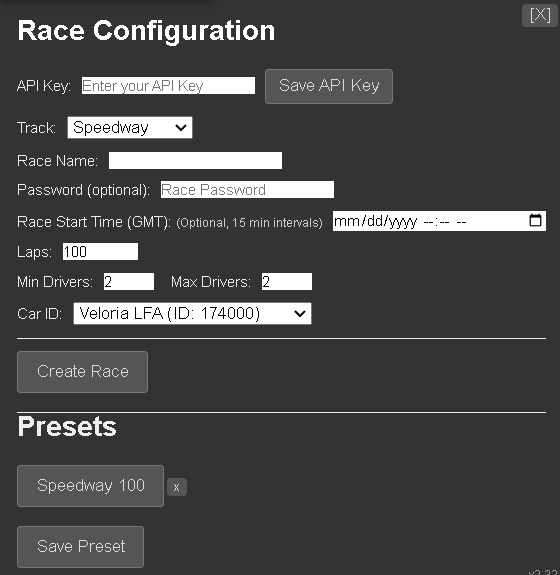
I have made this script into a configurable script with a GUI Link put that link into tampermonkey and of course disable the speedway script


tested on Chrome Tampermonkey, and Torn PDA both work as intended PDA Requires GMforPDA Script installed.


Rosti [2840742]

Warning: this might or might not be an illegal script despite it's wide adoption as staff decided now even though it is such an old post.