The Ultimate Stock Manager is a script designed to balance your company stock to last the most amount of days, based on daily sales.
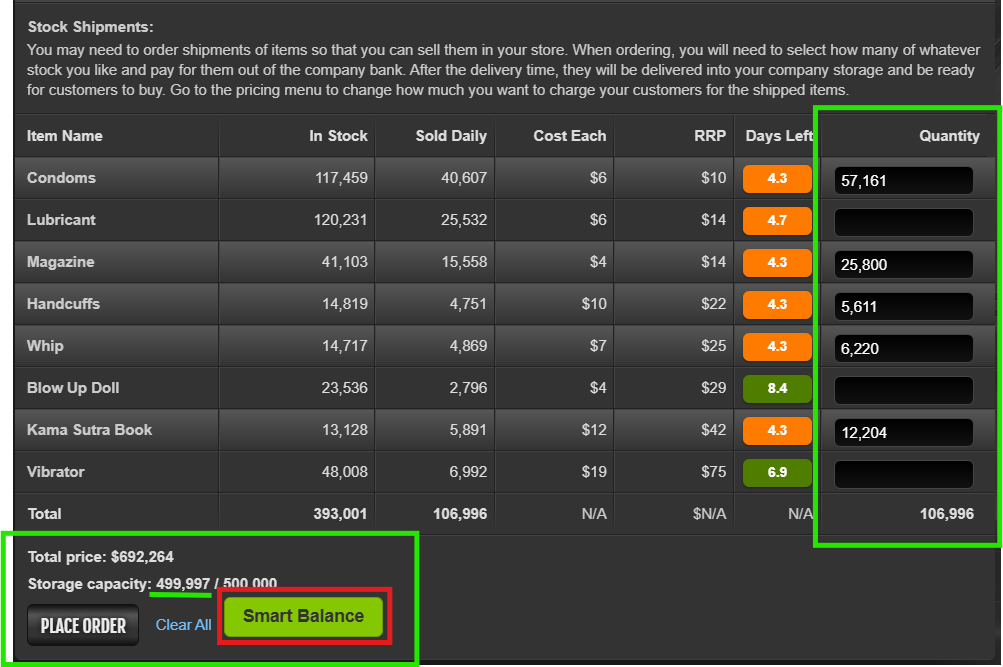
This script analyzes your current stock, daily sales, and available warehouse capacity to calculate the perfect balance.
It automatically fills your order forms so that every item runs out on the exact same day, ensuring you never have dead shelf space while other items go out of stock.
Key Features
-
Smart Balance Button: One click to calculate and fill quantities for all items.
-
Visual "Days Left" Badges: Replaces the generic "Delivery" text with a clear, color-coded badge showing exactly how many days of stock you have left (including what you are about to buy).
Attention!!!
If for any reason you forgot to buy stocks for any product and you emptied it's stock. The next day the sales will be zero and the script will not work as it depends on the daily sales to calculate the balancing.
In this specific case, you should add manually the amount to stock it. After that, the script will work as intended for that item.
🛠️ How to Use
-
Install the script.
-
Go to the Company Stock page.
-
Click the Smart Balance button.
-
Watch the script fill in the ideal quantities.
-
Review the "Days Left" badges to see your new stock duration.
-
Click Order to confirm.
📜 Installation
https://greasyfork.org/en/scripts/566690-torn-city-company-stock-manager-smart-balance
Changelog v18.0:
-
Full support for TornPDA mobile headers.
-
Badges are now purely informational indicators (Smart Balance button controls the filling).
-
Improved calculation speed.
NO API REQUIRED
This script was done 100% using Gemini as I don´t know anything about coding.