Skip to content
TORNLIFE More

[script] Arson Bang for Buck

Started by Para_Thenics [2875067] on in Tools & Userscripts.

529 replies · 7.95k views · thread synced · 3 days ago · View on torn.com

Posts archived: 530 / 530 posts (100%) · the total is Torn's reply count + the opening post at the last fetch

Hogfather [330973]

Credit goes fully to Oceane [3148330] 

But here's a fix that works. 


Open the script and find the section...

"Function addTooltips(){"

Now look for these...



Make the following changes....


.sections___tZPkg -- becomes --> .sections___IVEqp
.scenario___msSka -- becomes --> .scenario___DtvAZ


Save, reload, refresh, close browser/app... whatever...

And it should work.


Edit: 

To get the recipes back... Go to this section of the code (search "Const hoverTarget")


Change lines 3959 and 3960 to this...

const hoverTarget = section.querySelector('.crimeOptionSection___FL3HG.flexGrow___AYYE7.titleSection___OcF53');
        const iconTarget = section.querySelector('.titleAndScenario___LGa1f'); // ✅ Only this small clickable area
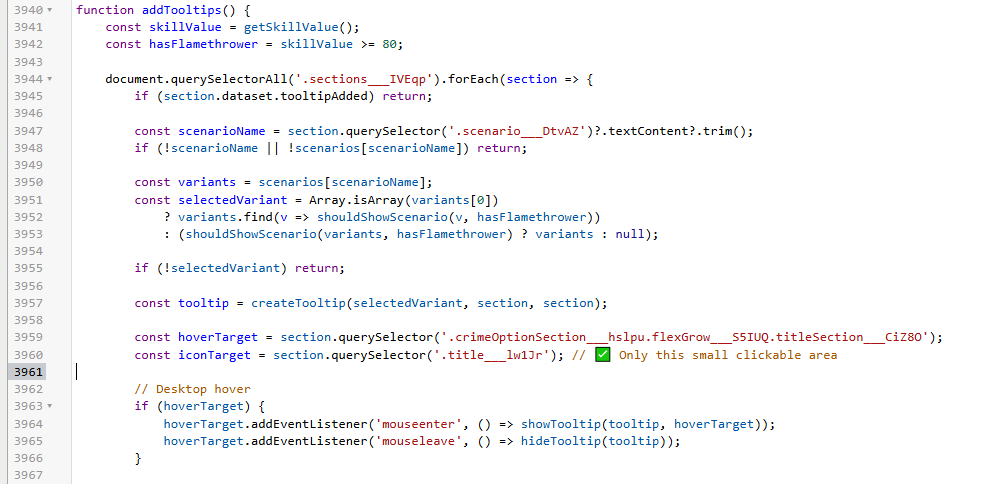


And it should work!

Once again, full credit goes to  Oceane [3148330] 


Edit: This works for Browser (chrome)... I can't get it to work for PDA. Would appreciate if someone can provide a fix to that!


Edit 2: Check some of the next few replies on this and the next page for compiled scripts that you can download, no need to edit anything anymore.

Mentions: Oceane [3148330]
Hogfather [330973]

I think it may have broken again LOL!

It highlights the colours for what's a good job, but it's not showing 'what to do' when you hover over.


Madz [2035318]

pair this fix with torn.report and its an easy way to get those bucks anyway instead of checking all manually

SPGoding [2826456]

To show suggestion, make an extra fix:


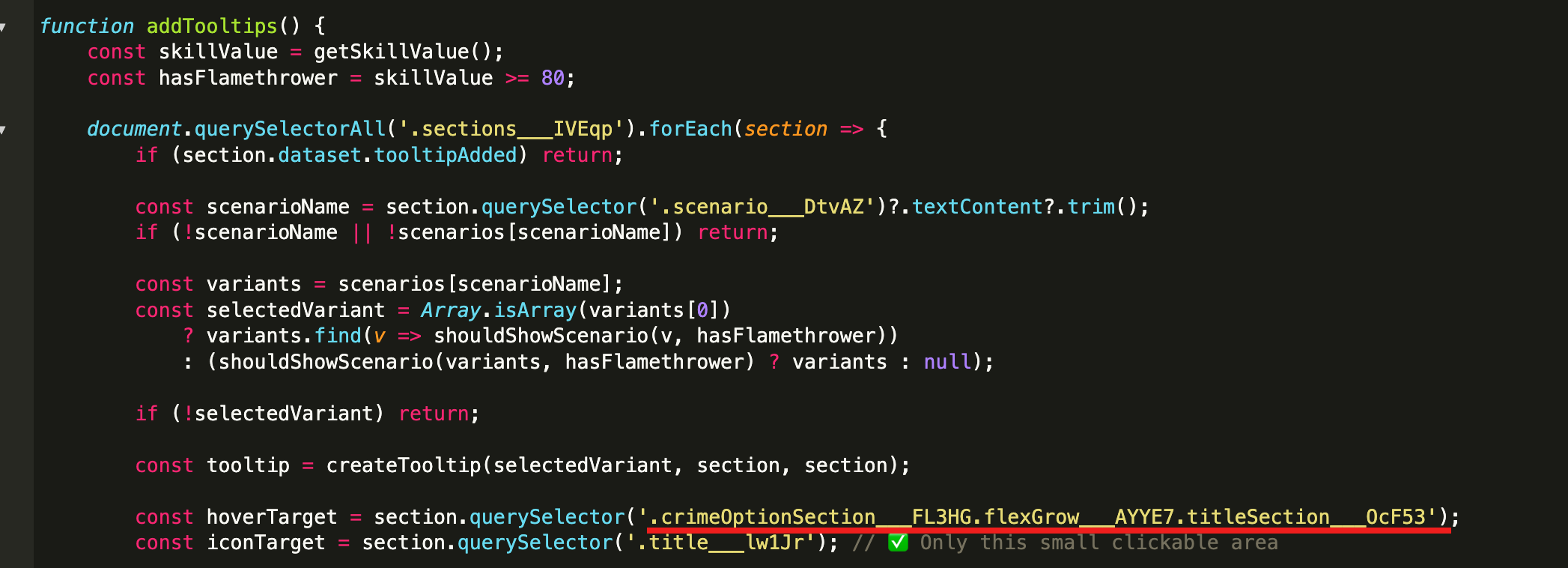
.crimeOptionSection___FL3HG.flexGrow___AYYE7.titleSection___OcF53


I think there are more fixes to make mobile view working as well, but idk...


edit: i think the top reply of this page has merged this fix. Check that if you are looking for fixes.

Hogfather [330973]

Ok the fixes in my post above, should fix it for browser (chrome).

I can only get the colour indicators to work on Torn.PDA. Can't get the recipes to load :(

PedroXimenez [3391983] Committee Committee

This is happening because the CSS selectors aren't fixed. 


There's an explanation and a solution to this class of problem here: https://gist.github.com/pedroximeneztorn/f9e6ef72b461a040e0522323de655a7a


I have forked this script to use that solution (and made a performance enhancement): https://github.com/pedroximeneztorn/torn-arson-bang-for-buck/blob/main/torn-arson-bang-for-buck.user.js [direct install link]


I don't plan to keep this updated, so someone else should take it from here, although if someone wants to take responsibility for keeping the data bit updated, I can keep the script itself running and publish it, and add occasional new features.


If you like Torn arson scripts, you might like this one too: https://www.torn.com/forums.php#/p=threads&f=67&t=16541531&b=0&a=0

Mentions: [SCRIPT] Inline Arson Helper

dang_nabbit [2173594]

thanks, this is awesome! one tiny suggestion i have is, since its always class prefixes, you can use ^= instead of *= in the selectors, and start the regexes with ^ too


ofc it would have zero impact on the performance, it would just be a little more semantically explicit

Hogfather [330973]

Thanks for this, got it working on desktop (Chrome browser). 

It partially works on PDA, shows the colour indicators, but like with the other fix, it doesn't pull the recipe details.

I'm guessing this is something mobile specific in the code, around the 'touch' instead of 'click' components?

Edit: No I don't know how to fix it if anyone was wondering lol

Oceane [3148330]

PDA recipe information, change the relevant line to this.


const iconTarget = section.querySelector('[class^="title___"]'); // ✅ Only this small clickable area

PedroXimenez [3391983] Committee Committee

This should also now Just Work on Torn PDA. For the pop-up, you click the job name (which is how I think it worked before, but I hadn't used it)

Indefatigable [2517458]

I can barely figure out how to install a script let alone edit one.  But I have found this script to be indispensable and a sever increase in my quality of life.  


Please may it be continued by technical savvy and generous people.


Thanks