Yeah, I’m also still seeing the process use between 1 GB and 2 GB of memory, even with only a single tab open.
Performance issues with chat 3.0 due to GC
Started by PMV [1577993] on in Bugs & Issues.
Posts archived: 92 / 92 posts (100%) · the total is Torn's reply count + the opening post at the last fetch
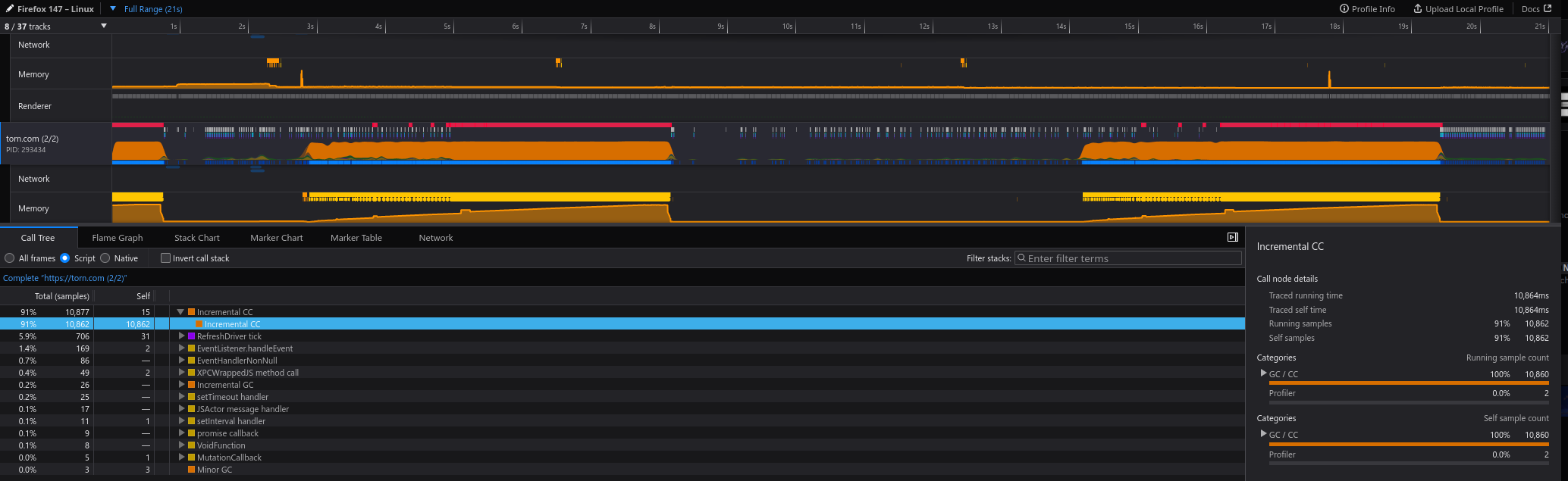
Nope, ain't fixed. Games just shitting itself every 5 seconds for 1-2 seconds during a clash.
This is frustrating.
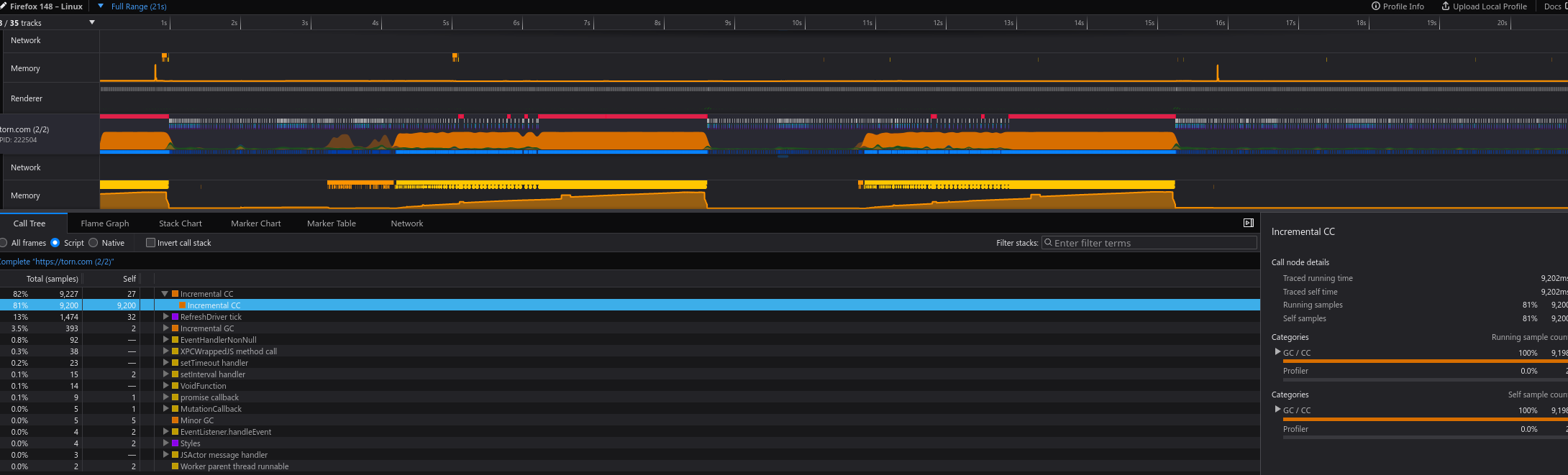
Exact same issue.
All you have to do is participate in any sort of clash with at least ~50 participants from both sides total for it to trigger. Once it starts, it just keeps going over and over until you close the browser entirely regardless of what you do.
I don't understand why it's taken literal years at this point to fix or remove this malware that's attached to every page. It's clear that the admins don't play their own game at a competitive level.
edit: it's even worse than it's ever been tbh. Reblocking sendbird ends the lag completely.
New year, same shit.
Since my original post was closed, i'll add my findings here:
So while typing not a long text, the usage increases tremendously and the second window of split screen is having hard time loading the written message from the first window. Could this syncing be done after input stops and 10-15 seconds have passed? Less resources spent on constant syncing between chats.
While restarting the browser or app solves the problem, i think it would be good idea to limit sendbird websocket connections TTL, meaning when browser tab or app has been on background for long time, the sendbird traffic should be closed.
Edit: spelling
Reporting that the problem is still persisting and it keeps eating away RAM the same way after long periods of multi tab or multi window setup. I see that status is info required, how could i be more helpful?
+1 I'm still seeing this.
General behaviour I'm seeing:
- After a few hours of having Torn Tabs open it gets a bit slow/stuck for a few seconds at a time.
- I close all Torn tabs only (Youtube, Email, anything else get's left)
- Memory drops MASSIVELY
- Relaunch Torn Tabs
- Everything is smooth again.
Right now I'm at 8GB of memory used by FireFox with 3 Torn Tabs open.
- After closing 1st tab it drops down to: 7.9GB
- After closing 2nd tab it drops down to: 7GB
- After closing 1st tab it drops down to: 6GB
If there is anything I can do in terms of logging/information provided please let me know.
Running Windows 11 with Firefox.
Having very similar issues, thought I will go crazy and worked with chatgpt for weeks on trying to fix this on my end but ultimately giving up now, was going to file a bugzilla report. My memory doesn't even climb that high, it's just anytime I do anything extensive on Torn like warring, lot of crimes and so on, the torn page starts freezing for 3 seconds every 5-10 seconds until it's restarted with the general performance degraded quite a bit in-between freezing.
Absolutely nothing helps and believe me I have tried every possible thing, to a point even chatpgt told me it's waste of time to try anything else and that I should just file a report.
Happening on Firefox exclusively, not happening on Edge, Chrome, Vivaldi. Been happening for months now.
Sorry I'm using chatpgt but despite being above average tech savvy this is beyond my skill set so I've asked it to compose a report for me based on everything, it analyzed all the profilers saved and memory before during and after freezing. It's certainly not a simple weak CPU either as I have a high end one. hope it helps devs maybe?
Bug report draft
Title
Multi-second freezes caused by Incremental Cycle Collector / CC Build Graph on long-lived Torn.com SPA (Chromium unaffected)
Product
Core → JavaScript Engine / Cycle Collector (or Performance if triage moves it)
Description
Firefox experiences repeated 2–3 second UI freezes while using Torn.com (https://www.torn.com), a long-lived JavaScript single-page application.
The freezes only affect the Web Content process containing Torn. Firefox itself remains responsive, and audio/video in other tabs continues playing normally.
The issue has been present since first installing Firefox on this Windows installation and does not occur in Chromium-based browsers using the same profile of extensions and the same workload.
Reproduction
- Open Torn.com.
- Use the site normally for some time (Crimes, Gym, Faction pages, Profiles, etc.).
- After sufficient usage, periodic freezes begin.
- Once they start, they occur across the entire Torn SPA regardless of which page is currently displayed.
Observed behavior
- Entire Torn tab becomes unresponsive for approximately 2–3 seconds.
- Other Firefox tabs continue functioning.
- Audio/video in unrelated tabs continues uninterrupted.
- about:processes shows the Torn Web Content process consuming approximately 96% CPU during the freeze.
- Firefox profiler consistently attributes the stall to Incremental Cycle Collection / CC Build Graph.
- Memory usage later decreases without restarting Firefox.
Expected behavior
The page should remain responsive throughout normal interaction, comparable to Chromium browsers.
Firefox Profiler observations
Repeated captures consistently show:
- Incremental CC
- CC Build Graph
occupying the majority of the freeze duration.
One representative capture:
- Incremental CC
- CC Build Graph ≈90% of the sampled stall
- Freeze duration ≈2.7 seconds
about:processes observations
During freezes:
- Torn Web Content process ≈96% CPU
- Firefox parent process remains responsive
- GPU process remains active
- Other tabs continue functioning
about:memory observations
Representative measurements show:
- ~900 MB explicit allocations
- ~600 MB window-objects
- ~430 MB active objects for the primary Torn page
Memory consists primarily of:
- JS Objects
- Functions
- Arrays
- Scripts
No obvious runaway DOM growth.
DOM size remains approximately:
document.querySelectorAll("*").length ≈ 2930
and remains stable.
Troubleshooting already performed
No improvement after:
- Hardware acceleration on/off
- Tampermonkey completely disabled
- Userscripts disabled
- ESET browser integration completely removed
- Accessibility disabled
- BFCache-related prefs disabled
- Session history tweaks
- GC incremental preferences verified enabled
- "Minimize memory usage" does not resolve freezes
Issue reproduces consistently.
Browser comparison
Same workload tested on:
- Chrome
- Edge
- Vivaldi
None exhibit the freezes.
GPT won't find the problem. It has to do with how sendbird interacts with fast updating pages like the war base during RWs. It quickly consumes memory till the garbage collector starts, then Firefox repeatedly runs the collector over and over for some reason.
Block chat by adding https://www.torn.com/builds/chat/* to your adblocker, enable it, close, and reopen Firefox and watch all of the memory spikes go away. Torn becomes very responsive after that.
Also note, I had the same issue on Chrome prior to these later rounds of fixes. I haven't tried it since because... well, I don't want to use Chrome.
Makes perfect sense, I wasn't aware of this thread or anyone else having issues, I believed it was on my end because I refused to imagine that something this crippling to a user experience on the 4th most used browser with 100k+ daily players across the game, effectively making firefox unusable if you're an active torn player, would've been anything but that. Especially if it's something that should've been fixed within a week if such was the case.
Weeks of googling with no result ended with me trying chatgpt for few more weeks to attempt finding an issue there and nothing ever helped really. Reading through here and your response I'm getting the picture now. What a disaster
Yea it's been a few years of this shit.
I just keep chat on when Im not fighting or doing much but when I have a big fight I just turn adblocker on and chat poofs, then the game runs decently well. I get to miss callouts in chat but oh well.
So we have a relatively common major user experience issue caused by a faulty feature that has been identified over a year ago, easy to reproduce, and extremely consistent, yet here we are.
Traded chat history in a text based browser game in 2025 for inability to play the game very well. Round of applause to Torn, I guess. Not sure what else this deserves.
Throwing in negativity won’t help 🙃 If anything, it actually discourages.
Constructive critisim is welcome, but complaining and talking down is your mindset.
It's been 2 1/2 years of this shit.
While I agree with your sentiment, it's not entirely unreasonable that there's going to be negativity. Also, armchair moderating is also unhelpful and could argue to be even more detrimental.
To actually add substance to the bug report itself, yes it still happens, and yes blocking sendbird alleviates all of the issues. Being back in bomb shelter and having lower traffic overall seems to help a little but it will still occur. Doesn't seem to matter which machine/OS that I use because I have this issue on Win11, CachyOS, Mint, and with two separate computers.
I agree with your point also, not trying to do moderating, just trying to remind people that there is a hell lot of more that is working and added features, than ever before. 🙏 While i do understand the frustration that you have been feeling (i am in the same boat with you), but i also must ask, do you use TornPDA or only on PC?
I really wish we could have a separate, dedicated window/tab for just the chat, and not have the chat sit in every single window/tab. The pop-up chat is buggy anyway - it doesn't really sync up properly across tabs, despite seemingly trying. Plus, chat is always covering part of the page, which is annoying, especially considering that minimizing and maximizing it can take so long once performance starts tanking.
If we had a dedicated chat window/tab, it would solve both of those problems. One, no need to sync the chat across tabs, and two, nothing ever hidden behind chat. No need to put away with the current implementation either: have a dedicated chat URL (torn.com/chat or something), plus an option to disable the overlay chat in all other windows entirely. This would be tremendously appreciated.
Alternatively, as a band-aid, could we have an option to disable the chat syncing its minimized/maximized state across tabs? I would like to at least minimize it in every window but one, but that's not currently possible.
The best solution is to toss sendbird to the garbage where it belongs and use a different system entirely. I mean, Twitch used to use IRC (Im not sure if they still do)
It's literally malware attached to every torn page at this point. Tossing it in it's own window won't make much of a difference. I've had it on a tab open on the home page, then blocked on other tabs, and i still get this shit. To get rid of the spikes, you need to kill all of it.
Can confirm this is still a problem after being force-switched to 3.0. Back to 2.0 we go. Even with the persistent ghost chats popping up in 2.0 now, it still performs better than 3.0.