OC Level Filter
If you've ever opened the Organized Crimes page and had to scroll through a wall of crews you're either too low or too high to join, you know how tedious it gets. A script I was using previously had a filter feature that handled this, then dropped it in an update. Rather than just complaining about it, I built my own. Set a minimum and maximum level once and everything outside that range disappears. The list you actually care about is the only one you see.
How It Works
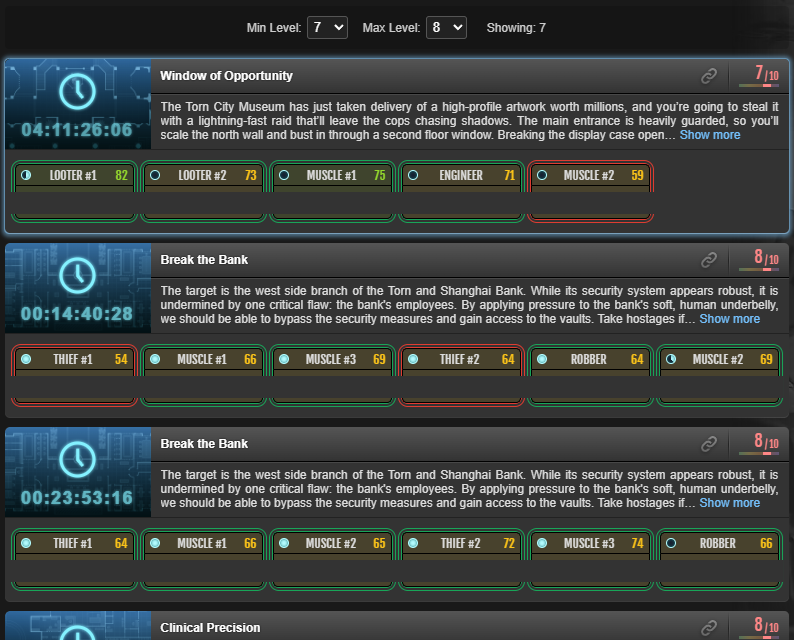
A pair of dropdown menus is embedded directly into the Organized Crimes page, sitting between the Recruiting/Planning/Completed tabs and the crime list. Pick your min and max level from the dropdowns (levels 1-10) and anything outside that range is hidden from the list instantly. Your settings persist across page loads so you only have to set it once.

The Result
No greyed-out entries, no visual clutter, just the crews that are actually in your range. Works across all three tabs and holds up fine on both desktop and TornPDA.
Features
- Embedded directly into the OC page, no floating panels or extra UI to manage
- Min and max level dropdowns covering levels 1-10
- Non-matching entries are hidden entirely, not just greyed out
- Settings persist across page loads
- Works on desktop and TornPDA
Installation
Install via GreasyFork, requires Tampermonkey (or equivalent).
👉 Install OC Level Filter
Feedback, bug reports, and suggestions are always welcome. If you found this script helpful in any way, please consider giving the post a thumbs up. Thanks!
API: No API key required.
Mentions: BBSmalls' Userscript Toolkit