Bazaar Sentry
Dollar bazaar events are a race. Everyone's after the same items and the difference between scoring and missing out is how fast you can spot the deal. Scanning every item manually while twelve other people are doing the same thing is not a winning strategy. Bazaar Sentry watches every bazaar you open and instantly highlights anything that matches your price rules so you can see the good stuff the second the page loads them, not three seconds later when someone else already bought it.
How It Works
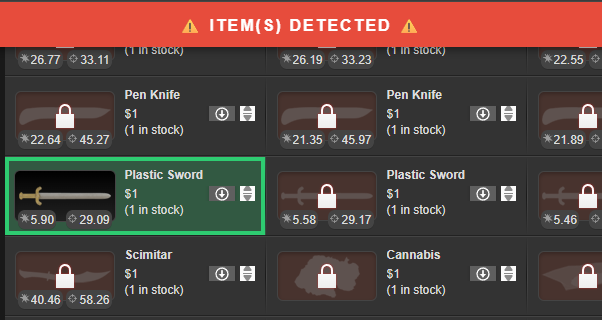
The script scans the bazaar in real time using DOM detection. Any item matching one of your configured price rules gets a colored background and a glowing border so it stands out immediately from the rest of the list. At the same time, a red banner fires across the top of the screen as a second heads-up that something worth buying is on the page. Only items with an active buy button count as matches, so locked or unavailable items won't trigger a false alarm.
Setting Up Your Rules
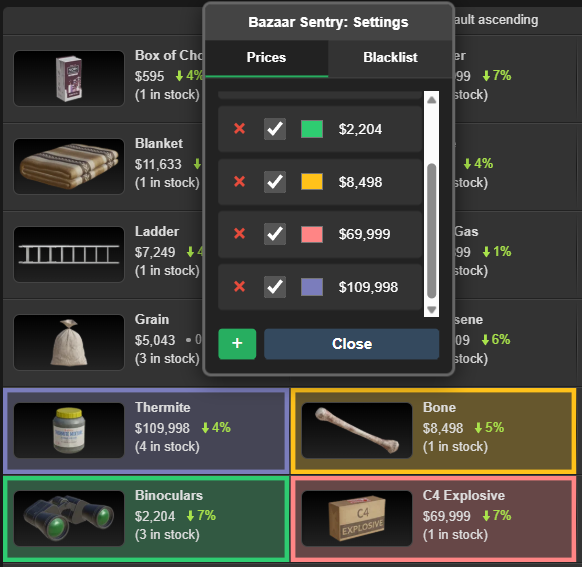
Click the Bazaar Sentry link in the bazaar page header to open the settings panel. Each price rule gets its own entry: set the price, pick a highlight color, and toggle it on or off without deleting it. Rules are sorted automatically and persist across sessions so you set them once and forget about it. On first install the settings panel opens automatically so you can get configured straight away.
The Blacklist
Sometimes a price rule is too broad. Maybe you want every $1 item but you already have 500 Baseball Bats and never want to see another one. The Blacklist tab lets you add items by name that will be excluded from matching entirely, even if their price fits a rule. Each blacklist entry has its own enable/disable toggle so you can suspend an exclusion without removing it.
Features
- Real time DOM scanning on every bazaar page
- Per-rule custom highlight color with background and border glow
- Full screen banner alert when matches are found, dismissable
- Only matches items with an active buy button, no false positives on locked items
- Price rules and blacklist entries each have individual enable/disable toggles
- Blacklist tab to exclude specific items from matching by name
- Settings persist across page loads
- Works on desktop and TornPDA
Installation
Install via GreasyFork, requires Tampermonkey (or equivalent).
👉 Install Bazaar Sentry
Feedback, bug reports, and suggestions are always welcome. If you found this script helpful in any way, please consider giving the post a thumbs up. Thanks!
API: No API key required.
Mentions: BBSmalls' Userscript Toolkit