Skip to content
TORNLIFE More

[Userscript] Torn Market Adviser

Started by ItsMeStevieG [4408938] on in Tools & Userscripts.

4 replies · 180 views · thread synced · 7 days ago · View on torn.com
About this thread

Posts archived: 5 / 5 posts (100%) · the total is Torn's reply count + the opening post at the last fetch

Counted by TornLife from the archived posts.

Archived posts
5
Discussion span
→
People posting
2
Likes on archived posts
1
Authority score
36 / 100
Historical score
18 / 100
Story score
30 / 100
Engagement score
55 / 100
ItsMeStevieG [4408938]

Torn Market Adviser

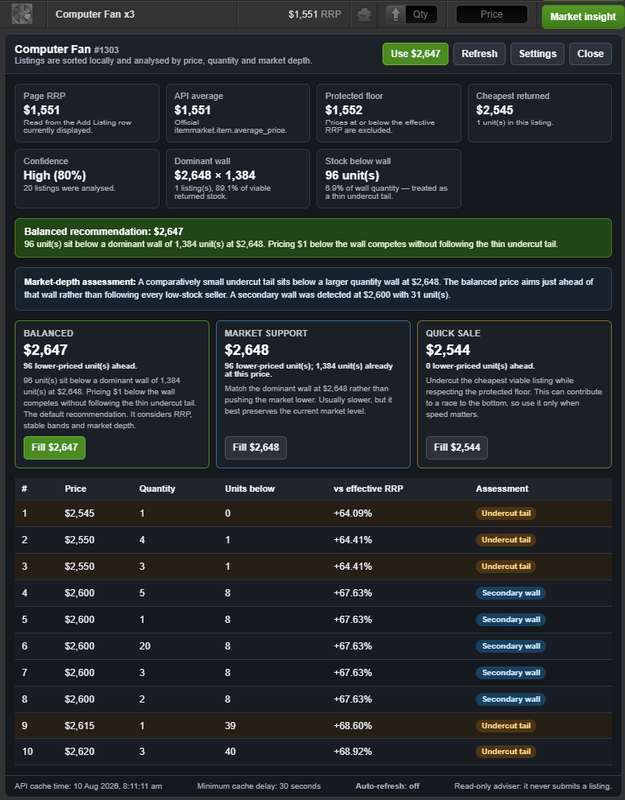
Torn Market Adviser is a free userscript that adds market-depth analysis and manual pricing assistance directly to Torn’s Item Market.

Instead of automatically following the cheapest listing, it examines prices, quantities, dominant market walls and smaller undercut listings to provide more informed pricing options.

Install Torn Market Adviser from Greasy Fork
 

Features

  • Market insight controls on the Add Listing screen.
  • Price-review controls for your existing listings.
  • Balanced, quick-sale and market-support price suggestions.
  • Dominant quantity-wall and undercut-tail detection.
  • Units-ahead and market-position calculations.
  • HOLD, RAISE, REPOSITION, STALE and BELOW FLOOR assessments.
  • Gross proceeds, estimated fees and net proceeds.
  • Locally observed listing age and price history.
  • Confidence ratings with explanations and warnings.
  • Light- and dark-mode support.

How it works

The default Balanced strategy attempts to identify meaningful market depth instead of blindly undercutting one unusually cheap seller.

For example, if only a small quantity is listed cheaply but a much larger quantity wall exists slightly higher, the adviser can suggest positioning near the larger wall and show how many units would remain ahead of you.

All recommendations are advisory. Clicking a suggested price only fills the visible price field. You must review and manually submit or confirm every listing change yourself.

Privacy and API access

  • Requires only a dedicated Public Only Torn API key.
  • The key is stored locally in your userscript manager.
  • The saved key is not written back into Torn’s page when Settings opens.
  • The key is sent only to Torn’s official API at api.torn.com.
  • No information is sent to the developer or another third party.
  • No analytics, tracking, advertising, webhooks or remote executable code.

Designed around Torn’s scripting rules

  • Uses Torn’s official API for additional market information.
  • Reads listing information only from Item Market pages you have opened.
  • Does not fetch hidden Torn webpages or internal AJAX endpoints.
  • Does not automatically buy, sell, remove, relist, submit or confirm anything.
  • Does not interact with CAPTCHAs.
  • Optional API refresh is disabled by default and pauses while the tab is hidden.

Installation

  1. Install Tampermonkey or another compatible userscript manager.
  2. Open Torn Market Adviser on Greasy Fork.
  3. Click Install this script.
  4. Create a separate Torn API key named Torn Market Adviser with Public Only access.
  5. Open Market Adviser Settings through Torn’s sidebar or the Tampermonkey menu.
  6. Enter the API key and save.
  7. Open the Item Market’s Add Listing or View Listings screen.

Important: Do not use a Full Access key. The script does not require one.

Public-beta note

This is an early public release. Torn occasionally changes its page structure, so please report missing buttons, incorrect item detection or layout problems through the feedback section on Greasy Fork.

Pricing suggestions are estimates based on the current Torn API snapshot and your configured settings. They cannot guarantee a sale, sale speed or profit.

View, inspect and install Torn Market Adviser

ItsMeStevieG [4408938]

I am in the process of making further improvements, all feedback is welcome.


EDIT: Have made several quality of life improvements. 

ItsMeStevieG [4408938]

Version 0.1.6 has been released

What's new in v0.1.6


  • Fixed Analyse visible listings losing visible progress when Torn refreshes the listings table during a batch.
  • Analysis now reacquires the current listing rows and continues against the live page.
  • Waits through Torn's brief empty-table transition while replacement rows load.


Previous Changes

  • Fixed the alignment of the Market Adviser Settings icon and text in Torn's sidebar.
  • Updated price and quantity input detection for Torn's current Item Market controls.
  • Stabilised the View Listings review toolbar and kept totals in a fixed stacked layout.
  • Added compact spinners for row reviews and batch analysis, with cleaner loading labels.
  • Refined Add Listing, View Listings, and Settings to use more compact Torn-style controls.
  • Added per-listing anonymous-fee detection with safe fee clamping.
  • Improved Settings keyboard navigation and added confirmation before resetting settings.
  • Aligned the Market Adviser sidebar icon with Torn's existing icon column.
  • Moved the listing-review totals beneath the explanatory text and above **Analyse visible listings**.
  • Prevented the totals and analysis button from jumping as live counts and button text change.
  • Added compact icon-and-text statuses between each listing price and its **Review price** button.
  • Kept **HOLD** results collapsed during **Analyse visible listings** while still analysing and counting them.
  • Added an **Automatically expand listings needing review** setting, enabled by default.
  • Made batch results for **RAISE**, **REPOSITION**, **STALE**, **BELOW FLOOR**, and errors expand only when that setting is enabled.
  • Kept manual **Review price** actions expanded for every result, including **HOLD**.
  • Added an Error count to the listing-review summary.
  • Combined Add Listing market analysis, manual price filling, View Listings review, and visible-listing batch analysis in one release.
  • Added stable-band, dominant-wall, secondary-wall, and undercut-tail market-depth analysis.
  • Added Balanced, Market support, and Quick sale strategies with units-ahead calculations.
  • Added HOLD, RAISE, REPOSITION, STALE, and BELOW FLOOR listing classifications.
  • Added locally observed listing age, self-listing adjustment, fee/net proceeds estimates, and recommendation confidence.
  • Added reliable settings access through TornTools-compatible sidebar placement, the Tampermonkey menu, and Item Market fallbacks.
  • Stored the user-supplied Public Only API key locally through Tampermonkey.
  • Prevented the saved API key from being written into Torn's page DOM when Settings opens.
  • Kept every recommendation advisory with no automatic listing submission or confirmation.
  • Added Torn Areas-container fallbacks and Torn-style pill presentation.
  • Repositioned the entry when the sidebar is rebuilt and prevented duplicates.
  • Retained Tampermonkey menu and Item Market settings fallbacks.
  • Added a Market Adviser Settings sidebar entry near TornTools Settings.
  • Added manual View Listings price review and visible-listing batch analysis.
  • Added HOLD, RAISE, REPOSITION, STALE, and BELOW FLOOR classifications.
  • Added locally observed listing age and configurable age thresholds.
  • Added seller-ID and visible-quantity self-listing adjustment.
  • Added units-ahead, fee, gross/net proceeds, and confidence reporting.
  • Kept all listing changes advisory and manually confirmed.
  • Added quantity-weighted market-depth analysis.
  • Added dominant and secondary exact-price wall detection
  •  Distinguished shallow undercut tails from larger market anchors.
  • Added Balanced, Market support, and Quick sale strategies.
  • Added lower-priced units-ahead calculations for recommendations and returned listings.
  • Added highlighting and configurable market-depth thresholds.
  • Fixed page-RRP detection when Torn displays the amount before the `RRP` label.
  • Supported both `$764 RRP` and `RRP $764` text arrangements.
  • Retained the official API average-price fallback when the page value is unavailable.
  • Improved dark-mode table contrast and protected the panel from conflicting Torn styles.
  • Added alternating market-result rows and clearer hover highlighting.
  • Added optional automatic refresh for insight panels already opened by the user.
  • Added a next-refresh countdown and a minimum 30-second refresh interval.
  • Paused automatic refresh while the browser tab is hidden.
  • Preserved existing API-key and compatible settings storage.
  • Added Item Market **Add Listing** integration.
  • Added configurable Public Only Torn API key storage.
  • Added page RRP and API average-price display.
  • Added sorted item-market results and stable-band detection.
  • Added protected price-floor logic and conservative recommendations.
  • Added manual recommended-price filling without automatic submission.
  • Added a Tampermonkey menu command, settings modal, and floating settings fallback.
ItsMeStevieG [4408938]

Yes, you can use user scripts on mobile devices, but you need a specialized browser or an extension because mainstream mobile browsers like standard Google Chrome or iOS Safari do not support them by default. I may look at alternative methods into the future. But for now, it works best on desktop.