EZ Chat Templates
If you've ever typed "hey, still interested in that trade?" for the 400th time, or copy-pasted the same war callout into four different chat windows like some kind of medieval town crier, this one's for you. EZ Chat Templates lets you build a library of reusable message templates and fire them off with a click, directly inside Torn's existing chat windows. No external panels, no alt-tabbing, no retyping.
Setting It Up
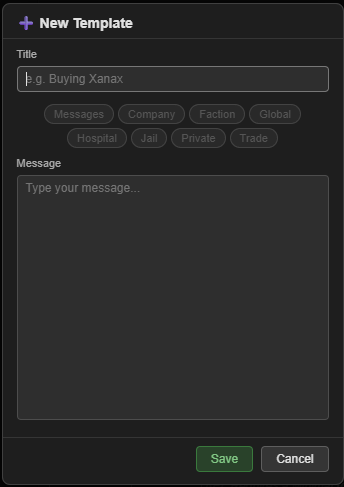
Click the cog wheel to the left of the message dropdown in any chat window to open the settings panel. Hit + Add at the bottom to create a new template. Give it a title, toggle which chat windows it should appear in, type your message (emojis and HTML both work), and save. That's it. Repeat until you've got your whole roster of go-to messages locked in.
Using It
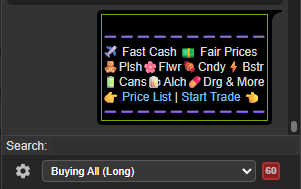
A dropdown box sits embedded just above the standard chat text field. Select your template from it, then hit the green airplane icon to the right to send. It pastes the template body into the text field and fires it off in one smooth motion. Two clicks, done, back to whatever chaos you were in the middle of.
Trade Chat Cooldown
Torn enforces a 60-second cooldown on Trade chat messages and EZ Chat Templates respects that. If you're in a trade chat and you've just sent, the airplane icon turns into a countdown timer so you know exactly when you can fire again. No guessing, no "why isn't this sending," no accidentally trying to double-send because you are impatient.
Organizing Your Templates
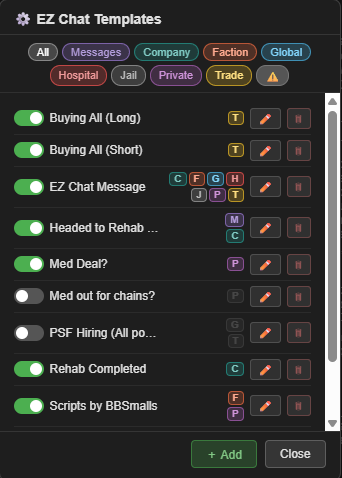
You can have as many templates as you want. Each one is tagged to one or more chat categories (faction, trade, etc.), and when you're in the settings panel you can filter by category to keep things manageable. Each template also gets a colored letter badge next to its title so you can tell at a glance what it's for without having to read every entry. You can also flip the toggle to the left of an item to hide them from the dropdowns if you get tired of seeing them but don't want to permanently delete them.
Installation
Install via GreasyFork, requires Tampermonkey (or equivalent).
👉 Install EZ Chat Templates
Feedback, bug reports, and suggestions are always welcome. If you found this script helpful in any way, please consider giving the post a thumbs up. Thanks!
API: No API key required.
Compliance: EZ Chat Templates has been reviewed by Torn Staff Member IceBlueFire, who confirmed it is fully compliant with Torn's "1 action per click" rule. Pasting a template into the text field is a client-side action and only the final send initiates a server request, which counts as the single action per click.
Mentions: BBSmalls' Userscript Toolkit
