Skip to content
TORNLIFE More

-Fortie-: forum

-Fortie- [3566613] Level 61 Aetherion Protocol AEPR Leader

Forum posts (Torn's count)
84 observed
Archived posts
194
Threads started (archived)
14

Boards

From the 194 newest archived posts.

Threads started

Most-liked posts

Likes as archived at fetch time, adjusted for how long each post had been up. Scored posts only; the full score pass runs after the import.

-Fortie- Torn Enhancement Suite · · 55 likes

-Fortie- Torn Enhancement Suite

T.E.S v1.4.0

● CURRENT BUILD
13 MODULES / PC / PDA

One master -Fortie- userscript with modular tools and a central settings panel.

ONE INSTALLATION / CENTRAL SETTINGS / 13 INDEPENDENT MODULES

INSTALL T.E.S DISCORD

MASTER CONTROL

Install T.E.S once, then enable only the tools you actually want to use.

• Enable all ready modules
• Disable every module at once
• Export suite settings
• Import suite settings
• Reset Master Suite settings while leaving individual module data intact
• Open Master Settings with Alt + F

SHARED TORN API KEY

Modules that require Torn API data can use the key saved through Master Settings. The key is stored only in your browser and is not included when suite settings are exported.

FACTION

Faction Tools

5 MODULES

Activity Intelligence

Adds compact faction activity intelligence showing last action, travel status, whether a member is abroad, hospital status and jail information using the shared Torn API key.

Faction Member View

Expands faction member management with country flags, a country map, live member information, member intelligence, custom tags, profile fields and automatic War Ledger rating tags.

Member tags and automatic rating colours can be managed directly through Faction Member View settings, with country data and related member information handled inside the same module.

MEMBER COUNTRY FLAGS NOW INTEGRATED

Armory Loan Scanner

Scans faction armory pages, stores loaned item data locally, colour codes loan status and displays member loan information on faction and mini profile views.

War Ledger

Ranked War performance analytics covering member reliability, risk, participation, historical war data and command views, with ArmaSync After Action reporting.

OC Operations

Organized Crime management with OC reminders, missing required item alerts, role item scanning, armory loan intelligence, role weights, suitability scoring and estimated success.

Missing item alerts can be configured to watch just your own OC slot or every member.
Suitability thresholds are adjustable, and OC role requirements can be scanned across Recruiting and Planning stages.

Integrated OC Intelligence tracks members currently outside an OC and uses recent OC history to show Average level, Preferred level, Highest completed level, OCs Joined, OCs Passed and time since Last OC.

OC OPERATIONS + OC INTELLIGENCE COMBINED

QUALITY OF LIFE

Everyday Improvements

4 MODULES

Prayer Reminder

Adds a daily prayer reminder icon that hides after praying and remains hidden until the next UTC day.

Med Advisor

Provides smart medical item recommendations based on your current life and hospital time, helping you choose the most suitable medical option.

Item Intel

Adds compact item markers showing Organized Crime uses, enhancers, crime requirements and energy, nerve, happiness and health gains.

Event Intel

Enhances the Torn Events page with a cleaner, searchable and categorised dashboard including quick statistics, event actions and Saved Events support.

COMPANY

Company Management Suite

Company management tools covering stock, pricing, employees, wages, training logs, tax tracking and company snapshots.

RACING

Championship Tracker

Scans race results and tracks championships, standings, race logs, driver profiles and racing statistics.

CASINO

Edge Scanner

Sports betting market scanner with no vig probabilities, bookmaker margin analysis, market strength information and live probability search.

LISTS

Target & Enemy Alerts

Monitors Targets and Enemies, adds dedicated People panel tabs, displays Okay counters and provides configurable status alerts.

MODULE SETTINGS

Additional module settings are available directly through T.E.S for Company Management Suite, OC Operations, Med Advisor, Target & Enemy Alerts and Faction Member View.

LEGACY CHANGES

+ Existing Country Flags module state is migrated into Faction Member View where applicable.
− The old Country Flags module entry is removed from the master suite settings.
− Chain Watch is removed from the current suite configuration.

COMMUNITY

Follow development, report bugs, suggest improvements and keep up with future T.E.S releases through Discord.

OPEN DISCORD →

BUILT BY -FORTIE-

T.E.S v1.4.0

(Script) Oi...What's This Item Again? · · 25 likes

⚠ Deprecated Thread

Ever been halfway through listing stuff on the market and gone:

“Yeah sweet… wait… hang on… do I actually need this for something?”

Crime item?
OC gear?
Enhancer?
Or just random junk sitting in your inventory since 2019?

Yeah… been there.


So instead of using my last remaining brain cells every time, I knocked together 3 tiny scripts that chuck a little icon on the item image so you can tell what it is straight away.


No thinking required. Beautiful.


What The Dots Mean

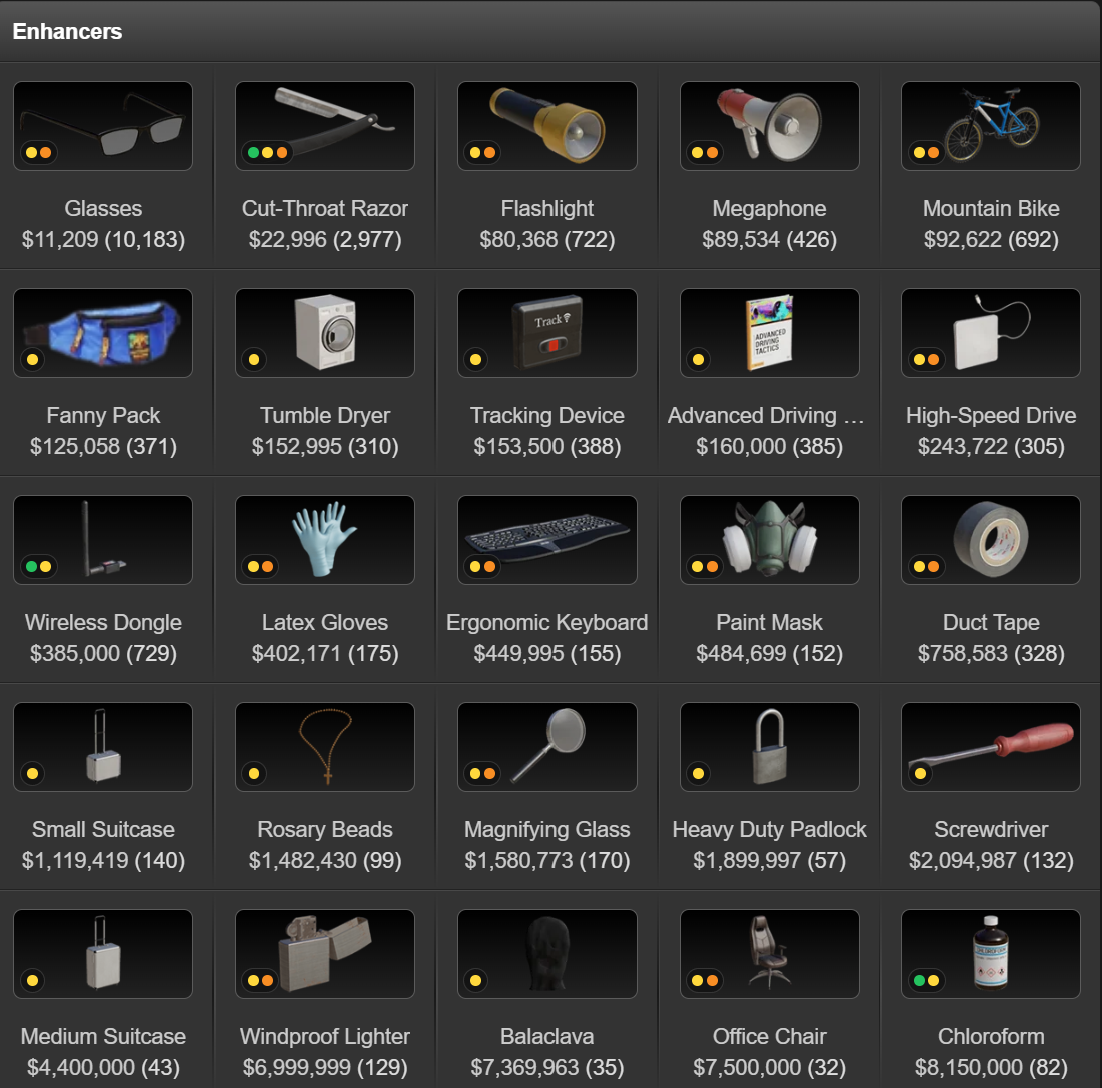
🟠 Orange Dot
Crime item.

Simple as that.


🟢 Green Dot
OC item.

Helps stop those moments where you accidentally sell something your crew actually needs.


🟡 Yellow Dot
Enhancer.

Good for when you're flying through Bazaar listings pretending you know exactly what you're doing.

Multiple Dots

Some items fall into more than one category, so you might see multiple dots next to the item.

For example an item might be used for:

Crime + OC
Crime + Enhancer
Or all three.

So the script will show all relevant dots.

Script

Where It Shows Up

From testing, it works anywhere the normal item icon shows up:

  • Inventory

  • Item Market

  • Bazaar

  • Trade screens

  • All the usual spots you would see item images

Works on PC & PDA.
No API key.
No weird setup.
Just install it and off you go.

Minimal By Design

The dots are intentionally small and simple so they don’t mess with the UI.

Just enough info to help you at a glance without turning the page into a Christmas tree.

Click or hover on them to find out what each dot means if you forget.


If you’ve got ideas, reckon something looks dodgy, or think I’ve missed something sing out.

If this stops even one of you from selling your last OC item and blaming “lag”, then it’s done its job


Maker of

(Script) Oi...You Don't Even Have The Item

(Script) Oi...What's This Item Again?

(Script) Oi...Best Role For This Bloke?

(Script) Oi...Have You Prayed Yet?


Selling 7* clothing store! · · 3 likes

Im not saying its right or wrong necessarily, and im not here to shit can him for what he wants for it.

Its more he knows what he wants for it but isnt saying it.

My comment is just so people are aware of how much he wants, which could potentially save people wasting his and/or their own time.

Its like anything, its worth what its worth to the right person. I'm just saving a bit of time potentially for some people is all.

(Script) Oi...Best Role For This Bloke? · · 12 likes

⚠ Deprecated Thread

Ever looked at your company page and thought…

“Right… but what are they actually good at?”

Who should be in Sales?
Who should not be anywhere near Sales?
Who’s secretly built for something better?

Yeah. That.

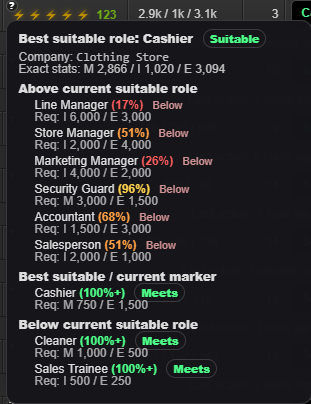
So I knocked together a small script that gives you a quick role hint based on employee stats.

Nothing fancy.
Nothing over the top.
Just a little nudge in the right direction.

What It Does

When you’re looking at your company employees, the script gives a role suggestion hint based on their stats.

Not a forced change.
Not auto assigning anything.

Just a helpful “hey… maybe try them here instead” kind of thing.

Good for:

  • New companies

  • New hires

  • Fixing staff you shoved somewhere random months ago

  • Or when you just can’t be bothered doing the maths

Where It Works

Company employee page only.

Doesn’t touch anything else.
No weird popups.
No clutter.

Works on PC & PDA.


Why I Made It

Because half the time we just go:

“Yeah you’ll do.”

And stick someone in a role without actually checking if they’re actually suited to it.

This just saves a bit of guesswork and helps squeeze a bit more efficiency out of your company without turning it into a spreadsheet simulator.


Before Anyone Says It…

Yeah, I know there are proper systems out there like YATA and other tools that go deep into company optimisation.

This isn’t trying to replace any of that.

This is just something quick and easy, based purely on stats, for those on the run moments where you want a rough idea without opening three tabs and doing a full breakdown.

Fast. Simple. Done.


If something looks off, a suggestion seems cooked, or you’ve got ideas to improve it — sing out

Helpful.
Minimal.
No stuffing around.

SCRIPT


Maker of

(Script) Oi...You Don't Even Have The Item

(Script) Oi...What's This Item Again?

(Script) Oi...Best Role For This Bloke?

(Script) Oi...Have You Prayed Yet?


(Script) Oi...Have You Prayed Yet? · · 9 likes

⚠ Deprecated Thread

Ever been doing your usual Torn routine and thought:

“Wait… did I pray today?”

And then you either forget… or remember right as you log off. Classic.

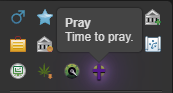
So I put together a small script that adds a Prayer reminder icon so you don’t miss it.

Simple. Quick. No stuffing around.
Script

What It Does
  • Adds a Pray icon (fits Torn’s style)

  • Has a Torn style tooltip so it doesn’t look out of place

  • Once you’ve prayed, it hides itself until the next UTC day (UTC = TCT time)

So it’s basically a little “oi mate” reminder that disappears once you’ve done the thing.


Before Anyone Says It…

Yeah, I know there are other versions of this floating around.

Most of what I’ve seen relies on API calls to track it.

This one doesn’t.

No API keys needed.
No external tracking.

It simply resets itself as the Torn day rolls over (UTC/TCT).

Kept it simple on purpose.

Local Only

It runs locally per device.

So if you jump between PC and mobile, it’ll still show up on the other device until you’ve prayed there too.

Although it's not synced, that’s the trade off for keeping it clean and API free.


If you’ve got ideas for better placement, cleaner tooltip wording, or reckon it could be improved without turning it into a monster — sing out 👍


Maker of

(Script) Oi...You Don't Even Have The Item

(Script) Oi...What's This Item Again?

(Script) Oi...Best Role For This Bloke?

(Script) Oi...Have You Prayed Yet?


Recent archived posts

-Fortie- Torn Enhancement Suite · · 1 like

Hey mate,


Med Advisor does have a manual scan button which doesn't require an API key.

When this is clicked it reads the visible in focus data which allows it to be within the standards as its not pulling data from elsewhere.

The fetch itself is for when the API key fails for whatever reason though more so where it looks at recent historical data to bring the answer over. 


Loan Scanner itself doesn't directly request loan data from Torn. It reads the armory information already rendered in the page and saves the results locally.

The scan does run an expansion helper before reading the rows. That helper was added for PDA. If a row already exposes its loaned information, which is normally the case on PC, it doesn't click anything and simply reads the DOM.

If it ever encounters a row where that information isn't exposed, it can trigger Torn's native manage/settings control. In that case T.E.S. still isn't making the network request itself, although Torn's own UI may make a request as a consequence of the native click.

-Fortie- Torn Enhancement Suite ·

T.E.S. UPDATE v1.5.0

Torn Enhancement Suite


A major OC Operations overhaul, cleaner tracking, better outcome detection, bug fixes and a full script audit.

OC OPERATIONS & TRACKER OVERHAUL

The biggest changes since v1.4.0 have been inside OC Operations.

OC Scanner

  • Scanner moved directly underneath Torn's native Recruiting / Planning / Completed tabs.
  • Removed duplicated scan status displays.
  • Recruiting and Planning now use one clear status indicator each.
  • The OC Tracker button now sits inside the same scanner bar.

OC Tracker

The tracker now properly follows an OC through its full lifecycle:

Planning > Monitoring > Completed / Failed

  • Added a dedicated Failed OCs section.
  • Failed OCs no longer count towards Delayed OCs, Total Delay or Longest Delay.
  • Failed OCs are removed from active monitoring as soon as their outcome is known.
  • Successful OCs are also removed from Current Monitoring once completed.
  • Torn's actual completion timestamp is now used for delay calculations.
  • Completed OCs are recorded as Started on time or Started late.

Smarter OC Matching

T.E.S. now has multiple ways to work out which completed OC belongs to which tracked Planning OC.

  • OC ID first
  • Fallback matching using OC name
  • Participant count
  • Members
  • Expected start time
  • Accented names are normalised, so names such as Guardian Ángels still match properly.

Better Success / Failure Detection

T.E.S. no longer relies on only one source to decide what happened to an OC.

  • Torn OC API results
  • Torn's Completed page
  • Visible SUCCESS and FAILED result states

Stale Tracker Cleanup

One of the bigger bugs was completed OCs remaining under Current Monitoring at 0s - Delayed.
If an OC has already reached Recent Delay History or Failed OCs, it can no longer remain active in Current Monitoring.

OC Name Fixes

Some completed OCs were appearing in history as things like:
Looter #1
Thief
Car Thief
T.E.S. was occasionally grabbing a participant's role name instead of the actual OC scenario name.
The parser has now been tightened so the proper scenario name remains the canonical OC name.

Faction Member View Fix

Fixed a repeated console error caused by:

mutationNeedsMemberRefresh is not defined


The helper existed, but was sitting inside the wrong module scope. This has now been corrected.

FULL SCRIPT AUDIT

Before moving to v1.5.0, the entire T.E.S. master script received another full cleanup and sanity check.

  • Userscript metadata checked
  • Module registrations checked
  • Shared API handling checked
  • MutationObservers reviewed
  • Previous undefined-reference issues checked
  • Old branding and unsupported references checked
  • Debug / TODO leftovers checked
  • Safe duplicate code cleanup completed
  • Version references updated
  • Full JavaScript syntax validation passed

T.E.S. v1.5.0

This update isn't about throwing another dozen buttons onto the screen. It's about making the systems already inside T.E.S. cleaner, more reliable and considerably smarter.

Same T.E.S.
Less bullshit.
More useful information.

-Fortie- Torn Enhancement Suite ·

T.E.S UPDATE
MEMBER INTELLIGENCE, WAR ANALYTICS & ITEM INTEL

LATEST DEVELOPMENT UPDATE

T.E.S HAS GROWN AGAIN

Since the last major performance and OC update, development has shifted heavily toward member intelligence, war analytics, OC visibility and item intelligence.

T.E.S is now doing far more than simply displaying information.
It is starting to connect data from multiple modules together so faction leadership can understand what members are actually doing.

Faction Member View Expanded

• Faction Member View now shows considerably more intelligence without cluttering Torn's native member list.

• Automatic War, Outside and Bleed rating tags are displayed directly against each member.

• OC status intelligence is now integrated directly into the member list.

• Current OC participants display IN OC.

• Members not currently in an OC are rated using their last completed OC activity:

OC GOOD - recently completed an OC

OC AVG - starting to become overdue

OC BAD - overdue for OC participation

OC ? - no usable OC history available

Automatic Tag Colours

• Automatic system tag colours are now fully configurable from Faction Member View settings.

• War, Outside and Bleed ratings use a shared configurable grading palette.

• Separate colours can be chosen for:

• S+ / S

• A

• B

• C

• D

• F

• Unrated / Unknown

• OC status colours are also configurable independently.

Member Sorting Rebuilt

• Faction Member View now has a much larger sorting system.

• Members can now be sorted by:

• Name A to Z

• Name Z to A

• Marriage Status

• BSP High to Low / Low to High

• FF High to Low / Low to High

• AVG High to Low / Low to High

• Country A to Z / Z to A

• War Score

• Outside Score

• Bleed Score

• OC Score

• Sorting has also been rebuilt to be less dependent on Torn's exact page structure and more reliable when the member list rerenders.

Ranked War Report Intelligence

• Ranked War report pages now display additional War Intel directly beside each member.

• Three compact values are shown:

W = War Hits

O = Outside Hits

B = Bleed

• Rating information remains available through tooltips without overcrowding the report.

• Layout has been specifically adjusted for both PC and PDA.

War Ledger Scoring Rebuilt

• The War Ledger Risk system has been redesigned to judge a member's entire war contribution.

• A member will no longer be marked as critical simply because their direct War Hits are low.

• The new overall assessment considers:

35% War Contribution

25% Outside Contribution

20% Bleed Discipline

15% Participation

5% Reliability & Sample Confidence

• Contribution per active war is also compared against the faction baseline.

• Strong War or Outside performance can now compensate for a weaker area.

• DANGER now requires a genuinely poor overall profile with multiple separate warning conditions.

• Command View recommendations and leadership watch lists now use the new overall assessment.

Item Intel Expanded

• Item Intel now contains significantly more OC intelligence.

• OC items can now display: OC×1, OC×2, OC×3 and higher.

• The number represents how many mapped OC crime / role uses that item currently has.

• Tooltips can now show OC Level, Crime, Role and whether the item is consumed or returned.

• Current OC demand is also calculated from existing Recruiting and Planning scan data.

• Shortage support has been added using an ! indicator when an active OC requires an unavailable item.

• No additional API calls are required for this intelligence.

Item Badge Design Reworked

• PC Item Intel badges are larger and easier to read.

• Badge text now uses black for stronger contrast.

• Badge positions are now fixed into a consistent order:

CR ENH OC

• Empty positions remain reserved so Crime, Enhancer and OC tags stay aligned down the entire list.

• On the Faction Utilities page, badges now sit inside the Item Name / Qty cell instead of covering item artwork.

• The same Name / Qty placement system is now supported on Torn's Item page.

• PDA retains the smaller compact overlay layout.

OC Intelligence Connected Across T.E.S

• Recruiting and Planning scan data can now immediately update other parts of T.E.S.

• Current OC assignments feed directly into Faction Member View.

• Historical OC completion data feeds member recency ratings.

• The same OC data now powers Item Intel demand and shortage information.

• This allows multiple modules to share the same information without repeatedly querying Torn.

Bug Fixes & Layout Improvements

• Fixed multiple Item Intel placement issues across Utilities and item sections

• Fixed item badges covering item artwork on PC.

• Fixed item page layout issues caused by modifying Torn's native name container.

• Fixed badge positioning so item columns are no longer stretched across the page.

• Fixed a JavaScript naming collision that prevented Item Intel badges from appearing.

• Improved Faction Member View sorting stability.

• Continued improvements to PC, PDA and responsive layouts.

T.E.S CONTINUES TO EVOLVE

The goal remains the same.
Keep Torn's interface familiar while adding useful intelligence exactly where it is needed. 

If you're already using T.E.S through GreasyFork, your userscript manager should pick up new releases automatically.

UPDATE / INSTALL T.E.S

One script. One settings menu. Enable what you want. Disable what you don't.

-Fortie- Torn Enhancement Suite ·

T.E.S UPDATE
PERFORMANCE, API & OC IMPROVEMENTS

VERSION 1.3.0

A LOT HAS CHANGED UNDER THE HOOD

This round of updates has focused heavily on reducing API usage, improving faction page performance, rebuilding parts of OC Operations and making T.E.S more reliable across PC, PDA, Fold and Legacy layouts.

API Usage Reduced

• Targets & Enemies no longer refresh from normal page clicks or chat interactions.

• Default Target / Enemy checks have been increased from 1 minute to 10 minutes.

• The minimum automatic check interval is now 5 minutes.

• Individual profile API calls used purely for missing avatars have been removed.

• Faction Member View and Activity Intelligence now share the same faction member API data.

• Recruiting and Planning can reuse the same fresh available OC response when checked close together.

• OC historical intelligence is cached for longer instead of repeatedly refreshing.

• Med Advisor now briefly caches vitals to prevent unnecessary repeat requests.

Faction Member View Performance

• The faction member page has been heavily optimised for larger factions.

• Member column positions are now measured once and reused.

• Member rows only rebuild when their actual data changes.

• BSP, FF and AVG values only update when required.

• Repeated delayed stat refreshes have been reduced.

• T.E.S now ignores its own member view DOM changes instead of triggering another refresh cycle.

• Sorting is only reapplied when the actual sort data changes.

OC Operations Reworked

• Recruiting and Planning now scan automatically when visited.

• Each stage tracks Scan Required and Scan Complete.

• Each member, their OC role and required item are checked.

• Missing item alerts now include the member's User ID.

• Missing item alerts remain active until a newer successful scan replaces them.

• Incorrect OC item names caused by Torn role text have been fixed.

• OC Intelligence has been rebuilt to better survive Torn rerenders.

• OC Intelligence now only mounts in the correct Not in OC section instead of jumping elsewhere on the page.

Utilities Highlighting Improved

• Required item highlighting now loads faster and repairs itself more reliably.

• The Highlight Meaning legend has been restored.

• PDA and Fold layouts have been cleaned up so the legend no longer breaks Torn's native title.

• Retrieving an OC item no longer intentionally removes every other highlighted row.

• T.E.S now watches Torn's armory rerender after retrieving an item and reapplies highlights automatically.

Green = Required

Yellow = Not Required

Red = Not in OC

Legacy Sidebar Support

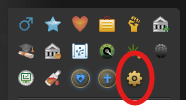
• The main T.E.S settings cog now supports Torn's Legacy sidebar.

• The cog appears alongside Torn's normal status icons.

• Med Advisor now also supports the Legacy sidebar.

• Sidebar rerenders and layout changes should no longer cause these icons to disappear.

Bug Fixes & Reliability

• Fixed OC scan state crashing from an invalid storage reference.

• Fixed missing Scan button and scan state markers.

• Fixed OC Intelligence lifecycle and positioning issues.

• Fixed incorrect required item names in OC alerts.

• Fixed Faction Member View tags dropping below the member row.

• Fixed Utilities highlighting disappearing after retrieving loaned items.

• Reduced unnecessary background processing across multiple modules.

CURRENT VERSION: 1.3.0

If you're already using T.E.S through GreasyFork, your userscript manager should pick up the latest update automatically.

UPDATE / INSTALL T.E.S

One script. One settings menu. Enable what you want. Disable what you don't.

-Fortie- Torn Enhancement Suite · · 1 like

T.E.S UPDATE
OC & SIDEBAR IMPROVEMENTS

VERSION 1.2.0

OC OPERATIONS HAS HAD A BIG CLEAN UP

The OC scanner has been updated to make checking Recruiting and Planning quicker, more accurate and much easier to keep track of.

Automatic OC Scanning

• No more needing to manually hit the Scan button every time.

• Opening Recruiting automatically scans that section.

• Opening Planning automatically scans that section.

• Every visit triggers a fresh scan using your configured API key.

• Each member, their OC role and required item are checked automatically.

Scan Required / Scan Complete Tracking

• Recruiting and Planning now keep their scan status visible at all times.

• A section stays marked Scan Required until its fresh scan successfully completes.

• You must still physically visit both Recruiting and Planning before the overall OC check is considered complete.

• Failed scans will not falsely mark a section as completed.

Required Item Alerts Improved

• Item alerts now use the exact required item for that specific OC role.

• Incorrect or stale item alerts should no longer appear.

• Member IDs are now shown beside names in the alert.

• Existing missing item highlights stay active until the next successful scan replaces them.

Utilities Highlighting Restored

• Utility item highlighting now loads much faster again.

• The Highlight Meaning legend has been restored.

Green = Required

Yellow = Not Required

Red = Not in OC

Legacy Sidebar Support

• The main T.E.S cog now supports Torn's Legacy sidebar.

• The cog appears alongside the normal Torn status icons.

• Med Advisor now also supports the Legacy sidebar.

• Switching sidebar layouts or Torn rerendering the sidebar should no longer make these icons disappear.

CURRENT VERSION: 1.1.13

If you're already using T.E.S through GreasyFork, your userscript manager should pick up the latest update automatically.

UPDATE / INSTALL T.E.S

One script. One settings menu. Enable what you want. Disable what you don't.

-Fortie- Torn Enhancement Suite · · 1 like

I'll try get the item part fixed up tonight time permitting.

If I can manage to get that done I will also do the Legacy sidebar patch.

As for the API scan that could be the easiest way to control it actually. Let me work on that too.

-Fortie- Torn Enhancement Suite ·

Hey mate,

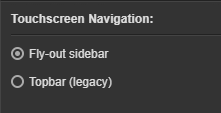
Can you go to your settings

https://www.torn.com/preferences.php

and change Touchscreen Navigation to 

Fly-out sidebar


Let me know if that fixes it

-Fortie- Torn Enhancement Suite ·

Hey mate

Yeah im not sure why its flagging the wrong items.

I have this part fixed currently and will be hopefully fully fixed some time today depending on how I go time wise.


So you want the player id to show beside the name also?


I can look at adding/changing to an api scan but this could become alot more annoying as it could happen during a fight for example. The manual version atleast gives you exact control as its only happening when you decide to go to that page and go through the process. Not saying its a no for that feature but it really has to be thought about and planned pre release

-Fortie- Torn Enhancement Suite · · 2 likes

Fuck me swinging I didn't even think about checking that and surprise surprise it does disable it if you use legacy...suppose I should make a patch for that haha


I mean it is possible to simplify it that much. 

The difference between mine & that primarily is you can use mine without an API key being required, hence the scan function, amomg other things also but yes it is something I can change/tweak let me have a look at that particular script again as I haven't looked at it since he first released it when I wanted to check how different his was to mine haha

-Fortie- Torn Enhancement Suite · · 1 like

You're the second to my knowledge with this issue, but the other user is on Opera not Chrome & I use Chrome myself so thats actually baffled me a little bit....let me look into it more as it should be showing up no dramas. I might bring back an old fallback settings button just in case too maybe

-Fortie- Torn Enhancement Suite ·

Hey mate,
Yeah im not sure why but for some reason you need to log in to GreasyFork.
Im looking into this currently as to why it is forcing that to happen.


The settings cog should be on the left hand side up above your name where your sex, faction, education etc icons are.

-Fortie- Torn Enhancement Suite · · 2 likes

Hmmmm thats strange that the link isn't working properly. When I try it tells me to log in to GreasyFork first now. I'll fix this up shortly.

-Fortie- Torn Enhancement Suite ·

T.E.S 1.0.0

Torn Enhancement Suite


ONE SCRIPT • ONE SYSTEM • ONE PLACE FOR EVERY UPDATE


The individual script system has officially been replaced.

INSTALL T.E.S HERE

WHAT IS T.E.S?

After a huge amount of work, testing, rebuilding, merging and cleaning up, the entire script system has now officially reached Version 1.0.0.

What started as a collection of separate scripts has now become one complete system.

One script. One settings menu. One place to control everything.

You can enable or disable every feature individually, meaning you only use the parts of T.E.S that you actually want.

INCLUDED SYSTEMS

Faction Member View
Member information, activity, ranks, country flags, BSP, FF, AVG, tags, custom fields, company details and sorting.

Country Intelligence
Country tracking, flags, country map, import/export and member location tools.

War Ledger
War performance, outside hits, bleed tracking, ratings, member performance and historical war information.

OC Operations
OC scanning, required items, member suitability, loan tracking and OC intelligence.

Targets & Enemies
Live monitoring and alerts when targets or enemies become available.

Med Advisor
Quick medical information and treatment guidance.

Item Intel
Useful item markers and intelligence throughout Torn, including OC and enhancer identification.

Event Intel
A rebuilt Events page including filters, search, daily grouping, Quick Stats, Money In, Money Out, Net Cash Flow, Internal Transfers, Bookie results, racing points, bounties, stock events, direct links, copy tools and saved events.

Company Management
Extra tools and information for managing companies and employees.

Racing Tools
Race and championship tracking tools.

IMPORTANT - INDIVIDUAL SCRIPTS

The individual scripts will no longer be updated separately.

Every feature has now been moved into T.E.S and can still be enabled or disabled individually through the T.E.S settings menu.

From this point forward, all fixes, improvements and new features will be released through the Torn Enhancement Suite.

MOVING TO T.E.S

From the testing completed so far, around 99% of your existing data should transfer across automatically.

Most of the local data is still pulled from the same storage locations used by the existing individual scripts, so your saved information should remain intact.

RECOMMENDED CHANGEOVER

1. Install T.E.S

2. Open the T.E.S Settings Cog

3. Enable the features you currently use

4. Check that your existing data has transferred correctly

5. Once everything looks right, you should be safe to uninstall the old individual scripts

I would still recommend checking everything first before removing the old scripts, just in case something unique to your setup has not transferred across.

VERSION 1.0.0

This release is more than just a version number.

The entire suite has been reviewed, cleaned up and optimised.

✅ Old systems removed
✅ Duplicate handling reduced
✅ Processing optimised
✅ Route handling consolidated
✅ Unnecessary background checks reduced
✅ Old development code cleaned out
✅ Modules merged where they belonged together
✅ PC and PDA support improved
✅ Full script audit completed

T.E.S 1.0.0

Turn on what you want. Turn off what you don't.

AXIOM | Where Members Become Family ·

AXIOM RECRUITING


There are plenty of factions that can give you perks.

We're trying to build something better.

Axiom is looking for people who actually want to be part of a faction.

You don't need ridiculous battle stats.

You don't need years of experience.

You don't need to live on Torn 24/7.

You just need to be active, willing to improve, and prepared to contribute to the team.

WHAT DO YOU GET IN RETURN?

Xanax supplied for Ranked Wars, Chains & Faction Funded Training Periods

All war hits paid - inside, outside & assists

OC items supplied with 90% of payouts returned to participants

Regular organised Ranked Wars

Genuine opportunities to move into leadership

Competitions, giveaways & faction funded rewards

Weekly faction racing events

Our own growing suite of custom Axiom tools & scripts

Experienced players willing to help you learn and grow

An active community where people actually know each other

But the biggest thing we offer isn't sitting in the armoury.

It's the people.

We're building a faction where newer players can develop, experienced players can help shape what comes next, and everyone has an opportunity to contribute.

No egos.

No being forgotten.

No need to already be a monster.

Bring the effort.

We'll help with the rest.

AXIOM

More than a faction.

Be part of what we're building.

AXIOM | Where Members Become Family ·


AXIOM IS RECRUITING


Looking for a faction where you're more than just another number?

At Axiom, we care far more about the person behind the account than the battle stats on the profile.

We want members who are active, loyal, willing to learn and who enjoy succeeding as a team.

WHAT WE OFFER

Xanax supplied for Ranked Wars & Chain. PLUS the odd faction funded training period

All war hits paid (Inside, Outside & Assists)

OC items supplied with 90% payouts returned

Organised Ranked Wars with experienced leadership

Genuine opportunities to earn leadership positions

Competitions, giveaways and faction funded rewards

Exclusive custom tools and scripts built for our members

A real community that invests in its members

We don't expect perfection.

We expect effort.

Whether you're a veteran looking for a fresh start or a newer player searching for the right place to grow, we'll help you become stronger, smarter and more successful every single week.

We're not just building a stronger faction.

We're building a family.

Stop being another roster slot.

JOIN AXIOM

Where effort matters. Where loyalty is rewarded. Where every member counts.

-Fortie- Torn Enhancement Suite · · 3 likes

Premium Torn Script Ecosystem -Fortie- Script Collection

Something New Is Coming

One System • Every Script • Complete Control

Centralised • Modular • Built Around You

Incoming System

The -Fortie- Script Hub


A completely new way to access, control, and manage the entire -Fortie- script collection from one single place.

One Installation

Every Script. One Control Centre.


No more downloading and managing every script separately.
The new system will bring the entire collection together into one modular script ecosystem.

From a single settings panel, you will be able to decide exactly which tools you want active and which ones you do not.

Complete Control

Enable What You Want


Your Scripts. Your Choice.

Turn individual scripts on or off whenever you want without uninstalling anything.
Only the tools you choose will run.

Change It Anytime

Enable a tool when you need it, disable it when you do not, and adjust your setup at any time from one central location.

Built For Simplicity

A Cleaner Script Ecosystem


One Download
Access the full collection through one master installation.

One Settings Panel
Manage every included script from one unified interface.

Modular Control
Run only the scripts and features that suit the way you play.

Easier Updates
A more streamlined foundation for future tools, improvements, and releases.

Development In Progress

The Next Evolution Is Coming

The -Fortie- script collection is being rebuilt into a single connected ecosystem designed to be easier to install, easier to control, and easier to expand.

More Information Coming Soon

-Fortie- Torn Enhancement Suite ·

Major Update

Company: Management Suite

Version 2.3.2

Complete Interface Refresh

The old Control Room styling has now been completely removed.
The suite has been rebuilt using the same modern design language found throughout the other scripts, creating a much cleaner and more consistent experience.

New Settings Menu

Added a brand new Settings panel allowing you to enable or disable individual modules instead of having every feature permanently displayed.

  • War Ledger Styling
  • Stock Tools
  • Pricing Calculator
  • Employee Analysis
  • Training Log
  • Tax Tracker
  • Snapshot Export
  • Scan & Compare

Snapshot Export Overhaul

Snapshot Export has been redesigned into a much more comprehensive reporting tool.

  • Company Summary
  • Product Summary
  • Warehouse Usage
  • Advertising Budget
  • Daily & Weekly Income
  • Daily & Weekly Customers
  • Profit & Margin calculations
  • Automatic snapshot filenames

YYYY_MM_DD_CompanyType.csv

Employee Intelligence

Employee data can now be captured directly into Snapshot exports.

  • Position
  • Effectiveness
  • Merits
  • Addiction
  • Inactivity
  • Working Stats
  • Current Pay

Role suitability now displays exact values such as 118% or 132% instead of simply showing 100%+.

Training Log Improvements

  • Clear all scheduled trains
  • Schedules remain cleared after refreshing
  • Calendar refresh improvements
  • Training bubble synchronisation
  • Rapid training clicks are now logged correctly

Thank You

Thank you to everyone who has provided feedback and suggestions.
Every update helps make the Company Management Suite a more powerful tool for company directors across Torn.

Built by -Fortie-


AXIOM | Where Members Become Family ·

Recruitment Transmission

⬢ AXIOM

Truth • Family • Progress

Built for players who want more than another faction.

We do not recruit numbers.
We build exceptional members.


Ranked Wars • Paid Hits • OC Support • Community • Progression

⬢ Who We Are

AXIOM is not trying to become the biggest faction in Torn.

We are building one of the strongest communities in it.

Every member matters. Every voice matters. Every victory belongs to everyone.

Some join us for Ranked Wars. Many stay because they finally found people they genuinely enjoy logging in to play with.


What AXIOM Offers

⚔ Warfare

Ranked Wars three out of every four weeks
Every eligible hit paid - inside, outside and assists
Xanax supplied for Ranked Wars
War planning, target guidance and live coordination

📈 Growth

Training and progression advice
Dedicated manuals and faction guides
Battle stat mentoring and new-player support
Organised Crime progression with required items supplied

🤝 Community

Active Discord and daily conversation
Quantum Raceway Championship
Giveaways, competitions and member events
Leadership that communicates and knows its members

🛠 Resources

AXIOM Operations Manuals
War intelligence and performance reports
Training and chaining doctrine
Script repository, tools and seasonal event guides


Our Values

Truth

We tell members what they need to hear, not simply what they want to hear.

Family

Nobody succeeds alone. When one member grows, AXIOM grows.

Progress

Every day, every war, every organised crime and every race is an opportunity to become better than yesterday.


Who We Are Looking For

We are not recruiting based on battle stats, net worth or account age alone.

✔ Communicates
✔ Keeps improving
✔ Wants to learn
✔ Shows respect
✔ Supports the team
✔ Wants a long-term home

You do not need to be a veteran.
You simply need to contribute, communicate and become part of the group.


Recruitment Open

Thousands of factions are looking for members.

AXIOM is looking for teammates.

If you are looking for quick payouts, there are plenty of options.
If you are looking for somewhere you will still proudly call home years from now...

Welcome to AXIOM.

Apply to AXIOM

Truth • Family • Progress

Truth guides us. Family strengthens us. Progress defines us.


-Fortie- Torn Enhancement Suite ·

Let me run a check on it shortly mate. PC im assuming?

-Fortie- Torn Enhancement Suite ·

I found that myself earlier actually haha.

Have you updated the script?

I pushed an update earlier today.