I've had some questions about how to use the Torn PDA Chaining area, so I figured I'd write up some notes.
This is not a guide on how to chain (Chaining Guide (Infographic), Chaining 2.0: A Guide to Respect), where to find targets (TAC Targets Updated, https://www.torntargets.com/), or how to chain watch (Undo's Guide to Chain Watching, [GUIDE] Chain Watching). There are many great guides for those topics that I won’t be covering.
First of all, why not just use the browser to chain? It's entirely possible to do that, but Torn PDA offers a lot of things to help make chaining easier that can't be done easily with just a browser:
- Monitoring hospital status
- Panic mode
- Notes
- Historic Respect and Fair Fight numbers
- Sorting by location, activity, hospital status, or remaining life
- Monitor both factions and an arbitrary list of chaining targets
There are some downsides to depending on Torn PDA only for managing chains, the biggest being that it has to poll for its updates so it can't show you if people med out of the hospital or if the chain has been saved already (until it asks the servers for the updates). Full coverage is only possible using all available tools.
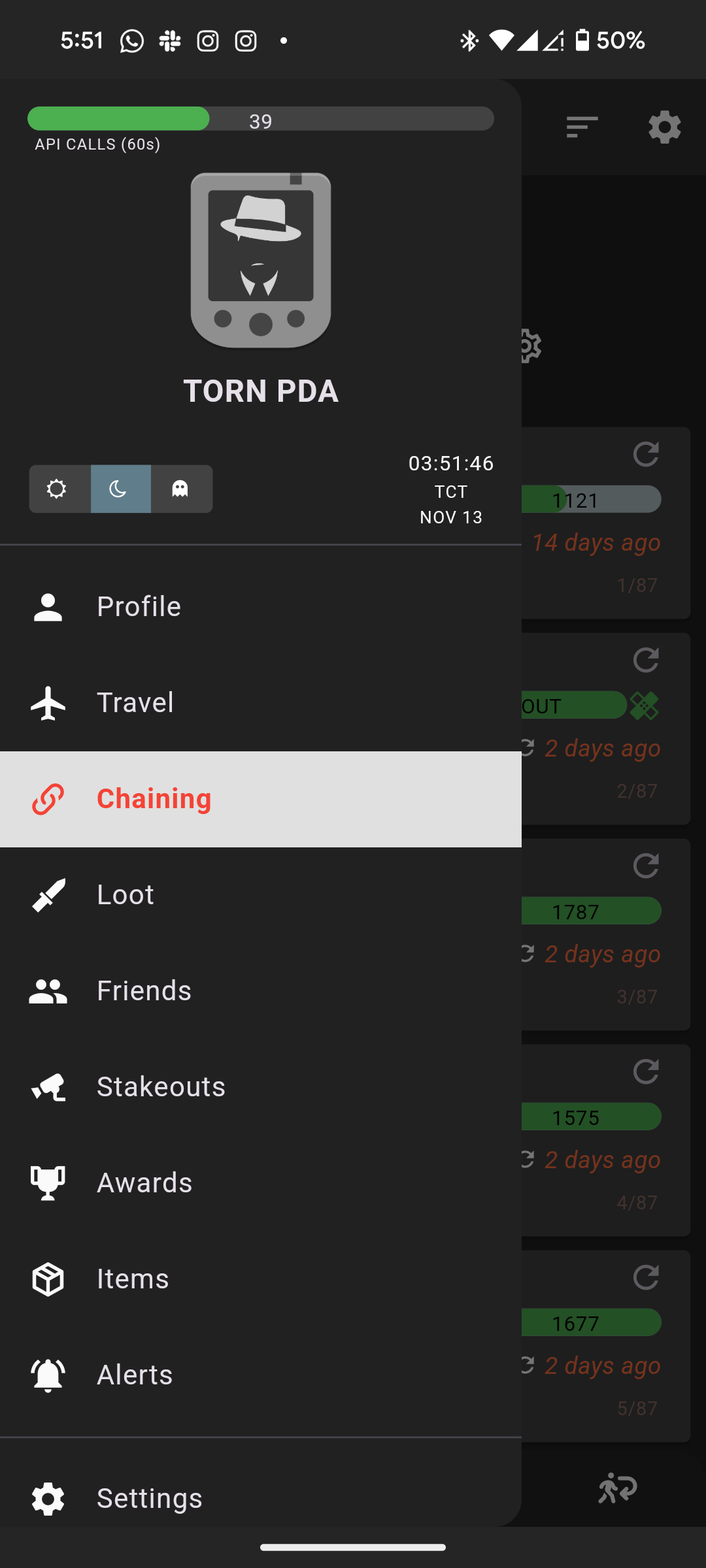
How to get to the Chaining area
Click the hamburger menu (three bars) in the top left and click Chaining.
Targets chaining tab
The Targets Chaining Tab has a lot of information on it. Don't be afraid, we'll walk through it. When doing a regular chain, this is where you'd spend a lot of your time.
![[image: reallybad.ninja]](https://reallybad.ninja/forum_images/faction/chaining/chaining_main_screen.png)
Navigation is at the bottom. We're currently on the Targets tab, but there is also Attacks, War, and Retaliation. I'll mention them a bit, but let's stay focused.
- This is one of the ways you can add new targets. Just paste their player id and they'll be added to your chaining list. I don't normally add targets this way, but it's there if you need it. I'll go over a few other ways later.
- This is the global refresh button. It does a "quick" refresh of everyone's status. It doesn't refresh stat estimates. After you've burned through your chaining targets, you'll hit this to see who is available to be hit again.
- This is the attack button. When you have an appropriate target, touch it and you'll be brought directly to their attack screen with the browser in "attack" mode (more on this in the Attacking section).
- This shows your previous Respect and Fair Fight score so you can pick the best targets for the right times
- This shows their last activity (not sure if this is updated when you click the global refresh)
- You can write any notes you want about your chaining targets. You can also assign colours to them, red being hardest, green being easiest.
- Refreshes the individual card. Do this to check additional information not updated by the global refresh or to just update that individual row.
- Shows when the last refresh was. How fresh is the data.
- Sort the target list. Ones I might use regularly are "respect (des)" (high respect is good for chains), "life (des)" (who will be easiest to kill because they're already weakened), "hosp. time (des)" (who comes out of the hospital next).
- Yata sync. You have Yata hooked up to Torn PDA right? This way you will have a backup of your chaining list in case your phone is crushed in an accident on a construction site.
- Chain timer, how much time is left on the chain (this is one of the values that isn't updated as quickly as the website. You will get the correct value after you click the global refresh button).
- Chain length, including the next bonus target. Also not updated except when requested.
- Energy level, can I even attack anymore?
- Does anyone know what this line means? I thought it meant progress to next 5 energy increment, but I'm not 100% sure on that.
- Watch mode. This is useful for chain watching, but also only works while the phone screen is on. Your phone should be plugged in when you use this. The sides of the screen will change colour based on how much time is left on the timer, it will also have an audio and vibrate alert depending on how close the chain is to ending.
- Panic mode. I've only used this a bit. I believe you select panic targets and if the chain gets too low your phone will open the attack screen on a random panic target of your choosing.
Each row can be swiped left or right. Swiping right lets you remove the target and swiping left lets you add them to your panic list.
The "i" with a circle around it gives you information about the opponent.
Attacks tab
This tab lists all your most recent attacks and gives you a quick button to add them to your chaining list (green plus with a circle around it) or remove them from your chaining list (red minus with circle).
War tab
This is where we war. It gives you quick information about the opposing faction, but a lot of it is the same as the Targets tab.
You probably don’t want the warring faction on your chaining list because some of them might be too strong for you or you might be saving them for your lower level faction mates to attack. This is why I don’t add these targets to my chain list and use the pin feature instead.
![[image: reallybad.ninja]](https://reallybad.ninja/forum_images/faction/chaining/chaining_faction_screen.png)
- This is the quick add for factions and also where you filter out factions from the list (touch the eye to make them visible or invisible).
- Oh look, the refresh button moved.
- The Ranked Wars area. I didn't realize, but you can add the opposing faction here by going to the "Upcoming" section and touching the green plus with a circle around it.
- Filters, very important. Green/red is active/inactive. Checkmark/plus is Okay/in hospital. Pin is only pinned opponents (more on this below). Airplane/no airplane is outside torn/inside torn. Chain hides or shows the chain info at the top of the screen. Clicking any of them requires a refresh, so be patient.
- This position is the quick torn pda estimate data. The highlighted one estimates their battle stats between 200k and 2.5M (this is using a fairly accurate method, but there's no way to reduce the range) and they have taken more Xanax than me (red), about the same amount of energy Refills (orange), exactly the same amount of stat Enhancers (white), and more Cans than me. If there were any that were less, they'd be green. The i with a circle around it brings up the various estimators. If it says "unk stats" press the circle arrow to refresh them. These are only refreshed once.
- Travel and idle status. If someone is flying from or to somewhere, it will show up there. It will also show when they were last active (now vs. inactive vs. idle). These statuses aren't updated until you refresh, so it can't show you someone who has medded out or become active since your last refresh.
You can swipe these rows right to Hide or Pin them or left to add them to your panic list. I will Pin all opponents that I can hit in the faction and they will get a green box around them and be brought to the top of the list. I can still see the other scary people in the faction but I won't accidentally think I can attack them.
Something else I like to do is add my own faction to this area. That way if I need a quick way to see where everyone has flown to or if anyone is coming out of the hospital soon, I can hide the opposing faction and make my own faction visible (tap the eye under the faction + button (1)). Great for situational awareness on mobile.
You can also add someone to your chaining list with the green plus with a circle around it, if they piss you off.
Retaliation tab
If you end up on a tab that gives you a big red API error, you have reached the Retalation tab. Given Faction API (AA) access, you will see targets who have recently hit your faction mates. Without Faction API access, you will just see an error. Go to one of the other tabs.
Attack screen
Now you actually want to attack someone, let's see what it looks like.
![[image: reallybad.ninja]](https://reallybad.ninja/forum_images/faction/chaining/chaining_attack_screen.png)
- Shows and hides the chain info, like on the other tabs.
- Opens your medical item area. Only works when you're not actively in a fight. Touch it, then choose Personal or Faction, tap your quick items, then tap the back arrow in the top left to get back to your target. Really great for a quick heal between fights.
- The Next Target button. Really useful for chaining, it will switch to the next available chaining target (based on the previous refreshed data, so popular chaining targets might have been hospitalized since).
- Quick add/link popup. Add the opponent to your target, stakeout (something not covered here), panic, or war faction lists. Also easily copy their id or a link to their profile.
- The Torn PDA stats estimate for the target. Same as the short one, a little easier to read, and also include networth.
- This is where the accurate chain timer would show up. Trust this one to show you when other people have completed a hit. It might still lag a bit, but it's as up to date as you can get.
- X back to the chaining area. Don't use your phone back button because it'll go back to the previous browser page.
If you ever get stuck in the chaining UI, hold down on the play/pause button to disable it. This used to trip me up all the time.
The "Fair Fight" estimate in the top left under the Attacking heading is rDacted's FF Scouter script. Highly recommended!
Hopefully with this guide you'll be able to use most or all of Torn PDA's chaining features.
Mentions: [GUIDE] Chain Watching · [Script] FF Scouter - fight difficulty indicator · Chaining 2.0: A Guide to Respect · Chaining Guide (Infographic) · TAC Targets Updated · Undo's Guide to Chain Watching